



 本文介绍了注解、XML文件和属性文件在程序设计中的应用。详细讲解了注解的作用、格式、内置注解以及自定义注解的使用,并通过案例展示了如何通过反射读取注解信息。接着探讨了XML文件的编写和DOM4J解析,强调了XML文件在应用程序配置中的角色。最后提到了属性文件作为另一种存储程序数据的方式。
第一节 复习
反射技术 :
Class类 --》反射技术的入口
a)如何获取一个类的Class对象 , 最常用的方式Class.forName(“完整的包名+类名”);
举例:Class.forName(“com.mysql.jdbc.Driver”);
b)Class是所以使用class声明的数据类型[类类型]的模板
一个类需要具备 1)属性 2)方法 3)构造方法
使用Class对象获取任意一个类的属性 -->属性对象 Field 对象
使用Class对象获取任意一个类的方法 --> 方法对象 Method对象 ,在Method类有一个非常重要的方法 invoke (…)
使用Class对象获取任意一个类的构造方法 -->构造方法对象 Constructor 对象,在,Constructor类有一个非常重要的方法 newInstance().,用于创建类的对象
第二节 注解
2.1 注解的简介
注解的作用
①不是程序本身,可以对程序作出解释。(这一点跟注释没什么区别)
②可以被其他程序(比如:编译器等)读取。(注解信息处理流程,是注解和注释的重大区别,如果没有注解信息处理流程,则注解毫无意义)
注解的格式
注解是以”@注释名”在代码中存在,还可以添加一些参数值,例如@SuppressWarnings(value=”unchecked”)。
注解在哪里使用
可以附加在package,class,method,field等上面,相当于给它们添加了额外的辅助信息,我们可以通过反射机制编程实现对这些元素的访问。
内置的注解
①@Override :标识方法是重写的方法
② @Deprecated :标识的方法不建议使用
③ @SuppressWarnings:用来抑制编译时的警告信息
④@SuppressWarinings需要提供参数才能正常使用,这些参数都是已经定义好的,我们只需要选择就可以了。

举例:
@SuppressWarnings(“unchecked”)
@SuppressWarnings(value={“unchecked”,“deprecation”})
自定义注解的语法
使用@interface定义自定义注解时,自动继承了java.lang.annotation.Annotation接口
【1】@interface 用来声明一个注解
【2】其中的每一个方法实际上是声明了一个配置参数
◆ 方法的名称就是参数的名称
◆ 返回值类型就是参数类型(返回值类型只能是基本类型、Class、String、enum)
◆ 可以通过default来声明参数的默认值
◆ 如果只有一个成员,一般参数名为value
注意事项:注解元素必须要有值。我们定义注解元素时,经常使用空字符串,0作为默认值。
也经常使用负数(比如-1)表示不存在的含义
元注解
元注解的作用就是负责注解其他注解。在Java中定义了4个标准的meta-annotation类型,它们被用来提供对其它annotation类型作说明
这些类型和它们所支持的类在java.lang.annotation包中可以找到
◆@Target
◆@Retention
◆@Documented
◆@Inherited
@Target
作用:用于描述注解的使用范围(即被描述的注解可以用在什么地方)

@Retention
作用:表示需要在什么级别保存该注解信息,用于描述注解的生命周期

2.2 自定义注解及使用
自定义注解
package com.bjsxt.annotation;
import java.lang.annotation.Retention;
import java.lang.annotation.Target;

import static java.lang.annotation.ElementType.*;
import static java.lang.annotation.RetentionPolicy.*;

/**
 * 自定义注解
 */
@Target({TYPE,METHOD,FIELD})  //@Target说明自定义注解MyAnnotation 的适用范围 是类,接口,。。方法,属性
@Retention(RUNTIME)   //@Retention说明自定义的的注解MyAnnotation的使用时机,是程序运行时
public @interface MyAnnotation {
    String value();//注解的参数
}
使用注解 (将注解应用到类上,属性上,方法上)
package com.bjsxt.annotation;

/**
 *给MyUser类添加注解
 */
@MyAnnotation(value = "这是一个用户类")  //在类上使用注解
public class MyUser {

    @MyAnnotation(value = "用户编号")   //在属性上使用注解
    private String uid;
    @MyAnnotation(value = "这是一个显示用的方法")  //在方法上使用注解
    public void show(){

    }
}
使用反射技在程序运时读取注解
package com.bjsxt.annotation;

import java.lang.annotation.Annotation;
import java.lang.reflect.Field;
import java.lang.reflect.Method;

import static java.lang.Class.forName;

/**
 * 使用反射技术在程序运行时读取注释
 */
public class Test {
    public static void main(String[] args) throws ClassNotFoundException, NoSuchMethodException {
        Class aClass = forName("com.bjsxt.annotation.MyUser");

        //
        Annotation[] annotations = aClass.getAnnotations();
        for (Annotation annotation:annotations) {
            Class aClass1 = annotation.annotationType();
            System.out.println("注解的类名称"+aClass1.getName());
        }
        System.out.println("-----------------------我是分割线---------------------------");
        MyAnnotation annotation1 = (MyAnnotation) aClass.getAnnotation(MyAnnotation.class);
        System.out.println("注解上注解的参数值"+annotation1.value());

        //
        Field[] fields = aClass.getDeclaredFields();
        for (Field field:fields) {
            MyAnnotation annotation = field.getAnnotation(MyAnnotation.class);
            System.out.println("属性上的注解"+annotation.value());
        }

        //
        Method show = aClass.getDeclaredMethod("show");
        MyAnnotation annotation = show.getAnnotation(MyAnnotation.class);
        System.out.println("注解的参数值"+annotation.value());

    }
}
2.3 课堂案例_反射读取注解信息
有一个Java类名称为Student,使用ORM思想(类和表对应,属性和字段对应,对象和数据行对应)使用注解完成类和表结构的映射关系,在类上使用注解,在程序运行时,通过反射读取注解,在数据库中创建Student类对应的数据表tb_student。
操作步骤
(1)创建Student类
(2)编写注解
a)编写应用在Student类上的注解 ,后期用于数据库中表的名称
b)编写应用在Student类上的属性上的注解,后期用于数据库表中的字段
【一个字段由三部分组成,名称,数据类型,长度】
(3)在Student类和属性上应用注解
(4)准备jdbcutil和jar包
(5)写测试,使用反射读取注解
使用注解完成类和表结构的映射关系,怎么映射呀?发现表名和类名是不对等的,字段名和属性名也有可能对不上,怎么办?就需要使用注解来让他们对应起来。那么我们就做这样一件事情:将java当中Student类使用使用第三方程序(就是我们写的程序)用过读取注解在数据库中创建一张表出来。(也就是在java中有一个Student类,在Student类中使用注解,在程序运行的时候,使用反射读取注解,到数据库当中,把这个表创建出来)
【1】创建Student类
package com.bjsxt.deno;

/**
 *bean类
 */
public class Student {
    private int stuId;
    private String stuName;
    private int age;

    public int getStuId() {
        return stuId;
    }
    public void setStuId(int stuId) {
        this.stuId = stuId;
    }
    public String getStuName() {
        return stuName;
    }
    public void setStuName(String stuName) {
        this.stuName = stuName;
    }
    public int getAge() {
        return age;
    }
    public void setAge(int age) {
        this.age = age;
    }
    public Student(int stuId, String stuName, int age) {
        this.stuId = stuId;
        this.stuName = stuName;
        this.age = age;
    }
    public Student() {
    }
    @Override
    public String toString() {
        return "Student{" +
                "stuId=" + stuId +
                ", stuName='" + stuName + '\'' +
                ", age=" + age +
                '}';
    }
}
【2】编写注解——— a)编写应用在Student类上的注解 ,后期用于数据库中表的名称
package com.bjsxt.deno;

import java.lang.annotation.ElementType;
import java.lang.annotation.Retention;
import java.lang.annotation.RetentionPolicy;
import java.lang.annotation.Target;

/**
 * 类的注释
 */
@Target(ElementType.TYPE)
@Retention(RetentionPolicy.RUNTIME)
public @interface SxtTable {
    String tableName(); //注解的参数
}
【2】编写注解———编写应用在Student类上的属性上的注解,后期用于数据库表中的字段
【一个字段由三部分组成,名称,数据类型,长度】
package com.bjsxt.deno;

import java.lang.annotation.ElementType;
import java.lang.annotation.Retention;
import java.lang.annotation.RetentionPolicy;
import java.lang.annotation.Target;

/**
 *属性注解
 */
@Target(ElementType.FIELD)
@Retention(RetentionPolicy.RUNTIME)
public @interface SxtField {
    String name(); //字段名称
    int length();  //字段类型的长度
    String type();   //字段的数据类型
}
【3】在Student类和属性上应用注解
/**
 *bean类
 */
@SxtTable(tableName = "tb_student")
public class Student {
    @SxtField(name="stuId",type="int",length=4)
    private int stuId;
    @SxtField(name="stuName",type="varchar",length=20)
    private String stuName;
    @SxtField(name="age",type="varchar",length=20)
    private int age;

    public int getStuId() {
        return stuId;
    }
    public void setStuId(int stuId) {
        this.stuId = stuId;
    }
    public String getStuName() {
        return stuName;
    }
    public void setStuName(String stuName) {
        this.stuName = stuName;
    }
    public int getAge() {
        return age;
    }
    public void setAge(int age) {
        this.age = age;
    }
    public Student(int stuId, String stuName, int age) {
        this.stuId = stuId;
        this.stuName = stuName;
        this.age = age;
    }
    public Student() {
    }
    @Override
    public String toString() {
        return "Student{" +
                "stuId=" + stuId +
                ", stuName='" + stuName + '\'' +
                ", age=" + age +
                '}';
    }
}
【4】准备jdbcutil和jar包
【5】写测试,使用反射读取注解
package com.bjsxt.deno;

import java.lang.reflect.Field;
import java.sql.Connection;
import java.sql.SQLException;
import java.sql.Statement;
import java.util.HashMap;
import java.util.Set;

/**
 *课堂案例:反射读取注解信息
 */
public class Test2 {
    public static void main(String[] args) throws ClassNotFoundException, SQLException {
        //【1】获取Student的Class对象
        Class aClass = Class.forName("com.bjsxt.deno.Student");

        //【2】获取类上的注解
        SxtTable annotation =(SxtTable) aClass.getAnnotation(SxtTable.class);
        //【3】获取注解中的参数值,这个参数值就是表名
        String tableName = annotation.tableName();

        //创建一个集合,用于存储属性注解中的参数值,为了后面拼接sql语句使用
        HashMap<String,String> map=new HashMap<>();
        //【4】获取Student类的属性对象
        Field[] declaredFields = aClass.getDeclaredFields();
        for (Field field:declaredFields) {
            SxtField annotation1 = field.getAnnotation(SxtField.class);  //获取属性上的注解
            //属性上的注解由3部分组成,分别是名称、类型、长度
            String name = annotation1.name();
            String type = annotation1.type();
            int length = annotation1.length();
            map.put(name,type+"("+length+")");
        }
        //System.out.println(map);
        //拼接sql语句
        StringBuilder sql=new StringBuilder();
        sql.append("create table");
        sql.append(" ");
        sql.append(tableName);
        sql.append("(");
        //获取所有key的集合
        Set<String> keys = map.keySet();
        //遍历集合
        for (String key:keys) {
            sql.append(key);
            sql.append(" ");
            sql.append(map.get(key));
            sql.append(",");
        }
        sql.deleteCharAt(sql.length()-1);
        sql.append(")");
        System.out.println(sql);

        //开始操作数据库
        Connection conn = JDBCUtil.getConn();
        Statement statement = conn.createStatement();
        boolean execute = statement.execute(sql.toString());
        //execute()方法只要不是查询返回值都为false
        System.out.println(!execute?"成功":"失败");

    }
}
第三节 XML文件
3.1 编写XML文件
<?xml version="1.0" encoding="utf-8"?>
<students>
    <student>
        <id>1001</id>
        <name>张三</name>
        <age>21</age>
    </student>
    <student>
        <id>1001</id>
        <name>李四</name>
        <age>22</age>
    </student>
    <student>
        <id>1003</id>
        <name>王五</name>
        <age>24</age>
    </student>
</students>
编写完xml文件,可以使用浏览器打开 ,如果出错,将显示出错的位置
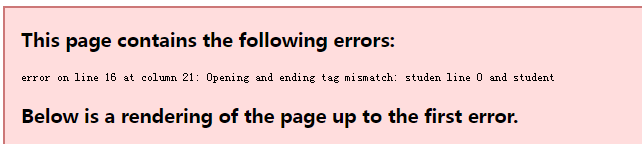
正常则显示如下效果
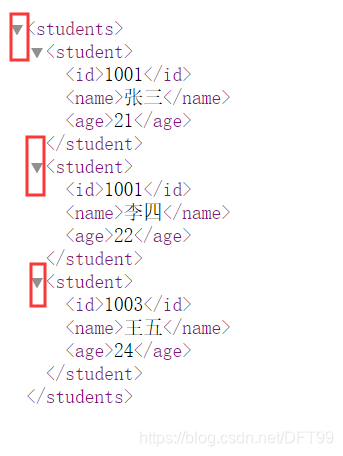
以上的测试,只能测试xml语法是否正确,,但是没有限定编写规则
什么叫限定的编写规则?
指的是根元素students中除了student标签之外,还允许不允许有其它的标签
student的子标签中id,name,age可以出现几次呢?目前没有限制
就需要使用一个名称为DTD的技术 :验证XML文档是否“合法”,
”合法“:指的是程序员定义的规则
3.2 DOM4J解析XML文件
XML文件:通常是应用程序的配置文件(存储的数据是应用程序启动的必备数据)
应用程序启动时,需要从配置文件中读取数据,怎么读?
目前最流行的方式:DOM4J
使用Java解析【读取xml文件中的数据】xml 文件, 有4种方式
(1)DOM 解析
(2)JDOM 解析
(3)SAX解析
(4)DOM4J 解析
四种解析方式的优缺点?
略
3.2.1 使用DOM4J解析XML文件
使用DOM4J的步骤
(1)导包
(2)使用DOM4J
package com.bjsxt.xml;

import com.bjsxt.deno.JDBCUtil;
import com.bjsxt.deno.Student;
import org.dom4j.Document;
import org.dom4j.DocumentException;
import org.dom4j.Element;
import org.dom4j.io.SAXReader;

import java.io.File;
import java.sql.Connection;
import java.sql.PreparedStatement;
import java.sql.SQLException;
import java.util.ArrayList;
import java.util.Iterator;
import java.util.List;

public class Test {
    public static void main(String[] args) throws DocumentException, SQLException {
        List<Student> list=new ArrayList<>();

        SAXReader reader = new SAXReader();//创建对象
        Document doc = reader.read(new File("student.xml"));
        Element rootElement = doc.getRootElement();  //得到根元素对象
        //System.out.println(rootElement);
        //System.out.println(rootElement.getName());  //得到根的名称
        //获取直接子元素
        for( Iterator iterator = rootElement.elementIterator();iterator.hasNext();){
            //取元素
            Element subStudent = (Element)iterator.next();
           // System.out.println(subStudent.getName());
            //创建Student对象
            Student student=new Student();
            //继续遍历subStudent的子元素
            Iterator iterator1 = subStudent.elementIterator();
            for(;iterator1.hasNext();){
                Element next = (Element) iterator1.next();
                System.out.println(next.getName());
                switch (next.getName()){  //判断的是标签的名称
                    case "id":
                        student.setStuId(Integer.parseInt(next.getText())); //将String类型转化为int类型
                        break;
                    case "name":
                        student.setStuName(next.getText());
                        break;
                    case "age":
                        student.setAge(Integer.parseInt(next.getText()));
                        break;
                }
            }
            //将学生对象放到集合中
            list.add(student);
            System.out.println("-----------------------------------");
        }

        //遍历打印
        for (Student student:list) {
            System.out.println(student);
        }
        //调用insert方法将数据添加到数据库中
        insert(list);

    }
    public static void insert(List<Student> list) throws SQLException {
        int count=0;
        for (Student student:list) {
            //编写sql语句
            String sql="insert into tb_student values(?,?,?)";
            //获取连接
            Connection conn = JDBCUtil.getConn();
            //创建sql语句发送器
            PreparedStatement statement = conn.prepareStatement(sql);
            //给占位符赋值
            statement.setInt(1,student.getStuId());
            statement.setString(2,student.getStuName());
            statement.setInt(3,student.getAge());
            //到数据库执行
            statement.executeUpdate();
            count++;

        }
        System.out.println(count>0?"一共插入了"+count+"条数据":"失败");
    }
}
第四节 属性文件
认识 :xml文件 -->存储和传递数据
很多应用程序的配置文件,就是使用xml
除了xml文件之外,还有一种类型的文件,也可以存储程序运行的必备数据
称为属性文件 ,对应的是java中的属性类
将属性对象中的数据存储到属性文件
package com.bjsxt.pro;

import java.io.FileNotFoundException;
import java.io.FileOutputStream;
import java.io.IOException;
import java.util.Properties;

/**
 *将属性对象中的数据存储到属性文件
 */
public class Test {
    public static void main(String[] args) throws IOException {
        //属性类,对应的是以.properties结尾的属性文件
        Properties properties = new Properties();  //创建属性类的对象

        //创建属性文件存什么内容?
        properties.setProperty("name","marry");  //name-->key,marry -->value,底层调用的是hashtable的put方法
        properties.setProperty("id","1001");
        properties.setProperty("age","24");

        //将属性对象中的值存储到属性文件
        properties.store(new FileOutputStream("student.properties"),"学生信息");//第二个参数是对文件的说明

    }
}
从属性文件中读取数据
package com.bjsxt.pro;

import java.io.FileInputStream;
import java.io.FileNotFoundException;
import java.io.IOException;
import java.util.Properties;

/**
 * 将属性对象中的数据存储到属性文件
 */
public class TestRead {
    public static void main(String[] args) throws IOException {
        //(1)创建属性对象
        Properties properties = new Properties();
        //(2)从流中加载属性文件
        properties.load(new FileInputStream("student.properties"));
        //根据key获取值
        String id = properties.getProperty("id");
        String name = properties.getProperty("name");
        String age = properties.getProperty("age");
        System.out.println(id+"\t"+name+"\t"+age);
    }
}
使用属性文件封装JDBCUtil
package com.bjsxt.pro;

import java.io.*;
import java.sql.*;
import java.util.Properties;

/**
 *使用属性文件封装JDBCUtil
 */
public class JDBCUtil2 {
    private static  String DRIVER ;
    private static  String URL;
    private static  String USERNAME ;
    private static  String PWD ;
    //static静态代码块,为类的静态变量赋值
    static{
        File file=new File("jdbc.properties");  //创建文件
        Properties properties = new Properties();  //创建属性对象
        if(!file.exists()){  //如果文件不存在,创建
            //如果文件不存在,则需要初始化数据(数据库连接字符串的数据),默认连mysql数据库
            properties.setProperty("mysqlDriver","com.mysql.jdbc.Driver");
            properties.setProperty("mysqlURL","jdbc:mysql://localhost:3306/syl1105");
            properties.setProperty("mysqlUserName","root");
            properties.setProperty("mysqlPassWord","root");
            properties.setProperty("type","mysql");  //连接的数据库

            //将属性对象中的数据存储到磁盘文件
            try {
                properties.store(new FileOutputStream(file),"jdbc");
            } catch (IOException e) {
                e.printStackTrace();
            }
        }
        //文件存在,则从文件中读取内容
        try {
            properties.load(new FileInputStream(file));  //从文件中加载
            //给静态变量赋值
            String type = properties.getProperty("type");
            if("mysql".equals(type)){  //说明连接mysql数据库
                DRIVER = properties.getProperty("mysqlDriver");
                URL = properties.getProperty("mysqlURL");
                USERNAME = properties.getProperty("mysqlUserName");
                PWD = properties.getProperty("mysqlPassWord");
            }else{//连接oracle数据库
                DRIVER = properties.getProperty("oracleDriver");
                URL = properties.getProperty("oracleURL");
                USERNAME = properties.getProperty("oracleUserName");
                PWD = properties.getProperty("oraclePassword");
            }
        } catch (IOException e) {
            e.printStackTrace();
        }
    }
    //共享对象是Connection对象
    public static Connection getConn(){
        Connection connection=null;
        try {
            Class.forName(DRIVER);
            connection= DriverManager.getConnection(URL,USERNAME,PWD);
        } catch (Exception e) {
            e.printStackTrace();
        }
        return  connection;
    }


    public static void main(String[] args) {
        System.out.println(getConn());
    }

}
jdbc.properties
#jdbc
#Tue Nov 12 17:20:32 CST 2019
mysqlUserName=root
mysqlDriver=com.mysql.jdbc.Driver
type=mysql
mysqlPassWord=root
mysqlURL=jdbc\:mysql\://localhost\:3306/syl1105


oracleDriver=oracle.jdbc.driver.OracleDriver
oracleURL=jdbc\:oracle\:thin\:@192.168.151.241\:1521\:xe
oracleUserName=scott
oraclePassword=tiger





 扫一扫
扫一扫


 1216
1216

 被折叠的 条评论
为什么被折叠?
被折叠的 条评论
为什么被折叠?
 到【灌水乐园】发言





