



 本文档展示了一个.NET Framework 4.7.2环境下,利用OpcUaHelper.dll库实现OPC UA客户端的连接、读取、订阅和取消订阅的C#代码实例。通过OPC UA协议,程序能读取和订阅KepwareServer中的数据点,用于PLC与OPC点位的调试。案例包含OPC连接、定时读取、订阅回调方法及地址验证等功能。
开发背景:需要通过Kepware Server中对应数据点获取值,用于前期PLC与OPC点位调试。
开发环境:.NET Framework 4.7.2
主要引用NuGet:OpcUaHelper.dll
本案例主要OPC数据主要获取方式:读取与订阅两个方式
OPC连接开启方法:opcUaClient.ConnectServer(OPCAddress);
OPC连接断开方法: opcUaClient.Disconnect();//前面是自定义的OPC客户端
读取方法:opcUaClient.ReadNode();//前面是自定义的OPC客户端
订阅方法:opcUaClient.AddSubscription(string Key, MonitorNodeTags, SubCallback);//前面是自定义的OPC客户端
取消订阅: opcUaClient.RemoveSubscription(string Key);//前面是自定义的OPC客户端
下图为from1的demo.cs文件供大家参考
using System;
using System.Collections.Generic;
using System.ComponentModel;
using System.Data;
using System.Drawing;
using System.Linq;
using System.Text;
using System.Threading.Tasks;
using System.Windows.Forms;
using Opc.Ua;
using Opc.Ua.Client;
using OpcUaHelper;

namespace OPC_MES_Demo
{

    public partial class Form1 : Form
    {
        //定义OPC Client
        private OpcUaClient opcUaClient = new OpcUaClient();
        // 缓存的批量订阅的节点
        private string[] MonitorNodeTags = null;
        public static string OPCAddress = "opc.tcp://xx.xx.xx.xx:49320";
        public Form1()
        {
            InitializeComponent();
        }

        /// <summary>
        /// 从OPC定时获取按钮
        /// </summary>
        /// <param name="sender"></param>
        /// <param name="e"></param>
        private void button1_Click(object sender, EventArgs e)
        {
            //设置Timer控件可用
            this.timer1.Enabled = true;
            //设置时间间隔(毫秒为单位)
            this.timer1.Interval = 300;
            timer1.Start();
        }
//界面加载后,连接OPCclient
        private void Form1_Load(object sender, EventArgs e)
        {
            OpcClientConnect();

        }


//opc连接方法
        public async void OpcClientConnect()
        {
            try
            {
                await opcUaClient.ConnectServer(OPCAddress);
            }
            catch (Exception ex)
            {
                ClientUtils.HandleException(Text, ex);
            }
        }

/// <summary>
/// 订阅值按钮
/// </summary>
/// <param name="sender"></param>
/// <param name="e"></param>
        private void button2_Click(object sender, EventArgs e)
        {
            MonitorNodeTags = new string[]
        {
                "ns=2;s=xxxa",
                "ns=2;s=xxxb",
                "ns=2;s=xxxc"
        };
            opcUaClient.AddSubscription("B", MonitorNodeTags, SubCallback);
        }

//信号回收方法
        private void SubCallback(string key, MonitoredItem monitoredItem, MonitoredItemNotificationEventArgs args)
        {
            if (InvokeRequired)
            {
                Invoke(new Action<string, MonitoredItem, MonitoredItemNotificationEventArgs>(SubCallback), key, monitoredItem, args);
                return;
            }

            if (key == "A")
            {
                // 如果有多个的订阅值都关联了当前的方法,可以通过key和monitoredItem来区分
                MonitoredItemNotification notification = args.NotificationValue as MonitoredItemNotification;
                if (notification != null)
                {
                    txt_MesHeartBeat.Text = notification.Value.WrappedValue.Value.ToString();
                }
            }
            else if (key == "B")
            {
                // 需要区分出来每个不同的节点信息
                MonitoredItemNotification notification = args.NotificationValue as MonitoredItemNotification;
                if (monitoredItem.StartNodeId.ToString() == MonitorNodeTags[0])
                {
                    txt_MesHeartBeat.Text = notification.Value.WrappedValue.Value.ToString();//MES心跳文本框
                }
                else if (monitoredItem.StartNodeId.ToString() == MonitorNodeTags[1])
                {
                    txt_PLCHeartBeat.Text = notification.Value.WrappedValue.Value.ToString();////PLC心跳文本框
                }

            }
        }
//取消订阅按钮
        private void button3_Click(object sender, EventArgs e)
        {
            opcUaClient.RemoveSubscription("B");//取消订阅方法
        }
//OPC地址确认按钮
        private void button4_Click(object sender, EventArgs e)
        {
            try
            {
                if (txt_OPCaddress.Text.Length > 0)//判断OPC地址长度是否大于0
                {
                    if (txt_OPCaddress.Text.ToString() == OPCAddress)
                    {
                        MessageBox.Show("不需确认,地址未修改", "系统提示");
                    }
                    else
                    {
                        opcUaClient.Disconnect();//OPC客户端链接断开
                        OPCAddress=txt_OPCaddress.Text;
                        OpcClientConnect();
                    }
                }
                else
                {
                    MessageBox.Show("请输入OPC服务器地址", "系统提示");
                }
            }
            catch (Exception ex)
            {
                ClientUtils.HandleException(Text, ex);
            }
        }
//当前界面关闭后断开OPC Client链接
        private void Form1_FormClosing(object sender, FormClosingEventArgs e)
        {
            opcUaClient.Disconnect();
        }
//定时器,用于定时获取接口数据
        private void timer1_Tick(object sender, EventArgs e)
        {
            try
            {
//OPC读取方法
                Opc.Ua.DataValue MESHeartBeatvalue = opcUaClient.ReadNode("ns=2;s=xxxA");
                Opc.Ua.DataValue PLCHeartBeatvalue = opcUaClient.ReadNode("ns=2;s=xxxB");
                txt_MesHeartBeat.Text = MESHeartBeatvalue.WrappedValue.Value.ToString();
                txt_PLCHeartBeat.Text = PLCHeartBeatvalue.WrappedValue.Value.ToString();
                // MessageBox.Show(value.ToString()); // 显示测试数据
            }
            catch (Exception ex)
            {
                // 使用了opc ua的错误处理机制来处理错误,网络不通或是读取拒绝
                ClientUtils.HandleException(Text, ex);
            }
        }
//取消监听
        private void button5_Click(object sender, EventArgs e)
        {
            timer1.Stop();
            //设置Timer控件可用
            this.timer1.Enabled = false;
        }

    }
}
下图为OPC Client Demo
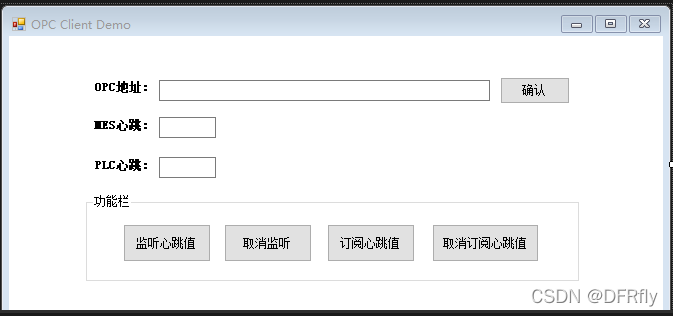
通过本案例可以获取用户需要数据位的值,希望可以给你们提供帮助。





 扫一扫
扫一扫


 6221
6221

 被折叠的 条评论
为什么被折叠?
被折叠的 条评论
为什么被折叠?
 到【灌水乐园】发言





