



一.NumberAnimation
导入声明:import QtQuick 2.2
继承:PropertyAnimation
NumberAnimation是专门定义动画时应用数值变化。
属性:
from:real
to:real
关于from和to说明,看下面的例子说明;
importQtQuick2.0
Image{
source:"image/1.jpg"
width:1000
height:600
Image{
x:40;y:80
source:"image/1.jpg"
NumberAnimationony{
from:300
to:500
}
}
}这个例子中,我们可以看到里面的图片会按照y的方向从300这个地方运动到500 的地方,速度很快,一下就掉下去了。从中就不难猜出from和to的作用了吧!如果不知名from,就默认是从当前地方到500处。
二.PropertyAnimation
导入声明:import QtQuick 2.2
继承:Animation
PropertyAnimation提供了一种动画改变属性的值。它可以用来定义动画以多种方式:
属性:
duration : int这个属性是动画的持续时间,以毫秒为单位。默认值是250。easing指定了缓和曲线用于动画指定一个宽松曲线至少需要指定类型。还可以指定一些曲线振幅,段和/或过度(表)后提供更多的细节。默认的缓和曲线是Easing.Linear。
easing.type : enumeration 用于指定一种类型参考最后
easing.amplitude : realeasing.overshoot : realeasing.period : realeasing.bezierCurve : list<real>
exclude : list<Object>这个属性保持item不受这个动画的影响。from : variant 保存动画的开始值properties : string 这些属性确定设置那些属性有动画,单数和复数形式在功能上是相同的,property单数,properties复数,单个属性用单数,单数形式
复数形式
property : stringtarget : Object 目标targets : list<Object>to : variant
| easing.type的值如下: |
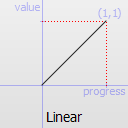
Easing.Linear |
Easing curve for a linear (t) function: velocity is constant. 缓和曲线线性(t)功能:速度是恒定的。 |
 |
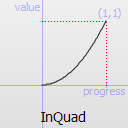
Easing.InQuad |
Easing curve for a quadratic (t^2) function: accelerating from zero velocity. 缓和曲线二次(t ^ 2)功能:加速从0速度。 |
 |
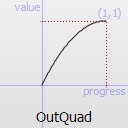
Easing.OutQuad |
Easing curve for a quadratic (t^2) function: decelerating to zero velocity. 缓和曲线二次(t ^ 2)功能:减速为零速度。 |
 |
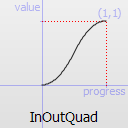
Easing.InOutQuad |
Easing curve for a quadratic (t^2) function: acceleration until halfway, then deceleration. 缓和曲线二次(t ^ 2)功能:加速到一半,然后减速。 |
 |
Easing.OutInQuad |
Easing curve for a quadratic (t^2) function: deceleration until halfway, then acceleration. 缓和曲线二次(t ^ 2)功能:减速直到一半,然后加速度。 |
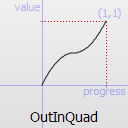 |
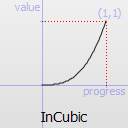
Easing.InCubic |
Easing curve for a cubic (t^3) function: accelerating from zero velocity. 缓和曲线一立方(t ^ 3)功能:加速从0速度。 |
 |
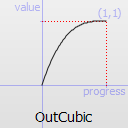
Easing.OutCubic |
Easing curve for a cubic (t^3) function: decelerating from zero velocity. 缓和曲线一立方(t ^ 3)功能:减速从零速度。 |
 |
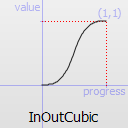
Easing.InOutCubic |
Easing curve for a cubic (t^3) function: acceleration until halfway, then deceleration. 缓和曲线一立方(t ^ 3)功能:加速到一半,然后减速。 |
 |
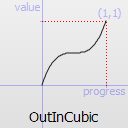
Easing.OutInCubic |
Easing curve for a cubic (t^3) function: deceleration until halfway, then acceleration. 缓和曲线一立方(t ^ 3)功能:减速直到一半,然后加速度。 |
 |
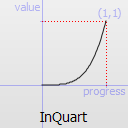
Easing.InQuart |
Easing curve for a quartic (t^4) function: accelerating from zero velocity. 缓和曲线的四次(t ^ 4)功能:加速从0速度。 |
 |
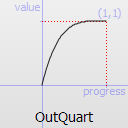
Easing.OutQuart |
Easing curve for a quartic (t^4) function: decelerating from zero velocity. 缓和曲线的四次(t ^ 4)功能:减速从零速度。 |
 |
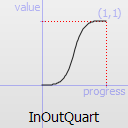
Easing.InOutQuart |
Easing curve for a quartic (t^4) function: acceleration until halfway, then deceleration. 缓和曲线的四次(t ^ 4)功能:加速到一半,然后减速。 |
 |
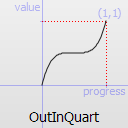
Easing.OutInQuart |
Easing curve for a quartic (t^4) function: deceleration until halfway, then acceleration. 缓和曲线的四次(t ^ 4)功能:减速直到一半,然后加速度。 |
 |
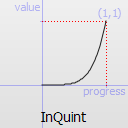
Easing.InQuint |
Easing curve for a quintic (t^5) function: accelerating from zero velocity. 缓和曲线的五次(t ^ 5)功能:加速从0速度。 |
 |
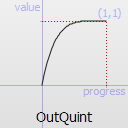
Easing.OutQuint |
Easing curve for a quintic (t^5) function: decelerating from zero velocity. 缓和曲线的五次(t ^ 5)功能:减速从零速度。 |
 |
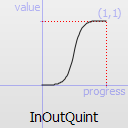
Easing.InOutQuint |
Easing curve for a quintic (t^5) function: acceleration until halfway, then deceleration. 缓和曲线的五次(t ^ 5)功能:加速到一半,然后减速。 |
 |
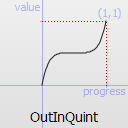
Easing.OutInQuint |
Easing curve for a quintic (t^5) function: deceleration until halfway, then acceleration. 缓和曲线的五次(t ^ 5)功能:减速直到一半,然后加速度。 |
 |
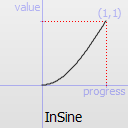
Easing.InSine |
Easing curve for a sinusoidal (sin(t)) function: accelerating from zero velocity. 宽松为正弦曲线(sin(t))功能:加速从0速度。 |
 |
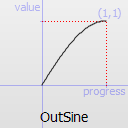
Easing.OutSine |
Easing curve for a sinusoidal (sin(t)) function: decelerating from zero velocity. 宽松为正弦曲线(sin(t))功能:减速从零速度。 |
 |
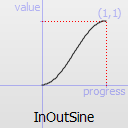
Easing.InOutSine |
Easing curve for a sinusoidal (sin(t)) function: acceleration until halfway, then deceleration. 宽松为正弦曲线(sin(t))功能:加速到一半,然后减速。 |
 |
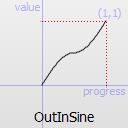
Easing.OutInSine |
Easing curve for a sinusoidal (sin(t)) function: deceleration until halfway, then acceleration. 宽松为正弦曲线(sin(t))功能:减速直到一半,然后加速度。 |
 |
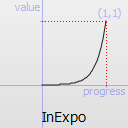
Easing.InExpo |
Easing curve for an exponential (2^t) function: accelerating from zero velocity. 缓和曲线的指数(2 ^ t)功能:加速从0速度。 |
 |
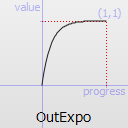
Easing.OutExpo |
Easing curve for an exponential (2^t) function: decelerating from zero velocity. 缓和曲线的指数(2 ^ t)功能:减速从零速度。 |
 |
Easing.InOutExpo |
Easing curve for an exponential (2^t) function: acceleration until halfway, then deceleration. 缓和曲线的指数(2 ^ t)功能:加速到一半,然后减速。 |
 |
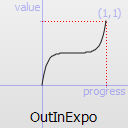
Easing.OutInExpo |
Easing curve for an exponential (2^t) function: deceleration until halfway, then acceleration. 缓和曲线的指数(2 ^ t)功能:减速直到一半,然后加速度。 |
 |
Easing.InCirc | Easing curve for a circular (sqrt(1-t^2)) function: accelerating from zero velocity. |
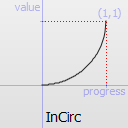 |
Easing.OutCirc | Easing curve for a circular (sqrt(1-t^2)) function: decelerating from zero velocity. |
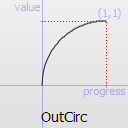 |
Easing.InOutCirc | Easing curve for a circular (sqrt(1-t^2)) function: acceleration until halfway, then deceleration. |
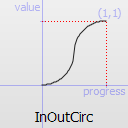 |
Easing.OutInCirc | Easing curve for a circular (sqrt(1-t^2)) function: deceleration until halfway, then acceleration. |
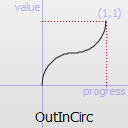 |
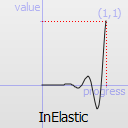
Easing.InElastic |
Easing curve for an elastic (exponentially decaying sine wave) function: accelerating from zero velocity. The peak amplitude can be set with the amplitude parameter, and the period of decay by the period parameter. |
 |
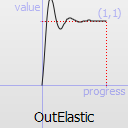
Easing.OutElastic |
Easing curve for an elastic (exponentially decaying sine wave) function: decelerating from zero velocity. The peak amplitude can be set with the amplitude parameter, and the period of decay by the period parameter. |
 |
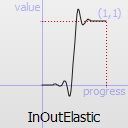
Easing.InOutElastic | Easing curve for an elastic (exponentially decaying sine wave) function: acceleration until halfway, then deceleration. |
 |
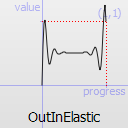
Easing.OutInElastic | Easing curve for an elastic (exponentially decaying sine wave) function: deceleration until halfway, then acceleration. |
 |
Easing.InBack | Easing curve for a back (overshooting cubic function: (s+1)*t^3 - s*t^2) easing in: accelerating from zero velocity. |
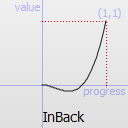 |
Easing.OutBack | Easing curve for a back (overshooting cubic function: (s+1)*t^3 - s*t^2) easing out: decelerating to zero velocity. |
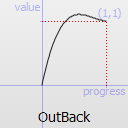 |
Easing.InOutBack | Easing curve for a back (overshooting cubic function: (s+1)*t^3 - s*t^2) easing in/out: acceleration until halfway, then deceleration. |
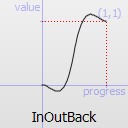 |
Easing.OutInBack | Easing curve for a back (overshooting cubic easing: (s+1)*t^3 - s*t^2) easing out/in: deceleration until halfway, then acceleration. |
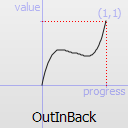 |
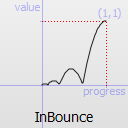
Easing.InBounce | Easing curve for a bounce (exponentially decaying parabolic bounce) function: accelerating from zero velocity. |
 |
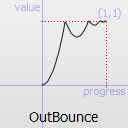
Easing.OutBounce | Easing curve for a bounce (exponentially decaying parabolic bounce) function: decelerating from zero velocity. |
 |
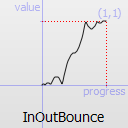
Easing.InOutBounce | Easing curve for a bounce (exponentially decaying parabolic bounce) function easing in/out: acceleration until halfway, then deceleration. |
 |
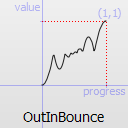
Easing.OutInBounce | Easing curve for a bounce (exponentially decaying parabolic bounce) function easing out/in: deceleration until halfway, then acceleration. |
 |
Easing.Bezier | Custom easing curve defined by the easing.bezierCurve property. |
三.Animation
导入声明:import QtQuick 2.2
属性:
alwaysRunToEnd : bool 这个属性包含动画是否应该运行完成时停止。loops : int 动画运行的次数 当为Animation.Infinite,一直运行paused : bool 这个属性包含动画是否目前暂停。running : bool 这个属性保存当前动画是否运行
信号:
onStarted() 信号被唤起动画就开始onStopped() 信号被唤起动画就结束
方法:
complete() 结束动画,跳到最后一个属性pause() 暂停动画restart() 重启动画resume() 恢复动画start() 开始动画stop() 结束动画





 扫一扫
扫一扫


 429
429

 被折叠的 条评论
为什么被折叠?
被折叠的 条评论
为什么被折叠?
 到【灌水乐园】发言





