 解决Spring Boot DataSource配置错误





 本文介绍了当Spring Boot应用程序启动时报出DataSource配置错误时的原因分析及解决方案。主要原因是项目自动配置了MySQL驱动,但实际环境中未使用数据库设置。解决方法是在@SpringBootApplication注解中排除DataSourceAutoConfiguration。
目录
程序报错:
Description:

Failed to configure a DataSource: 'url' attribute is not specified and no embedded datasource could be configured.

Reason: Failed to determine a suitable driver class


Action:

Consider the following:
	If you want an embedded database (H2, HSQL or Derby), please put it on the classpath.
	If you have database settings to be loaded from a particular profile you may need to activate it (no profiles are currently active).
错误分析:
由于我们在新建项目的时候,勾选了 Mysql Driver这个选项
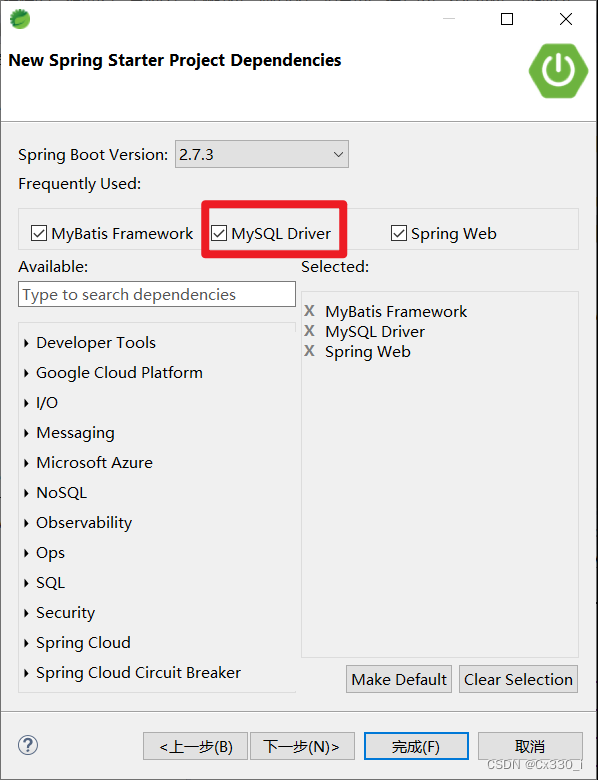
这就导致我们在pom.xml文件中,自动生成了sql相关的代码文件,但是我们在刚开始运行时,我们并没有使用sql,这里就会报错啦!
解决办法:
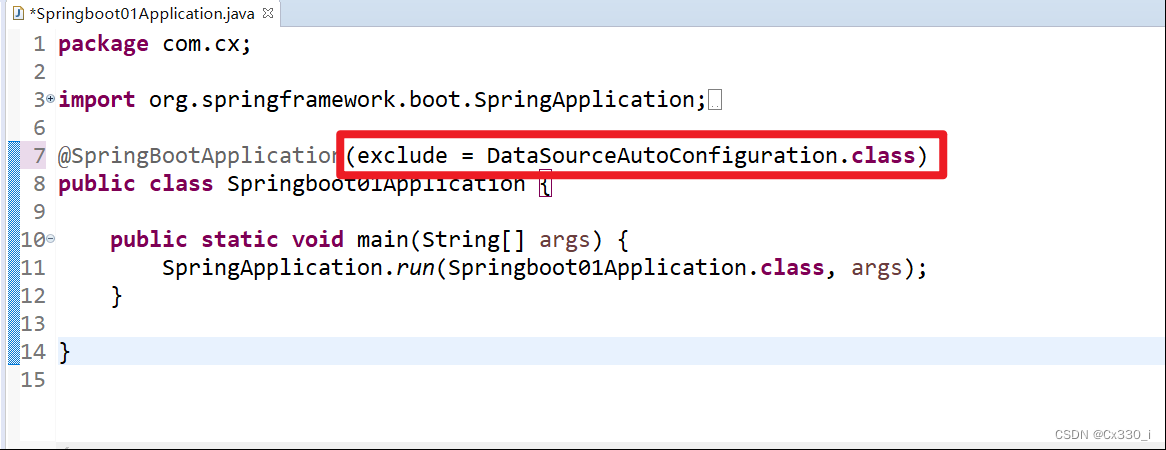
在Java文件中的@SpringBootApplication后面加上(exclude = DataSourceAutoConfiguration.class)
import org.springframework.boot.SpringApplication;
import org.springframework.boot.autoconfigure.SpringBootApplication;
import org.springframework.boot.autoconfigure.jdbc.DataSourceAutoConfiguration;

@SpringBootApplication(exclude = DataSourceAutoConfiguration.class)
public class Springboot01Application {

	public static void main(String[] args) {
		SpringApplication.run(Springboot01Application.class, args);
	}

}
这一句就好啦,这一句的意思是“忽略数据库相关配置信息”就可以啦





 扫一扫
扫一扫


 24万+
24万+

 被折叠的 条评论
为什么被折叠?
被折叠的 条评论
为什么被折叠?
 到【灌水乐园】发言





