


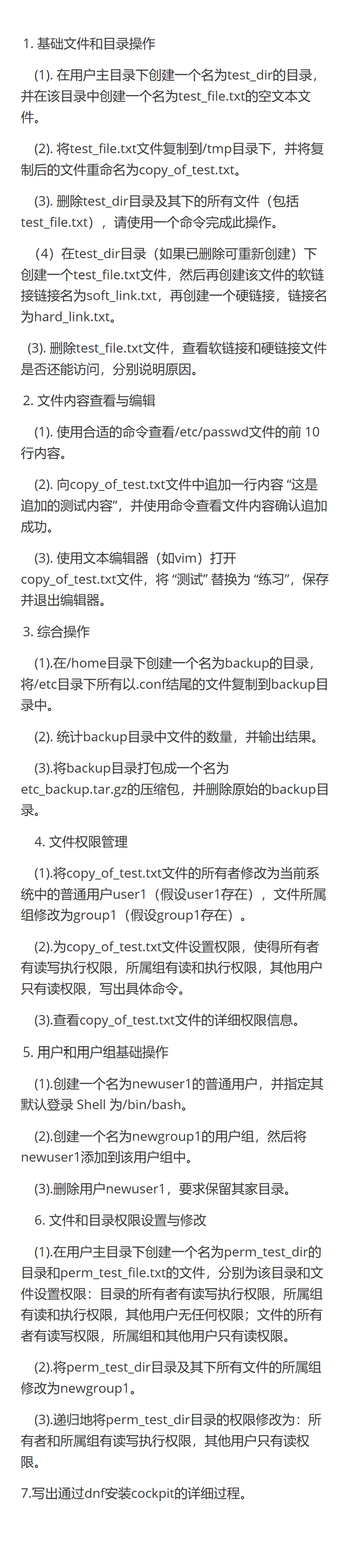
1.(1)[root@localhost ~]# mkdir test_dir
[root@localhost ~]# cd test_dir
[root@localhost test_dir]# touch test_file.txt
(2)[root@localhost ~]# cp test_dir/test_file.txt /tmp/copy_of_test.txt
(3)[root@localhost ~]# rm -rf test_dir
(4)[root@localhost ~]# mkdir test_dir
[root@localhost test_dir]# touch ~/test_dir/test_file.txt
[root@localhost test_dir]# ln -s test_file.txt soft_link.txt
[root@localhost test_dir]# ln test_file.txt hard_link.txt
(5)[root@localhost test_dir]# test_file.txt
[root@localhost test_dir]# cat soft_link.txt
软 :提示"没有那个文件或目录" 它存储的是指向原文件的路径。当原文件被删除后,软链接就会失效,无法访问。
硬 :可以正常访问 硬链接指向原来的数据块,故可以访问
2.(1)[root@localhost ~]# head -n 10 /etc/passwd
(2)[root@localhost ~]# echo "这是追加的测试内容" >> copy_of_test.txt
[root@localhost ~]# cat copy_of_test.txt
(3)[root@localhost ~]# vim copy_of_test.txt
:%s/测试/练习/g
:wq
3.(1)[root@localhost ~]# cd /home
[root@localhost home]# mkdir /backup
[root@localhost home]# cp /etc/*.conf /home/backup
(2)[root@localhost ~]# ls /home/backup | wc -l
(3)[root@localhost ~]# tar -zcvf etc_backup.tar.gz /home/backup
[root@localhost ~]# rm -rf /home/backup
4.(1)[root@localhost ~]# chown user1 : group1 /copy_of_test.txt
(2)[root@localhost ~]# chmod 754 /copy_of_test.txt
(3)[root@localhost ~]# ls -l /copy_of_test.txt
5.(1)[root@localhost ~]# sudo useradd -s /bin/bash newuser1
(2)[root@localhost ~]# sudo groupadd newgroup1
[root@localhost ~]# sudo usermod -aG newgroup1 newuser1
(3)[root@localhost ~]# sudo userdel newuser1
6.(1)[root@localhost ~]# mkdir /perm_test_dir
[root@localhost ~]# touch /perm_test_file.txt
[root@localhost ~]# chmod 750 /perm_test_dir
[root@localhost ~]# chmod 644 /perm_test_file.txt
(2)[root@localhost ~]# chgrp -R newgroup1 /perm_test_dir
(3)[root@localhost ~]# chmod -R 774 /perm_test_dir
7.[root@localhost ~]# mount /dev/sr0 /mnt
[root@localhost ~]# vim /etc/yum.repos.d/base.repo
[BaseOS]
name=BaseOS
baseurl=file:///mnt/BaseOS
gpgcheck=0
[AppStream]
name=AppStream
baseurl=file:///mnt/AppStream
gpgcheck=0
[root@localhost ~]# dnf install cockpit -y
[root@localhost ~]# systemctl restart cockpit
[root@localhost ~]# systemctl stop firewalld





 扫一扫
扫一扫


 被折叠的 条评论
为什么被折叠?
被折叠的 条评论
为什么被折叠?
 到【灌水乐园】发言





