<template>
<view >
经管2201李甜竺202209010120
</view>
<view class="container">
<view class="search-bar">
<input v-model="inputCity" placeholder="输入城市名称" @confirm="fetchWeather" />
<button @click="fetchWeather">查询</button>
</view>
<view class="current-weather">
<view class="city">
{{ city }}
</view>
<view class="temperature">
{{ realtime.temperature }}℃
</view>
<view class="weather-info">
<text>{{ realtime.info }}</text>
</view>
<view class="current-weather">
<view class="current-aqi">
<text class="aqi-number">{{realtime.aqi}}–{{computeAirQuality}}</text>
<view class="progress-box">
<progress :percent="20" activeColor="#FFFFFF" backgroundColor="#10AEFF" stroke-width="3"/>
</view>
<text class="aqi-info">当前AQI(CN)为{{realtime.aqi}}。</text>
</view>
</view>
<view class="future">
<view class="future-item" v-for="(item,index) in future" :key="index">
<view class="future-item-left">
<view class="timer">{{getDay(item.date)}}</view>
<view class="weekDay">{{getWeekday(item.date)}}</view>
</view>
<image :src="getWeather(item.weather)" mode=""></image>
<view class="future-temperature">{{item.temperature}}</view>
</view>
</view>
<view class="other">
<view class="humidity">
<view class="other-title">
<span class="iconfont"></span>
<text>湿度</text>
</view>
<view class="other-number mt26">{{realtime.humidity}}%</view>
<view class="other-info mt26">舒适度:{{computeComfort}}</view>
</view>
<view class="demeanor">
<view class="other-title">
<span class="iconfont"></span>
<text>风度</text>
</view>
<view class="other-number">{{ realtime.power }}</view>
<view class="other-info">风力:{{realtime.direct}}</view>
</view>
</view>
<view class="life-recommend" style="margin-top: 26rpx;">
<text>生活建议</text>
<view class="cutting-line mt26"></view>
<view class="category mt26">
<view class="category-item" v-for="(value,key,index) in life" :key="index">
<rich-text :nodes="lifeIconfontList[key]"></rich-text>
<view class="item-descript">{{value.v}}</view>
</view>
</view>
</view>
</view>
</view>
</template>
<script>
import { getInfo } from"@/api/info.js"
export default {
onLoad(){
this.getWeathers();
this.getLife();
},
data() {
return {
inputCity:"",
city: "西安",
realtime: {
"temperature": "10",
"humidity": "100",
"info": "阴",
"wid": "02",
"direct": "东风",
"power": "1级",
"aqi": "56"
},
"future":[{
"date": "2025-10-23",
"temperature": "8/16℃",
"weather": "多云",
"wid": {
"day": "01",
"night": "01"
},
"direct": "西风转东北风"
},
{
"date": "2025-10-24",
"temperature": "8/12℃",
"weather": "小雨",
"wid": {
"day": "07",
"night": "07"
},
"direct": "东北风转西南风"
},
{
"date": "2025-10-25",
"temperature": "5/17℃",
"weather": "多云",
"wid": {
"day": "01",
"night": "01"
},
"direct": "西风转东北风"
},
{
"date": "2025-10-26",
"temperature": "7/19℃",
"weather": "多云",
"wid": {
"day": "01",
"night": "01"
},
"direct": "东北风"
},
{
"date": "2025-10-27",
"temperature": "7/15℃",
"weather": "多云",
"wid": {
"day": "01",
"night": "01"
},
"direct": "东北风转西风"
}],
weatherIconList: [
"/static/weather/sun.bmp",
"/static/weather/overcast.bmp",
"/static/weather/cloudy.bmp",
"/static/weather/rain.bmp",
],
standardList:["优","良","轻度污染","中度污染","重度污染","严重污染"],
lifeIconfontList: {
"kongtiao": '<span class="iconfont"></span>',
"guomin": '<span class="iconfont"></span>',
"shushidu": '<span class="iconfont"></span>',
"chuanyi": '<span class="iconfont"></span>',
"diaoyu": '<span class="iconfont"></span>',
"ganmao": '<span class="iconfont"></span>',
"ziwaixian": '<span class="iconfont"></span>',
"xiche": '<span class="iconfont"></span>',
"yundong": '<span class="iconfont"></span>',
"daisan": '<span class="iconfont"></span>'
},
life: {
"kongtiao": { "v": "较少开启", "des": "您将感到很舒适,一般不需要开启空调。" },
"guomin": { "v": "极不易发", "des": "天气条件极不易诱发过敏。" },
"shushidu": { "v": "较舒适", "des": "白天天气晴好,您在这种天气条件下,会感觉早晚凉爽、舒适,午后偏热。" },
"chuanyi": { "v": "较冷", "des": "建议着厚外套加毛衣等服装。年老体弱者宜着大衣、呢外套加羊毛衫。" },
"diaoyu": { "v": "不宜", "des": "天气不好,不适合垂钓。" },
"ganmao": { "v": "极易发", "des": "天气条件极易诱发感冒,请注意适当增减衣服,加强自我防护避免感冒。" },
"ziwaixian": { "v": "最弱", "des": "属弱紫外线辐射天气,无需特别防护。若长期在户外,建议涂擦SPF在8-12之间的防晒护肤品。" },
"xiche": { "v": "较适宜", "des": "较适宜洗车,未来一天无雨,风力较小,擦洗一新的汽车至少能保持一天。" },
"yundong": { "v": "较适宜", "des": "天气较好,无雨水困扰,较适宜进行各种运动,但因气温较低,在户外运动请注意增减衣物。" },
"daisan": { "v": "不带伞", "des": "天气晴好,您在这种天气条件下,无需带伞。" }
}
};
},
methods: {
// 新增:查询天气方法
async fetchWeather() {
const city = this.inputCity.trim();
if (!city) {
uni.showToast({ title: "请输入城市", icon: "none" });
return;
}
// 调用聚合数据API查询天气
const apiKey = "27721abb4ebff0b3cd292d750479cd1d";
const timestamp = new Date().getTime();
const url = `https://apis.juhe.cn/simpleWeather/query?city=${encodeURIComponent(this.inputCity)}&key=${apiKey}`;
try {
const res = await uni.request({ url, method: "GET" });
if (res[1].error_code === 0) {
this.city = res[1].result.realtime.city;
this.realtime = res[1].result.realtime; // 更新实时数据
this.future = res[1].result.future; // 更新未来日期数据
}else{
console.log("天气查询失败:", res.data.reason);
uni.showToast({ title: "查询失败,请稍后重试", icon: "none" });
}
} catch (err){
console.error("天气查询失败:", err);
uni.showToast({ title: "网络或API异常", icon: "none" });
}
},
// 新增:查询生活建议(若需要)
async fetchLifeSuggestion() {
const city = this.inputCity.trim();
const timestamp = new Date().getTime();
const apiKey = "27721abb4ebff0b3cd292d750479cd1d";
const url = `https://apis.juhe.cn/simpleWeather/life?city=${encodeURIComponent(this.inputCity)}&key=${apiKey}`;
try {
const res = await uni.request({ url, method: "GET" });
if (res.data && res.data.error_code === 0) {
this.life = res[1].result.life;
}else{
console.log("生活建议查询失败:", res[1].reason);
}
} catch (err) {
console.error("生活建议查询失败:", res.data.reason);
}
},
getWeekday(date) {
let weekdays = ["周日", "周一", "周二", "周三", "周四", "周五", "周六"];
let weekday = new Date(date).getDay();
return weekdays[weekday];
},
getDay(date) {
let newDate=date.split("-")[1]+"月"+date.split("-")[2]+"日"
return newDate
},
getWeather(status) {
let src = "";
switch (status) {
case "晴":
src = this.weatherIconList[0];
break;
case "阴":
src = this.weatherIconList[1];
break;
case "多云":
src = this.weatherIconList[2];
break;
case "小雨":
src = this.weatherIconList[3];
break;
case "多云转阴":
src = this.weatherIconList[1];
break;
case "多云转晴":
src = this.weatherIconList[2];
break;
case "小雨转阴":
src = this.weatherIconList[3];
break;
default:
}
return src;
},
getWeathers(){
let param ={
URL: "/juhe/simpleWeather/query",
Method:"GET",
Params:[{
Key:"key",
Value:"27721abb4ebff0b3cd292d750479cd1d"
},
{
Key:"city",
Value:"西安"
}]
}
getInfo(param).then(res=>{
//this.realtime = JSON.parse(res.data).result.realtime
//this.future = JSON.parse(res.data).result.future
}).catch(err => {
console.log('请求天气数据错误详情:', err);
})
},
getLife(){
let data ={
URL:"/juhe/simpleWeather/life",
Method:"GET",
Params:[{
Key:"key",
Value:"27721abb4ebff0b3cd292d750479cd1d",
},
{
Key:"city",
Value:"西安"
}]
}
getInfo(data).then(res =>{
//this.life = JSON.parse(res.data).result.life
}).catch(err => {
console.log('请求生活建议数据错误:', err);
uni.showToast({ title: '天气数据请求失败,请检查网络或API配置', icon: 'none' });
})
}
},
computed: {
computeAirQuality() { // 空气情况
let data = Number(this.realtime.aqi);
if (data <= 50) {
return this.standardList[0];
} else if (50 < data && data <= 100) {
return this.standardList[1];
} else if (100 < data && data <= 150) {
return this.standardList[2];
} else if (150 < data && data <= 200) {
return this.standardList[3];
} else if (200 < data && data <= 300) {
return this.standardList[4];
} else {
return this.standardList[5];
}
},
computeComfort() {
let comfortLevel = ["极度干燥", "偏干", "舒适", "略湿润", "湿润", "非常潮湿"];
let humidity = Number(this.realtime.humidity);
if (humidity <= 30) {
return comfortLevel[0];
} else if (humidity > 30 && humidity <= 40) {
return comfortLevel[1];
} else if (humidity > 40 && humidity <= 60) {
return comfortLevel[2];
} else if (humidity > 60 && humidity <= 70) {
return comfortLevel[3];
} else if (humidity > 70 && humidity <= 85) {
return comfortLevel[4];
} else {
return comfortLevel[5];
}
},
},
};
</script>
<style scoped lang="scss">
.container {
background-size: cover;
height: 100vh;
color: white;
overflow-y: scroll;
background-image: url("/static/weather/morning.jpg");
}
.current-weather {
text-align: center;
margin-bottom: 30rpx;
.city {
font-size: 50rpx;
line-height: 50rpx;
}
.temperature {
font-size: 110rpx;
line-height: 130rpx;
}
.weather-info {
font-size: 36rpx;
margin-bottom: 100rpx;
}
.current-aqi {
box-sizing: border-box;
width: 90%;
border-radius: 30rpx;
margin: auto;
margin-bottom: 26rpx;
padding: 30rpx;
background-color: rgba(255, 255, 255, 0.1);
.aqi-number {
font-size: 36rpx;
}
.progress-box {
margin: 20rpx 0;
}
}
}
.future {
box-sizing: border-box;
width: 90%;
border-radius: 30rpx;
margin: auto;
margin-bottom: 26rpx;
padding: 30rpx;
background-color: rgba(255, 255, 255, 0.1);
.future-item {
display: flex;
align-items: center;
justify-content: space-between;
.future-item-left {
display: flex;
.timer {
margin-right: 20rpx;
}
}
image {
width: 50rpx;
height: 50rpx;
}
.future-temperature {
width: 100rpx;
}
}
}
.other {
box-sizing: border-box;
width: 90%;
margin: 0 auto;
display: flex;
justify-content: space-between;
.humidity,
.demeanor {
box-sizing: border-box;
width: 48%;
padding: 20rpx;
border-radius: 30rpx;
background-color: rgba(255, 255, 255, 0.1);
.other-title {
color: rgba(255, 255, 255, 0.5);
.iconfont {
margin-right: 10rpx;
}
}
.other-info {
color: rgba(255, 255, 255, 0.9);
}
.other-number {
font-size: 55rpx;
}
.mt26 {
margin-top: 26rpx;
}
}
}
.life-recommend {
box-sizing: border-box;
width: 90%;
border-radius: 30rpx;
margin: 0 auto;
padding: 30rpx;
background-color: rgba(255, 255, 255, 0.1);
text {
font-size: 32rpx;
font-weight: bold;
}
.cutting-line {
height: 1px;
background-color: #fcfcfc;
margin: 26rpx 0;
}
.category {
display: flex;
flex-wrap: wrap;
.category-item {
width: 33%;
height: 140rpx;
display: flex;
flex-direction: column;
align-items: center;
justify-content: center;
.iconfont {
font-size: 50rpx;
}
.item-descript {
margin-top: 10rpx;
font-size: 28rpx;
}
}
}
}
.search-bar {
display: flex;
gap: 20rpx;
padding: 20rpx;
background-color: rgba(255, 255, 255, 0.1);
border-radius: 16rpx;
margin: 20rpx;
}
input {
flex: 1;
border: 1px solid #eee;
border-radius: 8rpx;
padding: 16rpx;
color: #fff;
}
button {
background: #007dff;
color: #fff;
border: none;
border-radius: 8rpx;
padding: 0 32rpx;
}
</style>不能实时更新天气
最新发布



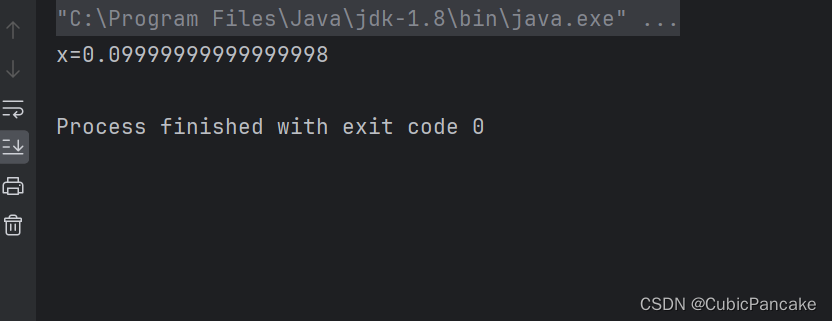 显然x=0.1,而编译结果却不为0.1。这是由于涉及浮点数计算时,存在精度丢失的情况。因此在涉及浮点数判断时,应该尽量避免直接使用”==“的情况判断是否相等,而采用差值小于临界值的条件来判断,如下所示: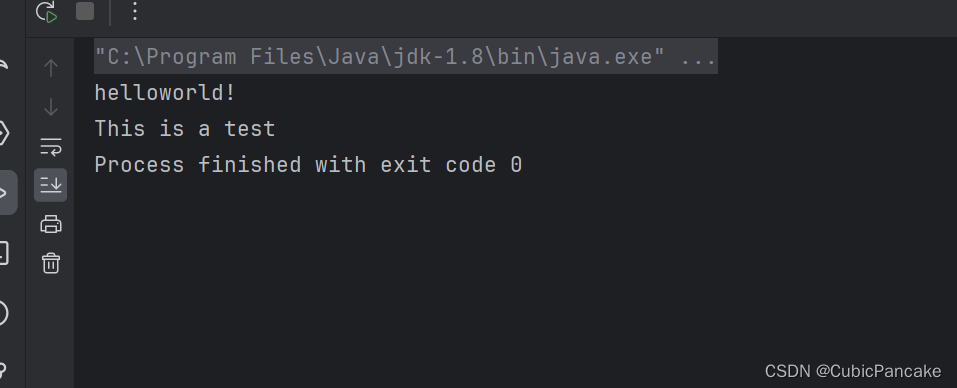





 扫一扫
扫一扫


 1163
1163


 到【灌水乐园】发言



