



 本文详细介绍了Android中的ProgressBar控件,包括进度条的样式设计,如圆形和横向进度条,以及如何通过style定制其外观。同时,文章还探讨了在drawable资源文件中定义进度条样式的方法,并提供了相关的源码示例。
ProgressBar控件
ProgressBar是进度条组件,通常用于向用户展示某个耗时操作完成的进度,而不让用户感觉是程序失去了响应,从而更好的提升用户界面的友好性。
进度条样式
通过style来定义进度条的样式
-
普通圆形(默认)
<TextView android:layout_width="wrap_content" android:layout_height="wrap_content" android:text="普通圆形" android:textColor="#FF0000" android:textSize="25sp"/> <ProgressBar android:layout_width="wrap_content" android:layout_height="wrap_content"/> -
大号圆形
<TextView android:layout_width="wrap_content" android:layout_height="wrap_content" android:text="大号圆形" android:textColor="#FF0000" android:textSize="25sp"/> <ProgressBar android:layout_width="wrap_content" android:layout_height="wrap_content" style="?android:attr/progressBarStyleLarge"/> -
小号圆形
<TextView android:layout_width="wrap_content" android:layout_height="wrap_content" android:text="小号圆形" android:textColor="#FF0000" android:textSize="25sp"/> <ProgressBar android:layout_width="wrap_content" android:layout_height="wrap_content" style="?android:attr/progressBarStyleSmall"/> -
标题型圆形
<TextView android:layout_width="wrap_content" android:layout_height="wrap_content" android:text="标题型圆形" android:textColor="#FF0000" android:textSize="25sp"/> <ProgressBar android:layout_width="wrap_content" android:layout_height="wrap_content" style="?android:attr/progressBarStyleSmallTitle"/> -
横条样式
<LinearLayout android:layout_width="match_parent" android:layout_height="wrap_content" android:orientation="vertical"> <TextView android:layout_width="wrap_content" android:layout_height="wrap_content" android:text="横向进度条" android:textColor="#FF0000" android:textSize="25sp"/> <ProgressBar android:id="@+id/progress" android:layout_width="300dp" android:layout_height="10dp" android:max="100" android:progress="0" style="@android:style/Widget.ProgressBar.Horizontal" android:progressDrawable="@drawable/progress_shape" /> </LinearLayout> -
…
横向进度条样式设计
- 指定进度条样式
style="@android:style/Widget.ProgressBar.Horizontal"
- 在drawable资源文件中新建progress_shape.xml,并定义各项属性
<?xml version="1.0" encoding="utf-8"?>
<layer-list xmlns:android="http://schemas.android.com/apk/res/android">
   <!--背景色-->
   <item android:id="@android:id/background">
       <shape>
           <solid android:color="#f0f0f0"></solid>
       </shape>
   </item>

   <!--进度条颜色 这里的id为系统自带id,非自定义id-->
   <item android:id="@android:id/progress">
       <scale android:scaleWidth="100%" 	            android:drawable="@drawable/progress_color">

       </scale>
   </item>
</layer-list>
Drawable资源文件中的progress_color.xml文件
<?xml version="1.0" encoding="utf-8"?>
<shape xmlns:android="http://schemas.android.com/apk/res/android">
    <gradient android:angle="180" android:startColor="#00DBff" android:endColor="#2F74FB">

    </gradient>
</shape>
- 在java文件中调用横向进度条,完成项目内容
public class ProcessBarActivity extends AppCompatActivity {
    private Handler handler = new Handler();
    private ProgressBar progressBar;
    int i = 0;
    private Runnable runnable = new Runnable() {
        @Override
        public void run() {
            i++;
            if (i == 100) {
                //handler.removeCallbacks(this); //停止
                i = 0;
                progressBar.setProgress(i);
            }
            progressBar.setProgress(i);
            handler.postDelayed(this,100);
        }
    };
    @Override
    protected void onCreate(Bundle savedInstanceState) {
        super.onCreate(savedInstanceState);
        setContentView(R.layout.activity_process_bar);

        progressBar = findViewById(R.id.progress);
        handler.postDelayed(runnable,100);
    }
}
源码
-
activity_process_bar.xml
<?xml version="1.0" encoding="utf-8"?> <LinearLayout xmlns:android="http://schemas.android.com/apk/res/android" android:layout_width="match_parent" android:layout_height="match_parent" android:orientation="vertical" > <TextView android:layout_width="wrap_content" android:layout_height="wrap_content" android:text="普通圆形" android:textColor="#FF0000" android:textSize="25sp"/> <ProgressBar android:layout_width="wrap_content" android:layout_height="wrap_content"/> <TextView android:layout_width="wrap_content" android:layout_height="wrap_content" android:text="大号圆形" android:textColor="#FF0000" android:textSize="25sp"/> <ProgressBar android:layout_width="wrap_content" android:layout_height="wrap_content" style="?android:attr/progressBarStyleLarge"/> <TextView android:layout_width="wrap_content" android:layout_height="wrap_content" android:text="小号圆形" android:textColor="#FF0000" android:textSize="25sp"/> <ProgressBar android:layout_width="wrap_content" android:layout_height="wrap_content" style="?android:attr/progressBarStyleSmall"/> <TextView android:layout_width="wrap_content" android:layout_height="wrap_content" android:text="标题型圆形" android:textColor="#FF0000" android:textSize="25sp"/> <ProgressBar android:layout_width="wrap_content" android:layout_height="wrap_content" style="?android:attr/progressBarStyleSmallTitle"/> <LinearLayout android:layout_width="match_parent" android:layout_height="wrap_content" android:orientation="vertical"> <TextView android:layout_width="wrap_content" android:layout_height="wrap_content" android:text="横向进度条" android:textColor="#FF0000" android:textSize="25sp"/> <ProgressBar android:id="@+id/progress" android:layout_width="300dp" android:layout_height="10dp" android:max="100" android:progress="0" style="@android:style/Widget.ProgressBar.Horizontal" android:progressDrawable="@drawable/progress_shape" /> </LinearLayout> </LinearLayout> -
Drawable中的progress_color.xml和progress_shape.xml
<?xml version="1.0" encoding="utf-8"?>
<shape xmlns:android="http://schemas.android.com/apk/res/android">
    <gradient android:angle="180" android:startColor="#00DBff" android:endColor="#2F74FB">
    </gradient>
</shape>
<?xml version="1.0" encoding="utf-8"?> <layer-list xmlns:android="http://schemas.android.com/apk/res/android"> <!--背景色--> <item android:id="@android:id/background"> <shape> <solid android:color="#f0f0f0"></solid> </shape> </item> <!--进度条颜色--> <item android:id="@android:id/progress"> <scale android:scaleWidth="100%" android:drawable="@drawable/progress_color"> </scale> </item> </layer-list> -
java源码
public class ProcessBarActivity extends AppCompatActivity { private Handler handler = new Handler(); private ProgressBar progressBar; int i = 0; private Runnable runnable = new Runnable() { @Override public void run() { i++; if (i == 100) { //handler.removeCallbacks(this); //停止 i = 0; progressBar.setProgress(i); } progressBar.setProgress(i); handler.postDelayed(this,100); } }; @Override protected void onCreate(Bundle savedInstanceState) { super.onCreate(savedInstanceState); setContentView(R.layout.activity_process_bar); progressBar = findViewById(R.id.progress); handler.postDelayed(runnable,100); } } -
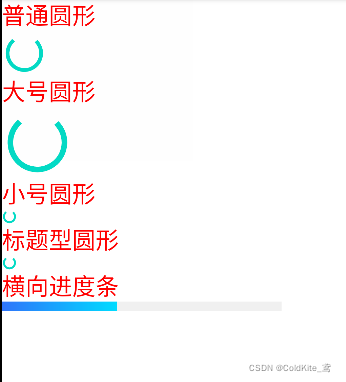
界面





 扫一扫
扫一扫


 333
333

 被折叠的 条评论
为什么被折叠?
被折叠的 条评论
为什么被折叠?
 到【灌水乐园】发言





