


在自己的项目中接入通义千问大模型,使其具有AI应用能力。需要提前申请 通义千问 API Key:
https://www.explinks.com/blog/how-to-obtain-the-tongyi-qianwen-api-key-step-by-step-guide/#title-2
然后通过SpringAI集成到自己的项目中
下面详细说明接入步骤
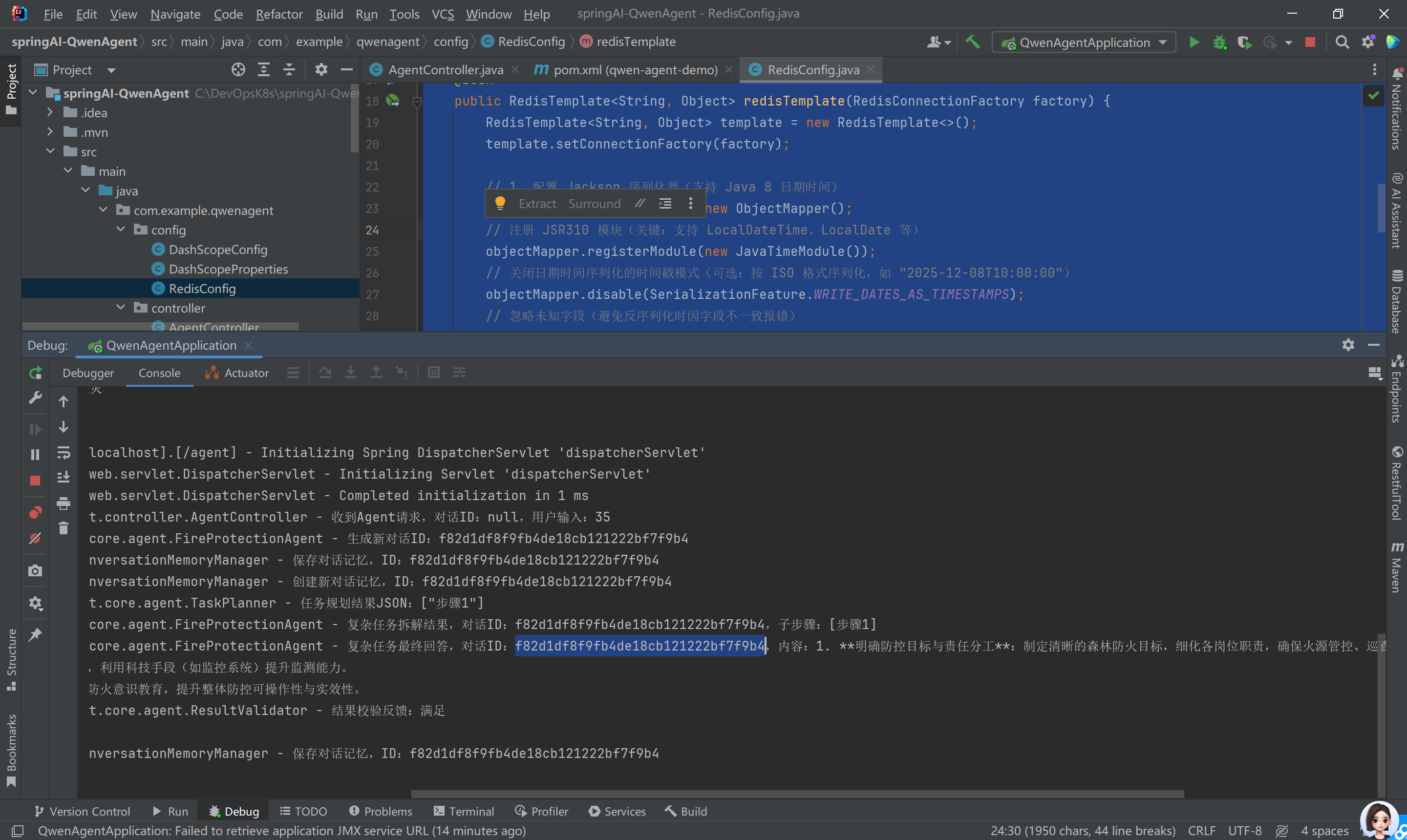
运行环境要求:
◦ JDK 17 或更高版本
◦ Spring Boot 3.x 系列
项目代码如下
一、 POM.xml
<?xml version="1.0" encoding="UTF-8"?>
<project xmlns="http://maven.apache.org/POM/4.0.0" xmlns:xsi="http://www.w3.org/2001/XMLSchema-instance"
		 xsi:schemaLocation="http://maven.apache.org/POM/4.0.0 https://maven.apache.org/xsd/maven-4.0.0.xsd">
	<modelVersion>4.0.0</modelVersion>
	<parent>
		<groupId>org.springframework.boot</groupId>
		<artifactId>spring-boot-starter-parent</artifactId>
		<version>3.2.5</version>
		<relativePath/> <!-- lookup parent from repository -->
	</parent>
	<groupId>com.example</groupId>
	<artifactId>spring-ai-qwen-demo</artifactId>
	<version>0.0.1-SNAPSHOT</version>
	<name>通义千问整合案例</name>
	<description>Spring Boot 3.x 整合通义千问 SDK 2.10.0 案例(森林防火问答)</description>

	<properties>
		<java.version>17</java.version>
		<spring-ai.version>1.0.0-M6</spring-ai.version>
		<dashscope-sdk.version>2.10.0</dashscope-sdk.version>
		<gson.version>2.10.1</gson.version>
		<lombok.version>1.18.32</lombok.version>
	</properties>

	<dependencies>
		<!-- Spring Web 核心(提供HTTP接口支持) -->
		<dependency>
			<groupId>org.springframework.boot</groupId>
			<artifactId>spring-boot-starter-web</artifactId>
		</dependency>

		<!-- Spring AI 核心(预览版) -->
		<dependency>
			<groupId>org.springframework.ai</groupId>
			<artifactId>spring-ai-core</artifactId>
			<version>${spring-ai.version}</version>
		</dependency>

		<!-- 通义千问官方 SDK(核心依赖) -->
		<dependency>
			<groupId>com.alibaba</groupId>
			<artifactId>dashscope-sdk-java</artifactId>
			<version>${dashscope-sdk.version}</version>
			<exclusions>
				<!-- 排除冲突的SLF4J实现(使用Spring Boot默认的logback) -->
				<exclusion>
					<groupId>org.slf4j</groupId>
					<artifactId>slf4j-simple</artifactId>
				</exclusion>
			</exclusions>
		</dependency>

		<!-- Gson 依赖(通义千问SDK序列化所需) -->
		<dependency>
			<groupId>com.google.code.gson</groupId>
			<artifactId>gson</artifactId>
			<version>${gson.version}</version>
		</dependency>

		<!-- Lombok(简化代码:@Slf4j、@Data等) -->
		<dependency>
			<groupId>org.projectlombok</groupId>
			<artifactId>lombok</artifactId>
			<version>${lombok.version}</version>
			<optional>true</optional> <!-- 编译时生效,不传递依赖 -->
		</dependency>

		<!-- Spring Boot 测试依赖 -->
		<dependency>
			<groupId>org.springframework.boot</groupId>
			<artifactId>spring-boot-starter-test</artifactId>
			<scope>test</scope>
		</dependency>
		<dependency>
			<groupId>com.hikvision.dec.client</groupId>
			<artifactId>dec-client</artifactId>
			<version>2.2.0</version>
		</dependency>
		<dependency>
			<groupId>org.springdoc</groupId>
			<artifactId>springdoc-openapi-starter-webmvc-ui</artifactId>
			<version>2.2.0</version>
		</dependency>
		<!-- 替代手动引入 hibernate-validator 和 jakarta.validation-api -->
		<dependency>
			<groupId>org.springframework.boot</groupId>
			<artifactId>spring-boot-starter-validation</artifactId>
		</dependency>
	</dependencies>

	<!-- 仓库配置(国内加速+预览版支持) -->
	<repositories>
		<repository>
			<id>maven-central</id>
			<name>Maven Central</name>
			<url>https://repo1.maven.org/maven2/</url>
			<releases><enabled>true</enabled></releases>
			<snapshots><enabled>false</enabled></snapshots> <!-- 快照版关闭,避免不稳定 -->
		</repository>
		<repository>
			<id>aliyun-maven</id>
			<name>Alibaba Maven Repository</name>
			<url>https://maven.aliyun.com/repository/public</url>
			<releases><enabled>true</enabled></releases>
			<snapshots><enabled>true</enabled></snapshots>
		</repository>
	</repositories>

	<pluginRepositories>
		<pluginRepository>
			<id>aliyun-maven</id>
			<url>https://maven.aliyun.com/repository/public</url>
		</pluginRepository>
	</pluginRepositories>

	<build>
		<plugins>
			<plugin>
				<groupId>org.springframework.boot</groupId>
				<artifactId>spring-boot-maven-plugin</artifactId>
				<configuration>
					<excludes>
						<!-- 排除Lombok依赖传递 -->
						<exclude>
							<groupId>org.projectlombok</groupId>
							<artifactId>lombok</artifactId>
						</exclude>
					</excludes>
				</configuration>
			</plugin>
		</plugins>
	</build>

</project>
二、优化后的配置文件(application.yml)
yaml
# 服务器配置
server:
  port: 8080 # 统一端口配置
  servlet:
    context-path: / # 根路径(可选,默认即可)

# 通义千问配置(集中管理)
dashscope:
  api-key: sk-xxxxxxxxxxxxxxxxxxxxxxxxxxxxxxxx # 替换为你的API Key
  model: qwen-turbo # 模型名称(qwen-turbo/qwen-plus/qwen-max,按需选择)
  # 可选配置(默认使用官方端点,无需修改可注释)
  http-base-url: https://dashscope.aliyuncs.com/api/v1
  websocket-base-url: wss://dashscope.aliyuncs.com/api-ws/v1/inference/
  # SDK调用参数(集中配置,便于修改)
  temperature: 0.6
  max-tokens: 1000

# Spring 日志配置(优化日志输出)
logging:
  level:
    root: INFO
    com.example.demo: DEBUG # 本项目包日志级别设为DEBUG,便于调试
    com.alibaba.dashscope: WARN # 通义千问SDK日志级别设为WARN,减少冗余
三、优化后的核心代码
1. 配置类(DashScopeConfig.java)
package com.example.springaiqwen;

import com.alibaba.dashscope.utils.Constants;
import jakarta.annotation.PostConstruct;
import lombok.extern.slf4j.Slf4j;
import org.springframework.beans.factory.annotation.Value;
import org.springframework.context.annotation.Configuration;
import org.springframework.util.Assert;

/**
 * 通义千问客户端配置类
 * 职责:初始化SDK配置(API Key、端点、超时等)
 */
@Slf4j
@Configuration
public class DashScopeConfig {

    @Value("${dashscope.api-key}")
    private String apiKey;

    @Value("${dashscope.http-base-url}")
    private String httpBaseUrl;

    @Value("${dashscope.websocket-base-url}")
    private String websocketBaseUrl;

    /**
     * 初始化通义千问配置(Bean初始化后执行)
     * 增加参数校验,避免空配置导致后续异常
     */
    @PostConstruct
    public void initDashScopeConfig() {
        // 1. 校验核心配置(API Key不能为空)
        Assert.hasText(apiKey, "通义千问API Key不能为空!请在application.yml中配置 dashscope.api-key");
        Assert.hasText(httpBaseUrl, "HTTP端点地址不能为空!");
        Assert.hasText(websocketBaseUrl, "WebSocket端点地址不能为空!");

        // 2. 设置全局配置
        Constants.apiKey = this.apiKey;
        Constants.baseHttpApiUrl = this.httpBaseUrl;
        Constants.baseWebsocketApiUrl = this.websocketBaseUrl;

        // 3. 可选:调整超时时间(根据业务需求配置)
        Constants.CONNECT_TIMEOUT = 15000; // 连接超时15秒(默认10秒)
        Constants.SOCKET_TIMEOUT = 60000; // 读写超时60秒(默认30秒)

        // 4. 日志输出(便于调试)
        log.info("通义千问SDK初始化成功!");
        log.debug("API Key:{}", maskApiKey(apiKey)); // 脱敏输出API Key,避免泄露
        log.debug("HTTP端点:{}", httpBaseUrl);
        log.debug("WebSocket端点:{}", websocketBaseUrl);
    }

    /**
     * API Key脱敏(只显示前6位和后4位)
     */
    private String maskApiKey(String apiKey) {
        if (apiKey.length() < 10) {
            return apiKey; // 异常长度直接返回(避免报错)
        }
        return apiKey.substring(0, 6) + "******" + apiKey.substring(apiKey.length() - 4);
    }
}
2. 配置属性类(DashScopeProperties.java)
package com.example.springaiqwen;

import lombok.Data;
import org.springframework.boot.context.properties.ConfigurationProperties;
import org.springframework.stereotype.Component;
import org.springframework.validation.annotation.Validated;

import javax.validation.constraints.NotBlank;
import javax.validation.constraints.Positive;
import javax.validation.constraints.PositiveOrZero;

/**
 * 通义千问配置属性类(绑定application.yml中的dashscope配置)
 * 采用@ConfigurationProperties+@Validated,替代分散的@Value,更规范
 */
@Data
@Validated
@Component
@ConfigurationProperties(prefix = "dashscope")
public class DashScopeProperties {

    /** API Key(必填) */
    @NotBlank(message = "通义千问API Key不能为空")
    private String apiKey;

    /** 模型名称(必填,如qwen-turbo) */
    @NotBlank(message = "模型名称不能为空")
    private String model;

    /** 生成温度(0-1,越小越稳定) */
    @PositiveOrZero(message = "temperature必须大于等于0")
    private Float temperature = 0.6f;

    /** 最大生成Token数(正整数) */
    @Positive(message = "max-tokens必须大于0")
    private Integer maxTokens = 1000;

    /** HTTP端点地址 */
    @NotBlank(message = "HTTP端点地址不能为空")
    private String httpBaseUrl;

    /** WebSocket端点地址 */
    @NotBlank(message = "WebSocket端点地址不能为空")
    private String websocketBaseUrl;
}
3. 服务类(FireProtectionService.java)
package com.example.springaiqwen;

import com.alibaba.dashscope.aigc.generation.Generation;
import com.alibaba.dashscope.aigc.generation.GenerationParam;
import com.alibaba.dashscope.aigc.generation.GenerationResult;
import com.alibaba.dashscope.exception.ApiException;
import com.alibaba.dashscope.exception.InputRequiredException;
import com.alibaba.dashscope.exception.NoApiKeyException;
import lombok.RequiredArgsConstructor;
import lombok.extern.slf4j.Slf4j;
import org.springframework.stereotype.Service;
import org.springframework.util.Assert;

/**
 * 森林防火问答服务
 * 职责:封装通义千问SDK调用,提供业务逻辑处理
 */
@Slf4j
@Service
@RequiredArgsConstructor
public class FireProtectionService {

    // 注入配置属性类(集中管理配置,更规范)
    private final DashScopeProperties dashScopeProperties;

    // 通义千问生成客户端(单例,无需每次创建)
    private final Generation generationClient = new Generation();

    /**
     * 生成森林防火问答结果
     * @param question 用户问题(非空)
     * @return AI专业回答
     */
    public String getFireProtectionAnswer(String question) {
        // 1. 入参校验(提前拦截无效请求)
        Assert.hasText(question, "提问内容不能为空!");
        log.debug("收到森林防火提问:{}", question);

        // 2. 构建SDK调用参数(从配置属性类获取,便于维护)
        GenerationParam param = GenerationParam.builder()
                .model(dashScopeProperties.getModel())
                .prompt(buildProfessionalPrompt(question))
                .resultFormat(GenerationParam.ResultFormat.MESSAGE)
                .temperature(dashScopeProperties.getTemperature())
                .maxTokens(dashScopeProperties.getMaxTokens())
                .build();

        // 3. 调用SDK并处理结果
        try {
            GenerationResult result = generationClient.call(param);
            String answer = parseAnswer(result);
            log.debug("森林防火回答生成成功,长度:{}字", answer.length());
            return answer;
        } catch (NoApiKeyException e) {
            log.error("通义千问API Key未配置", e);
            return "❌ 系统错误:通义千问API Key未配置,请联系管理员";
        } catch (InputRequiredException e) {
            log.warn("提问内容为空", e);
            return "❌ 输入错误:提问内容不能为空";
        } catch (ApiException e) {
            log.error("通义千问SDK调用失败,错误信息:{}", e.getMessage(), e);
            return String.format("❌ 调用失败:%s", e.getMessage());
        } catch (IllegalArgumentException e) {
            log.error("参数配置错误", e);
            return "❌ 系统错误:参数配置无效(可能是模型名称/端点地址错误),请联系管理员";
        } catch (Exception e) {
            log.error("未知异常", e);
            return "❌ 系统错误:服务暂时不可用,请稍后重试";
        }
    }

    /**
     * 构建专业提示词(引导AI生成精准、专业的回答)
     */
    private String buildProfessionalPrompt(String question) {
        return String.format("""
                你是资深森林防火专家,具备丰富的林区火灾防控、应急处置经验。
                请严格遵循以下要求回答:
                1. 专业性:基于森林防火行业规范和科学知识,拒绝不专业、不准确的内容;
                2. 简洁性:避免冗长,直击要点,控制在300字以内;
                3. 实用性:给出可操作的建议,而非纯理论;
                4. 安全性:优先强调人员安全,再提及财产保护。

                用户问题:%s
                """, question);
    }

    /**
     * 解析SDK返回结果(封装解析逻辑,便于后续修改)
     */
    private String parseAnswer(GenerationResult result) {
        Assert.notNull(result, "SDK返回结果不能为空");
        Assert.notNull(result.getOutput(), "SDK返回Output不能为空");
        Assert.notEmpty(result.getOutput().getChoices(), "SDK返回Choices不能为空");

        return result.getOutput().getChoices().get(0).getMessage().getContent().trim();
    }
}
4. 控制器类(FireProtectionController.java)
package com.example.springaiqwen;

import io.swagger.v3.oas.annotations.Operation;
import io.swagger.v3.oas.annotations.Parameter;
import io.swagger.v3.oas.annotations.media.Content;
import io.swagger.v3.oas.annotations.media.Schema;
import io.swagger.v3.oas.annotations.responses.ApiResponse;
import io.swagger.v3.oas.annotations.tags.Tag;
import lombok.RequiredArgsConstructor;
import lombok.extern.slf4j.Slf4j;
import org.springframework.http.ResponseEntity;
import org.springframework.web.bind.annotation.GetMapping;
import org.springframework.web.bind.annotation.RequestMapping;
import org.springframework.web.bind.annotation.RequestParam;
import org.springframework.web.bind.annotation.RestController;

/**
 * 森林防火问答控制器
 * 职责:提供HTTP接口,接收用户请求,返回结果
 */
@Slf4j
@RestController
@RequestMapping("/api/v1/fire-protection") // 接口路径规范(版本+业务模块)
@RequiredArgsConstructor
@Tag(name = "森林防火问答", description = "提供森林防火相关问题的AI问答接口")
public class FireProtectionController {

    private final FireProtectionService fireProtectionService;

    /**
     * 森林防火问答接口
     * 访问示例:http://localhost:8080/api/v1/fire-protection/ask?question=35℃的林区如何防控火灾
     */
    @GetMapping("/ask")
    @Operation(
            summary = "提问接口",
            description = "输入森林防火相关问题,获取AI专业回答",
            parameters = {
                    @Parameter(
                            name = "question",
                            description = "用户问题(如:35℃的林区如何防控火灾)",
                            required = true,
                            schema = @Schema(type = "string")
                    )
            },
            responses = {
                    @ApiResponse(responseCode = "200", description = "回答成功", content = @Content(schema = @Schema(type = "string"))),
                    @ApiResponse(responseCode = "400", description = "参数错误(问题为空)"),
                    @ApiResponse(responseCode = "500", description = "服务器内部错误")
            }
    )
    public ResponseEntity<String> askFireQuestion(
            @RequestParam(required = true, value = "question") String question) {
        try {
            String answer = fireProtectionService.getFireProtectionAnswer(question);
            return ResponseEntity.ok(answer);
        } catch (IllegalArgumentException e) {
            log.warn("参数错误:{}", e.getMessage());
            return ResponseEntity.badRequest().body("❌ " + e.getMessage());
        } catch (Exception e) {
            log.error("接口处理异常", e);
            return ResponseEntity.internalServerError().body("❌ 服务异常,请稍后重试");
        }
    }
}
5. 主启动类(SpringAiQwenDemoApplication.java)
package com.example.springaiqwen;

import org.springframework.boot.SpringApplication;
import org.springframework.boot.autoconfigure.SpringBootApplication;

@SpringBootApplication
public class SpringAiQwenApplication {

	public static void main(String[] args) {
		SpringApplication.run(SpringAiQwenApplication.class, args);
	}

}
运行测试验证
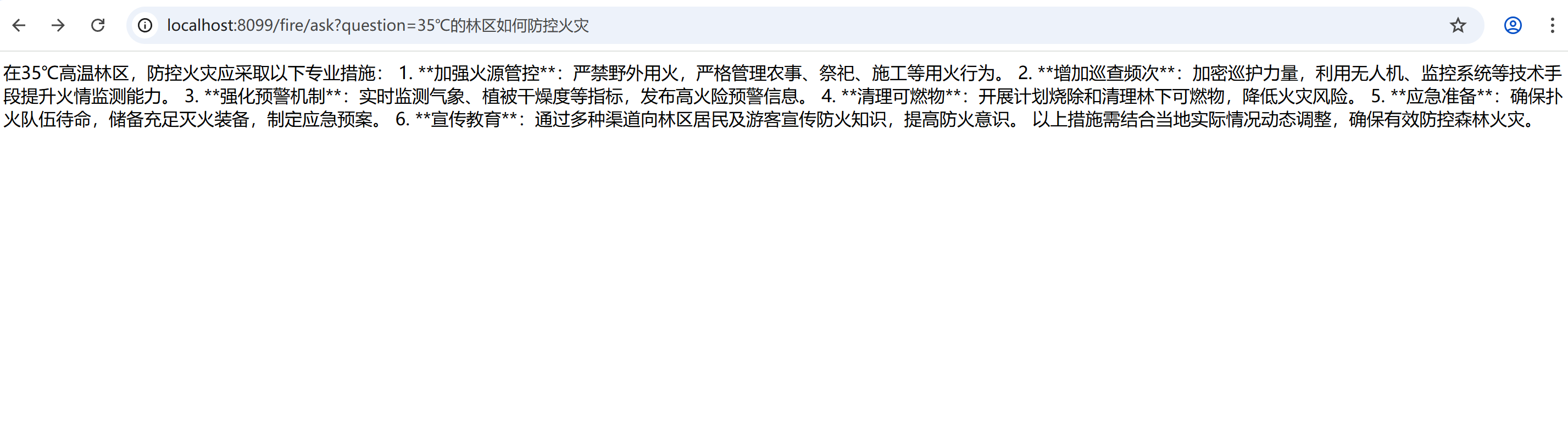
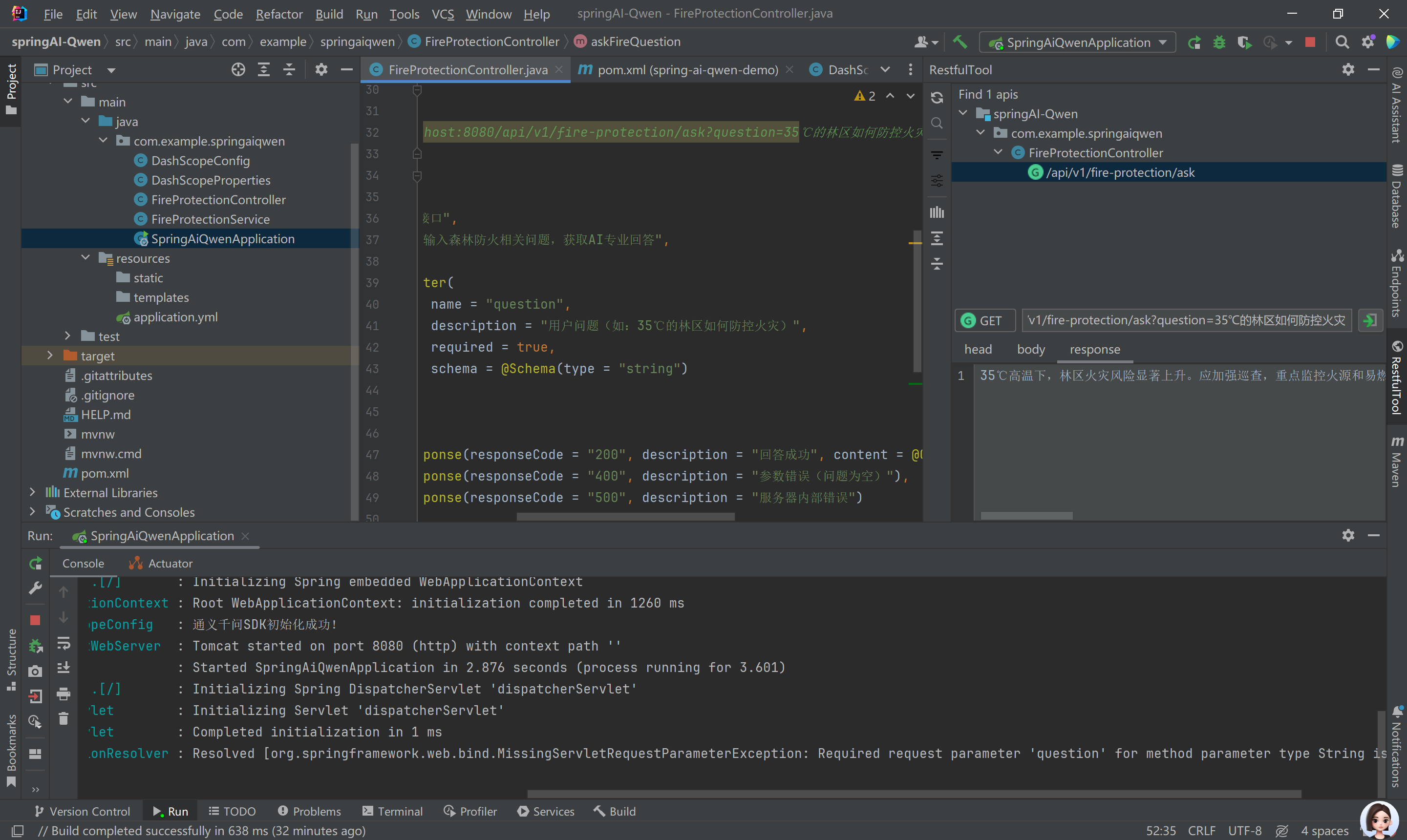
访问示例:http://localhost:8080/api/v1/fire-protection/ask?question=35℃的林区如何防控火灾
这个案例具备了 Agent 的 “雏形”,但还不属于严格意义上的「AI Agent」—— 更准确地说,它是一个「领域专用的 AI
问答应用」(聚焦森林防火场景)。要成为真正的 Agent,还需要补充核心的 Agent 能力案例已经实现了 Agent 的「基础交互逻辑」
场景聚焦:通过专业提示词(buildProfessionalPrompt)将通用大模型(通义千问)约束为「森林防火专家」,具备了 Agent
的「角色定位」能力;但本质上,它的核心逻辑是「单一轮次的 Prompt + 大模型调用」,缺少 Agent
最关键的「自主决策、工具调用、多轮规划」能力。 下一章详细介绍Agent基础开发





 扫一扫
扫一扫


 3425
3425

 被折叠的 条评论
为什么被折叠?
被折叠的 条评论
为什么被折叠?
 到【灌水乐园】发言





