


 文章提供了一种解决Docker容器无法上网的方案,包括停止Docker服务,编辑配置文件添加DNS,关闭iptables和ip_forward,以及使用iptables的MASQUERADE规则来允许特定IP网段访问互联网。特别地,对于5G核心网,需要为它分配正确的IP网段以确保网络访问。最后,检查容器内网络连接是否恢复。
Docker容器没网解决方法
借鉴我师兄的一种解决方法。用这种方法还是没网,原因后面分析。
After A LOT of time trying to solve this issue I think I finally
found a solution in an ebook I found on the internet.

Here's the steps I took to solve the issue:

$ sudo service docker stop
$ sudo nano /etc/default/docker

Edit the file and uncomment the DOCKER_OPTS option modifying it to somthing like this:
DOCKER_OPTS="--dns 8.8.8.8 --dns 8.8.4.4 --iptables=false --ip-forward=false"

$ sudo su
$ echo 1 > /proc/sys/net/ipv4/ip_forward
// Add the IP range you want to have access to the internet
$ iptables -t nat -A POSTROUTING -s 172.17.0.0/16 -j MASQUERADE
$ service docker restart
$ exit

Now hopefully your containers have access to the internet again.

I hope to help someone :)
转载自github:
https://github.com/moby/moby/issues/36151#issuecomment-630548256
原因分析:
上面教程中有个下面这个指令
// Add the IP range you want to have access to the internet
$ iptables -t nat -A POSTROUTING -s 172.17.0.0/16 -j MASQUERADE
这个是添加整个容器网段,这还不够。
解决方案:
因为上面这个是整个docker容器的网段
需要给5G核心网分配网段
按照上述教程一直运行命令行,直到运行到添加ip网段,我们先查看容器ip网段再用下面方法添加
// 先启动核心网,查看核心网ip(注意是docker-oai)
$ ifconfig
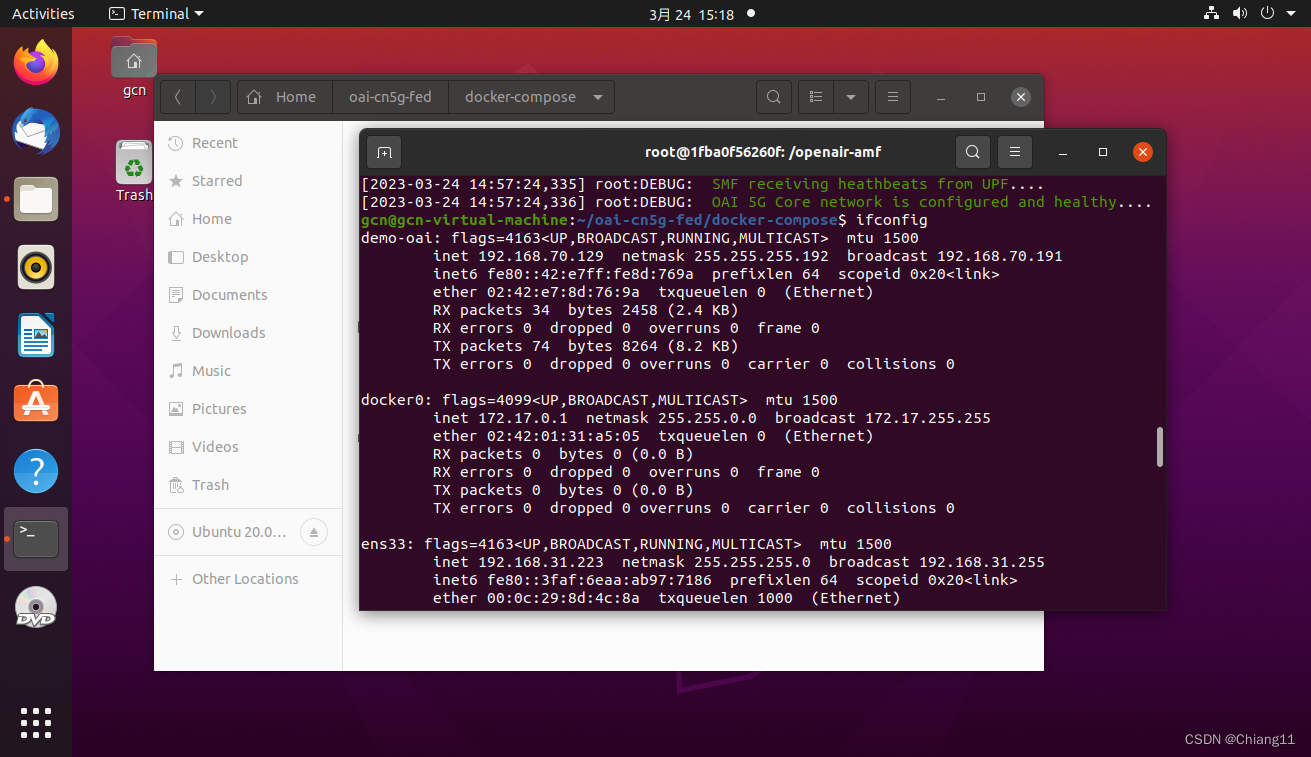
//我的是192.168.70.129,掩码是26
//先运行下面这行命令
$ iptables -t nat -A POSTROUTING -s 172.17.0.0/16 -j MASQUERADE
//再运行下面这个,添加核心网网段
$ iptables -t nat -A POSTROUTING -s 192.168.70.129/26 -j MASQUERADE
剩下的命令接着运行
接下来就可以检查是否有网了:先进入容器,然后ping或者apt update一下看看有没有网。
$ docker exec -it oai-amf bash





 扫一扫
扫一扫


 4444
4444

 被折叠的 条评论
为什么被折叠?
被折叠的 条评论
为什么被折叠?
 到【灌水乐园】发言





