


使用爬虫上网页抓取数据的时候,可以套用以下公式创建代码
包+目标网址+测试请求+读取所需数据+保存
一.所需包
import requests
from bs4 import BeautifulSoup
import pandas as pd
import time
request用于发送HTTP请求获取网页内容
BeautifulSoup用于解析主网页内容
pandas用于将数据存储到DataFrame
time用于增加延迟以避免反爬虫机制
二.设置目标网页
base_url = 'https://unece.org'
url = 'https://unece.org/trade/cefact/unlocode-code-list-country-and-territory'
这里以上Unlocode网页抓取港口坐标为例,先后设置Unlocode主页和子网页,实际网址根据所需要抓取数据的网页进行更改。
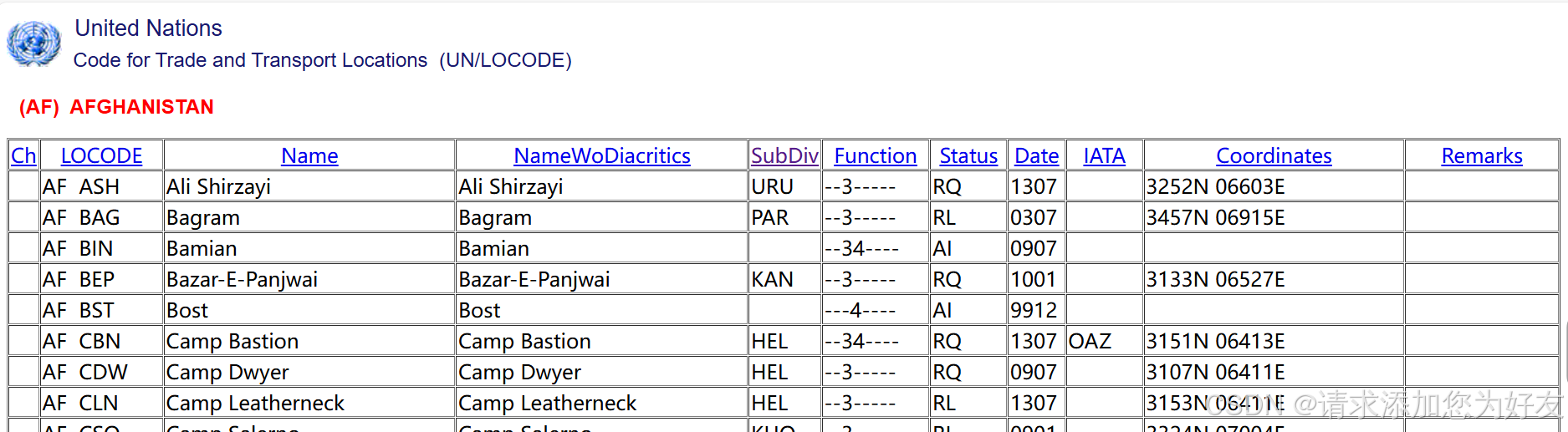
这个网页的数据性质是首页包含国家超链接,分别点进国家列表之后可以看到一个表格,包含这个国家所有的港口信息。
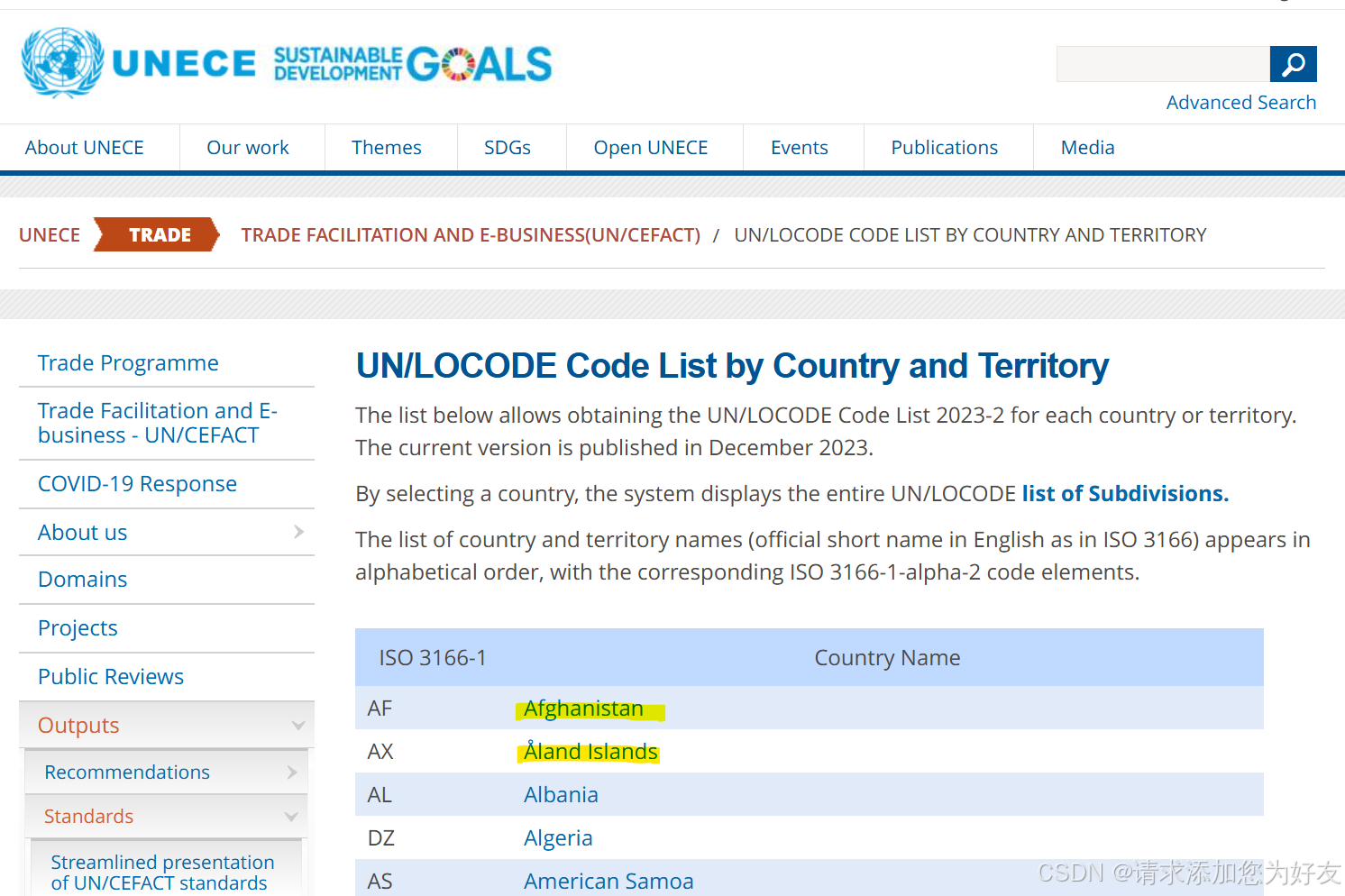
那么首先就需要读取首页里面的国家列表,之后分别进入每个国家的超链接,读取里面每个港口的信息。具体需要什么信息则只需要读取里面对应的列即可。
三.测试请求
3.1发送请求
response = requests.get(url)
3.2检查请求是否成功,若未成功,则无法抓取到国家信息,返回值;
if response.status_code == 200:
    # 解析主网页内容
    soup = BeautifulSoup(response.content, 'html.parser')

    # 找到所有国家链接
    country_links = soup.select('table a')

    if not country_links:
        print("No country links found")
四.抓取数据
4.1创建列表以存储所抓取到的数据
data = []
4.2遍历国家信息
    for link in country_links:
        # 拼接完整的国家URL
        href = link.get('href')
        if not href.startswith('http'):
            country_url = base_url + href
        else:
            country_url = href
        country_name = link.text.strip()

        print(f"Processing {country_name}: {country_url}")  # 添加日志
4.3发送请求获取每个国家的页面内容
        try:
            country_response = requests.get(country_url)
            if country_response.status_code == 200:
                country_soup = BeautifulSoup(country_response.content, 'html.parser')
4.4抓取需要的表格内容
                tables = country_soup.find_all('table')
                if len(tables) > 2:
                    table = tables[2]
                    print(f"Data table found for {country_name}")

                    rows = table.find_all('tr')[1:]  # 忽略表头

                    if not rows:
                        print(f"No data rows found for {country_name}")
                    else:
                        print(f"{len(rows)} data rows found for {country_name}")

                    for row in rows:
                        cols = row.find_all('td')

                        if len(cols) >= 9:  # 确保有足够的列
                            locode = cols[1].text.strip()
                            name = cols[2].text.strip()
                            subdiv = cols[4].text.strip()
                            coordinates = cols[9].text.strip()
                            print(f"Appending data: LOCODE={locode}, Name={name}, SubDiv={subdiv}, Coordinates={coordinates}")
                            data.append([country_name, locode, name, subdiv, coordinates])
                else:
                    print(f"No data table found for {country_name}")
4.5保存数据并写入文件
    if data:
        # 将数据存储到DataFrame
        df = pd.DataFrame(data, columns=['Country', 'LOCODE', 'Name', 'SubDiv', 'Coordinates'])

        # 输出结果到CSV文件
        df.to_csv('unlocode_data.csv', index=False)
        print("Data saved to unlocode_data.csv")
    else:
        print("No data to save.")
以上便完成了爬虫过程,可以在4.4中自由添加其他需要的数据或删除不需要的数据,根据自己的需求来。





 扫一扫
扫一扫


 847
847

 被折叠的 条评论
为什么被折叠?
被折叠的 条评论
为什么被折叠?
 到【灌水乐园】发言





