



线程和进程
进程:程序的一次执行,每个进程都有自己的地址空间、内存、数据线及其他记录其运行轨迹的辅助数据。
线程:所有的线程运行在同一个进程当中,共享相同的运行环境。线程有开始顺序执行和结束三个部分。
进程包括线程
thread模块
Python thread模块可以调用下述函数实现多线程开启。它将产生一个新线程,在新的线程中用指定的参数和可选的kwargs来调用这个函数。
函数式:调用 _thread 模块中的 start_new_thread() 函数来产生新线程。语法如下:
_thread.start_new_thread ( function, args [, kwargs] )
注意:使用这个方法时,一定要加time.sleep()函数,否则每个线程都可能不执行。此方法还有一个缺点,遇到较复杂的问题时,线程数不易控制。
# encoding=UTF-8
import thread
import time

def function():
	print 'hello world %s' % time.ctime()

#多线程
def main():
	thread.start_new_thread(function,()) #定义的函数并不需要参数传递
	thread.start_new_thread(function,())
	time.sleep(2)
	print "over"

#程序同一时刻运行两个函数
if __name__ == '__main__':
	main()
运行结果:
hello world Wed Apr 15 09:22:42 2020
hello world Wed Apr 15 09:22:42 2020
over
threading模块
threading 模块除了包含 _thread 模块中的所有方法外,还提供其他方法:
- threading.currentThread(): 返回当前的线程变量。
- threading.enumerate(): 返回一个包含正在运行的线程的list列表。正在运行指线程启动后、结束前。
- threading.activeCount(): 返回正在运行的线程数量,与 len(threading.enumerate()) 有相同的结果。
除了使用方法外,threading 线程模块同样提供了 threading.Thread 类来处理线程,threading.Thread类提供了以下方法:
- run(): 用以表示线程活动的方法。
- start():启动线程活动。
- join([time]): 父线程等待子线程至中止再执行。这阻塞调用线程直至线程的join() 方法被调用中止、正常退出或者抛出未处理的异常、再或者是可选的超时发生。
- isAlive(): 返回线程是否活动的。
- getName(): 返回线程名。
- setName(): 设置线程名。
问:对所有C段中的机器进行ping的探测,看其是否存活
对本机127.0.0.1进行测试
# encoding=UTF-8
import thread
import time
from subprocess import Popen,PIPE

def ping_check():

	# check = Popen('/bin/bash','-c','ping -c 2'+'127.0.0.1',stdin=PIPE,stdout=PIPE)
	# ping指定次数后停止ping 报错访问被拒绝,选项 -c 需要管理员权限
	ip = '127.0.0.1'
	check = Popen("ping {0} \n".format(ip),stdin=PIPE,stdout=PIPE,shell=True)
	data = check.stdout.read()
	print data

def main():
	ping_check()
	print "over"

if __name__ == '__main__':
	main()
输出正常连通结果,如下:
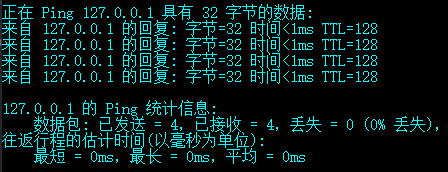
那么对一个C段网址进行ping探测,则需要设计一个循环,如果主机不存在,则返回timeout;如果主机存在,则包含TTL字样1,以TTL为标准,来判断是否存活。
修改上面代码如下:
# encoding=UTF-8
import thread
import time
from subprocess import Popen,PIPE

def ping_check():

	# check = Popen('/bin/bash','-c','ping -c 2'+'127.0.0.1',stdin=PIPE,stdout=PIPE)
	# ping指定次数后停止ping 报错访问被拒绝,选项 -c 需要管理员权限
	ip = '127.0.0.1'
	check = Popen("ping {0} \n".format(ip),stdin=PIPE,stdout=PIPE,shell=True)
	data = check.stdout.read() #数据
	if 'TTL' in data:#查找存活主机
		print '%s is existence' % ip

def main():
	#寻找目标 ichunqiu 1.31.128.240
	for i in range(1,255):
		ip = '1.31.128.'+str(i)
		#多线程方法
		thread.start_new_thread(ping_check,(ip, ))
		time.sleep(0.1)

if __name__ == '__main__':
	main()
结果如下





 扫一扫
扫一扫


 406
406

 被折叠的 条评论
为什么被折叠?
被折叠的 条评论
为什么被折叠?
 到【灌水乐园】发言





