



 本文详细介绍了Java中的File类及其常用方法,包括文件的创建、删除和读写操作。接着深入讲解了IO流的概念,如字节流、字符流、输入流和输出流,以及各种流的角色和分类。重点阐述了FileReader和FileWriter的使用,展示了读写文件的示例。同时,讨论了缓冲流、转换流的作用和使用,如BufferedReader和BufferedWriter。此外,还涉及到了标准输入输出流、打印流、数据流和对象流的使用。最后,提到了RandomAccessFile的特性以及NIO中的Path、Paths和Files工具类的应用。
Java基础学习笔记整理了我从零开始学习Java时所学习到的内容。
以下内容参考尚硅谷Java教程。
十四、Java IO
1 File类
1.1 File类的理解
- File类的一个对象,代表一个文件或一个文件目录(俗称:文件夹);
- File类声明在java.io包下;
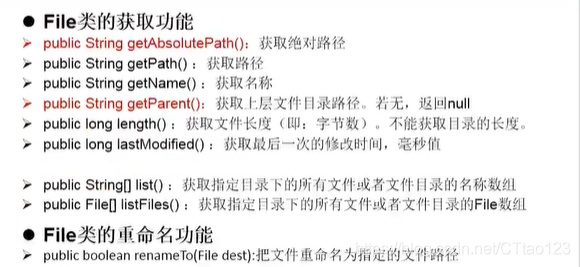
- File类中涉及到关于文件或文件目录的创建、删除、重命名、修改时间、文件大小等方法,并未涉及到写入或读取文件内容的操作。如果需要读取或写入文件内容,必须使用IO流来完成;
- 后续File类的对象常会作为参数传递到流的构造器中,指明读取或写入的“终点”。
1.2 File的实例化
1.2.1 常用构造器
File(String filePath)File(String parentPath,String childPath)File(File parentFile,String childPath)
1.2.2 文件路径及分隔符
相对路径:相较于某个路径下,指明的路径。
绝对路径:包含盘符在内的文件或文件目录的路径。
说明:
如果大家开发使用单元测试方法的相对路径基于当前Module下。
使用main()方法测试,相对路径基于当前Project下。
分隔符:
在Windows和DOS中,分隔符默认为:\
在UNIX和URL中,分隔符为:/
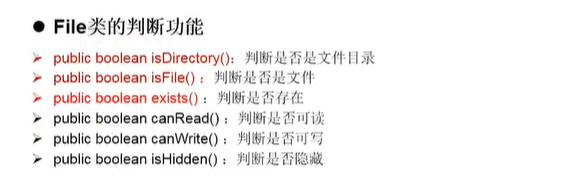
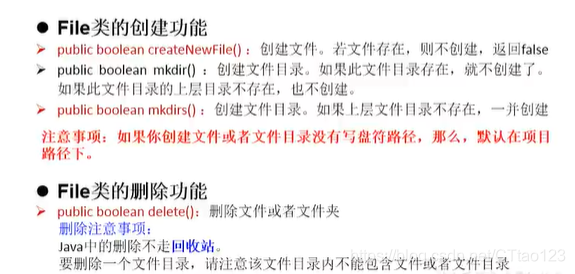
1.4 File类常用方法
2 IO流概述
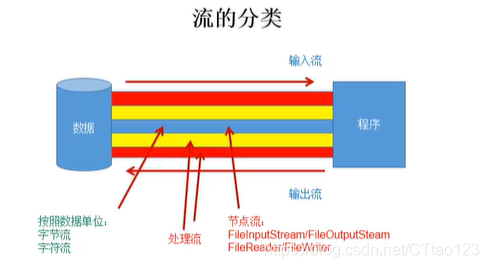
2.1 流的分类
- 操作数据单位:字节流、字符流
- 数据的流向:输入流、输出流
- 流的角色:节点流、处理流
图示:
2.2 流的体系结构
| 分类 | 字节输入流 | 字节输出流 | 字符输入流 | 字符输出流 |
|---|---|---|---|---|
| 抽象基类 | InputStream | OutputStream | Reader | Writer |
| 访问文件 | FileInputStream | FileOutputStream | FileReader | FileWriter |
| 访问数组 | ByteArrayInputStream | ByteArrayOutputStream | CharArrayReader | CharArrayWriter |
| 访问管道 | PipedInputStream | PipedOutputStream | PipedReader | PipedWriter |
| 访问字符串 | StringReader | StringWriter | ||
| 缓冲流 | BufferedInputStream | BufferedOutputStream | BufferedReader | BufferedWriter |
| 转换流 | InputStreamReader | OutputStreamWriter | ||
| 对象流 | ObjectInputStream | ObjectOutputStream | ||
| FilterInputStream | FilterOutputStream | FilterReader | FilterWriter | |
| 打印流 | PrintStream | PrintWriter | ||
| 推回输入流 | PushbackInputStream | PushbackReader | ||
| 特殊流 | DataInputStream | DataOutputStream |
2.3 重点的几个流

2.4 输入、输出的标准化流程
2.4.1 输入过程
- 创建File类对象,指明读取数据的来源(要求此文件一定要存在);
- 创建相应的输入流,将File类的对象作为参数,传入流的构造器中;
- 具体的读入过程:
创建相应的byte[]/char[]; - 关闭流资源。
说明:程序中出现的异常需要使用try-catch-finally处理。
2.4.2 输出过程
- 创建File类对象,指明读取数据的来源(此文件不一定存在);
- 创建相应的输出流,将File类的对象作为参数,传入流的构造器中;
- 具体的写出过程:
write(char[]/byte[] buffer,0,len) - 关闭流资源。
说明:程序中出现的异常需要使用try-catch-finally处理。
3 节点流
3.1 FileReader/FileWriter的使用
3.1.1 FileReader的使用
- read()的理解:返回读入的一个字符,如果到达文件末尾,返回-1;
- 异常的处理:为保证流资源一定可以执行关闭操作。使用try-catch-finally处理;
- 读入的文件必须存在,否则会报FileNotFoundException。
    @Test
    public void testFileReader1() {
        FileReader fr = null;
        try {
            File file = new File("hello.txt");
            fr = new FileReader(file);
            char[] cbuf = new char[5];
            int len;
            while((len = fr.read(cbuf)) != -1){
                for(int i = 0;i<len;i++){
                    System.out.print(cbuf[i]);
                }
            }
        } catch (IOException e) {
            e.printStackTrace();
        } finally {
            if(fr != null){
                try {
                    fr.close();
                } catch (IOException e) {
                    e.printStackTrace();
                }
            }
        }
    }
3.1.2 FileWriter的使用
从内存中写出数据到硬盘
- 输出操作,对应的File可以不存在。并不会报异常;
- File对应的文件如果不存在,在输出过程中,会自动创建该文件;
- File对应的硬盘中的文件如果存在:
如果流使用的构造器是FileWriter(file,false)/FileWriter(file):对原有文件覆盖;
如果流使用的构造器是FileWriter(file,true):不会覆盖原有文件,而是在原有文件的基础上进行添加。
    @Test
    public void testFileWriter(){
        FileWriter fr = null;
        try {
            //1.提供File类对象,指明写出到的文件
            File file = new File("hello1.txt");
            //2.提供FileWriter的对象,用于数据写出
            fr = new FileWriter(file,true);
            //3.写出的操作
            fr.write("I have a dream!\n");
            fr.write("You need be hard");
        } catch (IOException e) {
            e.printStackTrace();
        } finally {
            if(fr != null){
                //4.流的关闭
                try {
                    fr.close();
                } catch (IOException e) {
                    e.printStackTrace();
                }
            }
        }
    }
3.1.3 文本的复制
    @Test
    public void testFileReaderFileWriter()  {
        FileReader fr = null;
        FileWriter fw = null;
        try {
            //1.提供File类的对象,指明读入和写出的文件
            File srcFile = new File("hello.txt");
            File destFile = new File("hello2.txt");
            //2.创建输入输出流的对象
            fr = new FileReader(srcFile);
            fw = new FileWriter(destFile);
            //3.数据的读入写出
            char[] cbuf = new char[5];
            int len;
            while((len = fr.read(cbuf)) != -1){
                fw.write(cbuf,0,len);
            }
        } catch (IOException e) {
            e.printStackTrace();
        } finally {
            //4.流的关闭
            try {
                fr.close();
            } catch (IOException e) {
                e.printStackTrace();
            }
            try {
                fw.close();
            } catch (IOException e) {
                e.printStackTrace();
            }
        }

    }
3.2 FileInputStream/FileOutputStream的使用
- 对于文本文件(.txt、.java、.c、.cpp),使用字符流处理;
- 对于非文本文件(.jpg、.mp3、.mp4、.avi、.doc、…),使用字节流处理。
    @Test
    public void testFileCopy() {
        FileInputStream fis = null;
        FileOutputStream fos = null;
        try {
            File srcFile = new File("timg.jpg");
            File destFile = new File("timg1.jpg");

            fis = new FileInputStream(srcFile);
            fos = new FileOutputStream(destFile);

            byte[] buffer = new byte[5];
            int len;
            while((len = fis.read(buffer)) != -1){
                fos.write(buffer,0,len);
            }
        } catch (IOException e) {
            e.printStackTrace();
        } finally {
            if(fis != null){
                try {
                    fis.close();
                } catch (IOException e) {
                    e.printStackTrace();
                }
            }
            if(fos != null){
                try {
                    fos.close();
                } catch (IOException e) {
                    e.printStackTrace();
                }
            }
        }
    }
4 缓冲流
BufferedInputStream
BufferedOutputStream
BufferedReader
BufferedWriter
4.1 缓冲流的作用
由于内部提供了一个缓冲区,提升了流的读取、写入速度。
缓冲区的默认情况下是8kb。
4.2 典型代码
4.2.1 使用BufferedInputStream和BufferOutputStream非文本文件
    @Test
    public void BufferedStreamTest() {
        BufferedInputStream bis = null;
        BufferedOutputStream bos = null;
        try {
            //1.造文件
            File srcFile = new File("timg.jpg");
            File destFile = new File("timg3.jpg");
            //2.造流
            //2.1 造节点流
            FileInputStream fis = new FileInputStream(srcFile);
            FileOutputStream fos = new FileOutputStream(destFile);
            //2.2 造缓冲流
            bis = new BufferedInputStream(fis);
            bos = new BufferedOutputStream(fos);
            //3.文件的读取与写入
            byte[] buffer = new byte[10];
            int len;
            while((len = bis.read(buffer)) != -1){
                bos.write(buffer,0,len);
            }
        } catch (IOException e) {
            e.printStackTrace();
        } finally {
            //4.关闭流
            //要求:先关闭外层的流,再关闭内层的流
            if(bos != null){
                try {
                    bos.close();
                } catch (IOException e) {
                    e.printStackTrace();
                }
            }

            if(bis != null){
                try {
                    bis.close();
                } catch (IOException e) {
                    e.printStackTrace();
                }
            }
            //说明:关闭外层流时,内层流也会自动关闭
//        fos.close();
//        fis.close();
        }
    }
4.2.2 使用BufferedReader和BufferedWriter处理文本文件
    @Test
    public void testBufferedReaderWriter(){
        BufferedReader br = null;
        BufferedWriter bw = null;
        try {
            File srcFile = new File("hello.txt");
            File desFile = new File("hello3.txt");

            FileReader fr = new FileReader(srcFile);
            FileWriter fw = new FileWriter(desFile);

            br = new BufferedReader(fr);
            bw = new BufferedWriter(fw);
            //读写操作
//            //方式一:使用char[]数组
//            char[] cbuf = new char[1024];
//            int len;
//            while((len = br.read())!= -1){
//                bw.write(cbuf,0,len);
//                bw.flush();
//            }
        //方式二:使用String
        String data;
        while((data = br.readLine())!= null){
//            //方式一:
//            bw.write(data + "\n");//data中不包含换行符
            //方式二:
            bw.write(data);
            bw.newLine();
        }
        } catch (IOException e) {
            e.printStackTrace();
        } finally {
            if(bw != null){
                try {
                    bw.close();
                } catch (IOException e) {
                    e.printStackTrace();
                }
            }
            if(br != null){
                try {
                    br.close();
                } catch (IOException e) {
                    e.printStackTrace();
                }
            }
        }

    }
5 转换流
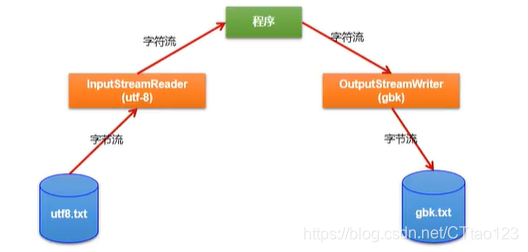
转换流都属于字符流。
- InputStreamReader:将一个字节的输入流转换为字符的输入流
解码:字节、字节数组 —>字符数组、字符串 - OutputStreamWriter:将一个字符的输出流转换为字节的输出流
编码:字符数组、字符串 —>字节、字节数组
说明编码决定了解码的方式
5.1 转换流的作用
提供字节流与字符流之间的转换
5.2 典型实现
    @Test
    public void test1(){
        InputStreamReader isr = null;//使用系统默认的字符集
        try {
            FileInputStream fis  = new FileInputStream("dbcp.txt");

//    InputStreamReader isr = new InputStreamReader(fis);//使用系统默认的字符集
            //取决于文件保存时的字符集
            isr = new InputStreamReader(fis,"UTF-8");

            char[] buffer = new char[20];
            int len;
            while((len = isr.read(buffer)) != -1){
                String str = new String(buffer, 0,len);
                System.out.println(str);
            }
        } catch (IOException e) {
            e.printStackTrace();
        } finally {
            if(isr != null){
                try {
                    isr.close();
                } catch (IOException e) {
                    e.printStackTrace();
                }
            }
        }
上图所示的转换
    @Test
    public void test2(){
        InputStreamReader isr = null;
        OutputStreamWriter osw = null;
        try {
            File file1 = new File("dbcp.txt");
            File file2 = new File("dbcp_gbk.txt");

            FileInputStream fis = new FileInputStream(file1);
            FileOutputStream fos = new FileOutputStream(file2);

            isr = new InputStreamReader(fis);
            osw = new OutputStreamWriter(fos, "gbk");

            char[] buffer = new char[20];
            int len;
            while((len = isr.read(buffer)) != -1){
                osw.write(buffer,0,len);
            }
        } catch (IOException e) {
            e.printStackTrace();
        } finally {
            try {
                osw.close();
            } catch (IOException e) {
                e.printStackTrace();
            }
            try {
                isr.close();
            } catch (IOException e) {
                e.printStackTrace();
            }
        }
    }
5.3 说明
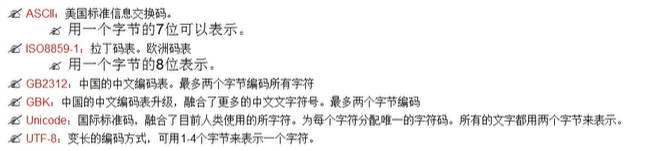
文件编码的方式(比如:GBK),决定了解析时使用的字符集(也只能是GBK)
补充:编码集
6 其他流
6.1 标准的输入输出流
System.in:标准的输入流,默认从键盘键入
System.out:标准的输出流,默认从控制台输出
修改默认的输入输出行为:
System类的setIn(InputStream is)/setOut(PrintStream ps)方式重新指定输入和输出的流。
6.2 打印流
PrintStream和PrintWriter
说明:
- 提供了一系列重载的
print()和println()方法,用于多种数据类型的输出; - System.out返回的是PrintStream的实例。
    @Test
    public void test1(){
        PrintStream ps = null;
        try {
            FileOutputStream fos = new FileOutputStream("test.txt");
            ps = new PrintStream(fos, true);
            if(ps !=null){
                System.setOut(ps);
            }
            for(int i =0;i<=255;i++){
                System.out.print((char)i);
            }
        } catch (FileNotFoundException e) {
            e.printStackTrace();
        } finally {
            ps.close();
        }
    }
6.3 数据流
DataInputStream和DataOutputStream
作用:用于读取或写出基本数据类型的变量或字符串
    @Test
    public void test3(){
        DataInputStream dis = null;
        try {
            dis = new DataInputStream(new FileInputStream("DataIOTest.txt"));

            boolean b = dis.readBoolean();
            int i = dis.readInt();

            System.out.println(b);
            System.out.println(i);
        } catch (IOException e) {
            e.printStackTrace();
        } finally {
            if(dis != null){
                try {
                    dis.close();
                } catch (IOException e) {
                    e.printStackTrace();
                }
            }
        }
    }
}
7 对象流
ObjectInputStream和ObjectOutputStream
作用:
ObjectOutputStream:内存中的对象—>存储中的文件、通过网络传输出去:序列化过程
ObjectInputStream:存储中的文件、通过网络接收回来 —>内存中的对象:反序列化过程
7.1 对象序列化机制
对象序列化机制允许把内存中的Java对象转换成平台无关的二进制流,从而允许把这种二进制流持久地保存在磁盘上,或通过网络将这种二进制流传输到另一个网络节点。//当其他程序获取了这种二进制流,就可以恢复成原来的Java对象。
7.2 代码实现
序列化过程
   @Test
    public void test1(){
        ObjectOutputStream oos = null;
        try {
            oos = new ObjectOutputStream(new FileOutputStream("Object.dat"));

            oos.writeObject(new String("你好"));
            oos.flush();
        } catch (IOException e) {
            e.printStackTrace();
        } finally {
            if(oos != null){
                try {
                    oos.close();
                } catch (IOException e) {
                    e.printStackTrace();
                }
            }
        }
    }
反序列化过程
    @Test
    public void test2(){
        ObjectInputStream ois = null;
        try {
            ois = new ObjectInputStream(new FileInputStream("Object.dat"));

            Object o = ois.readObject();
            String s = (String) o;
            System.out.println(s);
        } catch (IOException e) {
            e.printStackTrace();
        } catch (ClassNotFoundException e) {
            e.printStackTrace();
        } finally {
            if(ois != null){
                try {
                    ois.close();
                } catch (IOException e) {
                    e.printStackTrace();
                }
            }
        }
    }
7.3 序列化对象所属类需要满足的条件
- 需要实现接口:Serializable
- 当前类提供了一个全局常量:serialVersionUID
- 除了当前类需要需要实现Serializable接口之外,还必须保证其内部所有属性也是可序列化的(默认情况下,基本数据类型都是可序列化的)。
- ObjectOutputStream和ObjectInputStream不能序列化static和transient修饰的成员变量。
8 RandomAccessFile的使用
8.1 使用说明
- RandomAccessFile直接继承于java.lang.Object类,实现了DataInput和DataOutput两个接口
- RandomAccessFile既可以作为一个输入流,又可以作为一个输出流
- 输出时对文件内容的覆盖:
如果RandomRandomAccessFile作为输出流出现时,写出的文件如果不存在,则自动创建
如果写出的文件存在,则会对原有文件的内容进行覆盖(默认情况下,从头覆盖) - 可以通过相关操作,实现假插入操作
8.2 构造器与mode参数
构造器:
public RandomAccessFile(File file,String mode)
public RandomAccessFile(String name,String mode)
创建RandomAccessFile对象时需要指定一个mode参数,该参数指定RandomAccessFile的访问模式:
- r:以只读方式打开
- rw:打开以便读取和写入
- rwd:打开以便读取和写入;同步文件内容的更新
- rws:打开以便读取和写入;同步文件内容和元数据的更新
8.3 相关代码
典型代码1:文件的复制
    @Test
    public void test1(){
        RandomAccessFile raf1 = null;
        RandomAccessFile raf2 = null;
        try {
            raf1 = new RandomAccessFile(new File("timg.jpg"),"r");
            raf2 = new RandomAccessFile(new File("timg6.jpg"),"rw");

            byte[] buffer = new byte[1024];
            int len;
            while((len = raf1.read(buffer))!= -1){
                raf2.write(buffer,0,len);
            }
        } catch (IOException e) {
            e.printStackTrace();
        } finally {
            if(raf1 != null){
                try {
                    raf1.close();
                } catch (IOException e) {
                    e.printStackTrace();
                }
            }
            if(raf2 != null){
                try {
                    raf2.close();
                } catch (IOException e) {
                    e.printStackTrace();
                }
            }
        }
    }
典型代码2:数据的添加与覆盖
    @Test
    public void test2(){
        RandomAccessFile raf1 = null;
        try {
            raf1 = new RandomAccessFile("raft.txt","rw");
            raf1.seek(3);//将指针调到角标3的位置

            raf1.write("xyz".getBytes());//在有数据的情况下,就是覆盖
        } catch (IOException e) {
            e.printStackTrace();
        } finally {
            if(raf1 != null){
                try {
                    raf1.close();
                } catch (IOException e) {
                    e.printStackTrace();
                }
            }
        }
    }
假插入操作:
    @Test
    public void test3(){
        RandomAccessFile raf1 = null;
        try {
            raf1 = new RandomAccessFile("raft.txt","rw");
            raf1.seek(3);

            StringBuilder builder = new StringBuilder((int) new File("raft.txt").length());
            byte[] buffer = new byte[1024];
            int len;
            while ((len = raf1.read(buffer))!= -1){
                builder.append(new String(buffer,0,len));
            }
            raf1.seek(3);
            raf1.write("???".getBytes());

            raf1.write(builder.toString().getBytes());
        } catch (IOException e) {
            e.printStackTrace();
        } finally {
            if(raf1 != null){
                try {
                    raf1.close();
                } catch (IOException e) {
                    e.printStackTrace();
                }
            }
        }
    }
9 Path、Paths、Files的使用
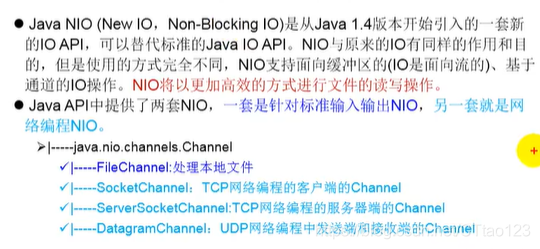
9.1 NIO的使用说明
NIO.2
随着JDK7的发布,Java对NIO进行了极大的扩展,增强了对文件处理和文件系统特性的支持,以至于被称为NIO.2
9.2 Path —JDK 7提供
9.2.1 Path的说明
使用Path替换原有的File类
9.2.2 如何实例化
主要通过Paths类的静态get()来获取Path对象
static Path get(String first,String .. more):用于将多个字符串串连成路径;
static Path get(URL url):返回指定url对应的Path路径。
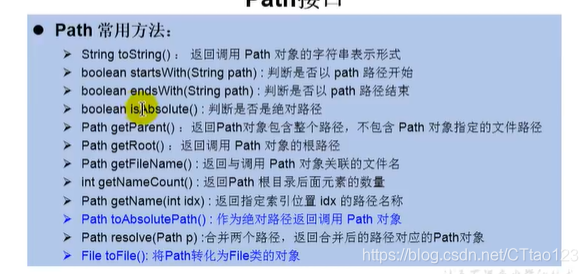
9.2.3 Path类常用方法
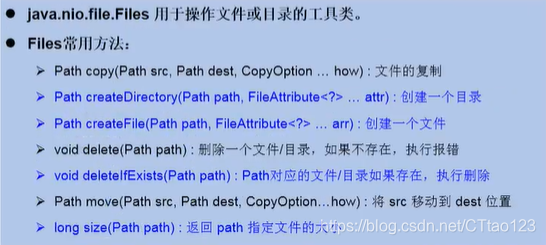
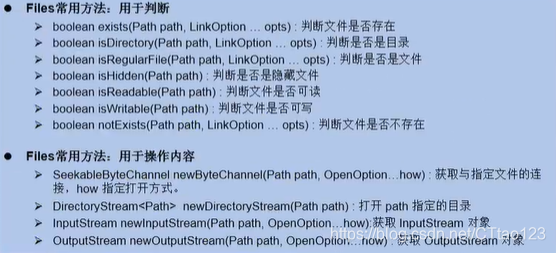
9.3 Files工具类 —JDK 7提供
Files工具类提供了操作文件或文件目录的一系列方法
常用方法:






 扫一扫
扫一扫


 1135
1135

 被折叠的 条评论
为什么被折叠?
被折叠的 条评论
为什么被折叠?
 到【灌水乐园】发言





