1. 安装
https://git-scm.com/downloads
2. 基础命令
git config --global user.name "TUzizi"  # 设置
git config --global user.email "2200xxxxx@xxxx.xxxx.xxx.xx"
git config user.name  # 查看自己的设置
git config user.email


git init    # 生成 .git
touch filename.xxx  # 添加空文件
git status  # 查看所有文件状态
git log     # 查看修改记录 --graph 查看 branch 图
git reflog  # 查看HEAD变化
git branch  # 查看分支
项目不同状态之间的跳转模式及命令
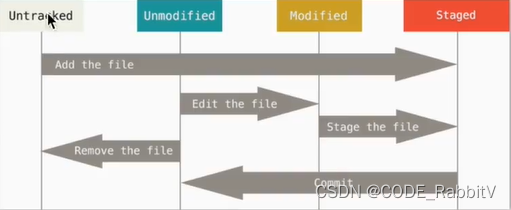
# ----------------------------------------------------
git add filename.xxx   # Untracked/Modified -> Staged
git commit -m "...."   # Staged -> Unmodified
git commit -am "..."   # Modified -> Staged -> Unmodified
git reset filename.xxx # Staged -> Modified
# ----------------------------------------------------
3. 如何回到过去的版本
在多个 commit 之间跳转的方法 reset:
git commit --amend --no-edit  # 附加到上一次的 commit 且不更改备注
git reset --hard HEAD~x       # 回到前几个 等价于 git reset --hard id号码
在多个 file 之间跳转的方法 checkout:
git checkout commit_idxxx -- filename.xxx
4. 分支 branch
git branch branch_xxx     # 创造分支 等价于 新建并修改 git checkout -b branch_xxx
git checkout branch_xxx   # 跳转到分支
git branch -d branch_xxx  # 删除分支

get merge --no-ff -m "........" branch_xxx  # 合并到 master 分支
5. 临时修改
git stash  # 保存当前到临时位置
git stash pop  # 返回之前的位置
参考:https://yulizi123.github.io/tutorials/others/git/


 本文详细介绍了Git的基础命令,包括安装、配置、文件管理、版本回溯、分支操作以及临时修改的处理。通过gitinit、gitadd、gitcommit、gitreset等命令,实现对项目状态的控制。此外,还讲解了如何使用gitbranch创建和切换分支,以及gitmerge进行分支合并。同时,gitstash功能用于保存临时修改。文章旨在帮助读者熟练掌握Git的基本操作。





 扫一扫
扫一扫


 984
984

 被折叠的 条评论
为什么被折叠?
被折叠的 条评论
为什么被折叠?
 到【灌水乐园】发言





