


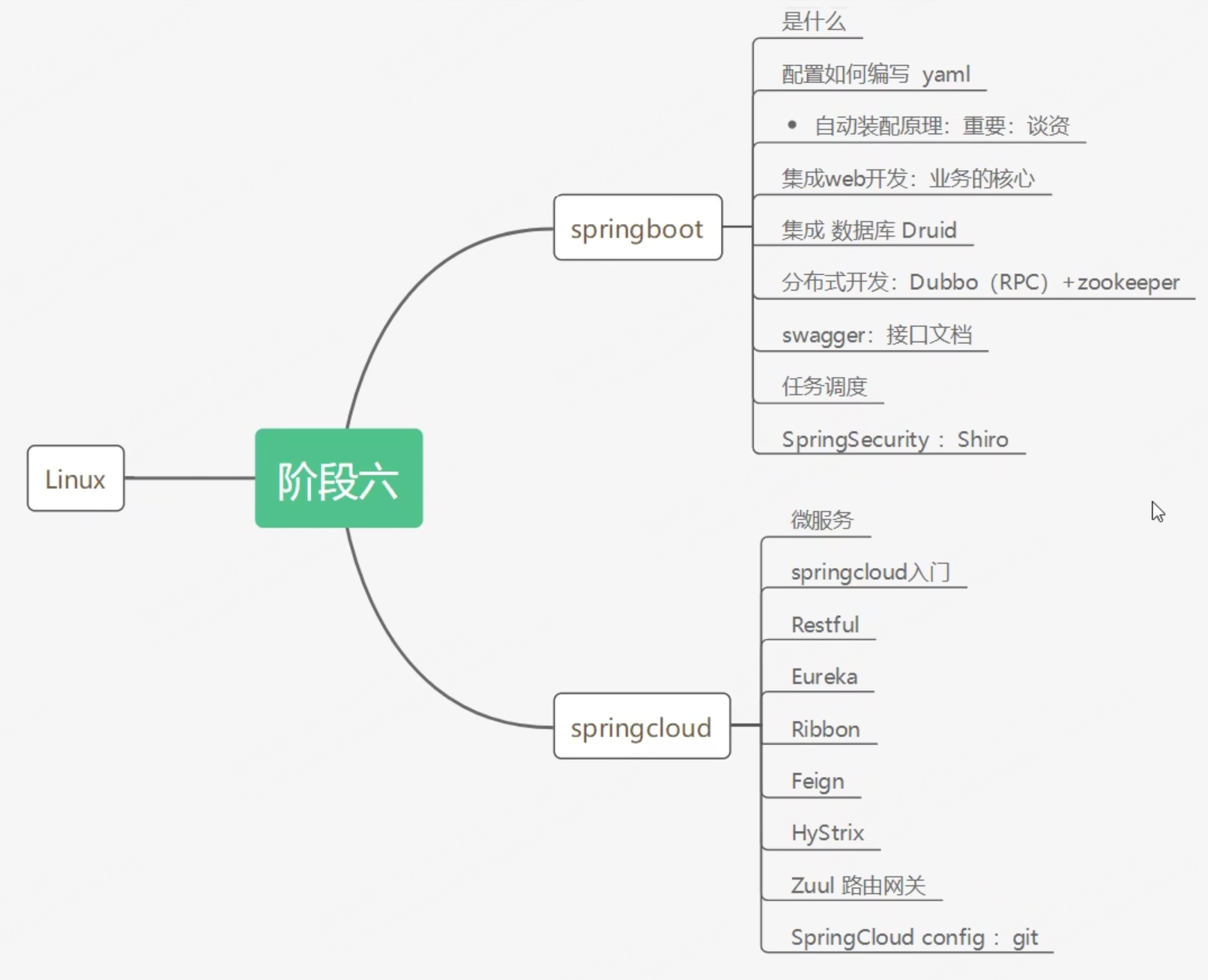
微服务阶段
回顾
- JavaSE: 锻炼了我们的OOP思想
- MySQL: 是用来持久化的
- html + css + js + jquery + 框架: 这是视图层用来展示用的
- javaWeb: 可以独立开发MVC三层架构的网站
- SSM: 企业级框架, 简化开发流程, 配置也开始较为复杂
- SpringBoot用来简化配置, 打包为jar包, 内嵌tomcat, 是微服务架构
- SpringCloud: 微服务治理
什么是SpringBoot
- SpringBoot是整合Spring技术栈的一站式框架,是简化Spring技术栈的快速开发脚手架,是一个能够快速构建生产级别的Spring应用的工具
- SpringBoot不是一个全新的框架,也不是Spring解决方案的替代品,而是对Spring框架的一个封装;
- 从最根本上来讲,Spring Boo是一个启动Spring项目的工具,是一些库的集合
SpringBoot核心功能
- 独立运行:SpringBoot开发的应用可以以JRA包的形式独立运行,运行一个SpringBoot应用只需通过 java –jar xxxx.jar 来运行
- 内嵌容器:SpringBoot内嵌了多个WEB容器,如:Tomcat、Jetty、Undertow,所以可以使用非WAR包形式进行项目部署
- 自动starter依赖:SpringBoot提供了一系列的starter来简化Maven的依赖加载。starter是一组方便的依赖关系描述符,它将常用的依赖分组并将其合并到一个依赖中,这样就可以一次性将相关依赖添加到Maven或Gradle中
- 自动配置:SpringBoot会根据在类路径中的JAR包和类,自动将类注入到SpringBoot的上下文中,极大地减少配置的使用
- Spring Boot 遵循“
约定优于配置”的原则,减少了繁琐的XML配置,让开发者更专注于业务逻辑的实现
- Spring Boot 遵循“
- 应用监控:SpringBoot提供基于http、ssh、telnet的监控方式,对运行时的项目提供生产级别的服务监控和健康检测
- 无代码生成/无需编写XML配置:SpringBoot不是借助于代码生成来实现的,而是通过条件注解来实现的,这是 Spring 4.x 提供的新特性。Spring4.x提倡使用Java配置和注解组合,无需编写任何xml配置即可实现Spring的所有配置功能
MVC、Spring、SpringMVC、SpringBoot、SpringCloud的区别是什么?
- MVC:MVC是一种设计模式,即Model模型、View视图以及Controller控制器
- Spring:Spring是一个开源框架,是在2003年兴起的一个轻量级的Java开发框架
- 它是为了解决企业应用开发的复杂性而创建的,框架的主要优势之一就是其分层架构,分层架构允许使用者选择使用哪一个组件,同时为 J2EE 应用程序开发提供集成的框架。
- Spring使用基本的JavaBean来完成以前只可能由EJB完成的事情。
- Spring的用途不仅限于服务器端的开发,从简单性、可测试性和松耦合的角度而言,任何Java应用都可以从Spring中受益。
- Spring的核心是控制反转(IoC)和面向切面(AOP),简单来说,Spring是一个分层的JavaSE/EEfull-stack(一站式) 轻量级开源框架
- SpringMVC:SpringMVC是一种WEB层的MVC框架,它是spring的一个模块,属于SpringFrameWork的后续产品,拥有spring的特性。SpringMVC分离了控制器、模型对象、分派器以及处理程序对象的角色
- Spring Boot:它不是一个全新的框架,也不是Spring解决方案的替代品,而是对Spring框架的一个封装
- Spring Cloud:Sping Cloud是Spring的一个顶级项目,是一个微服务框架,提供了全套的分布式应用系统的解决方案。为开发者提供了快速构建分布式系统的工具,使其可以快速的启动服务、构建应用、同时能够快速和云平台资源进行对接
微服务
什么是微服务?
- 微服务指的是一种应用架构,其中的一系列独立服务通过轻量级API进行通信
- 是一种更高效的应用开发方式
- 微服务架构是一种云原生软件构建方式,应用的每项核心功能均可独立存在。
- 应用的元素相互隔离,因此,开发和运维团队能够协同工作,而不会妨碍彼此。这意味着更多开发人员可以同时开发同一个应用,从而缩短开发所需的时间
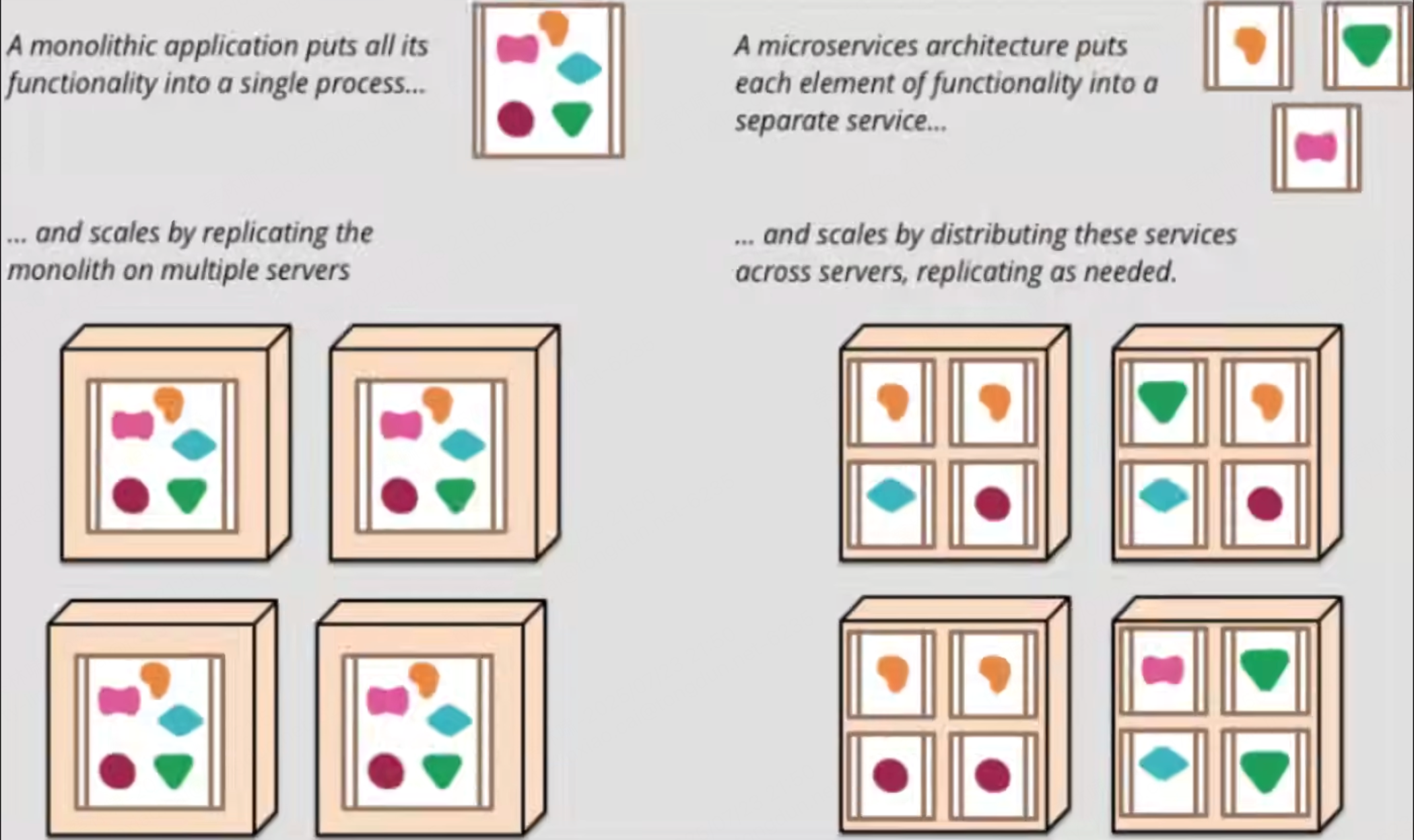
单体架构和微服务架构的区别
单体架构
- 传统的应用构建方法主要集中于单体式架构
- 在单体式架构中,应用的所有功能和服务都捆绑在一起,作为一个单元来运行。
- 在应用内以任何方式进行增添或优化都会使其架构变得更加复杂。
- 这使得在不拆分整个应用的前提下,优化应用中的任何单一功能都变得更加困难。
- 此外,如果应用中的某个进程需要扩展,整个应用也必须扩展
微服务结构
- 应用的每项核心功能均可独立运行
- 无需将应用完全中断,开发团队就可以根据不断变化的业务需求构建和更新新的组件
- 可以根据自身需要自由组合各个服务
第一个SpringBoot程序
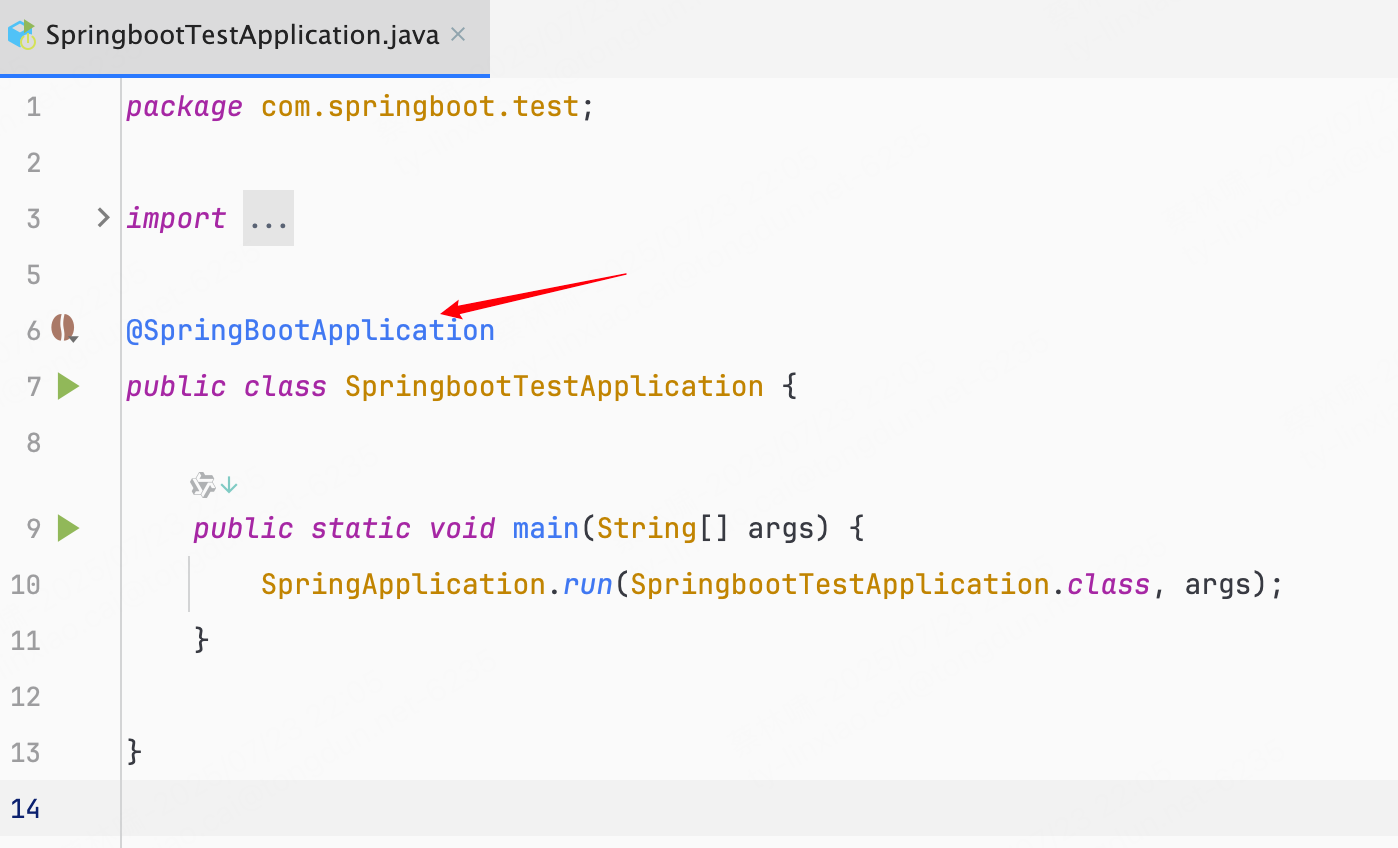
创建SpringBoot项目之后, 自动生成一个类src/main/java/com/springboot/test/SpringbootTestApplication.java, 这个是程序的主入口
@SpringBootApplication
public class SpringbootTestApplication {
    public static void main(String[] args) {
        SpringApplication.run(SpringbootTestApplication.class, args);
    }
}
还有配置文件src/main/resources/application.properties, 只是这个文件新创建的时候是空的, 这个是SpringBoot核心配置文件
SpringbootTestApplication
SpringbootTestApplication本身就是SpringBoot的一个组件
pom.xml
SpringBoot的Maven依赖都是以: spring-boot-starter开头
<?xml version="1.0" encoding="UTF-8"?>
<project xmlns="http://maven.apache.org/POM/4.0.0" xmlns:xsi="http://www.w3.org/2001/XMLSchema-instance"
         xsi:schemaLocation="http://maven.apache.org/POM/4.0.0 https://maven.apache.org/xsd/maven-4.0.0.xsd">
    <modelVersion>4.0.0</modelVersion>
    <groupId>com.Springboot.test</groupId>
    <artifactId>springboot-test</artifactId>
    <version>0.0.1-SNAPSHOT</version>
    <name>springboot-test</name>
    <description>springboot-test</description>
    <properties>
        <java.version>1.8</java.version>
        <project.build.sourceEncoding>UTF-8</project.build.sourceEncoding>
        <project.reporting.outputEncoding>UTF-8</project.reporting.outputEncoding>
        <spring-boot.version>2.6.13</spring-boot.version>
    </properties>
    <dependencies>
        <dependency>
            <groupId>org.springframework.boot</groupId>
            <artifactId>spring-boot-starter-web</artifactId>
        </dependency>

        <dependency>
            <groupId>org.springframework.boot</groupId>
            <artifactId>spring-boot-starter-test</artifactId>
            <scope>test</scope>
        </dependency>
    </dependencies>
    <dependencyManagement>
        <dependencies>
            <dependency>
                <groupId>org.springframework.boot</groupId>
                <artifactId>spring-boot-dependencies</artifactId>
                <version>${spring-boot.version}</version>
                <type>pom</type>
                <scope>import</scope>
            </dependency>
        </dependencies>
    </dependencyManagement>

    <build>
        <plugins>
            <plugin>
                <groupId>org.apache.maven.plugins</groupId>
                <artifactId>maven-compiler-plugin</artifactId>
                <version>3.8.1</version>
                <configuration>
                    <source>1.8</source>
                    <target>1.8</target>
                    <encoding>UTF-8</encoding>
                </configuration>
            </plugin>
            <plugin>
                <groupId>org.springframework.boot</groupId>
                <artifactId>spring-boot-maven-plugin</artifactId>
                <version>${spring-boot.version}</version>
                <configuration>
                    <mainClass>com.springboot.test.SpringbootTestApplication</mainClass>
                    <skip>true</skip>
                </configuration>
                <executions>
                    <execution>
                        <id>repackage</id>
                        <goals>
                            <goal>repackage</goal>
                        </goals>
                    </execution>
                </executions>
            </plugin>
        </plugins>
    </build>

</project>
如上所示, 主要有四部分
- 项目元数据信息: 创建的时候输入的Project Metadata部分, 也就是Maven项目的基本元素, 包括: groupId, artifactId, version, name, description等
- parent: 继承spring-boot-starter-parent的依赖管理, 控制版本与打包等内容
- dependencies: 项目具体依赖
- spring-boot-starter-web: 用于实现HTTP接口(该依赖中包含了SpringMVC), 官网对他的描述是: 使用SpringMVC构建web(包括RESTful)应用程序的入门者, 使用Tomcat作为默认嵌入容器
- spring-boot-starter-test: 用于编写单元测试的依赖包
- build: 构建配置部分. 默认使用了spring-boot-maven-plugin, 配合spring-boot-starter-parent就可以把SpringBoot应用打包成jar来直接运行
SPI机制
什么是SPI
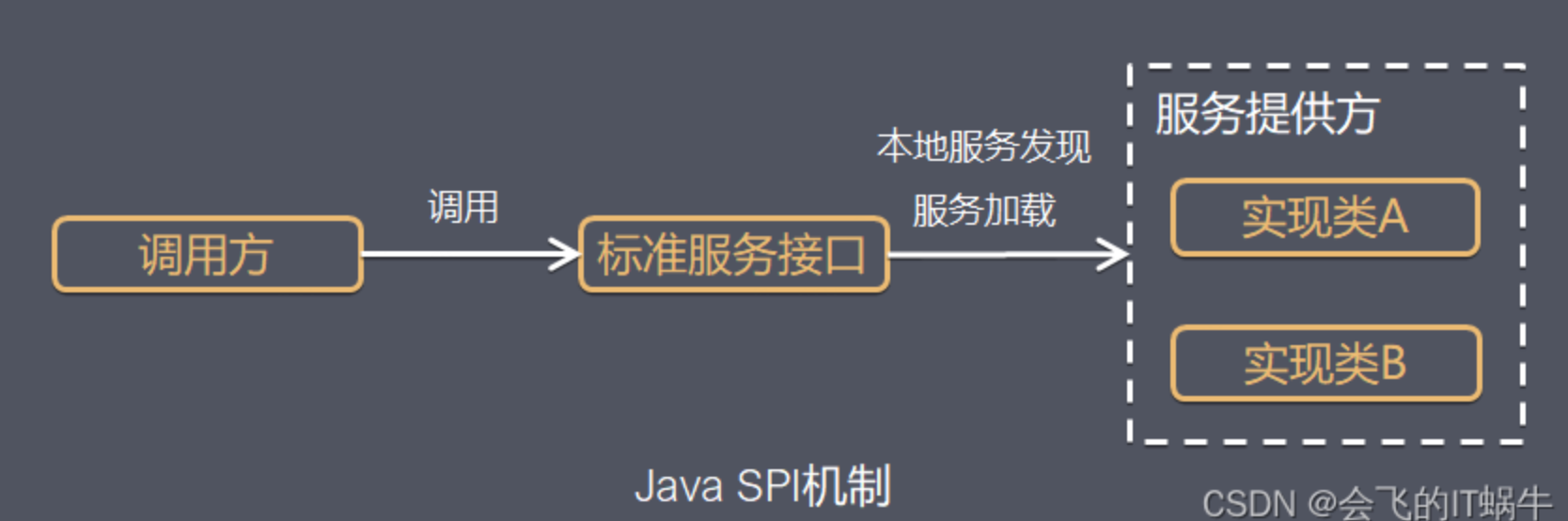
spi全称是: Service Provider Interface, 是JDK内置的一种服务提供发现机制.
SPI是一种动态替换发现的机制, 一种解耦非常优秀的思想
SPI的工作原理就是: ClassPath路径下的META_INF/services文件夹中, 以接口的全限定名来命名文件名, 文件里面写该接口的实现, 然后在利用资源加载的方式, 读取文件的内容(接口实现的全限定名), 然后再去加载类
SPI可以很灵活的让接口和实现分离, 让api提供者只提供接口, 然后第三方来实现
优点
- 使用Java SPI机制的优势是实现解耦, 使得第三方服务模块的装配控制的逻辑与调用者的业务代码分离, 而不是耦合在一起, 应用程序可以根据实际业务情况启动框架扩展或替换框架组件
缺点
- 虽然ServiceLoader也算是使用的延迟加载, 但是基本只能通过遍历全部获取, 也就是接口的实现类全部加载并实例化一遍, 如果你不想用某些实现类, 也会被加载并实例化, 这就造成了浪费, 并且获取某个实现类的方式不够灵活, 只能通过Iterator形式获取, 不能根据某个参数来获取对应的实现类
- 多个并发多线程使用ServiceLiader类的实例是不安全的
通过DriverManger理解SPI机制
在JDBC4.0之前,我们使用JDBC去连接数据库的时候,通常会经过如下的步骤
- 将对应数据库的驱动加到类路径中
- 通过
Class.forName()注册所要使用的驱动,如Class.forName(com.mysql.jdbc.Driver) - 使用驱动管理器
DriverManager来获取连接 - 后面的内容我们不关心了
在JDBC4.0,现在我们使用的时候,上面的第二步就不需要了,并且能够正常使用,这个就是SPI的功劳了
DriverManager.java
在DriverManager中,有一段静态代码(静态代码在类被加载的时候就会执行)
/**
 * Load the initial JDBC drivers by checking the System property
 * 通过检查System属性加载初始JDBC驱动程序和JDBC属性
 * jdbc.properties and then use the {@code ServiceLoader} mechanism
 * 然后使用{@code ServiceLoader}机制
 */
static {
  loadInitialDrivers();
  println("JDBC DriverManager initialized");
}
loadInitialDrivers()
private static void loadInitialDrivers() {
  String drivers;
  try {
    // 读取系统属性中的驱动类列表
    // 通过 AccessController.doPrivileged() 执行特权操作(获取系统属性 jdbc.drivers),防止权限管理器拦截
    drivers = AccessController.doPrivileged(new PrivilegedAction<String>() {
      public String run() {
        // 获取的 drivers 是一个 用冒号分隔的驱动类名字符串
        // 比如: com.mysql.cj.jdbc.Driver:org.postgresql.Driver
        return System.getProperty("jdbc.drivers");
      }
    });
  } catch (Exception ex) {
    drivers = null;
  }

	// 通过 ServiceLoader 加载所有的 JDBC 驱动服务提供类
  AccessController.doPrivileged(new PrivilegedAction<Void>() {
    public Void run() {

      // ServiceLoader.load(Driver.class) 会加载所有在 META-INF/services/java.sql.Driver 中注册的类(也就是“自动注册驱动”机制)
      ServiceLoader<Driver> loadedDrivers = ServiceLoader.load(Driver.class);
      Iterator<Driver> driversIterator = loadedDrivers.iterator();

      try{
        // 遍历迭代器
        // 这里需要这么做,是因为ServiceLoader默认是延迟加载
        // 只是找到对应的class,但是不加载
        // 所以这里在调用next的时候,其实就是实例化了对应的对象了
        // 请注意这里 --------------------------------------------------------------------  1
        while(driversIterator.hasNext()) {
          // 通过 driversIterator.next() 实例化这些驱动类,触发其静态块(DriverManager.registerDriver(...))注册驱动
          driversIterator.next();
        }
      } catch(Throwable t) {
        // 防止某些 SPI 注册了服务但类不存在(例如打包遗漏),避免 ClassNotFoundException、NoClassDefFoundError 等
        // Do nothing
      }
      return null;
    }
  });

  println("DriverManager.initialize: jdbc.drivers = " + drivers);

  if (drivers == null || drivers.equals("")) {
    return;
  }
  // 同时加载系统变量中找到的驱动类
  String[] driversList = drivers.split(":");
  println("number of Drivers:" + driversList.length);
  for (String aDriver : driversList) {
    try {
      println("DriverManager.Initialize: loading " + aDriver);
      // 由于是系统变量,所以使用系统类加载器,而不是应用类加载器
      Class.forName(aDriver, true,
                    ClassLoader.getSystemClassLoader());
    } catch (Exception ex) {
      println("DriverManager.Initialize: load failed: " + ex);
    }
  }
}
ServiceLoader.load(Driver.class)方法,该方法其实就是SPI的核心
public final class ServiceLoader<S>
    implements Iterable<S>
{
    /**
    *  由于是调用ServiceLoader.load(Driver.class)方法,所以我们先从该方法分析
    */
    public static <S> ServiceLoader<S> load(Class<S> service) {
        // 获取当前的上下文线程
        // 默认情况下是应用类加载器
        ClassLoader cl = Thread.currentThread().getContextClassLoader();
        // 调用带加载器的加载方法
        return ServiceLoader.load(service, cl);
    }

    /**
    *  带类加载器的加载方法
    */
    public static <S> ServiceLoader<S> load(Class<S> service,
                                            ClassLoader loader)
    {
        // 只是返回一个ServiceLoader对象,调用自己的构造函数嘛
        return new ServiceLoader<>(service, loader);
    }

    /**
    *  私有构造函数
    */
    private ServiceLoader(Class<S> svc, ClassLoader cl) {
        // 目标加载类不能为null
        service = Objects.requireNonNull(svc, "Service interface cannot be null");
        // 获取类加载器,如果cl是null,则使用系统类加载器
        loader = (cl == null) ? ClassLoader.getSystemClassLoader() : cl;
        acc = (System.getSecurityManager() != null) ? AccessController.getContext() : null;
        // 调用reload方法
        reload();
    }

    // 用于缓存加载的服务提供者
    private LinkedHashMap<String,S> providers = new LinkedHashMap<>();

    // 真正查找逻辑的实现
    private LazyIterator lookupIterator;

    /**
    *  reload方法
    */
    public void reload() {
        // 先清空内容
        providers.clear();
        // 初始化lookupIterator
        lookupIterator = new LazyIterator(service, loader);
    }
}
LazyIterator.class
LazyIterator是ServiceLoader的私有内部类
private class LazyIterator
        implements Iterator<S>
{

    Class<S> service;
    ClassLoader loader;

    /**
    *  私有构造函数,用于初始化参数
    */
    private LazyIterator(Class<S> service, ClassLoader loader) {
        this.service = service;
        this.loader = loader;
    }
}
Iterator<Driver> driversIterator = loadedDrivers.iterator();这一行代码用于获取一个迭代器
迭代器以及遍历迭代器的过程如下所示:
ServiceLoader.java
public Iterator<S> iterator() {
    return new Iterator<S>() {

        // 注意这里的providers,这里就是上面提到的用于缓存
        // 已经加载的服务提供者的容器。
        Iterator<Map.Entry<String,S>> knownProviders
            = providers.entrySet().iterator();

        // 底层其实委托给了providers
        public boolean hasNext() {
            if (knownProviders.hasNext())
                return true;
            // 如果没有缓存,则查找及加载
            return lookupIterator.hasNext();
        }

        // 同上
        public S next() {
            if (knownProviders.hasNext())
                return knownProviders.next().getValue();
            return lookupIterator.next();
        }

        public void remove() {
            throw new UnsupportedOperationException();
        }
    };
}
ServiceLoader.load()方法执行到LazyIterator的初始化之后就结束了,真正地查找直到调用lookupIterator.hasNext()才开始
LazyIterator.java
// 希望你还记得他
private class LazyIterator
        implements Iterator<S>
{

    Class<S> service;
    ClassLoader loader;
    Enumeration<URL> configs = null;
    Iterator<String> pending = null;
    String nextName = null;

    //检查 AccessControlContext,这个我们不关系
    // 关键的核心是都调用了hasNextService()方法
    public boolean hasNext() {
        if (acc == null) {
            return hasNextService();
        } else {
            PrivilegedAction<Boolean> action = new PrivilegedAction<Boolean>() {
                public Boolean run() { return hasNextService(); }
            };
            return AccessController.doPrivileged(action, acc);
        }
    }

    private boolean hasNextService() {
        // 第一次加载
        if (nextName != null) {
            return true;
        }
        // 第一次加载
        if (configs == null) {
            try {
                // 注意这里,获取了的完整名称
                // PREFIX定义在ServiceLoader中
                // private static final String PREFIX = "META-INF/services/"
                // 这里可以看到,完整的类名称就是 META-INF/services/CLASS_FULL_NAME
                // 比如这里的 Driver.class,完整的路径就是
                //                  META-INF/services/java.sql.Driver,注意这个只是文件名,不是具体的类哈
                String fullName = PREFIX + service.getName();
                // 如果类加载器为null,则使用系统类加载器进行加载
                // 类加载会加载指定路径下的所有类
                if (loader == null)
                    configs = ClassLoader.getSystemResources(fullName);
                else // 使用传入的类加载器进行加载,其实就是应用类加载器
                    configs = loader.getResources(fullName);
            } catch (IOException x) {
                fail(service, "Error locating configuration files", x);
            }
        }
        // 如果pending为null或者没有内容,则进行加载,一次只加载一个文件的一行
        while ((pending == null) || !pending.hasNext()) {
            if (!configs.hasMoreElements()) {
                return false;
            }
            // 解析读取到的每个文件,高潮来了
            pending = parse(service, configs.nextElement());
        }
        nextName = pending.next();
        return true;
    }

    /**
    *  解析读取到的每个文件
    */
    private Iterator<String> parse(Class<?> service, URL u)
        throws ServiceConfigurationError
    {
        InputStream in = null;
        BufferedReader r = null;
        ArrayList<String> names = new ArrayList<>();
        try {
            in = u.openStream();
            // utf-8编码
            r = new BufferedReader(new InputStreamReader(in, "utf-8"));
            int lc = 1;
            // 一行一行地读取数据
            while ((lc = parseLine(service, u, r, lc, names)) >= 0);
        } catch (IOException x) {
            fail(service, "Error reading configuration file", x);
        } finally {
            try {
                if (r != null) r.close();
                if (in != null) in.close();
            } catch (IOException y) {
                fail(service, "Error closing configuration file", y);
            }
        }
        // 返回迭代器
        return names.iterator();
    }

    // 解析一行行的数据
    private int parseLine(Class<?> service, URL u, BufferedReader r, int lc,
                          List<String> names)
        throws IOException, ServiceConfigurationError
    {
        String ln = r.readLine();
        if (ln == null) {
            return -1;
        }
        // 查找是否存在#
        // 如果存在,则剪取#前面的内容
        // 目的是防止读取到#及后面的内容
        int ci = ln.indexOf('#');
        if (ci >= 0) ln = ln.substring(0, ci);
        ln = ln.trim();
        int n = ln.length();
        if (n != 0) {
            // 不能包含空格及制表符\t
            if ((ln.indexOf(' ') >= 0) || (ln.indexOf('\t') >= 0))
                fail(service, u, lc, "Illegal configuration-file syntax");
            int cp = ln.codePointAt(0);
            // 检查第一个字符是否是Java语法规范的单词
            if (!Character.isJavaIdentifierStart(cp))
                fail(service, u, lc, "Illegal provider-class name: " + ln);
            // 检查每个字符
            for (int i = Character.charCount(cp); i < n; i += Character.charCount(cp)) {
                cp = ln.codePointAt(i);
                if (!Character.isJavaIdentifierPart(cp) && (cp != '.'))
                    fail(service, u, lc, "Illegal provider-class name: " + ln);
            }
            // 如果缓存中没有,并且当前列表中也没有,则加入列表。
            if (!providers.containsKey(ln) && !names.contains(ln))
                names.add(ln);
        }
        return lc + 1;
    }

    /**
    *  上面解析完文件之后,就开始加载文件的内容了
    */
    private S nextService() {
        if (!hasNextService())
            throw new NoSuchElementException();
        String cn = nextName;
        nextName = null;
        Class<?> c = null;
        try {
            // 这一行就很熟悉啦
            c = Class.forName(cn, false, loader);
        } catch (ClassNotFoundException x) {
            fail(service,
                    "Provider " + cn + " not found");
        }
        if (!service.isAssignableFrom(c)) {
            fail(service,
                    "Provider " + cn  + " not a subtype");
        }
        try {
            // 实例化并且将其转化为对应的接口或者父类
            S p = service.cast(c.newInstance());
            // 将其放入缓存中
            providers.put(cn, p);
            // 返回当前实例
            return p;
        } catch (Throwable x) {
            fail(service,
                    "Provider " + cn + " could not be instantiated",
                    x);
        }
        throw new Error();          // This cannot happen
    }
}
到此,解析的步骤就完成了,其实就是通过ServiceLoader去查找当前类加载器能访问到的目录下的WEB-INF/services/FULL_CLASS_NAME文件中的所有内容,而这些内容由一定的规范,如下:
- 每行只能写一个全类名
#作为注释- 只能使用utf-8及其兼容的编码
- 每个实现类必须提供一个无参构造函数,因为是直接使用
class.newInstance()来创建实例的嘛
SpringBoot自动装配原理
- SpringBoot启动会加载大量的自动配置类
- 我们可以发现自己需要的功能是否在springBoot默认写好的自动配置类中
- 我们可以看到自动配置类中到底配置了哪些组件, 只要我们要用的组件存在其中, 我们就不需要再手动配置了
- 给容器中自动配置类添加组件的时候, 会从properties类中获取某些属性, 我们只需要在配置文件中指定这些属性的值即可
- xxxAutoConfiguration: 自动配置类, 给容器中添加组件
- xxxproperties: 封装配置文件中相关属性
pom
start
注解
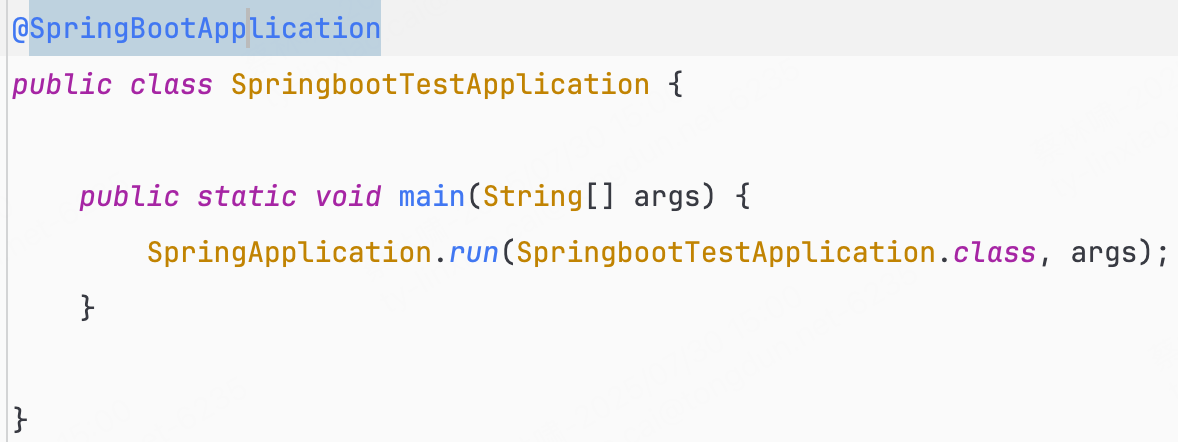
Spring Boot都需要创建一个mian启动类,而启动类都含有@SpringBootApplication注解
@SpringBootApplication
可以把
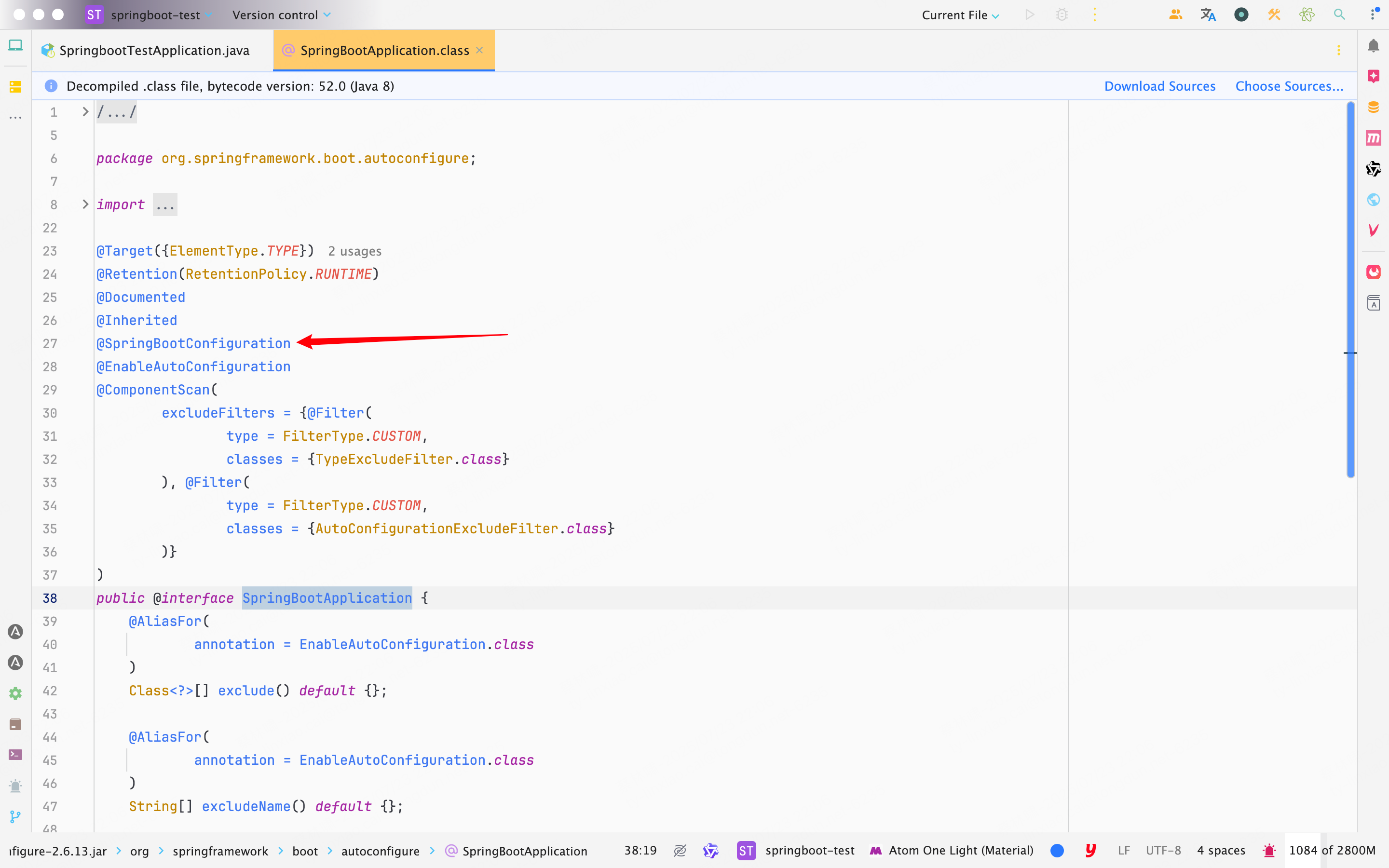
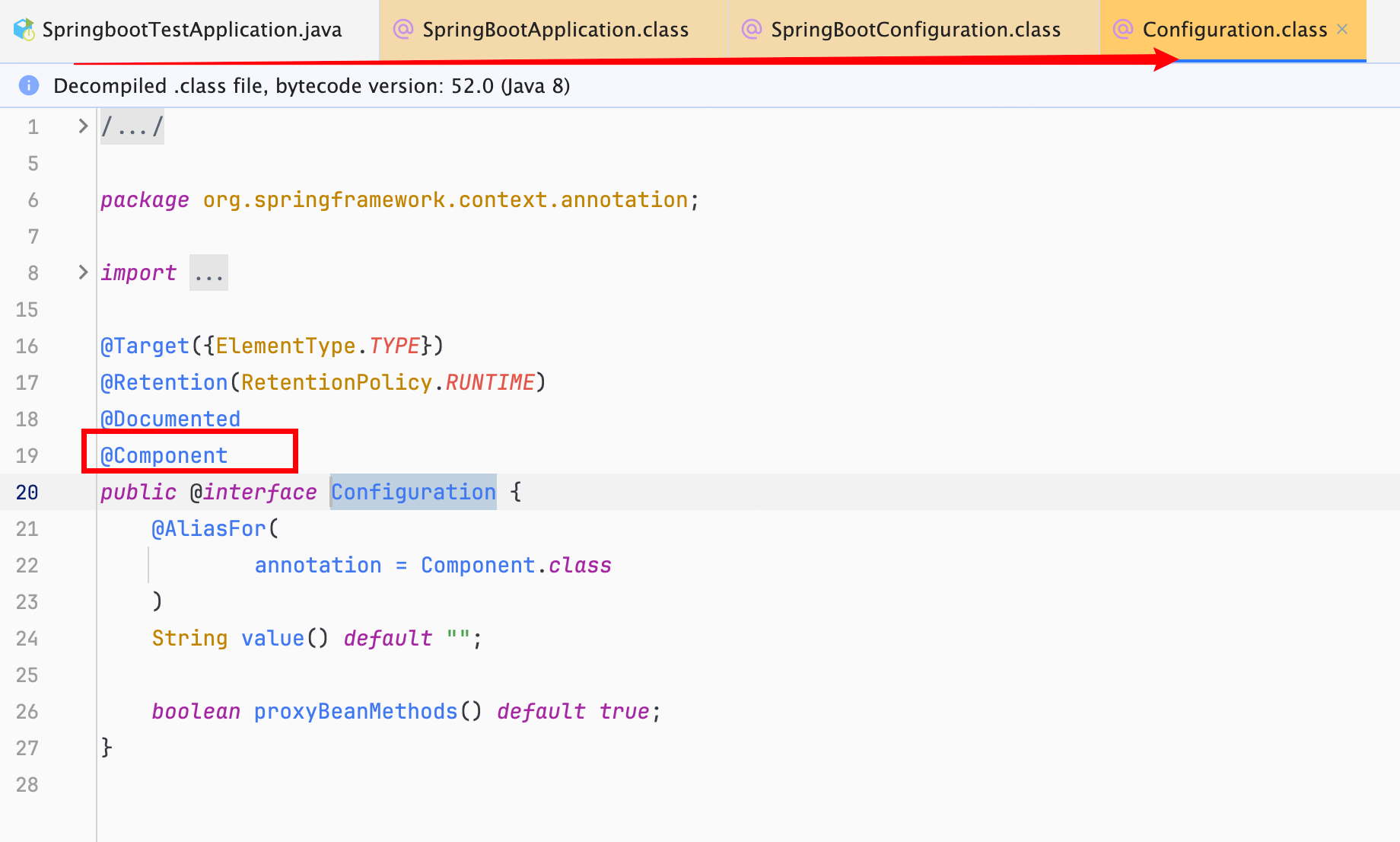
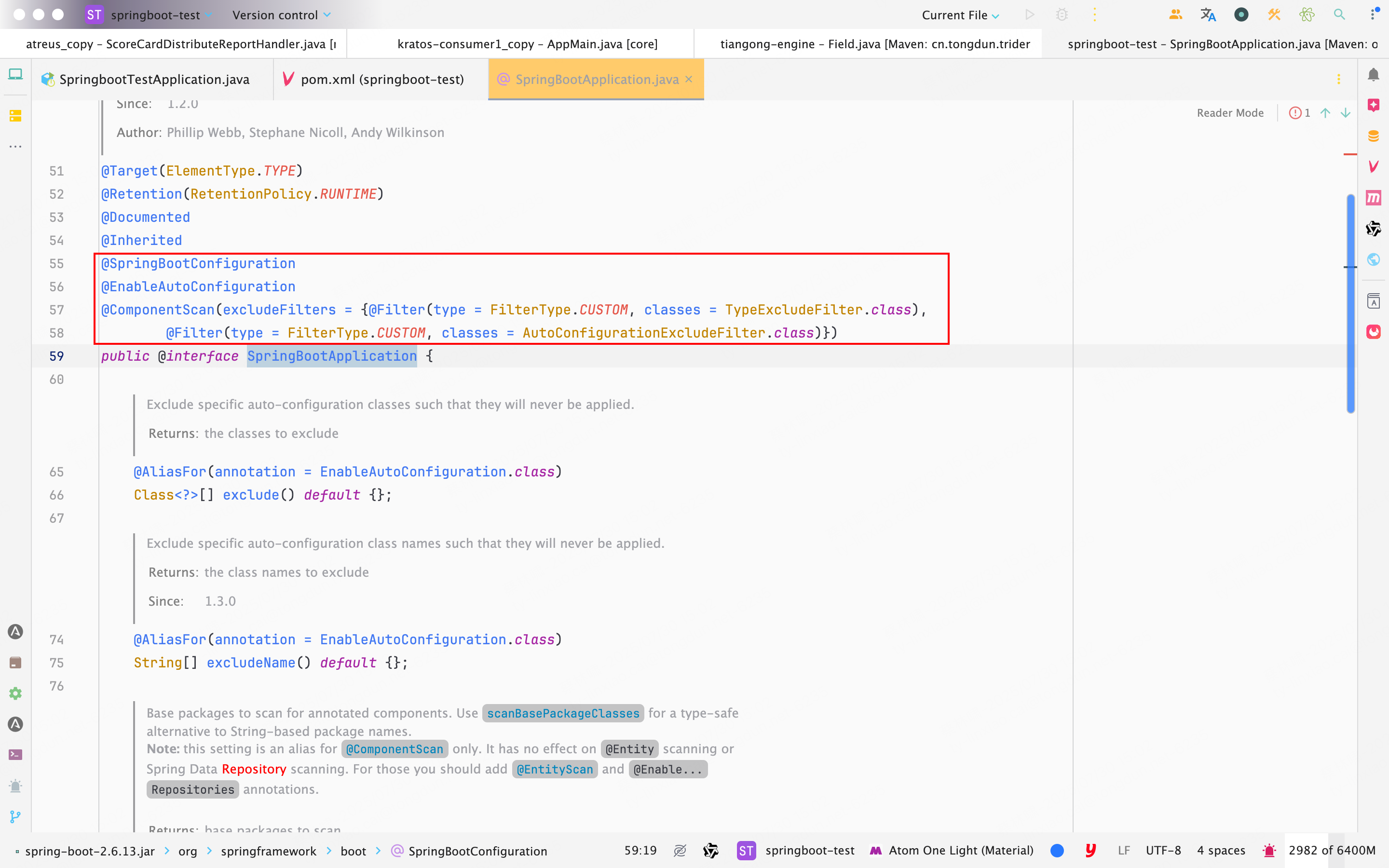
@SpringBootApplication看作是@Configuration、@EnableAutoConfiguration、@ComponentScan注解的集合
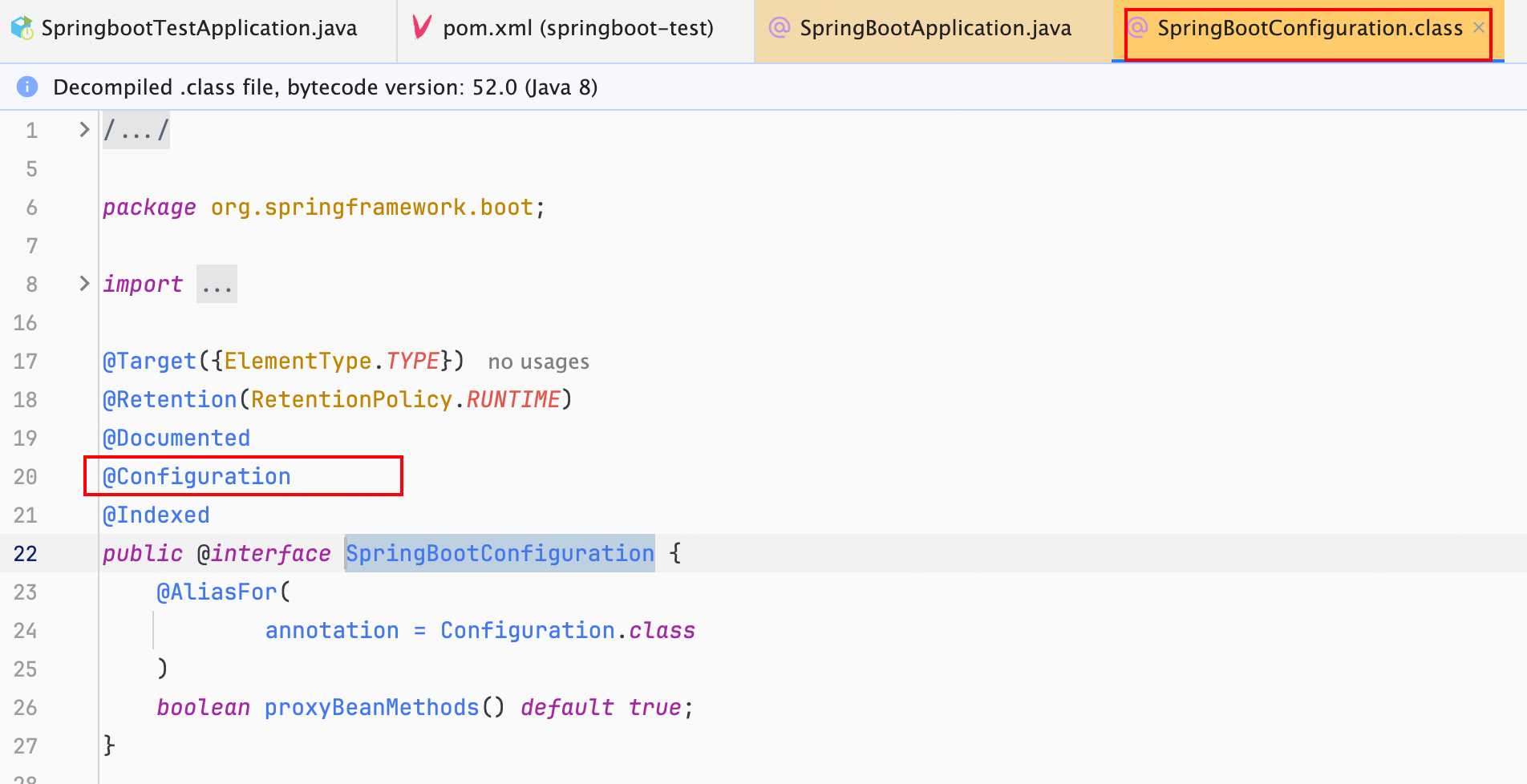
@Configuration: 允许在上下文中注册额外的 bean 或导入其他配置类@EnableAutoConfiguration: 启用 SpringBoot 的自动配置机制- @ComponentScan(excludeFilters = { @Filter(type = FilterType.CUSTOM, classes = TypeExcludeFilter.class),
@Filter(type = FilterType.CUSTOM, classes = AutoConfigurationExcludeFilter.class) })- 扫描被
@Component(@Service,@Controller)注解的 bean,注解默认会扫描启动类所在的包下所有的类 ,可以自定义不扫描某些 bean。如下图所示,容器中将排除TypeExcludeFilter和AutoConfigurationExcludeFilter
- 扫描被
@EnableAutoConfiguration
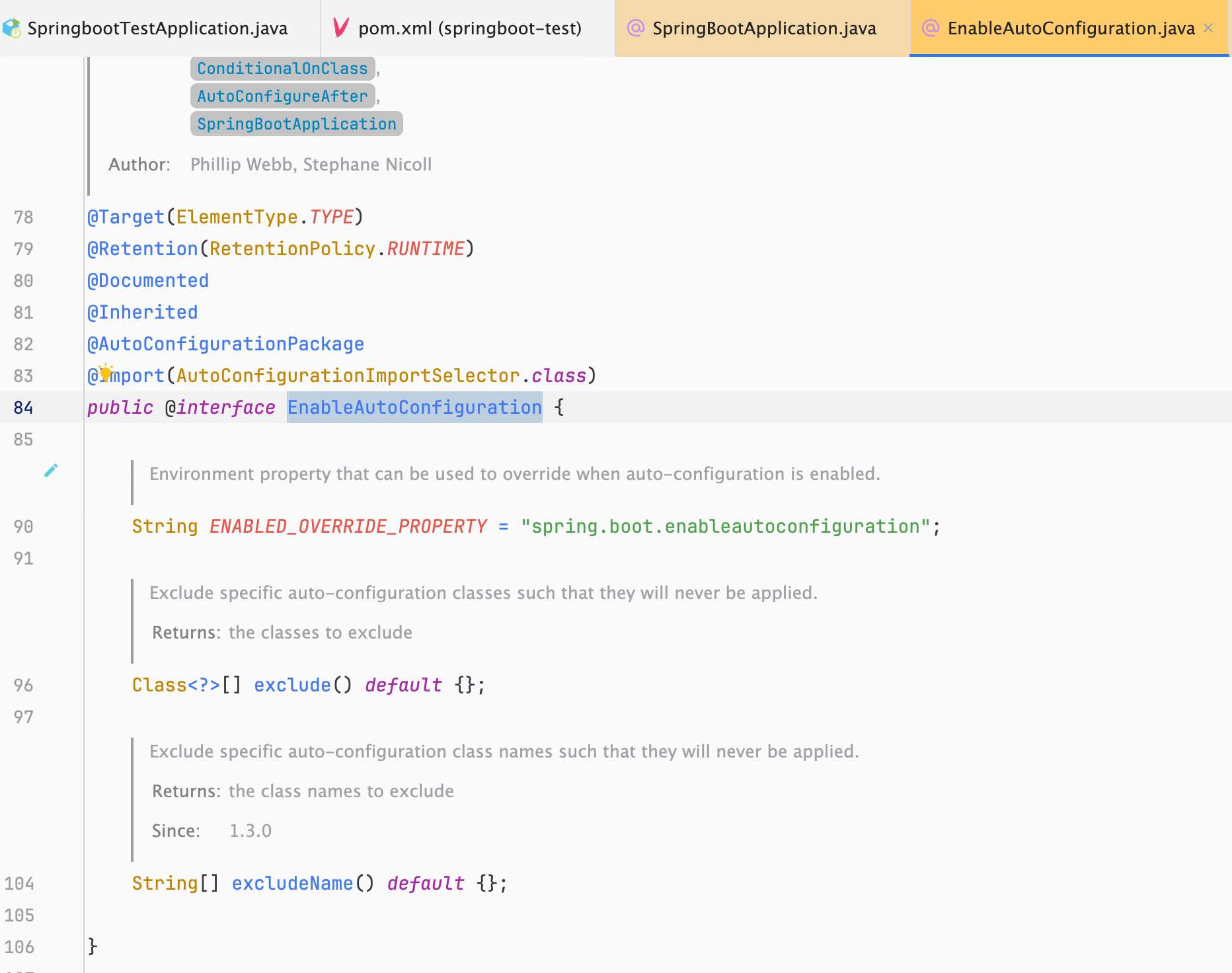
EnableAutoConfiguration只是一个简单地注解,自动装配核心功能的实现实际是通过AutoConfigurationImportSelector类
@Target(ElementType.TYPE)
@Retention(RetentionPolicy.RUNTIME)
@Documented
@Inherited
@AutoConfigurationPackage //作用:将main包下的所有组件注册到容器中
@Import(AutoConfigurationImportSelector.class) //加载自动装配类 xxxAutoconfiguration
public @interface EnableAutoConfiguration {

	String ENABLED_OVERRIDE_PROPERTY = "spring.boot.enableautoconfiguration";

	Class<?>[] exclude() default {};

	String[] excludeName() default {};

}
AutoConfigurationImportSelector: 加载自动装配类
AutoConfigurationImportSelector继承体系如下:
public class AutoConfigurationImportSelector implements DeferredImportSelector, 			BeanClassLoaderAware,
		ResourceLoaderAware, BeanFactoryAware, EnvironmentAware, Ordered {

    }

public interface DeferredImportSelector extends ImportSelector {

}

public interface ImportSelector {
    String[] selectImports(AnnotationMetadata importingClassMetadata);

    @Nullable
    default Predicate<String> getExclusionFilter() {
        return null;
    }
}

// 可以看出,AutoConfigurationImportSelector 类实现了 ImportSelector接口,也就实现了这个接口中的 selectImports方法,该方法主要用于获取所有符合条件的类的全限定类名,这些类需要被加载到 IoC 容器中
selectImports()
总结一下执行流程:
- 检查是否启用自动装配;
- 获取候选自动配置类;
- spring-boot/spring-boot-project/spring-boot-autoconfigure/src/main/resources/META-INF/spring.factories
XXXAutoConfiguration的作用就是按需加载组件。- 不光是这个依赖下的
META-INF/spring.factories被读取到,所有 Spring Boot Starter 下的META-INF/spring.factories都会被读取到 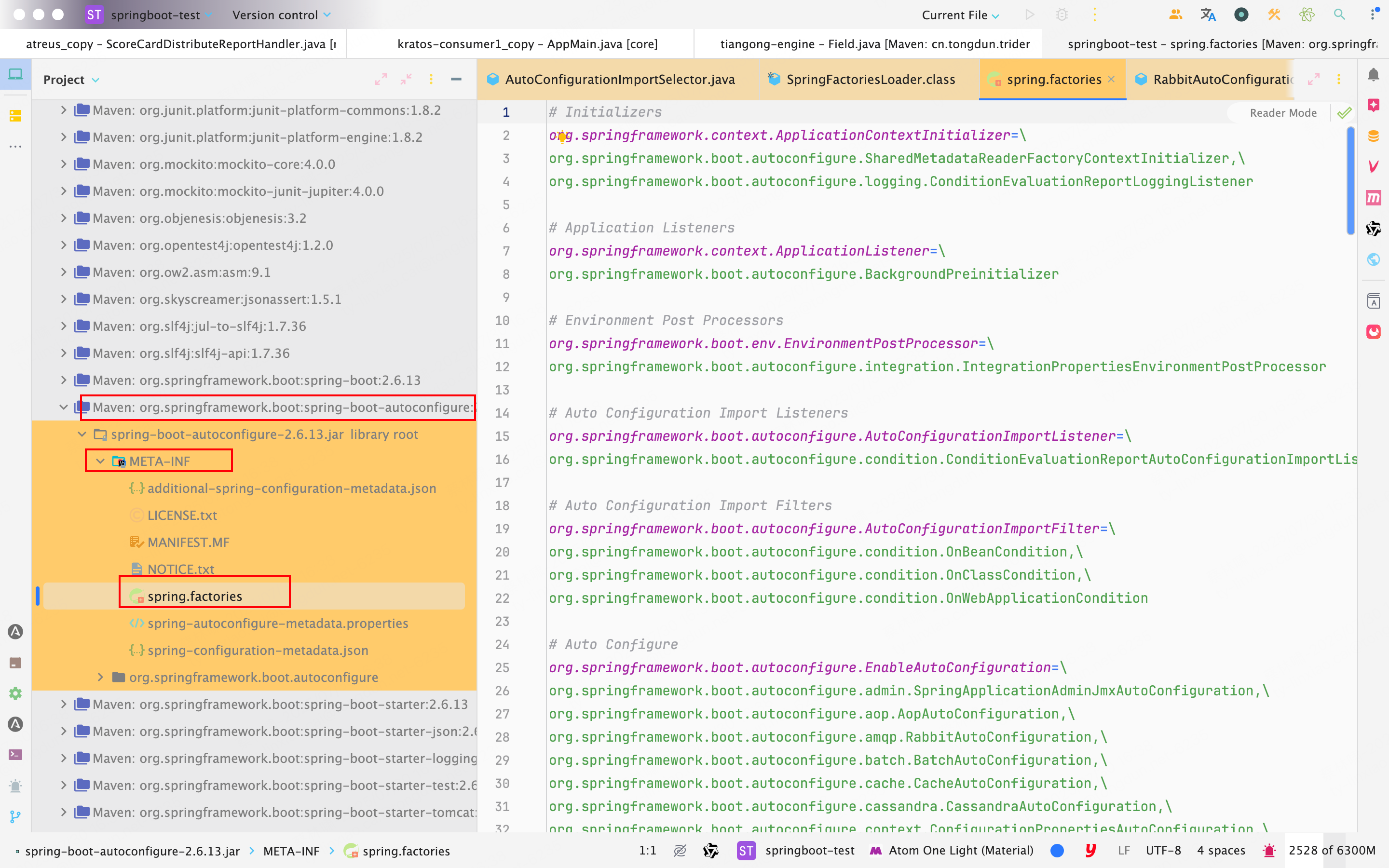
- 如果,我们自己要创建一个 Spring Boot Starter,这一步是必不可少的。
- 去重、处理排除类;
@ConditionalOnXXX中的所有条件都满足,该类才会生效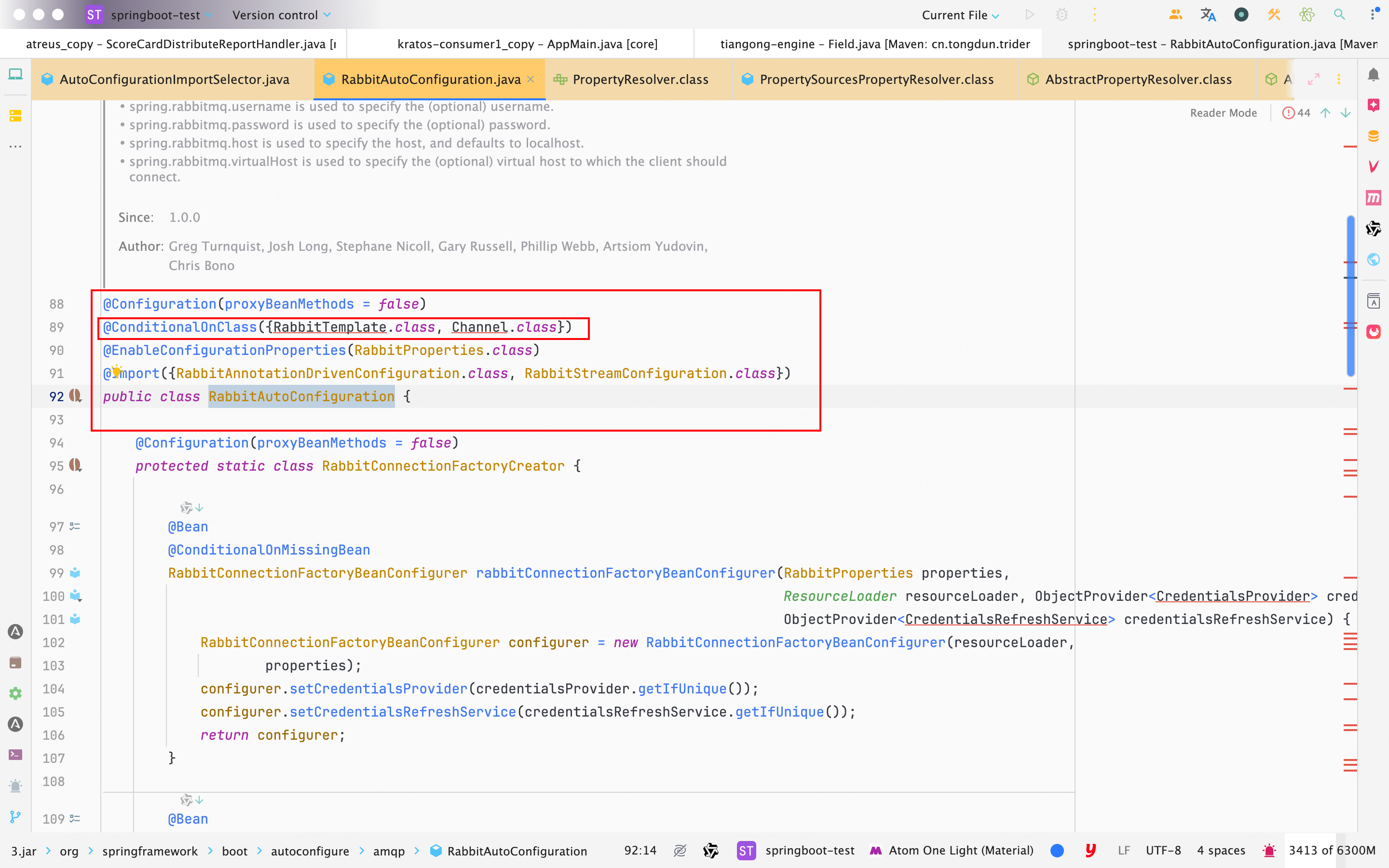
- SpringBoot提供的条件注解
@ConditionalOnBean:当容器里有指定 Bean 的条件下@ConditionalOnMissingBean:当容器里没有指定 Bean 的情况下@ConditionalOnSingleCandidate:当指定 Bean 在容器中只有一个,或者虽然有多个但是指定首选 Bean@ConditionalOnClass:当类路径下有指定类的条件下@ConditionalOnMissingClass:当类路径下没有指定类的条件下@ConditionalOnProperty:指定的属性是否有指定的值@ConditionalOnResource:类路径是否有指定的值@ConditionalOnExpression:基于 SpEL 表达式作为判断条件@ConditionalOnJava:基于 Java 版本作为判断条件@ConditionalOnJndi:在 JNDI 存在的条件下差在指定的位置@ConditionalOnNotWebApplication:当前项目不是 Web 项目的条件下@ConditionalOnWebApplication:当前项目是 Web 项 目的条件下
- 应用条件过滤器;
- 发布事件;
- 返回结果。
private static final String[] NO_IMPORTS = {};

@Override
public String[] selectImports(AnnotationMetadata annotationMetadata) {
  	// 判断自动装配开关是否打开
		if (!isEnabled(annotationMetadata)) {
			return NO_IMPORTS;
		}
  	// 获取所有需要装配的bean
		AutoConfigurationEntry autoConfigurationEntry = getAutoConfigurationEntry(annotationMetadata);
		return StringUtils.toStringArray(autoConfigurationEntry.getConfigurations());
	}

protected boolean isEnabled(AnnotationMetadata metadata) {
		if (getClass() == AutoConfigurationImportSelector.class) {
			return getEnvironment().getProperty(EnableAutoConfiguration.ENABLED_OVERRIDE_PROPERTY, Boolean.class, true);
		}
		return true;
	}

	/**
	 * Environment property that can be used to override when auto-configuration is
	 * enabled.
	 * 启用自动配置时可用于覆盖的环境属性。
	 */
	String ENABLED_OVERRIDE_PROPERTY = "spring.boot.enableautoconfiguration";

	/**
	 * Return the {@link AutoConfigurationEntry} based on the {@link AnnotationMetadata}
	 * of the importing {@link Configuration @Configuration} class.
	 * @param annotationMetadata the annotation metadata of the configuration class
	 * @return the auto-configurations that should be imported
	 * 在启动时确定哪些 @Configuration 配置类(即自动配置类)应被导入
	 */
//该方法接收一个 AnnotationMetadata 对象参数,它代表了调用 @Import 当前类的注解元信息(通常是某个配置类的元数据)
	protected AutoConfigurationEntry getAutoConfigurationEntry(AnnotationMetadata annotationMetadata) {
    // 如果自动配置被禁用(可能通过条件注解、配置项等),则直接返回一个空的 AutoConfigurationEntry,表示没有自动配置类需要导入
    // 默认spring.boot.enableautoconfiguration=true,可在 application.properties 或 application.yml 中设置
		if (!isEnabled(annotationMetadata)) {
			return EMPTY_ENTRY;
		}
    // 获取配置类上的 @EnableAutoConfiguration 或类似注解的属性内容,比如用户通过 exclude 指定排除的自动配置类。
    // 用于获取EnableAutoConfiguration注解中的 exclude 和 excludeName
		AnnotationAttributes attributes = getAttributes(annotationMetadata);
    // `关键步骤`:获取候选自动配置类的全类名列表。这个方法默认会读取 META-INF/spring.factories 或 META-INF/spring/org.springframework.boot.autoconfigure.AutoConfiguration.imports 文件,获取所有声明的自动配置类名
    // spring-boot/spring-boot-project/spring-boot-autoconfigure/src/main/resources/META-INF/spring.factories
		List<String> configurations = getCandidateConfigurations(annotationMetadata, attributes);
    // 移除重复的配置类名,确保每个自动配置类只导入一次。
		configurations = removeDuplicates(configurations);
    // 获取用户指定的排除类(通过 exclude 属性或配置文件中的 spring.autoconfigure.exclude)形成的排除集合
		Set<String> exclusions = getExclusions(annotationMetadata, attributes);
    // 校验要排除的类是否真的存在于自动配置候选类列表中,若不存在则抛出异常,避免用户排除不存在的类时出错
		checkExcludedClasses(configurations, exclusions);
    // 正式从候选自动配置类中移除那些被用户排除的类
		configurations.removeAll(exclusions);
    // 对剩余的自动配置类应用条件过滤器(比如 @ConditionalOnClass 等),移除当前运行环境中不满足条件的自动配置类
		configurations = getConfigurationClassFilter().filter(configurations);
    // 发布自动配置导入事件,允许监听器在 Spring Boot 自动配置选择过程中做进一步扩展(比如打印日志、记录导入哪些配置类等)
		fireAutoConfigurationImportEvents(configurations, exclusions);
    // 返回一个包含最终决定导入的配置类和排除类集合的 AutoConfigurationEntry 对象,供 Spring 后续执行 @Import 导入逻辑
		return new AutoConfigurationEntry(configurations, exclusions);
	}
getCandidateConfigurations()
protected List<String> getCandidateConfigurations(AnnotationMetadata metadata, AnnotationAttributes attributes) {
		List<String> configurations = SpringFactoriesLoader.loadFactoryNames(getSpringFactoriesLoaderFactoryClass(),
				getBeanClassLoader());
		Assert.notEmpty(configurations, "No auto configuration classes found in META-INF/spring.factories. If you "
				+ "are using a custom packaging, make sure that file is correct.");
		return configurations;
}
// getAutoConfigurationEntry方法通过SpringFactoriesLoader.loadFactoryNames() 扫描所有含有META-INF/spring.factories的jar包:

public static List<String> loadFactoryNames(Class<?> factoryType, @Nullable ClassLoader classLoader) {
        ClassLoader classLoaderToUse = classLoader;
        if (classLoaderToUse == null) {
            classLoaderToUse = SpringFactoriesLoader.class.getClassLoader();
        }

        String factoryTypeName = factoryType.getName();
        return (List)loadSpringFactories(classLoaderToUse).getOrDefault(factoryTypeName, Collections.emptyList());
    }


private static Map<String, List<String>> loadSpringFactories(ClassLoader classLoader) {
        Map<String, List<String>> result = (Map)cache.get(classLoader);
        if (result != null) {
            return result;
        } else {
            Map<String, List<String>> result = new HashMap();

            try {
                Enumeration<URL> urls = classLoader.getResources("META-INF/spring.factories");

                while(urls.hasMoreElements()) {
                    URL url = (URL)urls.nextElement();
                    UrlResource resource = new UrlResource(url);
                    Properties properties = PropertiesLoaderUtils.loadProperties(resource);
                    Iterator var6 = properties.entrySet().iterator();

                    while(var6.hasNext()) {
                        Map.Entry<?, ?> entry = (Map.Entry)var6.next();
                        String factoryTypeName = ((String)entry.getKey()).trim();
                        String[] factoryImplementationNames = StringUtils.commaDelimitedListToStringArray((String)entry.getValue());
                        String[] var10 = factoryImplementationNames;
                        int var11 = factoryImplementationNames.length;

                        for(int var12 = 0; var12 < var11; ++var12) {
                            String factoryImplementationName = var10[var12];
                            ((List)result.computeIfAbsent(factoryTypeName, (key) -> {
                                return new ArrayList();
                            })).add(factoryImplementationName.trim());
                        }
                    }
                }

                result.replaceAll((factoryType, implementations) -> {
                    return (List)implementations.stream().distinct().collect(Collectors.collectingAndThen(Collectors.toList(), Collections::unmodifiableList));
                });
                cache.put(classLoader, result);
                return result;
            } catch (IOException var14) {
                IOException ex = var14;
                throw new IllegalArgumentException("Unable to load factories from location [META-INF/spring.factories]", ex);
            }
        }
    }
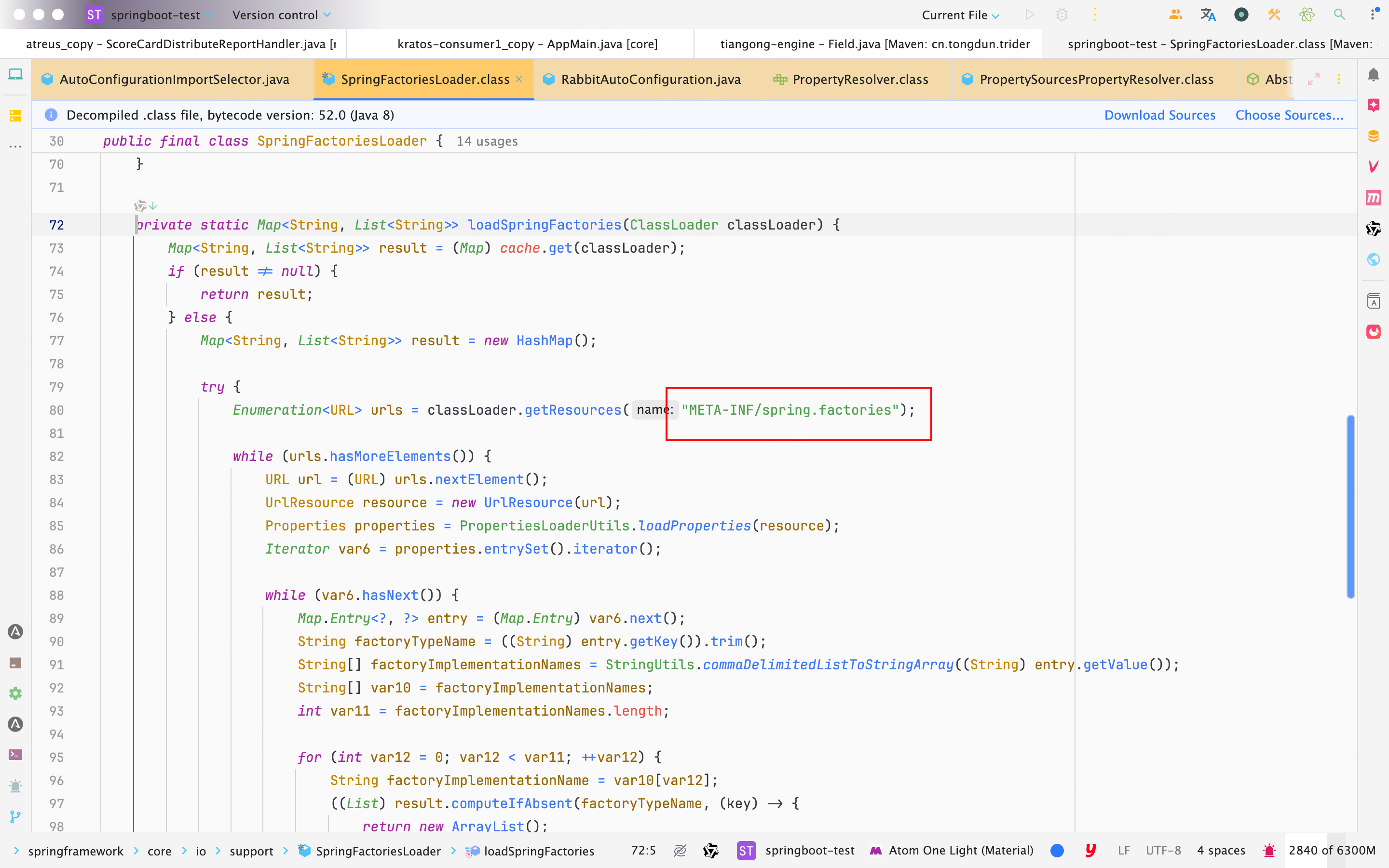
综上所述: 自动配置主要由
@EnableAutoConfiguration实现,添加了@EnableAutoConfiguration注解,会导入AutoConfigurationImportSelector类,里面的selectImports方法通过SpringFactoriesLoader.loadFactoryNames()扫描所有含有META-INF/spring.factories的jar包,将对应key为@EnableAutoConfiguration注解全名对应的value类全部装配到IOC容器中。这些属性自动配置到
IOC之后就无需自己手动配置bean了,Spring Boot中的约定大于配置理念,约定是将需要的配置以约定的方式添加到IOC容器中
并不是所有的bean都会装配到IOC容器中的
@ConditionalOnClass表示在类路径中存在类才会配置该配置类。只有引入相关依赖才会自动配置该配置类。@ConditionalOnMissingBean表示只有不存在对应的类的bean才会自动配置该类。所以
spring.factories里面并不是所有的bean都会装配到IOC容器中,只会按需配置对应的bean
- 自动装配简单来说就是自动将第三方的组件的
bean装载到IOC容器内,不需要再去写bean相关的配置,符合约定大于配置理念。Spring Boot基于约定大于配置的理念,配置如果没有额外的配置的话,就给按照默认的配置使用约定的默认值,按照约定配置到IOC容器中,无需开发人员手动添加配置,加快开发效率。
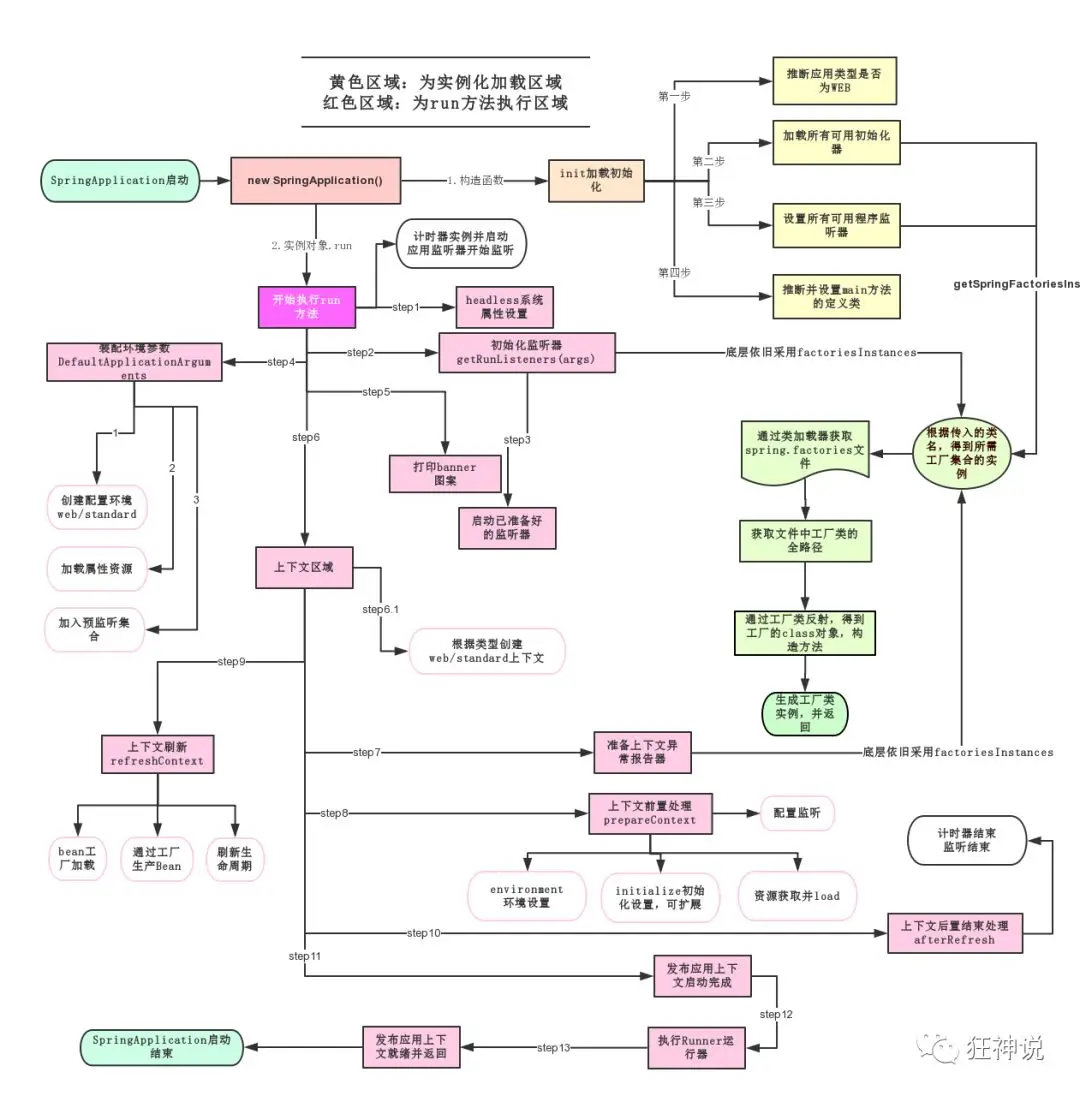
SpringBoot启动原理
前提
想要启动一个SpringBoot项目, 首先要有一个带有@SpringBootApplication注解的启动类
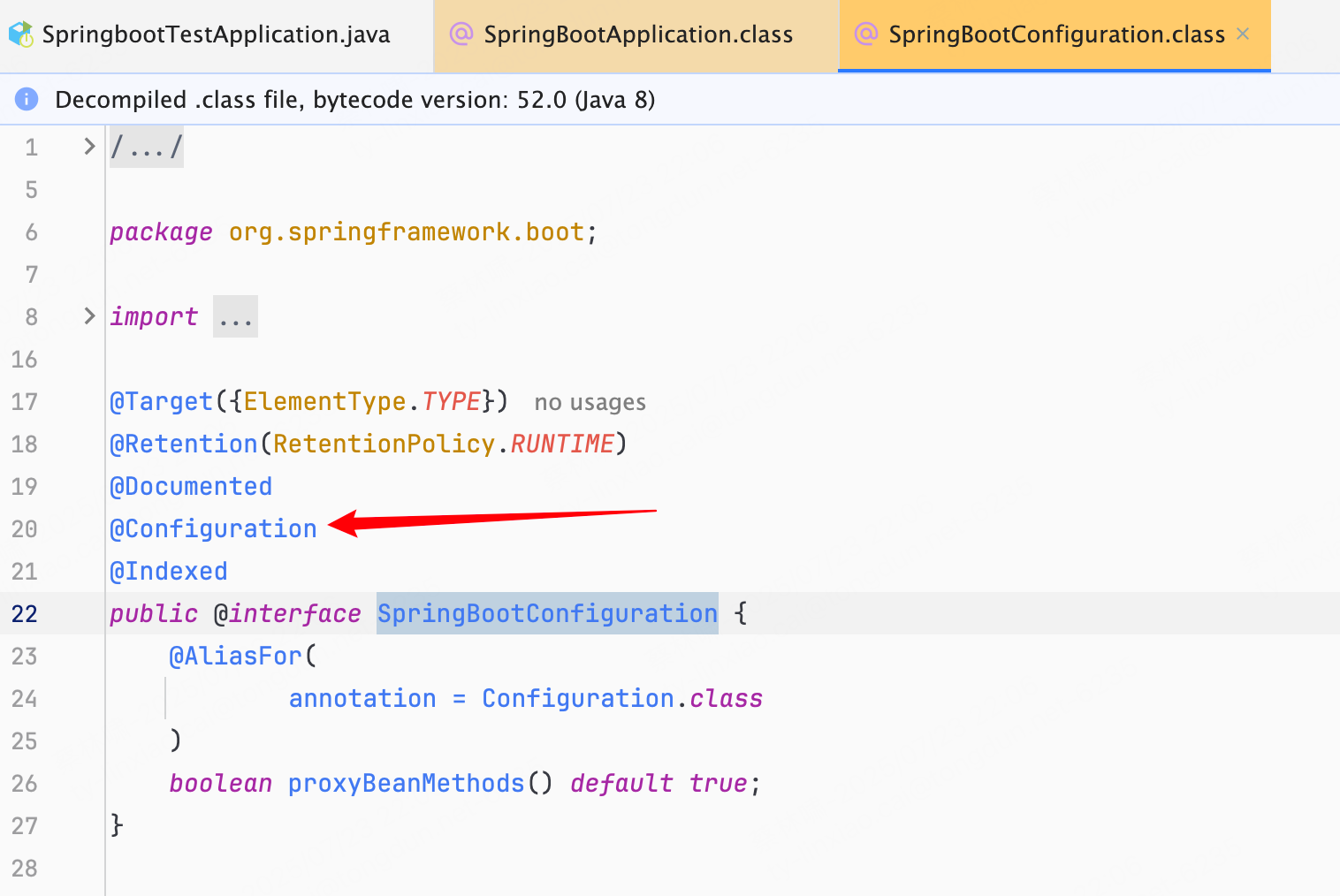
这个注解本质上就是由@SpringBootConfiguration, @EnableAutoConfiguration, @ComponentScan这三个注解加在一起构成的
- @SpringBootConfiguration
- 等同于
@Configuration, 就是将这个类标记为配置类会被加载到容器中
- 等同于
- @EnableAutoConfiguration
- 这个注解是最核心的
- 有了这个注解在启动时, 就会将
自动配置AutoConfigurationImportSelector类导入- 这个类会将所有符合条件的
@Configuration配置都进行加载
- 这个类会将所有符合条件的
- @ComponentScan
- 自动扫描并加载符合条件的Bean
其实如果启动类中不需要加配置内容, 也不需要指定扫描路径, 则可以使用@EnableAutoConfiguration替代@SpringBootApplication, 也可以完成启动
注解完成后, 运行的起点就是SpringApplication.run()方法
run()执行后, 会进入以下四个阶段
服务构建
服务就是指的是Spring服务对象SpringApplication, 服务构建这个阶段就是为了构建SpringApplication
SpringApplication构造方法
public SpringApplication(ResourceLoader resourceLoader, Class<?>... primarySources) {
  this.sources = new LinkedHashSet();
  this.bannerMode = Mode.CONSOLE;
  this.logStartupInfo = true;
  this.addCommandLineProperties = true;
  this.addConversionService = true;
  this.headless = true;
  this.registerShutdownHook = true;
  this.additionalProfiles = Collections.emptySet();
  this.isCustomEnvironment = false;
  this.lazyInitialization = false;
  this.applicationContextFactory = ApplicationContextFactory.DEFAULT;
  this.applicationStartup = ApplicationStartup.DEFAULT;
	// 将传入的资源加载器, 主方法类 记录在内存中
  this.resourceLoader = resourceLoader;
  Assert.notNull(primarySources, "PrimarySources must not be null");
  this.primarySources = new LinkedHashSet(Arrays.asList(primarySources));
  // 逐一判断对应的类是否存在, 来确定web服务的类型.
  // 默认是Servlet, 即基于Servlet的web服务, 如tomcat
  this.webApplicationType = WebApplicationType.deduceFromClasspath();
  // 加载初始化类, 会读取所有META_INF/spring.factories文件中的"注册初始化", "上下文初始化", "监听器"这三类配置
  this.bootstrapRegistryInitializers = new 		      ArrayList(this.getSpringFactoriesInstances(BootstrapRegistryInitializer.class));
  this.setInitializers(this.getSpringFactoriesInstances(ApplicationContextInitializer.class));
  this.setListeners(this.getSpringFactoriesInstances(ApplicationListener.class));
  // 通过运行栈stackTrace判断出main方法所在的类, 大概率就是启动类本身
  this.mainApplicationClass = this.deduceMainApplicationClass();
}
WebApplicationType.deduceFromClasspath() - 用来确定web服务的类型
- REACTIVE(响应式 Web,比如 WebFlux)
- SERVLET(Servlet/Web MVC)
- NONE(非 Web 应用)
默认是SERVLET
static WebApplicationType deduceFromClasspath() {
  // 判断是否是 REACTIVE 类型:
  // 存在 DispatcherHandler(Spring WebFlux 的入口类)
  // 且 不存在:
			// DispatcherServlet(Spring MVC 的入口类)
			// ServletContainer(JAX-RS Jersey)
  // 若满足,则判定为响应式 Web 应用:REACTIVE
  if (ClassUtils.isPresent("org.springframework.web.reactive.DispatcherHandler", (ClassLoader)null) && !ClassUtils.isPresent("org.springframework.web.servlet.DispatcherServlet", (ClassLoader)null) && !ClassUtils.isPresent("org.glassfish.jersey.servlet.ServletContainer", (ClassLoader)null)) {
    return REACTIVE;
  } else {
    // 判断是否是 SERVLET 类型:
    // 遍历 SERVLET_INDICATOR_CLASSES 数组中的类名(这些是判定 Web MVC 所需类)
		// 如果有一个类 不存在,说明不满足 servlet 项目的要求 → 返回 NONE
    String[] var0 = SERVLET_INDICATOR_CLASSES;
    int var1 = var0.length;

    for(int var2 = 0; var2 < var1; ++var2) {
      String className = var0[var2];
      if (!ClassUtils.isPresent(className, (ClassLoader)null)) {
        return NONE;
      }
    }

    // 上述两个条件都不满足,默认就是传统 servlet 应用
    return SERVLET;
  }
}
加载初始化类, 会读取所有META_INF/spring.factories文件中的"注册初始化", “上下文初始化”, "监听器"这三类配置
- 注册初始化
- BootstrapRegistryInitializer
- 上下文初始化
- ApplicationContextInitializer
- 监听器
- ApplicationListener
在Spring中没有默认的初始化配置, 而SpringBoot和SpringBootAutoconfigure这两个工程中配置了7个上下文初始化和8个监听器
如果想要自定义这三个配置, 只需要将其实现类全路径名放到spring.factories文件中, 启动的时候, 会一并加载进来
环境准备
调用run()就会进入环境准备阶段, 这个阶段就是往启动上下文BootstrapContext中填充
run()
所谓容器就是指内部有很多属性, 集合以及配套功能的结构体ApplicationContext, 也可以称为上下文, 但是称之为容器更贴切
public ConfigurableApplicationContext run(String... args) {
  long startTime = System.nanoTime();
  // new一个启动上下文, BootstrapContext, 同时逐一调用刚刚加载的"启动注册初始化器" BootstrapRegistryInitializer中的初始化initialize方法
  // 但是由于Spring中并不存在什么默认的BootstrapRegistryInitializer, 所以并不执行什么
  DefaultBootstrapContext bootstrapContext = this.createBootstrapContext();
  ConfigurableApplicationContext context = null;
  // 将java.awt.headless这个配置改为true, 表示缺失显示器, 键盘灯输入设备也可以正常启动
  this.configureHeadlessProperty();
  // 启动"运行监听器"SpringApplicationRunListeners
  SpringApplicationRunListeners listeners = this.getRunListeners(args);
  // 发布"启动事件", 获取并加载SpringBoot工程中的spring.factories配置文件中的EventPublishingRunListener
  // EventPublishingRunListener启动时, 也会将上文所说的8个监听器ApplicationListener都进行引入, 这样我们就可以通过监听这些事件, 然后在启动流程中加入自定义逻辑了
  listeners.starting(bootstrapContext, this.mainApplicationClass);

  Throwable ex;
  try {
    ApplicationArguments applicationArguments = new DefaultApplicationArguments(args);
    // 通过prepareEnvironment, 组装启动参数
    ConfigurableEnvironment environment = this.prepareEnvironment(listeners, bootstrapContext, applicationArguments);
    // 将spring.beaninfo.ignore设为true, 表示不加载Bean的元数据信息
    this.configureIgnoreBeanInfo(environment);
    // 打印banner图
    Banner printedBanner = this.printBanner(environment);
    // ---------------------------以下是容器创建阶段--------------------------
    // 创建容器
    context = this.createApplicationContext();
    context.setApplicationStartup(this.applicationStartup);
    this.prepareContext(bootstrapContext, context, environment, listeners, applicationArguments, printedBanner);
    this.refreshContext(context);
    this.afterRefresh(context, applicationArguments);
    Duration timeTakenToStartup = Duration.ofNanos(System.nanoTime() - startTime);
    if (this.logStartupInfo) {
      (new StartupInfoLogger(this.mainApplicationClass)).logStarted(this.getApplicationLog(), timeTakenToStartup);
    }

    listeners.started(context, timeTakenToStartup);
    this.callRunners(context, applicationArguments);
  } catch (Throwable var12) {
    ex = var12;
    this.handleRunFailure(context, ex, listeners);
    throw new IllegalStateException(ex);
  }

  try {
    Duration timeTakenToReady = Duration.ofNanos(System.nanoTime() - startTime);
    listeners.ready(context, timeTakenToReady);
    return context;
  } catch (Throwable var11) {
    ex = var11;
    this.handleRunFailure(context, ex, (SpringApplicationRunListeners)null);
    throw new IllegalStateException(ex);
  }
}
createBootstrapContext()
private DefaultBootstrapContext createBootstrapContext() {
    // 1. 创建新的DefaultBootstrapContext实例
    DefaultBootstrapContext bootstrapContext = new DefaultBootstrapContext();

    // 2. 遍历所有bootstrapRegistryInitializers初始化器
    this.bootstrapRegistryInitializers.forEach((initializer) -> {
        // 3. 使用每个初始化器初始化上下文
        initializer.initialize(bootstrapContext);
    });

    // 4. 返回初始化完成的上下文
    return bootstrapContext;
}
prepareEnvironment() - 组装启动参数
这是 Spring Boot 应用程序启动过程中准备环境的核心方法,负责创建、配置和初始化应用运行环境
private ConfigurableEnvironment prepareEnvironment(SpringApplicationRunListeners listeners, DefaultBootstrapContext bootstrapContext, ApplicationArguments applicationArguments) {
  			// 构造一个"可配置环境"ConfigurableEnvironment, 根据不同的web类型构造不同的环境, 默认是servlet
        ConfigurableEnvironment environment = this.getOrCreateEnvironment();
  			// 构造后加载"系统环境变量"systemEnvironment, "JVM系统属性"systemProperties等在内的4组配置信息
  			// 并将这些配置信息都加载到一个叫做propertiesSources的内存集合中, 这样后续使用到这些信息就无需加载了
  			// 这是也会通过"配置环境"configureEnvironment方法将我们启动时传入的环境参数args进行设置
  					// 例如启动时传入的诸如"开发/生产"环境配置等都会在这一步进行加载
        this.configureEnvironment((ConfigurableEnvironment)environment, applicationArguments.getSourceArgs());
  			// 在propertiesSources集合的首个位置添加一个值为空的配置内容"configurationProperties"
        ConfigurationPropertySources.attach((Environment)environment);
  			// 发布"环境加载完成事件", 加载进来的8个监听器会监听到这个事件, 其中的部分监听器会进行相应的处理
  			// "环境配置后处理监听器"EnvironmentPostProcessorApplicationListener会去加载spring.factories配置文件中"环境配置后处理器"EnvironmentPostProcessor
  			// 监听器是观察者模式设计, 是逐一"串行"执行, 需要等待所以的监听器都处理完成之后, 才会继续走后续的逻辑
        listeners.environmentPrepared(bootstrapContext, (ConfigurableEnvironment)environment);
        DefaultPropertiesPropertySource.moveToEnd((ConfigurableEnvironment)environment);
        Assert.state(!((ConfigurableEnvironment)environment).containsProperty("spring.main.environment-prefix"), "Environment prefix cannot be set via properties.");
        this.bindToSpringApplication((ConfigurableEnvironment)environment);
        if (!this.isCustomEnvironment) {
            environment = this.convertEnvironment((ConfigurableEnvironment)environment);
        }

  			// 考虑到刚创建的"可配置环境"在一系列过程中可能会有变化, 通过进行补偿, 通过二次更新保证匹配
        ConfigurationPropertySources.attach((Environment)environment);
        return (ConfigurableEnvironment)environment;
    }
容器创建
public ConfigurableApplicationContext run(String... args) {
  long startTime = System.nanoTime();
  // new一个启动上下文, BootstrapContext, 同时逐一调用刚刚加载的"启动注册初始化器" BootstrapRegistryInitializer中的初始化initialize方法
  // 但是由于Spring中并不存在什么默认的BootstrapRegistryInitializer, 所以并不执行什么
  DefaultBootstrapContext bootstrapContext = this.createBootstrapContext();
  ConfigurableApplicationContext context = null;
  // 将java.awt.headless这个配置改为true, 表示缺失显示器, 键盘灯输入设备也可以正常启动
  this.configureHeadlessProperty();
  // 启动"运行监听器"SpringApplicationRunListeners
  SpringApplicationRunListeners listeners = this.getRunListeners(args);
  // 发布"启动事件", 获取并加载SpringBoot工程中的spring.factories配置文件中的EventPublishingRunListener
  // EventPublishingRunListener启动时, 也会将上文所说的8个监听器ApplicationListener都进行引入, 这样我们就可以通过监听这些事件, 然后在启动流程中加入自定义逻辑了
  listeners.starting(bootstrapContext, this.mainApplicationClass);

  Throwable ex;
  try {
    ApplicationArguments applicationArguments = new DefaultApplicationArguments(args);
    // 通过prepareEnvironment, 组装启动参数
    ConfigurableEnvironment environment = this.prepareEnvironment(listeners, bootstrapContext, applicationArguments);
    // 将spring.beaninfo.ignore设为true, 表示不加载Bean的元数据信息
    this.configureIgnoreBeanInfo(environment);
    // 打印banner图
    Banner printedBanner = this.printBanner(environment);
    // ---------------------------以下是容器创建阶段--------------------------
    // 创建容器
    context = this.createApplicationContext();
    context.setApplicationStartup(this.applicationStartup);
    // 将创建好的处理器都放进容器之后, 使用prepareContext对容器中的部分属性进行初始化
    this.prepareContext(bootstrapContext, context, environment, listeners, applicationArguments, printedBanner);
    this.refreshContext(context);
    this.afterRefresh(context, applicationArguments);
    Duration timeTakenToStartup = Duration.ofNanos(System.nanoTime() - startTime);
    if (this.logStartupInfo) {
      (new StartupInfoLogger(this.mainApplicationClass)).logStarted(this.getApplicationLog(), timeTakenToStartup);
    }

    listeners.started(context, timeTakenToStartup);
    this.callRunners(context, applicationArguments);
  } catch (Throwable var12) {
    ex = var12;
    this.handleRunFailure(context, ex, listeners);
    throw new IllegalStateException(ex);
  }

  try {
    Duration timeTakenToReady = Duration.ofNanos(System.nanoTime() - startTime);
    listeners.ready(context, timeTakenToReady);
    return context;
  } catch (Throwable var11) {
    ex = var11;
    this.handleRunFailure(context, ex, (SpringApplicationRunListeners)null);
    throw new IllegalStateException(ex);
  }
}
createApplicationContext() - 根据服务类型创建容器ConfigurableApplicationContext
默认的服务类型是servlet, 所以创建的是
注解配置的Servlet-Web服务容器, 即AnnotationConfigServletWebServerApplicationContext
protected ConfigurableApplicationContext createApplicationContext() {
  return this.applicationContextFactory.create(this.webApplicationType);
}

public AnnotationConfigServletWebServerApplicationContext() {
  this.annotatedClasses = new LinkedHashSet();
  // 用来解析@Component, @ComponentSacn等注解的"配置类后处理器"ConfigurationClassPostProcessor
  // 用来解析@Autowired, @Value, @Inject等注解的"自动注解后处理器"AutowiredAnnotationBeanPostProcessor
  this.reader = new AnnotatedBeanDefinitionReader(this);
  this.scanner = new ClassPathBeanDefinitionScanner(this);
}

public GenericApplicationContext() {
  this.customClassLoader = false;
  this.refreshed = new AtomicBoolean();
  // 在创建服务容器的过程中构造
  // 用来存放和生产我们bean实例的"Bean工厂"DefaultListableBeanFactory
  this.beanFactory = new DefaultListableBeanFactory();
}
prepareContext() - 对容器中部分属性进行初始化
private void prepareContext(DefaultBootstrapContext bootstrapContext, ConfigurableApplicationContext context, ConfigurableEnvironment environment, SpringApplicationRunListeners listeners, ApplicationArguments applicationArguments, Banner printedBanner) {
        context.setEnvironment(environment);
  			// 设置"Bean名称生成器", "资源加载器", "类型转换器"
        this.postProcessApplicationContext(context);
  			// 执行之前加载进来的"上下文初始化"ApplicationContextInitializer, 默认加载7个
  			// 容器ID, 警告日志处理, 日志监听都是在这里实现的
        this.applyInitializers(context);
  			// 发布"容器准备完成"监听事件
        listeners.contextPrepared(context);
        bootstrapContext.close(context);
        if (this.logStartupInfo) {
            this.logStartupInfo(context.getParent() == null);
            this.logStartupProfileInfo(context);
        }

        ConfigurableListableBeanFactory beanFactory = context.getBeanFactory();
    //--------------------------------------------
  	// 陆续为容器注册"启动参数", "Banner", "Bean引用策略", 和"懒加载策略"等
        beanFactory.registerSingleton("springApplicationArguments", applicationArguments);
        if (printedBanner != null) {
            beanFactory.registerSingleton("springBootBanner", printedBanner);
        }

        if (beanFactory instanceof AbstractAutowireCapableBeanFactory) {
            ((AbstractAutowireCapableBeanFactory)beanFactory).setAllowCircularReferences(this.allowCircularReferences);
            if (beanFactory instanceof DefaultListableBeanFactory) {
                ((DefaultListableBeanFactory)beanFactory).setAllowBeanDefinitionOverriding(this.allowBeanDefinitionOverriding);
            }
        }

        if (this.lazyInitialization) {
            context.addBeanFactoryPostProcessor(new LazyInitializationBeanFactoryPostProcessor());
        }
  //--------------------------------------------

        context.addBeanFactoryPostProcessor(new PropertySourceOrderingBeanFactoryPostProcessor(context));
        Set<Object> sources = this.getAllSources();
        Assert.notEmpty(sources, "Sources must not be empty");
  			// 通过Bean定义加载器将"启动类"在内的资源加载到Bean定义池"BeanDefinitionMap"中, 以便后续根据Bean定义创建"Bean对象"
        this.load(context, sources.toArray(new Object[0]));
  			// 发布"资源加载完成事件", 至此ApplicationContext加载完成
        listeners.contextLoaded(context);
    }
填充容器
在这一步生成自身提供的以及自定义的所有Bean对象, 并且放入刚刚创建好的"容器"中, 这个过程也就是"自动装配"
public ConfigurableApplicationContext run(String... args) {
  long startTime = System.nanoTime();
  // new一个启动上下文, BootstrapContext, 同时逐一调用刚刚加载的"启动注册初始化器" BootstrapRegistryInitializer中的初始化initialize方法
  // 但是由于Spring中并不存在什么默认的BootstrapRegistryInitializer, 所以并不执行什么
  DefaultBootstrapContext bootstrapContext = this.createBootstrapContext();
  ConfigurableApplicationContext context = null;
  // 将java.awt.headless这个配置改为true, 表示缺失显示器, 键盘灯输入设备也可以正常启动
  this.configureHeadlessProperty();
  // 启动"运行监听器"SpringApplicationRunListeners
  SpringApplicationRunListeners listeners = this.getRunListeners(args);
  // 发布"启动事件", 获取并加载SpringBoot工程中的spring.factories配置文件中的EventPublishingRunListener
  // EventPublishingRunListener启动时, 也会将上文所说的8个监听器ApplicationListener都进行引入, 这样我们就可以通过监听这些事件, 然后在启动流程中加入自定义逻辑了
  listeners.starting(bootstrapContext, this.mainApplicationClass);

  Throwable ex;
  try {
    ApplicationArguments applicationArguments = new DefaultApplicationArguments(args);
    // 通过prepareEnvironment, 组装启动参数
    ConfigurableEnvironment environment = this.prepareEnvironment(listeners, bootstrapContext, applicationArguments);
    // 将spring.beaninfo.ignore设为true, 表示不加载Bean的元数据信息
    this.configureIgnoreBeanInfo(environment);
    // 打印banner图
    Banner printedBanner = this.printBanner(environment);
    // ---------------------------以下是容器创建阶段--------------------------
    // 创建容器
    context = this.createApplicationContext();
    context.setApplicationStartup(this.applicationStartup);
    // 将创建好的处理器都放进容器之后, 使用prepareContext对容器中的部分属性进行初始化
    this.prepareContext(bootstrapContext, context, environment, listeners, applicationArguments, printedBanner);
    // -------------------以下是填充容器阶段------------------------------------------
    // 自动装配, 分为12个小步骤, 不仅包括"Bean生命周期管理", 同时还会构造和启动一个Web服务器, 这样就可以通过web方法进行调用
    this.refreshContext(context);
    this.afterRefresh(context, applicationArguments);
    Duration timeTakenToStartup = Duration.ofNanos(System.nanoTime() - startTime);
    if (this.logStartupInfo) {
      (new StartupInfoLogger(this.mainApplicationClass)).logStarted(this.getApplicationLog(), timeTakenToStartup);
    }

    // 发布"启动完成事件"
    listeners.started(context, timeTakenToStartup);
    // 回调自定义实现的Runner接口, 来处理一些执行后定制化需求
    this.callRunners(context, applicationArguments);
  } catch (Throwable var12) {
    ex = var12;
    this.handleRunFailure(context, ex, listeners);
    throw new IllegalStateException(ex);
  }

  try {
    Duration timeTakenToReady = Duration.ofNanos(System.nanoTime() - startTime);
    listeners.ready(context, timeTakenToReady);
    return context;
  } catch (Throwable var11) {
    ex = var11;
    this.handleRunFailure(context, ex, (SpringApplicationRunListeners)null);
    throw new IllegalStateException(ex);
  }
}
IOC容器如何创建的
prepareRefresh()
在已有环境的基础上, 准备servelt相关的环境Environment, 而其余的环境配置, 在第二个大阶段就已经注册完成了
protected void prepareRefresh() {
  this.startupDate = System.currentTimeMillis();
  this.closed.set(false);
  this.active.set(true);
  if (this.logger.isDebugEnabled()) {
    if (this.logger.isTraceEnabled()) {
      this.logger.trace("Refreshing " + this);
    } else {
      this.logger.debug("Refreshing " + this.getDisplayName());
    }
  }

  this.initPropertySources();
  this.getEnvironment().validateRequiredProperties();
  if (this.earlyApplicationListeners == null) {
    this.earlyApplicationListeners = new LinkedHashSet(this.applicationListeners);
  } else {
    this.applicationListeners.clear();
    this.applicationListeners.addAll(this.earlyApplicationListeners);
  }

  this.earlyApplicationEvents = new LinkedHashSet();
}
WebApplicationContextUtils.initServletPropertySources()
通过"初始化属性资源"initServletPropertySources方法, 对"Servelt初始化参数"servletContextInitParams和servletConfigInitParams进行赋值
public static void initServletPropertySources(MutablePropertySources sources, @Nullable ServletContext servletContext, @Nullable ServletConfig servletConfig) {
        Assert.notNull(sources, "'propertySources' must not be null");
        String name = "servletContextInitParams";
        if (servletContext != null && sources.get(name) instanceof PropertySource.StubPropertySource) {
            sources.replace(name, new ServletContextPropertySource(name, servletContext));
        }

        name = "servletConfigInitParams";
        if (servletConfig != null && sources.get(name) instanceof PropertySource.StubPropertySource) {
            sources.replace(name, new ServletConfigPropertySource(name, servletConfig));
        }

    }
AbstractPropertyResolver.validateRequiredProperties()
校验是否有必填的环境变量, 可以在自定义"初始化属性资源"initPropertiesSoueces方法中通过setRequiredProperties将某些环境变量设置为必填
public void validateRequiredProperties() {
    MissingRequiredPropertiesException ex = new MissingRequiredPropertiesException();
    Iterator var2 = this.requiredProperties.iterator();

    while(var2.hasNext()) {
        String key = (String)var2.next();
        if (this.getProperty(key) == null) {
            ex.addMissingRequiredProperty(key);
        }
    }

    if (!ex.getMissingRequiredProperties().isEmpty()) {
        throw ex;
    }
}
最后完成监听器和事件初始化之后, 环境准备就完成了
太多了, 不写了…
yaml语法
YAML 是 “YAML Ain’t a Markup Language”(YAML 不是一种标记语言)的递归缩写。在开发的这种语言时,YAML 的意思其实是:“Yet Another Markup Language”(仍是一种标记语言)
YAML 的配置文件后缀为 .yml
基本语法
- 大小写敏感
- 使用缩进表示层级关系
- 缩进不允许使用 tab,只允许空格
- 缩进的空格数不重要,只要相同层级的元素左对齐即可
- # 表示注释
- : 号后面要加空格
数据类型
YAML 支持以下几种数据类型:
- 对象:键值对的集合,又称为映射(mapping)/ 哈希(hashes) / 字典(dictionary)
- 数组:一组按次序排列的值,又称为序列(sequence) / 列表(list)
- 纯量(scalars):单个的、不可再分的值
YAML 对象
对象键值对使用冒号结构表示 key: value,冒号后面要加一个空格。
也可以使用 key:{key1: value1, key2: value2, …}。
还可以使用缩进表示层级关系
key:
    child-key: value
    child-key2: value2
较为复杂的对象格式,可以使用问号加一个空格代表一个复杂的 key,配合一个冒号加一个空格代表一个 value:
?
    - complexkey1
    - complexkey2
:
    - complexvalue1
    - complexvalue2
#意思即对象的属性是一个数组 [complexkey1,complexkey2],对应的值也是一个数组 [complexvalue1,complexvalue2]
YAML 数组
以 - 开头的行表示构成一个数组:
- A
- B
- C
YAML 支持多维数组,可以使用行内表示:
key: [value1, value2, ...]
数据结构的子成员是一个数组,则可以在该项下面缩进一个空格。
-
 - A
 - B
 - C
一个相对复杂的例子:
companies:
    -
        id: 1
        name: company1
        price: 200W
    -
        id: 2
        name: company2
        price: 500W
#意思是 companies 属性是一个数组,每一个数组元素又是由 id、name、price 三个属性构成。
数组也可以使用流式(flow)的方式表示:
companies: [{id: 1,name: company1,price: 200W},{id: 2,name: company2,price: 500W}]
复合结构
数组和对象可以构成复合结构,例:
languages:
  - Ruby
  - Perl
  - Python
websites:
  YAML: yaml.org
  Ruby: ruby-lang.org
  Python: python.org
  Perl: use.perl.org
转换为 json 为:
{
  languages: [ 'Ruby', 'Perl', 'Python'],
  websites: {
    YAML: 'yaml.org',
    Ruby: 'ruby-lang.org',
    Python: 'python.org',
    Perl: 'use.perl.org'
  }
}
纯量
纯量是最基本的,不可再分的值,包括:
- 字符串
- 布尔值
- 整数
- 浮点数
- Null
- 时间
- 日期
boolean:
    - TRUE  #true,True都可以
    - FALSE  #false,False都可以
float:
    - 3.14
    - 6.8523015e+5  #可以使用科学计数法
int:
    - 123
    - 0b1010_0111_0100_1010_1110    #二进制表示
null:
    nodeName: 'node'
    parent: ~  #使用~表示null
string:
    - 哈哈
    - 'Hello world'  #可以使用双引号或者单引号包裹特殊字符
    - newline
      newline2    #字符串可以拆成多行,每一行会被转化成一个空格
date:
    - 2018-02-17    #日期必须使用ISO 8601格式,即yyyy-MM-dd
datetime:
    -  2018-02-17T15:02:31+08:00    #时间使用ISO 8601格式,时间和日期之间使用T连接,最后使用+代表时区
引用
& 锚点和 ***** 别名,可以用来引用:
& 用来建立锚点(defaults),<< 表示合并到当前数据,***** 用来引用锚点。
defaults: &defaults
  adapter:  postgres
  host:     localhost

development:
  database: myapp_development
  <<: *defaults

test:
  database: myapp_test
  <<: *defaults

#-----相当于
defaults:
  adapter:  postgres
  host:     localhost

development:
  database: myapp_development
  adapter:  postgres
  host:     localhost

test:
  database: myapp_test
  adapter:  postgres
  host:     localhost
注入配置文件
原始的注入值可以通过 @Value 注解给 Bean 注入属性值。
使用 YAML 的方式注入可以通过 @ConfigurationProperties 注解,将配置文件中的属性映射到 JavaBean 中。
@ConfigurationProperties作用:将配置文件中配置的每一个属性的值,映射到这个组件中;告诉SpringBoot将本类中的所有属性和配置文件中相关的配置进行绑定参数 prefix = “person” : 将配置文件中的person下面的所有属性一一对应
yaml文件
person:
	name: yahou
	age: 23
	happy: true
	birth: 2000/01/01
	maps:
		k1: v1
		k2: v2
	lists:
		- code
		- music
Java类
@Component
@ConfigurationProperties(prefix="person")
@Data
public class Person {
  private String name;
  private Integer age;
  private Boolean happy;
  private Date birth;
  private Map<String, Object> maps;
  private List<Object> lists;
}
加载指定的配置文件
- **@PropertySource :**加载指定的配置文件;
- @configurationProperties:默认从全局配置文件中获取值;
@Value和@ConfigurationProperties区别
| @ConfigurationProperties | @Value | |
|---|---|---|
| 功能 | 批量注入配置文件中的属性 | 只能一个个指定 |
| 松散绑定(松散语法) | 支持 | 不支持 |
| SpEL | 不支持 | 支持 |
| JSR303数据校验 | 支持 | 不支持 |
| 复杂类型封装 | 支持 | 不支持 |
JSR303数据校验
空检查
  @Null
  验证对象是否为null
  @NotNull
  验证对象是否不为null, 无法查检长度为0的字符串
  @NotBlank
  检查约束字符串是不是Null还有被Trim的长度是否大于0,只对字符串,且会去掉前后空格.
  @NotEmpty
  检查约束元素是否为NULL或者是EMPTY.

Booelan检查
  @AssertTrue
  验证 Boolean 对象是否为 true
  @AssertFalse
  验证 Boolean 对象是否为 false

长度检查
  @Size(min=, max=)
  验证对象(Array,Collection,Map,String)长度是否在给定的范围之内
  @Length(min=, max=)
  string is between min and max included.

日期检查
  @Past
  验证 Date 和 Calendar 对象是否在当前时间之前
  @Future
  验证 Date 和 Calendar 对象是否在当前时间之后
  @Pattern
  验证 String 对象是否符合正则表达式的规则
多环境切换
SpringBoot 配置文件可以放置在多种路径下,不同路径下的配置优先级有所不同。默认会扫描这几个放置目录的默认配置文件
加载顺序
- 当前项目的根目录/config/ : 最高优先级
- 当前项目的根目录 : 第二优先级
- 类路径(resource目录下)/config/ : 第三优先级
- 类路径(resource目录下)/ : 第四优先级
优先级由高到底,高优先级的配置会覆盖低优先级的相同配置项,不同的配置项互补配置
外部配置文件
在项目已打包运行后,若需要修改配置文件时,可以在 jar 包的外面,新建一个外部配置文件
在运行 jar 包命令后面添加激活外部配置文件的命令参数 (--spring.config.location=文件路径)
java -jar spring-boot-demo-config-0.0.1-SNAPSHOT.jar --spring.config.location=D:\lhj\application.yml;
外部配置文件会覆盖 jar 包中配置文件里相同的配置项信息。即:
外部配置文件优先级最高。
配置多环境配置文件
properties 格式全局配置文件
-
首先必须要有 application.properties 文件,在该文件下可以进行不同环境下共同的配置。
-
然后再写几个不同环境下的配置文件,Spring 官方给出的命名规则是 application-{profile}.properties。
-
如果不做激活配置,默认就使用application.properties。
server.port=8081 #激活application-dev.properties spring.profiles.active=dev -
在 application.properties 做激活配置,激活哪个,哪个生效。激活方式如下
spring.profiles.active = prod
yml 格式全局配置文件
yaml格式全局配置文件,可以在同一个 application.yml 全局配置文件进行多文档块方式配置
server:
	port: 8081
#激活某个全局配置文件
spring:
	profiles:
		active: dev

#定义文档块, 文档块之间用 "---" 隔开
---
spring:
	profiles: dev #命名文档块, 开发环境配置
server:
	port: 8082

---
spring:
	profiles: test #命名文档块, 测试环境配置
server:
	port: 8082
注意:有两个以上没定义文档块名称的,以最后一个文档块作为全局配置文件,所以文档块记得取名。
激活方式的优先级
在主配置文件 application.properties 或 application.yml 中激活指定配置文件
命令行参数激活指定配置文件
将项目打包成 jar 包,然后在 cmd 运行如下命令启动项目
java -jar spring-boot-demo-config-0.0.1-SNAPSHOT.jar --spring.profiles.active=dev;
在启动项目的时候传入命令行参数 --spring.profiles.active=dev 激活指定配置文件
IDEA 中配置参数激活指定配置文件
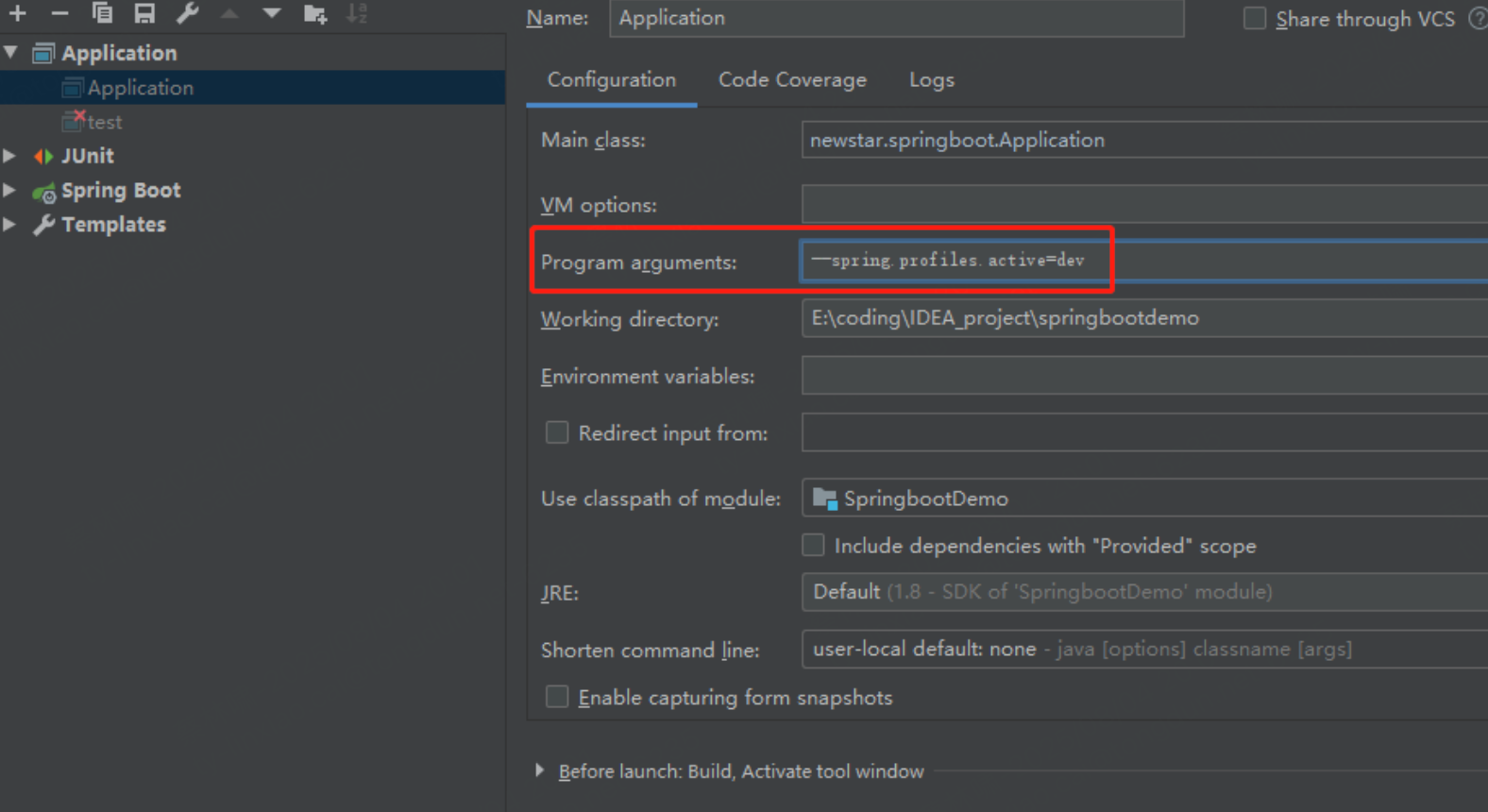
(1)运行参数
将 program arguments 的参数设置为 --spring.profiles.active=dev
虚拟机参数
将 VM options 的参数设置为 -Dspring.profiles.active=dev
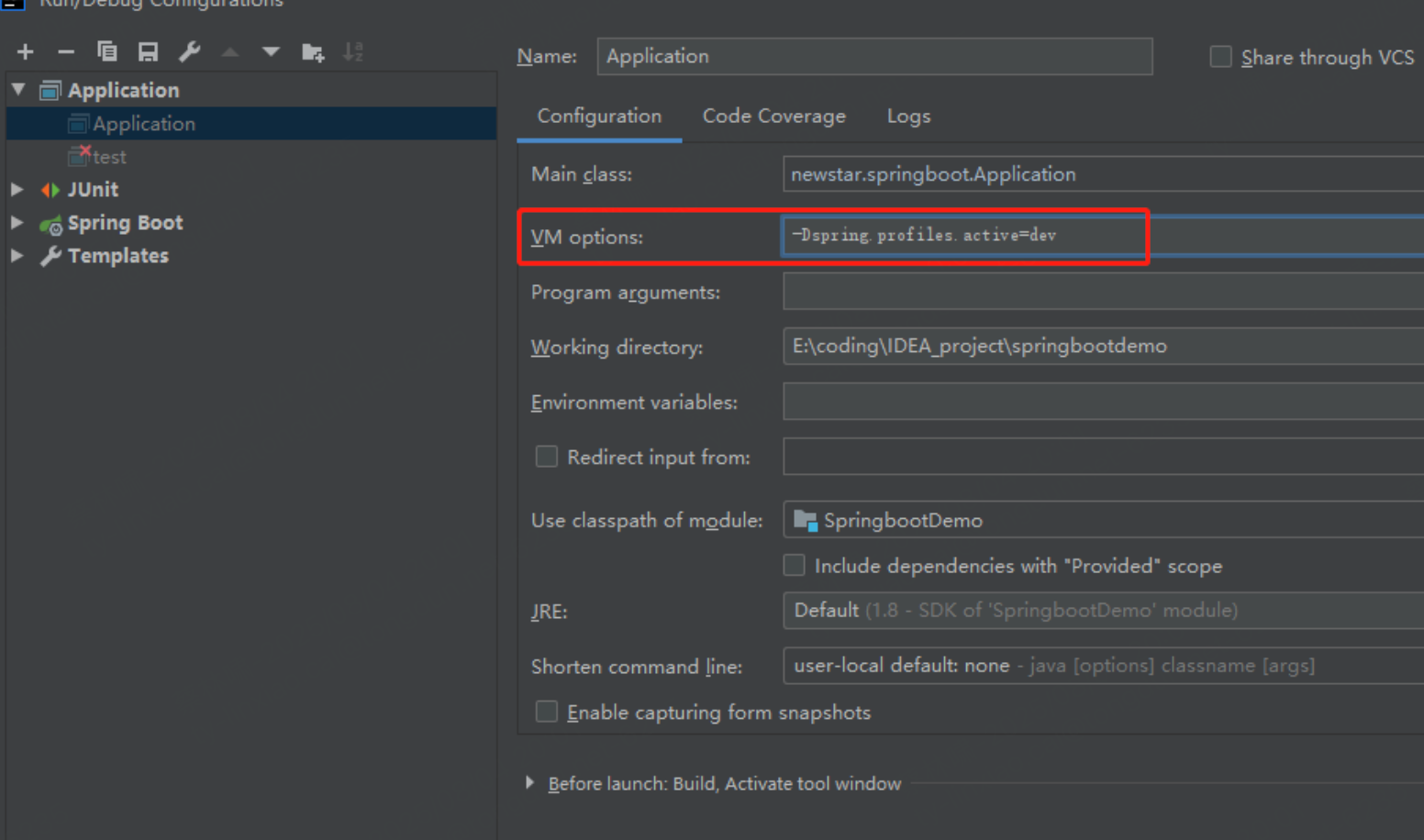
命令行参数激活 > IDEA参数激活 > 配置文件激活, 优先级高的会覆盖优先级低的激活配置
在我们的配置文件中, 存在一个固有的规律
Springboot中存在很多xxxAutoConfiguration.java, 会有很多默认值, 而xxxProperties.java和我们的配置文件绑定, 我们可以通过配置文件改变xxxAutoConfiguration.java中的默认值, 从而达到我们想要的效果
可以通过debug=true, 查看哪些配置类生效了, 哪些配置类没有生效
SpringBoot Web开发
源码: WebMvcAutoConfiguration.addResourceHandlers()
在SpringBoot中, 我们可以使用以下方式处理静态资源:
- 使用webjars, 导入webjars的maven依赖
- 访问路径: http://localhost:8080/webjars/
- 直接在resource下创建目录: public, static, /**, resources
- 访问路径: http://localhost:8080/
- 优先级: resources > static(默认) > public
扩展SpringMVC
官网地址: https://docs.spring.io/spring-boot/docs/2.2.5.RELEASE/reference/htmlsingle/#boot-features-spring-mvc-auto-configuration
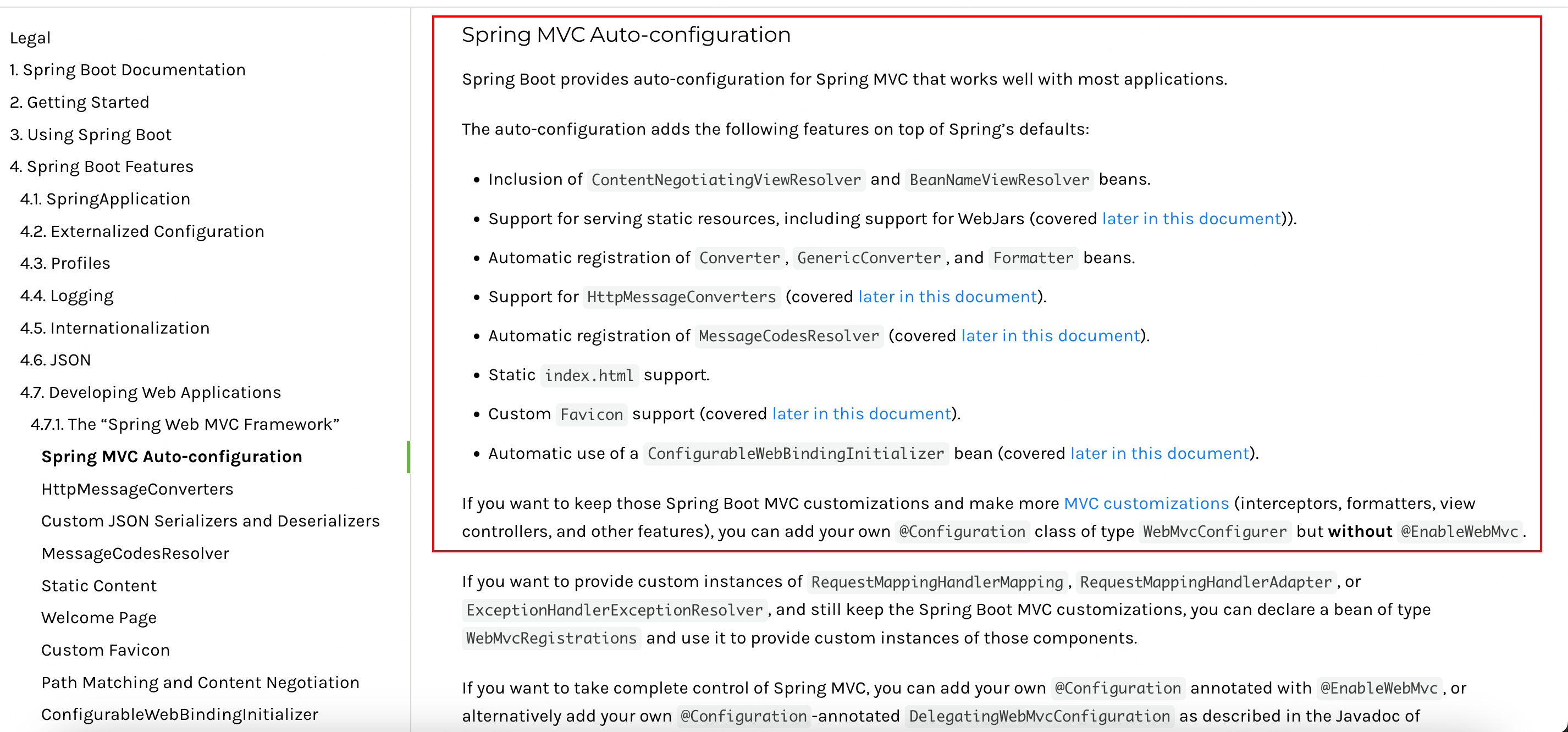
Spring MVC Auto-configuration
// Spring Boot为Spring MVC提供了自动配置,它可以很好地与大多数应用程序一起工作。
Spring Boot provides auto-configuration for Spring MVC that works well with most applications.
// 自动配置在Spring默认设置的基础上添加了以下功能:
The auto-configuration adds the following features on top of Spring’s defaults:
// 包含视图解析器
Inclusion of ContentNegotiatingViewResolver and BeanNameViewResolver beans.
// 支持静态资源文件夹的路径,以及webjars
Support for serving static resources, including support for WebJars
// 自动注册了Converter:
// 转换器,这就是我们网页提交数据到后台自动封装成为对象的东西,比如把"1"字符串自动转换为int类型
// Formatter:【格式化器,比如页面给我们了一个2019-8-10,它会给我们自动格式化为Date对象】
Automatic registration of Converter, GenericConverter, and Formatter beans.
// HttpMessageConverters
// SpringMVC用来转换Http请求和响应的的,比如我们要把一个User对象转换为JSON字符串,可以去看官网文档解释;
Support for HttpMessageConverters (covered later in this document).
// 定义错误代码生成规则的
Automatic registration of MessageCodesResolver (covered later in this document).
// 首页定制
Static index.html support.
// 图标定制
Custom Favicon support (covered later in this document).
// 初始化数据绑定器:帮我们把请求数据绑定到JavaBean中!
Automatic use of a ConfigurableWebBindingInitializer bean (covered later in this document).

/*
如果您希望保留Spring Boot MVC功能,并且希望添加其他MVC配置(拦截器、格式化程序、视图控制器和其他功能),则可以添加自己
的@configuration类,类型为webmvcconfiguer,但不添加@EnableWebMvc。如果希望提供
RequestMappingHandlerMapping、RequestMappingHandlerAdapter或ExceptionHandlerExceptionResolver的自定义
实例,则可以声明WebMVCregistrationAdapter实例来提供此类组件。
*/
If you want to keep Spring Boot MVC features and you want to add additional MVC configuration
(interceptors, formatters, view controllers, and other features), you can add your own
@Configuration class of type WebMvcConfigurer but without @EnableWebMvc. If you wish to provide
custom instances of RequestMappingHandlerMapping, RequestMappingHandlerAdapter, or
ExceptionHandlerExceptionResolver, you can declare a WebMvcRegistrationsAdapter instance to provide such components.

// 如果您想完全控制Spring MVC,可以添加自己的@Configuration,并用@EnableWebMvc进行注释。
If you want to take complete control of Spring MVC, you can add your own @Configuration annotated with @EnableWebMvc.
ContentNegotiatingViewResolver 内容协商视图解析器
自动配置了ViewResolver,就是我们之前学习的SpringMVC的视图解析器;
即根据方法的返回值取得视图对象(View),然后由视图对象决定如何渲染(转发,重定向)。
我们去看看这里的源码:我们找到 WebMvcAutoConfiguration , 然后搜索ContentNegotiatingViewResolver。找到如下方法!
@Bean
@ConditionalOnBean(ViewResolver.class)
@ConditionalOnMissingBean(name = "viewResolver", value = ContentNegotiatingViewResolver.class)
public ContentNegotiatingViewResolver viewResolver(BeanFactory beanFactory) {
    ContentNegotiatingViewResolver resolver = new ContentNegotiatingViewResolver();
    resolver.setContentNegotiationManager(beanFactory.getBean(ContentNegotiationManager.class));
    // ContentNegotiatingViewResolver使用所有其他视图解析器来定位视图,因此它应该具有较高的优先级
    resolver.setOrder(Ordered.HIGHEST_PRECEDENCE);
    return resolver;
}
我们可以点进这类看看!找到对应的解析视图的代码;
@Nullable // 注解说明:@Nullable 即参数可为null
public View resolveViewName(String viewName, Locale locale) throws Exception {
    RequestAttributes attrs = RequestContextHolder.getRequestAttributes();
    Assert.state(attrs instanceof ServletRequestAttributes, "No current ServletRequestAttributes");
    List<MediaType> requestedMediaTypes = this.getMediaTypes(((ServletRequestAttributes)attrs).getRequest());
    if (requestedMediaTypes != null) {
        // 获取候选的视图对象
        List<View> candidateViews = this.getCandidateViews(viewName, locale, requestedMediaTypes);
        // 选择一个最适合的视图对象,然后把这个对象返回
        View bestView = this.getBestView(candidateViews, requestedMediaTypes, attrs);
        if (bestView != null) {
            return bestView;
        }
    }
    // .....
}
我们继续点进去看,他是怎么获得候选的视图的呢?
getCandidateViews中看到他是把所有的视图解析器拿来,进行while循环,挨个解析!
Iterator var5 = this.viewResolvers.iterator();
所以得出结论:ContentNegotiatingViewResolver 这个视图解析器就是用来组合所有的视图解析器的
我们再去研究下他的组合逻辑,看到有个属性viewResolvers,看看它是在哪里进行赋值的!
protected void initServletContext(ServletContext servletContext) {
    // 这里它是从beanFactory工具中获取容器中的所有视图解析器
    // ViewRescolver.class 把所有的视图解析器来组合的
    Collection<ViewResolver> matchingBeans = BeanFactoryUtils.beansOfTypeIncludingAncestors(this.obtainApplicationContext(), ViewResolver.class).values();
    ViewResolver viewResolver;
    if (this.viewResolvers == null) {
        this.viewResolvers = new ArrayList(matchingBeans.size());
    }
    // ...............
}
自定义视图解析器
1、我们在我们的主程序中去写一个视图解析器来试试
@Bean //放到bean中
public ViewResolver myViewResolver(){
    return new MyViewResolver();
}

//我们写一个静态内部类,视图解析器就需要实现ViewResolver接口
private static class MyViewResolver implements ViewResolver{
    @Override
    public View resolveViewName(String s, Locale locale) throws Exception {
        return null;
    }
}
2、怎么看我们自己写的视图解析器有没有起作用呢?
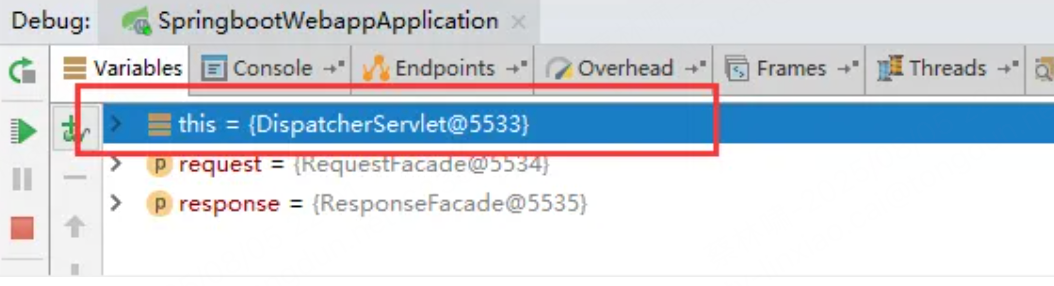
我们给 DispatcherServlet 中的 doDispatch方法 加个断点进行调试一下,因为所有的请求都会走到这个方法中

3、我们启动我们的项目,然后随便访问一个页面,看一下Debug信息;
找到this
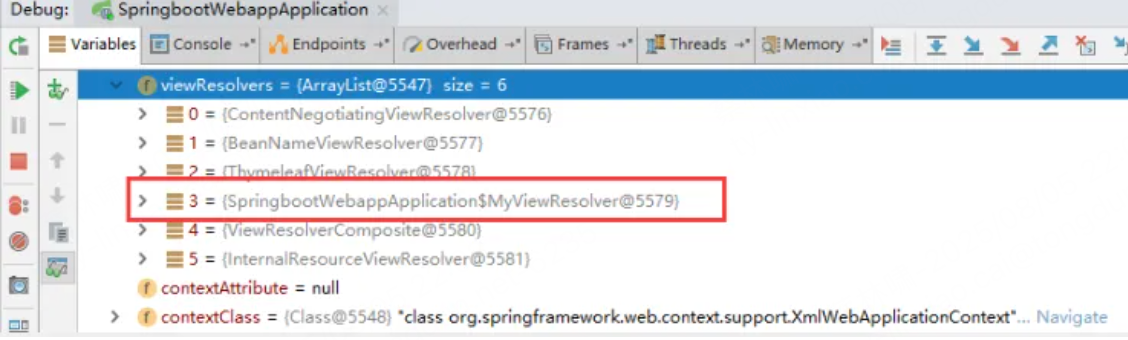
找到视图解析器,我们看到我们自己定义的就在这里了;
转换器和格式化器
@Bean
@Override
public FormattingConversionService mvcConversionService() {
    // 拿到配置文件中的格式化规则
    WebConversionService conversionService =
        new WebConversionService(this.mvcProperties.getDateFormat());
    addFormatters(conversionService);
    return conversionService;
}


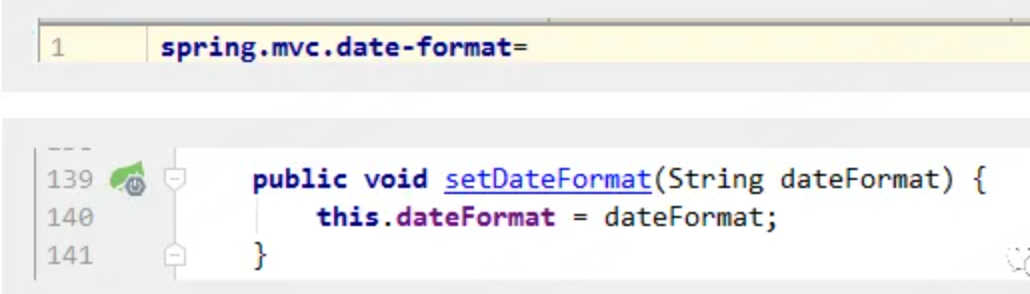
public String getDateFormat() {
    return this.dateFormat;
}

/**
* Date format to use. For instance, `dd/MM/yyyy`. 默认的
 */
private String dateFormat;
可以看到在我们的Properties文件中,我们可以进行自动配置它!
如果配置了自己的格式化方式,就会注册到Bean中生效,我们可以在配置文件中配置日期格式化的规则
扩展使用SpringMVC
官方文档说明
  If you want to keep Spring Boot MVC features and you want to add additional MVC configuration (interceptors, formatters, view controllers, and other features), you can add your own @Configuration class of type WebMvcConfigurer but without @EnableWebMvc. If you wish to provide custom instances of RequestMappingHandlerMapping, RequestMappingHandlerAdapter, or ExceptionHandlerExceptionResolver, you can declare a WebMvcRegistrationsAdapter instance to provide such components.
  如果你想保留Spring Boot MVC功能,并想添加额外的MVC配置(拦截器、格式化器、视图控制器和其他功能),你可以添加自己的WebMvcConfigurer类型的@configuration类,但不需要@EnableWebVC。如果您希望提供RequestMappingHandlerMapping、RequestMappingHandler Adapter或ExceptionHandlerExceptionResolver的自定义实例,您可以声明一个WebMvcRegistrationsAdapter实例来提供此类组件。
我们要做的就是编写一个@Configuration注解类,并且类型要为WebMvcConfigurer,还不能标注@EnableWebMvc注解;
//因为类型要求为WebMvcConfigurer,所以我们实现其接口
//可以使用自定义类扩展MVC的功能
@Configuration
public class MyMvcConfig implements WebMvcConfigurer {

    @Override
    public void addViewControllers(ViewControllerRegistry registry) {
        // 浏览器发送/test , 就会跳转到test页面;
        registry.addViewController("/test").setViewName("test");
    }
}
原理
-
WebMvcAutoConfiguration 是 SpringMVC的自动配置类,里面有一个类WebMvcAutoConfigurationAdapter
-
这个类上有一个注解,在做其他自动配置时会导入:@Import(EnableWebMvcConfiguration.class)
-
我们点进EnableWebMvcConfiguration这个类看一下,它继承了一个父类:DelegatingWebMvcConfiguration
-
public class DelegatingWebMvcConfiguration extends WebMvcConfigurationSupport { private final WebMvcConfigurerComposite configurers = new WebMvcConfigurerComposite(); // 从容器中获取所有的webmvcConfigurer @Autowired(required = false) public void setConfigurers(List<WebMvcConfigurer> configurers) { if (!CollectionUtils.isEmpty(configurers)) { this.configurers.addWebMvcConfigurers(configurers); } } } -
我们可以在这个类中去寻找一个我们刚才设置的viewController当做参考,发现它调用了一个
protected void addViewControllers(ViewControllerRegistry registry) { this.configurers.addViewControllers(registry); } -
public void addViewControllers(ViewControllerRegistry registry) { Iterator var2 = this.delegates.iterator(); while(var2.hasNext()) { // 将所有的WebMvcConfigurer相关配置来一起调用!包括我们自己配置的和Spring给我们配置的 WebMvcConfigurer delegate = (WebMvcConfigurer)var2.next(); delegate.addViewControllers(registry); } } -
结论:所有的WebMvcConfiguration都会被作用,不止Spring自己的配置类,我们自己的配置类当然也会被调用
全面接管SpringMVC
If you want to take complete control of Spring MVC , you can add your own @Configuration annotated with @EnableWebMvc.
全面接管即:SpringBoot对SpringMVC的自动配置不需要了,所有都是我们自己去配置!
只需在我们的配置类中要加一个@EnableWebMvc。
当然,我们开发中,不推荐使用全面接管SpringMVC
源码:
-
这里发现它是导入了一个类,我们可以继续进去看
@Import({DelegatingWebMvcConfiguration.class}) public @interface EnableWebMvc { } -
它继承了一个父类 WebMvcConfigurationSupport
public class DelegatingWebMvcConfiguration extends WebMvcConfigurationSupport { // ...... } -
WebMVC自动配置类
@Configuration(proxyBeanMethods = false) @ConditionalOnWebApplication(type = Type.SERVLET) @ConditionalOnClass({ Servlet.class, DispatcherServlet.class, WebMvcConfigurer.class }) // 这个注解的意思就是:容器中没有这个组件的时候,这个自动配置类才生效 @ConditionalOnMissingBean(WebMvcConfigurationSupport.class) @AutoConfigureOrder(Ordered.HIGHEST_PRECEDENCE + 10) @AutoConfigureAfter({ DispatcherServletAutoConfiguration.class, TaskExecutionAutoConfiguration.class, ValidationAutoConfiguration.class }) public class WebMvcAutoConfiguration { } -
总结一句话:@EnableWebMvc将WebMvcConfigurationSupport组件导入进来了;而导入的WebMvcConfigurationSupport只是SpringMVC最基本的功能!
SpringBoot实现国际化
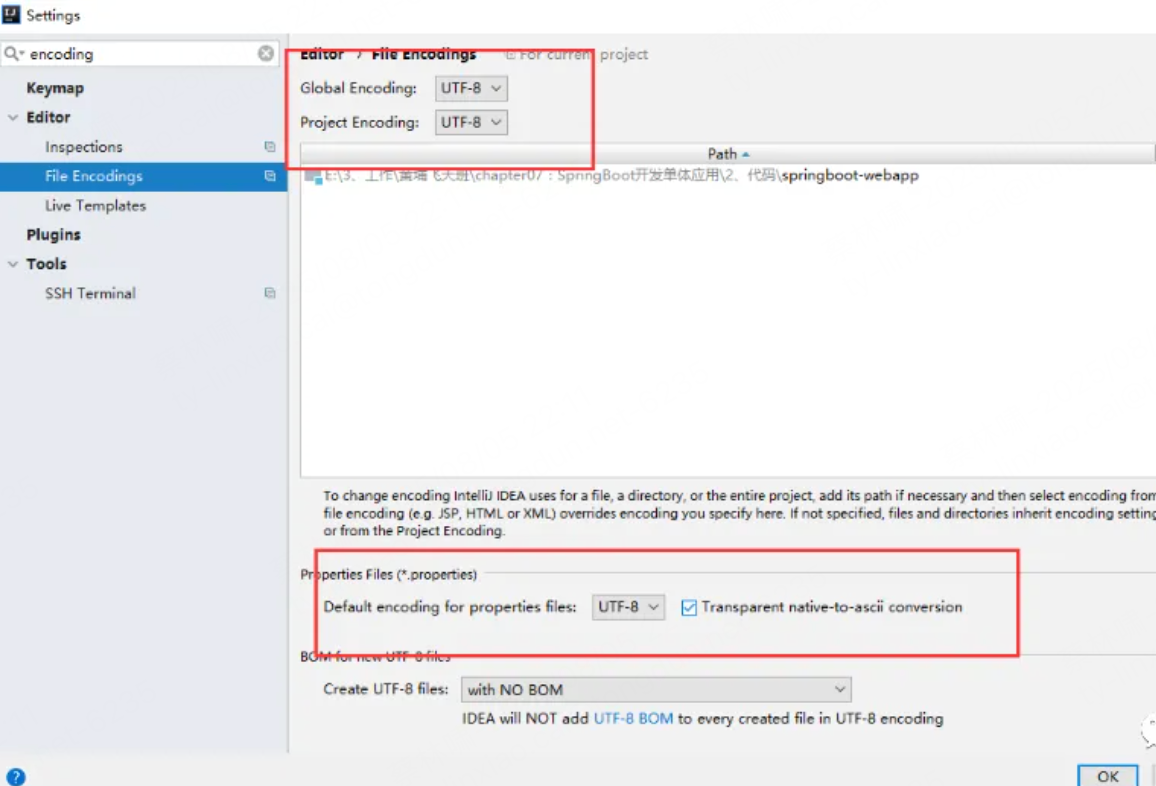
-
先在IDEA中统一设置properties的编码问题!
-
配置文件编写
-
我们在resources资源文件下新建一个i18n目录,存放国际化配置文件
-
创建login.properties文件, login_zh_CN.properties文件, login_en_US.properties文件
-
login.properties :默认
login.btn=登录 login.password=密码 login.remember=记住我 login.tip=请登录 login.username=用户名 -
英文
login.btn=Sign in login.password=Password login.remember=Remember me login.tip=Please sign in login.username=Username -
中文
login.btn=登录
login.password=密码
login.remember=记住我
login.tip=请登录
login.username=用户名
-
-
配置文件为何生效
- SpringBoot对国际化的自动配置类: MessageSourceAutoConfiguration, 里面有一个方法,这里发现SpringBoot已经自动配置好了管理我们国际化资源文件的组件 ResourceBundleMessageSource
// 获取 properties 传递过来的值进行判断 @Bean public MessageSource messageSource(MessageSourceProperties properties) { ResourceBundleMessageSource messageSource = new ResourceBundleMessageSource(); if (StringUtils.hasText(properties.getBasename())) { // 设置国际化文件的基础名(去掉语言国家代码的) messageSource.setBasenames( StringUtils.commaDelimitedListToStringArray( StringUtils.trimAllWhitespace(properties.getBasename()))); } if (properties.getEncoding() != null) { messageSource.setDefaultEncoding(properties.getEncoding().name()); } messageSource.setFallbackToSystemLocale(properties.isFallbackToSystemLocale()); Duration cacheDuration = properties.getCacheDuration(); if (cacheDuration != null) { messageSource.setCacheMillis(cacheDuration.toMillis()); } messageSource.setAlwaysUseMessageFormat(properties.isAlwaysUseMessageFormat()); messageSource.setUseCodeAsDefaultMessage(properties.isUseCodeAsDefaultMessage()); return messageSource; } -
application.properties中需要配置国际化的文件路径
spring.messages.basename=i18n.login -
配置国际化解析
在Spring中有一个国际化的Locale (区域信息对象);里面有一个叫做LocaleResolver (获取区域信息对象)的解析器!
@Bean
@ConditionalOnMissingBean
@ConditionalOnProperty(prefix = "spring.mvc", name = "locale")
public LocaleResolver localeResolver() {
    // 容器中没有就自己配,有的话就用用户配置的
    if (this.mvcProperties.getLocaleResolver() == WebMvcProperties.LocaleResolver.FIXED) {
        return new FixedLocaleResolver(this.mvcProperties.getLocale());
    }
    // 接收头国际化分解
    AcceptHeaderLocaleResolver localeResolver = new AcceptHeaderLocaleResolver();
    localeResolver.setDefaultLocale(this.mvcProperties.getLocale());
    return localeResolver;
}
AcceptHeaderLocaleResolver 这个类中有一个方法
public Locale resolveLocale(HttpServletRequest request) {
    Locale defaultLocale = this.getDefaultLocale();
    // 默认的就是根据请求头带来的区域信息获取Locale进行国际化
    if (defaultLocale != null && request.getHeader("Accept-Language") == null) {
        return defaultLocale;
    } else {
        Locale requestLocale = request.getLocale();
        List<Locale> supportedLocales = this.getSupportedLocales();
        if (!supportedLocales.isEmpty() && !supportedLocales.contains(requestLocale)) {
            Locale supportedLocale = this.findSupportedLocale(request, supportedLocales);
            if (supportedLocale != null) {
                return supportedLocale;
            } else {
                return defaultLocale != null ? defaultLocale : requestLocale;
            }
        } else {
            return requestLocale;
        }
    }
}
我们现在想点击链接让我们的国际化资源生效,就需要让我们自己的Locale生效
-
新增处理的组件类
package com.kuang.component; import org.springframework.util.StringUtils; import org.springframework.web.servlet.LocaleResolver; import javax.servlet.http.HttpServletRequest; import javax.servlet.http.HttpServletResponse; import java.util.Locale; //可以在链接上携带区域信息 public class MyLocaleResolver implements LocaleResolver { //解析请求 @Override public Locale resolveLocale(HttpServletRequest request) { String language = request.getParameter("l"); Locale locale = Locale.getDefault(); // 如果没有获取到就使用系统默认的 //如果请求链接不为空 if (!StringUtils.isEmpty(language)){ //分割请求参数 String[] split = language.split("_"); //国家,地区 locale = new Locale(split[0],split[1]); } return locale; } @Override public void setLocale(HttpServletRequest httpServletRequest, HttpServletResponse httpServletResponse, Locale locale) { } } -
为了让我们的区域化信息能够生效,我们需要再配置一下这个组件!在我们自己的MvcConofig下添加bean
@Bean
public LocaleResolver localeResolver(){
    return new MyLocaleResolver();
}
SpringBoot集成JDBC
对于数据访问层,无论是 SQL(关系型数据库) 还是 NOSQL(非关系型数据库),Spring Boot 底层都是采用 Spring Data 的方式进行统一处理。
Spring Boot 底层都是采用 Spring Data 的方式进行统一处理各种数据库,Spring Data 也是 Spring 中与 Spring Boot、Spring Cloud 等齐名的知名项目。
Sping Data 官网:https://spring.io/projects/spring-data
数据库相关的启动器 :可以参考官方文档:https://docs.spring.io/spring-boot/docs/2.2.5.RELEASE/reference/htmlsingle/#using-boot-starter
创建测试项目测试数据源
-
新建SpringBoot项目
-
导入maven依赖
<dependency> <groupId>org.springframework.boot</groupId> <artifactId>spring-boot-starter-jdbc</artifactId> </dependency> <dependency> <groupId>mysql</groupId> <artifactId>mysql-connector-java</artifactId> <scope>runtime</scope> </dependency> -
编写配置文件
spring: datasource: username: root password: 123456 #?serverTimezone=UTC解决时区的报错 url: jdbc:mysql://localhost:3306/springboot?serverTimezone=UTC&useUnicode=true&characterEncoding=utf-8 driver-class-name: com.mysql.cj.jdbc.Driver #=============================================== com.mysql.jdbc.Driver 是 mysql-connector-java 5中的, com.mysql.cj.jdbc.Driver 是 mysql-connector-java 6以及以上中的 #=============================================== -
直接测试
@SpringBootTest
class SpringbootDataJdbcApplicationTests {

    //DI注入数据源
    @Autowired
    DataSource dataSource;

    @Test
    public void contextLoads() throws SQLException {
        //看一下默认数据源
        System.out.println(dataSource.getClass());
        //获得连接
        Connection connection =   dataSource.getConnection();
        System.out.println(connection);
        //关闭连接
        connection.close();
    }
}
结果:我们可以看到默认给我们配置的数据源为 : class com.zaxxer.hikari.HikariDataSource
为什么默认数据源是class com.zaxxer.hikari.HikariDataSource
-
我们可以通过全局搜索: DataSourceAutoConfiguration
- 它是 @AutoConfiguration 标注的自动配置类(Spring Boot 2.7+ 里的新注解,相当于以前的 @Configuration + META-INF/spring.factories 注册方式)。
- 专门用于自动配置 DataSource(数据库连接池)。
- 会根据类路径的依赖、配置文件的 spring.datasource 属性,以及环境条件,来决定:
- 用嵌入式数据库(H2、Derby 等)还是连接池(Hikari、Tomcat JDBC Pool、DBCP2…)
- 最终选用哪种连接池实现
- 我们可以通过查看源码的方式, 发现DataSourceAutoConfiguration分为两大类配置:
- EmbeddedDatabaseConfiguration: 嵌入式
- 如果没配置数据源 URL 且类路径中有 H2/Derby 等,就用嵌入式数据库。
- PooledDataSourceConfiguration: 连接池
- 如果满足有连接池可用的条件,就加载这个配置类
- 它会 @Import 多个数据源配置类:
- Hikari(优先)
- Tomcat JDBC Pool
- DBCP2
- Oracle UCP
- Generic(兜底)
- 重点:导入顺序是固定的,Hikari 在最前面,且 matchIfMissing = true,所以默认就选 Hikari
- EmbeddedDatabaseConfiguration: 嵌入式
-
决定是否走连接池的条件
static class PooledDataSourceCondition extends AnyNestedCondition {
    @ConditionalOnProperty(prefix = "spring.datasource", name = "type")
    static class ExplicitType {}
    @Conditional(PooledDataSourceAvailableCondition.class)
    static class PooledDataSourceAvailable {}
}

显式指定 type → 一定用连接池
没指定 → 检查类路径是否有支持的连接池类(Hikari、Tomcat JDBC Pool、DBCP2…)
JdbcTemplate
Spring对数据库的操作在jdbc上面做了深层次的封装,使用spring的注入功能,可以把DataSource注册到JdbcTemplate之中。
JdbcTemplate位于`spring-jdbc-xxx.RELEASE.jar中。其全限定命名为org.springframework.jdbc.core.JdbcTemplate。要使用JdbcTemlate还需一个spring-tx-xxx.RELEASE.jar这个包包含了一下事务和异常控制
JdbcTemplate主要提供以下五类方法:
- execute方法:可以用于执行任何SQL语句,一般用于执行DDL语句;
- update方法及batchUpdate方法:update方法用于执行新增、修改、删除等语句;batchUpdate方法用于执行批处理相关语句;
- query方法及queryForXXX方法:用于执行查询相关语句;
- call方法:用于执行存储过程、函数相关语句
测试
@RestController
@RequestMapping("/jdbc")
public class JdbcController {

    /**
     * Spring Boot 默认提供了数据源,默认提供了 org.springframework.jdbc.core.JdbcTemplate
     * JdbcTemplate 中会自己注入数据源,用于简化 JDBC操作
     * 还能避免一些常见的错误,使用起来也不用再自己来关闭数据库连接
     */
    @Autowired
    JdbcTemplate jdbcTemplate;

    //查询employee表中所有数据
    //List 中的1个 Map 对应数据库的 1行数据
    //Map 中的 key 对应数据库的字段名,value 对应数据库的字段值
    @GetMapping("/list")
    public List<Map<String, Object>> userList(){
        String sql = "select * from employee";
        List<Map<String, Object>> maps = jdbcTemplate.queryForList(sql);
        return maps;
    }

    //新增一个用户
    @GetMapping("/add")
    public String addUser(){
        //插入语句,注意时间问题
        String sql = "insert into employee(last_name, email,gender,department,birth)" +
                " values ('狂神说','24736743@qq.com',1,101,'"+ new Date().toLocaleString() +"')";
        jdbcTemplate.update(sql);
        //查询
        return "addOk";
    }

    //修改用户信息
    @GetMapping("/update/{id}")
    public String updateUser(@PathVariable("id") int id){
        //插入语句
        String sql = "update employee set last_name=?,email=? where id="+id;
        //数据
        Object[] objects = new Object[2];
        objects[0] = "秦疆";
        objects[1] = "24736743@sina.com";
        jdbcTemplate.update(sql,objects);
        //查询
        return "updateOk";
    }

    //删除用户
    @GetMapping("/delete/{id}")
    public String delUser(@PathVariable("id") int id){
        //插入语句
        String sql = "delete from employee where id=?";
        jdbcTemplate.update(sql,id);
        //查询
        return "deleteOk";
    }

}
SpringBoot集成Druid数据源
Druid 是阿里巴巴开源平台上一个数据库连接池实现,结合了 C3P0、DBCP 等 DB 池的优点,同时加入了日志监控。
Druid 可以很好的监控 DB 池连接和 SQL 的执行情况,天生就是针对监控而生的 DB 连接池
Github项目地址 https://github.com/alibaba/druid
文档 https://github.com/alibaba/druid/wiki/%E5%B8%B8%E8%A7%81%E9%97%AE%E9%A2%98
下载 http://repo1.maven.org/maven2/com/alibaba/druid/
com.alibaba.druid.pool.DruidDataSource 基本配置参数如下:
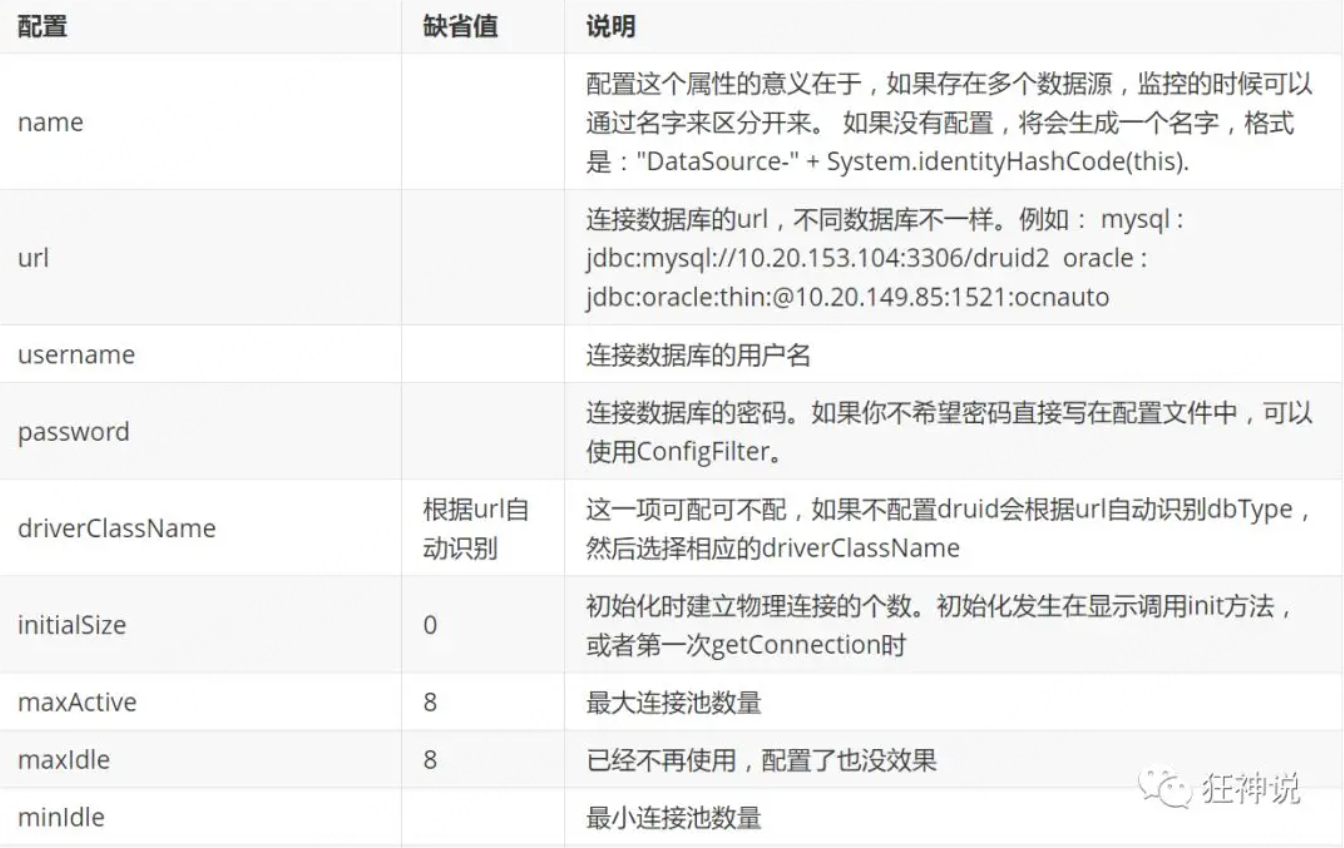
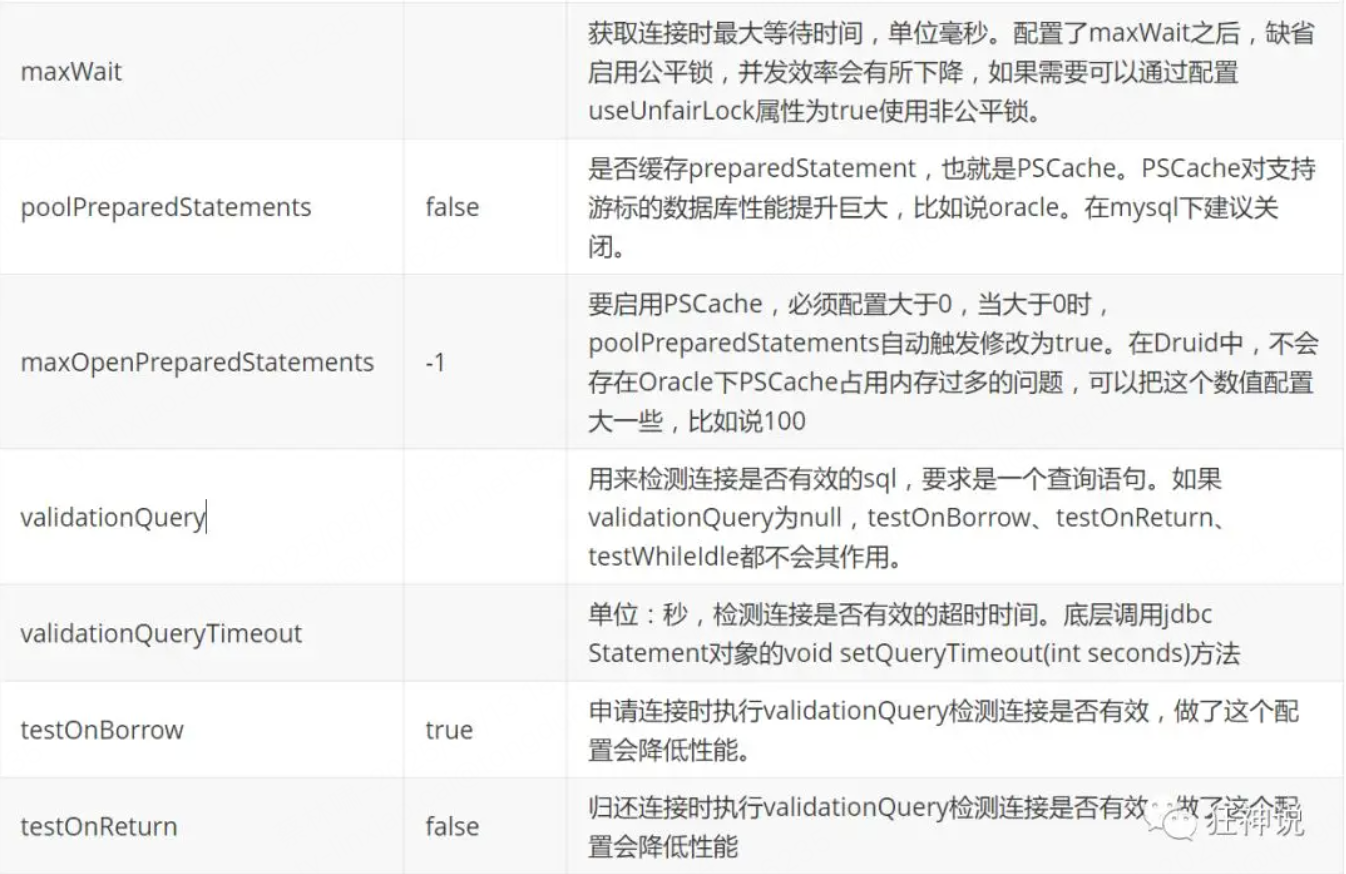
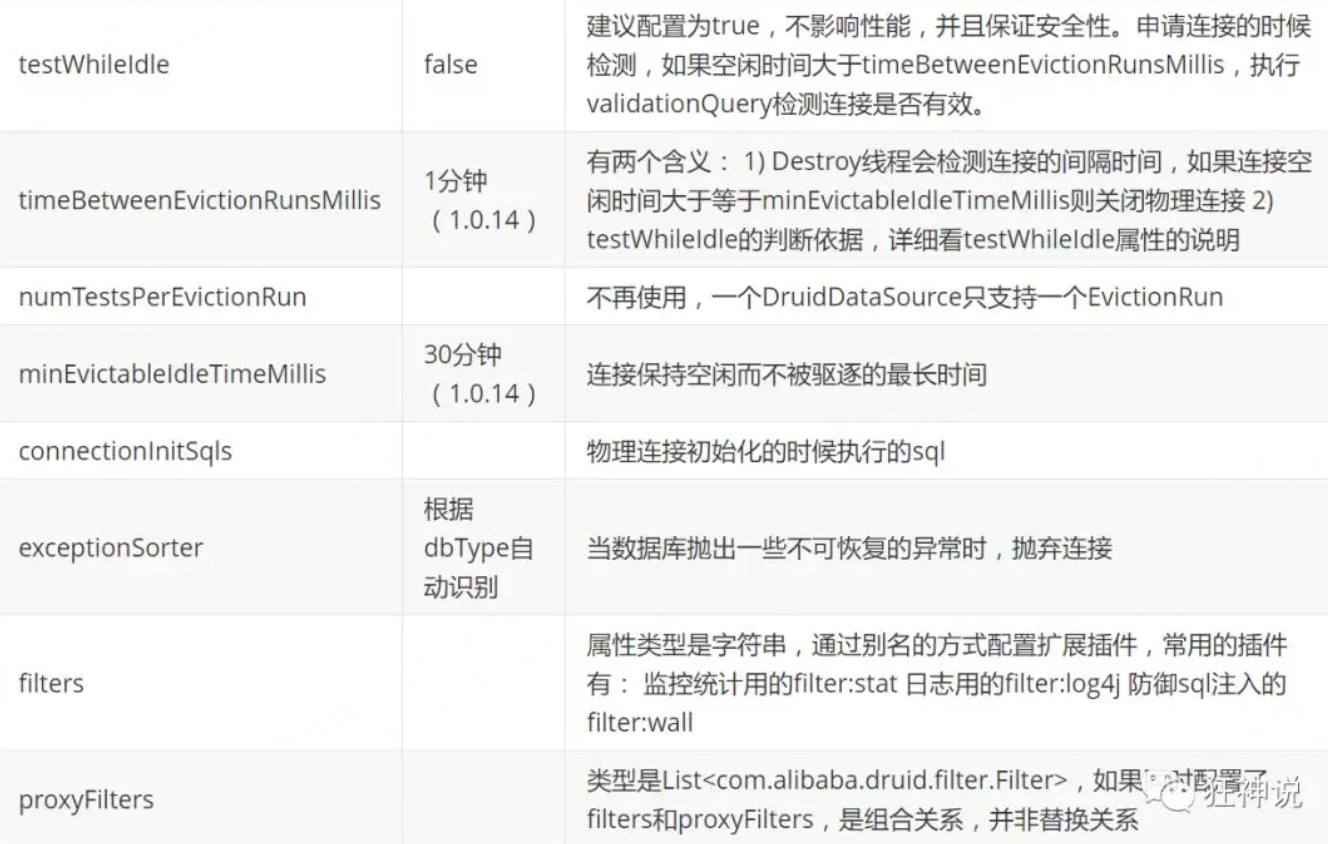
配置数据源
-
添加依赖
<!-- https://mvnrepository.com/artifact/com.alibaba/druid --> <dependency> <groupId>com.alibaba</groupId> <artifactId>druid</artifactId> <version>1.1.21</version> </dependency> -
切换数据源;
之前已经说过 Spring Boot 2.0 以上默认使用 com.zaxxer.hikari.HikariDataSource 数据源,但可以 通过 spring.datasource.type 指定数据源
-
设置数据源连接初始化大小、最大连接数、等待时间、最小连接数 等设置项
spring: datasource: username: root password: 123456 #?serverTimezone=UTC解决时区的报错 url: jdbc:mysql://localhost:3306/springboot?serverTimezone=UTC&useUnicode=true&characterEncoding=utf-8 driver-class-name: com.mysql.cj.jdbc.Driver type: com.alibaba.druid.pool.DruidDataSource #Spring Boot 默认是不注入这些属性值的,需要自己绑定 #druid 数据源专有配置 initialSize: 5 minIdle: 5 maxActive: 20 maxWait: 60000 timeBetweenEvictionRunsMillis: 60000 minEvictableIdleTimeMillis: 300000 validationQuery: SELECT 1 FROM DUAL testWhileIdle: true testOnBorrow: false testOnReturn: false poolPreparedStatements: true #配置监控统计拦截的filters,stat:监控统计、log4j:日志记录、wall:防御sql注入 #如果允许时报错 java.lang.ClassNotFoundException: org.apache.log4j.Priority #则导入 log4j 依赖即可,Maven 地址:https://mvnrepository.com/artifact/log4j/log4j filters: stat,wall,log4j maxPoolPreparedStatementPerConnectionSize: 20 useGlobalDataSourceStat: true connectionProperties: druid.stat.mergeSql=true;druid.stat.slowSqlMillis=500 -
导入Log4j 的依赖
<!-- https://mvnrepository.com/artifact/log4j/log4j --> <dependency> <groupId>log4j</groupId> <artifactId>log4j</artifactId> <version>1.2.17</version> </dependency> -
现在需要程序员自己为 DruidDataSource 绑定全局配置文件中的参数,再添加到容器中,而不再使用 Spring Boot 的自动生成了;我们需要 自己添加 DruidDataSource 组件到容器中,并绑定属性
@Configuration public class DruidConfig { /* 将自定义的 Druid数据源添加到容器中,不再让 Spring Boot 自动创建 绑定全局配置文件中的 druid 数据源属性到 com.alibaba.druid.pool.DruidDataSource从而让它们生效 @ConfigurationProperties(prefix = "spring.datasource"):作用就是将 全局配置文件中 前缀为 spring.datasource的属性值注入到 com.alibaba.druid.pool.DruidDataSource 的同名参数中 */ @ConfigurationProperties(prefix = "spring.datasource") @Bean public DataSource druidDataSource() { return new DruidDataSource(); } } -
测试
@SpringBootTest
class SpringbootDataJdbcApplicationTests {

    //DI注入数据源
    @Autowired
    DataSource dataSource;

    @Test
    public void contextLoads() throws SQLException {
        //看一下默认数据源
        System.out.println(dataSource.getClass());
        //获得连接
        Connection connection =   dataSource.getConnection();
        System.out.println(connection);

        DruidDataSource druidDataSource = (DruidDataSource) dataSource;
        System.out.println("druidDataSource 数据源最大连接数:" + druidDataSource.getMaxActive());
        System.out.println("druidDataSource 数据源初始化连接数:" + druidDataSource.getInitialSize());

        //关闭连接
        connection.close();
    }
}
配置Druid数据源监控
Druid 数据源具有监控的功能,并提供了一个 web 界面方便用户查看,类似安装路由器时,也提供了一个默认的 web 页面
-
设置 Druid 的后台管理页面,比如 登录账号、密码 等;配置后台管理
//配置 Druid 监控管理后台的Servlet; //内置 Servlet 容器时没有web.xml文件,所以使用 Spring Boot 的注册 Servlet 方式 @Bean public ServletRegistrationBean statViewServlet() { ServletRegistrationBean bean = new ServletRegistrationBean(new StatViewServlet(), "/druid/*"); // 这些参数可以在 com.alibaba.druid.support.http.StatViewServlet // 的父类 com.alibaba.druid.support.http.ResourceServlet 中找到 Map<String, String> initParams = new HashMap<>(); initParams.put("loginUsername", "admin"); //后台管理界面的登录账号 initParams.put("loginPassword", "123456"); //后台管理界面的登录密码 //后台允许谁可以访问 //initParams.put("allow", "localhost"):表示只有本机可以访问 //initParams.put("allow", ""):为空或者为null时,表示允许所有访问 initParams.put("allow", ""); //deny:Druid 后台拒绝谁访问 //initParams.put("kuangshen", "192.168.1.20");表示禁止此ip访问 //设置初始化参数 bean.setInitParameters(initParams); return bean; } -
访问 :http://localhost:8080/druid/login.html
-
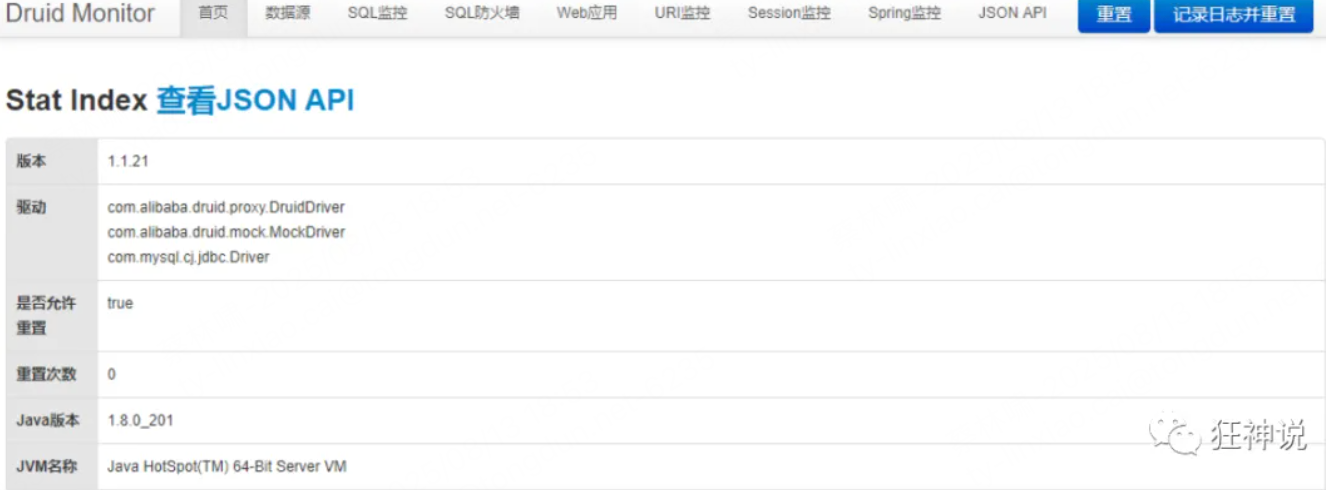
-
配置 Druid web 监控 filter 过滤器
//配置 Druid 监控 之  web 监控的 filter
//WebStatFilter:用于配置Web和Druid数据源之间的管理关联监控统计
@Bean
public FilterRegistrationBean webStatFilter() {
    FilterRegistrationBean bean = new FilterRegistrationBean();
    bean.setFilter(new WebStatFilter());

    //exclusions:设置哪些请求进行过滤排除掉,从而不进行统计
    Map<String, String> initParams = new HashMap<>();
    initParams.put("exclusions", "*.js,*.css,/druid/*,/jdbc/*");
    bean.setInitParameters(initParams);

    //"/*" 表示过滤所有请求
    bean.setUrlPatterns(Arrays.asList("/*"));
    return bean;
}
SpringBoot集成Mybatis框架
官方文档:http://mybatis.org/spring-boot-starter/mybatis-spring-boot-autoconfigure/
Maven仓库地址:https://mvnrepository.com/artifact/org.mybatis.spring.boot/mybatis-spring-boot-starter/2.1.1
-
导入依赖
<dependency> <groupId>org.mybatis.spring.boot</groupId> <artifactId>mybatis-spring-boot-starter</artifactId> <version>2.1.1</version> </dependency> -
配置数据库连接信息
spring: datasource: username: root password: 123456 #?serverTimezone=UTC解决时区的报错 url: jdbc:mysql://localhost:3306/springboot?serverTimezone=UTC&useUnicode=true&characterEncoding=utf-8 driver-class-name: com.mysql.cj.jdbc.Driver type: com.alibaba.druid.pool.DruidDataSource #Spring Boot 默认是不注入这些属性值的,需要自己绑定 #druid 数据源专有配置 initialSize: 5 minIdle: 5 maxActive: 20 maxWait: 60000 timeBetweenEvictionRunsMillis: 60000 minEvictableIdleTimeMillis: 300000 validationQuery: SELECT 1 FROM DUAL testWhileIdle: true testOnBorrow: false testOnReturn: false poolPreparedStatements: true #配置监控统计拦截的filters,stat:监控统计、log4j:日志记录、wall:防御sql注入 #如果允许时报错 java.lang.ClassNotFoundException: org.apache.log4j.Priority #则导入 log4j 依赖即可,Maven 地址:https://mvnrepository.com/artifact/log4j/log4j filters: stat,wall,log4j maxPoolPreparedStatementPerConnectionSize: 20 useGlobalDataSourceStat: true connectionProperties: druid.stat.mergeSql=true;druid.stat.slowSqlMillis=500 -
创建实体类
@Data @NoArgsConstructor @AllArgsConstructor public class Department { private Integer id; private String departmentName; } -
创建mapper目录以及对应的 Mapper 接口
//@Mapper : 表示本类是一个 MyBatis 的 Mapper @Mapper @Repository public interface DepartmentMapper { // 获取所有部门信息 List<Department> getDepartments(); // 通过id获得部门 Department getDepartment(Integer id); } -
对应的Mapper映射文件
<?xml version="1.0" encoding="UTF-8" ?> <!DOCTYPE mapper PUBLIC "-//mybatis.org//DTD Mapper 3.0//EN" "http://mybatis.org/dtd/mybatis-3-mapper.dtd"> <mapper namespace="com.kuang.mapper.DepartmentMapper"> <select id="getDepartments" resultType="Department"> select * from department; </select> <select id="getDepartment" resultType="Department" parameterType="int"> select * from department where id = #{id}; </select> </mapper> -
maven配置资源过滤问题
<resources> <resource> <directory>src/main/java</directory> <includes> <include>**/*.xml</include> </includes> <filtering>true</filtering> </resource> </resources> -
测试
安全框架
SpringSecurity
参考官网:https://spring.io/projects/spring-security
Spring Security是一个功能强大且高度可定制的身份验证和访问控制框架。它实际上是保护基于spring的应用程序的标准。
Spring Security是一个框架,侧重于为Java应用程序提供身份验证和授权
Spring Security 基于 Spring 框架,提供了一套 Web 应用安全性的完整解决方案。
一般来说,Web 应用的安全性包括用户认证(Authentication)和用户授权(Authorization)两个部分。
- 用户认证指的是验证某个用户是否为系统中的合法主体,也就是说用户能否访问该系统。
- 用户认证一般要求用户提供用户名和密码。系统通过校验用户名和密码来完成认证过程。
- 用户授权指的是验证某个用户是否有权限执行某个操作。在一个系统中,不同用户所具有的权限是不同的。比如对一个文件来说,有的用户只能进行读取,而有的用户可以进行修改。
- 一般来说,系统会为不同的用户分配不同的角色,而每个角色则对应一系列的权限。
- WebSecurityConfigurerAdapter:自定义Security策略
- AuthenticationManagerBuilder:自定义认证策略
- @EnableWebSecurity:开启WebSecurity模式
环境搭建
@Controller
public class RouterController {

   @RequestMapping({"/","/index"})
   public String index(){
       return "index";
  }

   @RequestMapping("/toLogin")
   public String toLogin(){
       return "views/login";
  }

   @RequestMapping("/level1/{id}")
   public String level1(@PathVariable("id") int id){
       return "views/level1/"+id;
  }

   @RequestMapping("/level2/{id}")
   public String level2(@PathVariable("id") int id){
       return "views/level2/"+id;
  }

   @RequestMapping("/level3/{id}")
   public String level3(@PathVariable("id") int id){
       return "views/level3/"+id;
  }

}
用户认证和授权
- 认证: Authentication
- 身份验证是关于验证您的凭据,如用户名/用户ID和密码,以验证您的身份。
- 身份验证通常通过用户名和密码完成,有时与身份验证因素结合使用
- 授权: Authorization
- 发生在系统成功验证您的身份后,最终会授予您访问资源(如信息,文件,数据库,资金,位置,几乎任何内容)的完全权限。
-
引入maven依赖
<dependency> <groupId>org.springframework.boot</groupId> <artifactId>spring-boot-starter-security</artifactId> </dependency> -
编写配置类
-
@EnableWebSecurity // 开启WebSecurity模式 public class SecurityConfig extends WebSecurityConfigurerAdapter { @Override protected void configure(HttpSecurity http) throws Exception { } } -
定制请求的授权规则
@Override protected void configure(HttpSecurity http) throws Exception { // 定制请求的授权规则 // 首页所有人可以访问 http.authorizeRequests().antMatchers("/").permitAll() .antMatchers("/level1/**").hasRole("vip1") .antMatchers("/level2/**").hasRole("vip2") .antMatchers("/level3/**").hasRole("vip3"); }- 测试一下:发现除了首页都进不去了!因为我们目前没有登录的角色,因为请求需要登录的角色拥有对应的权限才可以
-
在configure()方法中加入以下配置,开启自动配置的登录功能
// 开启自动配置的登录功能 // /login 请求来到登录页 // /login?error 重定向到这里表示登录失败 http.formLogin(); -
测试一下:发现,没有权限的时候,会跳转到登录的页面!
-
查看刚才登录页的注释信息;
我们可以定义认证规则,重写configure(AuthenticationManagerBuilder auth)方法
//定义认证规则 @Override protected void configure(AuthenticationManagerBuilder auth) throws Exception { //在内存中定义,也可以在jdbc中去拿.... auth.inMemoryAuthentication() .withUser("kuangshen").password("123456").roles("vip2","vip3") .and() .withUser("root").password("123456").roles("vip1","vip2","vip3") .and() .withUser("guest").password("123456").roles("vip1","vip2"); }-
测试,我们可以使用这些账号登录进行测试!发现会报错!
There is no PasswordEncoder mapped for the id “null”
-
原因,我们要将前端传过来的密码进行某种方式加密,否则就无法登录,修改代码
//定义认证规则
@Override
protected void configure(AuthenticationManagerBuilder auth) throws Exception {
   //在内存中定义,也可以在jdbc中去拿....
   //Spring security 5.0中新增了多种加密方式,也改变了密码的格式。
   //要想我们的项目还能够正常登陆,需要修改一下configure中的代码。我们要将前端传过来的密码进行某种方式加密
   //spring security 官方推荐的是使用bcrypt加密方式。

   auth.inMemoryAuthentication().passwordEncoder(new BCryptPasswordEncoder())
          .withUser("kuangshen").password(new BCryptPasswordEncoder().encode("123456")).roles("vip2","vip3")
          .and()
          .withUser("root").password(new BCryptPasswordEncoder().encode("123456")).roles("vip1","vip2","vip3")
          .and()
          .withUser("guest").password(new BCryptPasswordEncoder().encode("123456")).roles("vip1","vip2");
}
-
-
注销和权限控制
-
开启自动配置的注销的功能
//定制请求的授权规则 @Override protected void configure(HttpSecurity http) throws Exception { //.... //开启自动配置的注销的功能 // /logout 注销请求 http.logout(); } -
注销成功后,依旧可以跳转到首页
// .logoutSuccessUrl("/"); 注销成功来到首页
http.logout().logoutSuccessUrl("/");
记住我功能
-
开启记住我功能
//定制请求的授权规则 @Override protected void configure(HttpSecurity http) throws Exception { //。。。。。。。。。。。 //记住我 http.rememberMe(); } -
结论:登录成功后,将cookie发送给浏览器保存,以后登录带上这个cookie,只要通过检查就可以免登录了。如果点击注销,则会删除这个cookie
配置类完整代码
@EnableWebSecurity
public class SecurityConfig extends WebSecurityConfigurerAdapter {

   //定制请求的授权规则
   @Override
   protected void configure(HttpSecurity http) throws Exception {

       http.authorizeRequests().antMatchers("/").permitAll()
      .antMatchers("/level1/**").hasRole("vip1")
      .antMatchers("/level2/**").hasRole("vip2")
      .antMatchers("/level3/**").hasRole("vip3");


       //开启自动配置的登录功能:如果没有权限,就会跳转到登录页面!
           // /login 请求来到登录页
           // /login?error 重定向到这里表示登录失败
       http.formLogin()
          .usernameParameter("username")
          .passwordParameter("password")
          .loginPage("/toLogin")
          .loginProcessingUrl("/login"); // 登陆表单提交请求

       //开启自动配置的注销的功能
           // /logout 注销请求
           // .logoutSuccessUrl("/"); 注销成功来到首页

       http.csrf().disable();//关闭csrf功能:跨站请求伪造,默认只能通过post方式提交logout请求
       http.logout().logoutSuccessUrl("/");

       //记住我
       http.rememberMe().rememberMeParameter("remember");
  }

   //定义认证规则
   @Override
   protected void configure(AuthenticationManagerBuilder auth) throws Exception {
       //在内存中定义,也可以在jdbc中去拿....
       //Spring security 5.0中新增了多种加密方式,也改变了密码的格式。
       //要想我们的项目还能够正常登陆,需要修改一下configure中的代码。我们要将前端传过来的密码进行某种方式加密
       //spring security 官方推荐的是使用bcrypt加密方式。

       auth.inMemoryAuthentication().passwordEncoder(new BCryptPasswordEncoder())
              .withUser("kuangshen").password(new BCryptPasswordEncoder().encode("123456")).roles("vip2","vip3")
              .and()
              .withUser("root").password(new BCryptPasswordEncoder().encode("123456")).roles("vip1","vip2","vip3")
              .and()
              .withUser("guest").password(new BCryptPasswordEncoder().encode("123456")).roles("vip1","vip2");
  }
}
异步任务
//告诉Spring这是一个异步方法
@Async
public void hello(){
   try {
       Thread.sleep(3000);
  } catch (InterruptedException e) {
       e.printStackTrace();
  }
   System.out.println("业务进行中....");
}
SpringBoot就会自己开一个线程池,进行调用!但是要让这个注解生效,我们还需要在主程序上添加一个注解@EnableAsync ,开启异步注解功能
@EnableAsync //开启异步注解功能
@SpringBootApplication
public class SpringbootTaskApplication {

   public static void main(String[] args) {
       SpringApplication.run(SpringbootTaskApplication.class, args);
  }

}
邮件任务
邮件发送,在我们的日常开发中,也非常的多,Springboot也帮我们做了支持
-
邮件发送需要引入spring-boot-start-mail
<dependency> <groupId>org.springframework.boot</groupId> <artifactId>spring-boot-starter-mail</artifactId> </dependency> <!-其实是是引入了下面的依赖-> <dependency> <groupId>com.sun.mail</groupId> <artifactId>jakarta.mail</artifactId> <version>1.6.4</version> <scope>compile</scope> </dependency> -
SpringBoot 自动配置MailSenderAutoConfiguration

这个类中存在bean,JavaMailSenderImpl
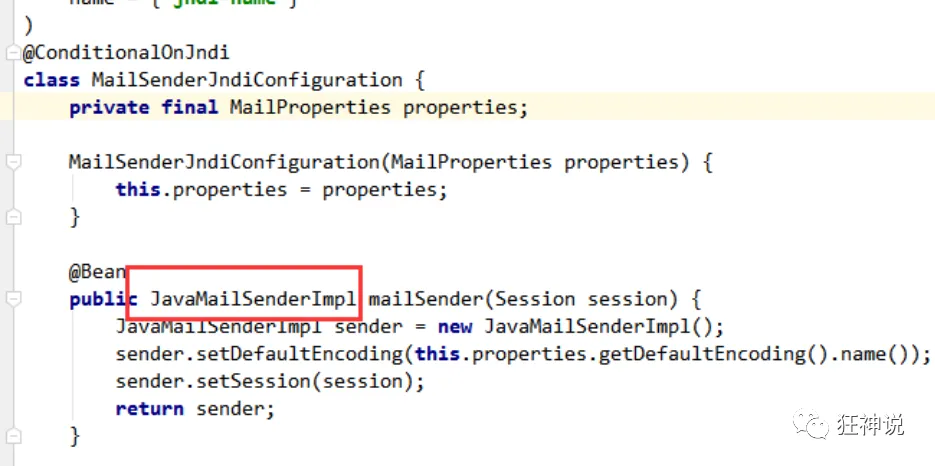
-
定义MailProperties内容,配置在application.yml中
配置类:
@ConfigurationProperties(
   prefix = "spring.mail"
)
public class MailProperties {
   private static final Charset DEFAULT_CHARSET;
   private String host;
   private Integer port;
   private String username;
   private String password;
   private String protocol = "smtp";
   private Charset defaultEncoding;
   private Map<String, String> properties;
   private String jndiName;
}
配置文件:
spring.mail.username=24736743@qq.com
spring.mail.password=你的qq授权码
spring.mail.host=smtp.qq.com
# qq需要配置ssl
spring.mail.properties.mail.smtp.ssl.enable=true
获取授权码:在QQ邮箱中的设置->账户->开启pop3和smtp服务:
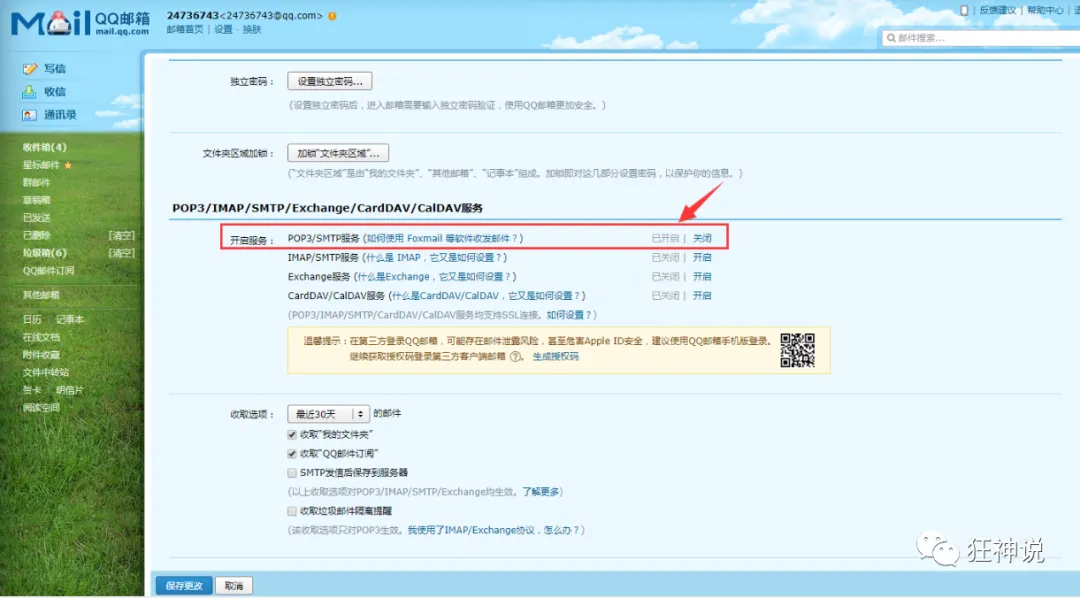
-
自动装配JavaMailSender
@Autowired JavaMailSenderImpl mailSender; @Test public void contextLoads() { //邮件设置1:一个简单的邮件 SimpleMailMessage message = new SimpleMailMessage(); message.setSubject("通知-明天来狂神这听课"); message.setText("今晚7:30开会"); message.setTo("24736743@qq.com"); message.setFrom("24736743@qq.com"); mailSender.send(message); } @Test public void contextLoads2() throws MessagingException { //邮件设置2:一个复杂的邮件 MimeMessage mimeMessage = mailSender.createMimeMessage(); MimeMessageHelper helper = new MimeMessageHelper(mimeMessage, true); helper.setSubject("通知-明天来狂神这听课"); helper.setText("<b style='color:red'>今天 7:30来开会</b>",true); //发送附件 helper.addAttachment("1.jpg",new File("")); helper.addAttachment("2.jpg",new File("")); helper.setTo("24736743@qq.com"); helper.setFrom("24736743@qq.com"); mailSender.send(mimeMessage); } -
测试邮件发送
定时执行任务
Spring为我们提供了异步执行任务调度的方式,提供了两个接口。
- TaskExecutor接口
- TaskScheduler接口
两个注解:
- @EnableScheduling
- @Scheduled
cron表达式:
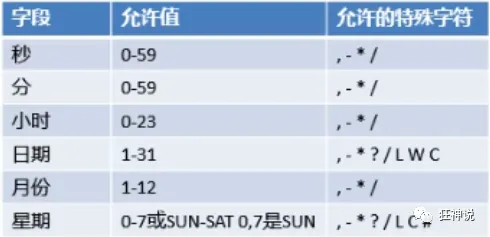
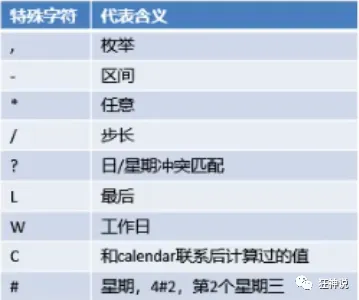
@Service
public class ScheduledService {

   //秒   分   时     日   月   周几
   //0 * * * * MON-FRI
   //注意cron表达式的用法;
   @Scheduled(cron = "0 * * * * 0-7")
   public void hello(){
       System.out.println("hello.....");
  }
}

// 开启定时任务
@EnableAsync //开启异步注解功能
@EnableScheduling //开启基于注解的定时任务
@SpringBootApplication
public class SpringbootTaskApplication {

   public static void main(String[] args) {
       SpringApplication.run(SpringbootTaskApplication.class, args);
  }

}





 扫一扫
扫一扫


 775
775

 被折叠的 条评论
为什么被折叠?
被折叠的 条评论
为什么被折叠?
 到【灌水乐园】发言





