


概述
一般集成了CommonAPI的应用,都需要先处理fidl和fdepl,生成源码后将源码组入工程,然后再编写CMakeLists.txt编译整个应用。
能否将fidl和fdepl作为工程的源码文件一起参与CMake编译,应该也是可以的,就是需要在CMakeLists.txt中,首先用自定义函数来处理fidl和fdepl文件,将fidl和fdepl的源码先生成出来,那肯定是可以的,分为下面几个步骤。
python脚本文件运行CommonAPI Generator
python脚本主要分为3个部分:解析参数,生成fidl的代码,生成fdepl的代码
对于fidl的代码生成,有如下几个重要参数
-sk
-dc // 公共代码的生成位置
-dp // Proxy代码的生成位置
-ds // Stub代码的生成位置
-dsk // Skeletion代码的生成位置
例如: commonapi-core-generator-linux-x86_64 -sk -dc ./gen/common/ -dp ./gen/proxy/ -ds ./gen/stub -dsk ./gen/skeleton ./HelloWorld.fidl
参数包括fidl和fdepl文件所在目录以及要生成的代码的所在目录,最终python脚本文件如下:
code_generator.py
import argparse
import os
import subprocess
import sys

def fidl_code_gen(args):
    in_dir = args.inputdir
    out_dir = args.outdir
    if (os.path.exists(in_dir)):
        fidl_path = os.path.join(in_dir, "*.fidl")
        core_command = 'commonapi-core-generator-linux-x86_64 -sk -dc {}/common/ -dp {}/proxy/ -ds {}/stub -dsk {}/skeleton {}'.format(
            out_dir, out_dir, out_dir, out_dir, fidl_path
        )
        subprocess.run(core_command, check=True, shell=True)
    else:
        print("fidl {}, file not exists !!".format(fidl_path))

def fdepl_code_gen(args):
    in_dir = args.inputdir
    out_dir = args.outdir
    if (os.path.exists(in_dir)):
        fdepl_path = os.path.join(in_dir, "*.fdepl")
        core_command = 'commonapi-someip-generator-linux-x86_64 -dc {}/common/ -dp {}/proxy/ -ds {}/stub {}'.format(
            out_dir, out_dir, out_dir, fdepl_path
        )
        subprocess.run(core_command, check=True, shell=True)
    else:
        print("fdepl {}, file not exists !!".format(fdepl_path))

if __name__  == "__main__":
    print("code_generator run as main module, begin ########")
    parser = argparse.ArgumentParser(description="FIDL 参数解析")  # 创建解析器
    parser.add_argument("-i", "--inputdir", help="path to fidl and fdepl directory", required=True)
    parser.add_argument("-o", "--outdir", help="path to store generate code files", required=True)
    args = parser.parse_args()
    print("input dir is {}".format(args.inputdir))
    print("output dir is {}".format(args.outdir))
    fidl_code_gen(args)
    fdepl_code_gen(args)
编写CMake函数调用python脚本
CMake中的用户自己的函数经常放在单独一个.cmake文件中,然后被CMakeLists.txt包含。CMake函数的格式一般如下:
function(函数名  参数名)
	...
endfunction()
此外,由于我们是需要在CMake函数中执行python脚本文件,因此需要开一个新的进程来执行python脚本,并且获取执行的结果:
function(函数名  参数名)
    execute_process(
        COMMAND cmd1
        COMMAND cmd2
        TIMEOUT  命令的超时时间
        RESULT_VARIABLE result
        WORKING_DIRECTORY  cmd1和cmd2命令的执行目录
        ...    // 还有很多不太用的上的参数
    )
endfunction()
最终,我们需要编写下面的CMake函数用来调用上面一章编写的 code_generator.py
helpers.cmake
function (generate_fidl_src FIDL_DIR OUT_DIR)
    execute_process(
        COMMAND /usr/bin/python3 ${CMAKE_CURRENT_SOURCE_DIR}/code_generator.py -i ${FIDL_DIR} -o ${OUT_DIR}
        WORKING_DIRECTORY ${CMAKE_BINARY_DIR}
        RESULT_VARIABLE returnCode
    )
endfunction()
CMakeLists.txt中调用CMake函数
最后一步就是在CMakeLists.txt中执行生成fidl和fdepl对应代码的cmake函数,同时将二进制工程中添加生成的代码:
cmake_minimum_required(VERSION 2.8)

project(generate_fidl)

include(helpers.cmake)

# 生成fidl和fdepl的C++代码
generate_fidl_src(${CMAKE_CURRENT_SOURCE_DIR} ${CMAKE_CURRENT_SOURCE_DIR}/gen)

set(CMAKE_CXX_FLAGS "${CMAKE_CXX_FLAGS} -pthread -std=c++11")
set(CMAKE_CXX_FLAGS "${CMAKE_CXX_FLAGS} -ldl")

include_directories(
    gen
    gen/proxy
    gen/stub
    gen/skeleton
    gen/common
    /usr/local/include/CommonAPI-3.2
)
link_directories(
    ${RUNTIME_PATH}/capicxx-core-runtime/build
    ${SOMEIP_PATH}/capicxx-someip-runtime/build
    ${VSOMEIP_PATH}/build
)
add_executable(HelloWorldClient
	HelloWorldClient.cpp
	gen/proxy/v1/commonapi/HelloWorldSomeIPProxy.cpp
	gen/common/v1/commonapi/HelloWorldSomeIPDeployment.cpp
)
target_link_libraries(HelloWorldClient CommonAPI CommonAPI-SomeIP vsomeip3)
add_executable(HelloWorldService
	HelloWorldService.cpp
	HelloWorldStubImpl.cpp
	gen/stub/v1/commonapi/HelloWorldSomeIPStubAdapter.cpp
	gen/common/v1/commonapi/HelloWorldSomeIPDeployment.cpp
)
target_link_libraries(HelloWorldService CommonAPI CommonAPI-SomeIP vsomeip3)

install(FILES HelloWorld-commonapi-someip.ini HelloWorld-commonapi.ini helloworld-someip.json
        DESTINATION ./)
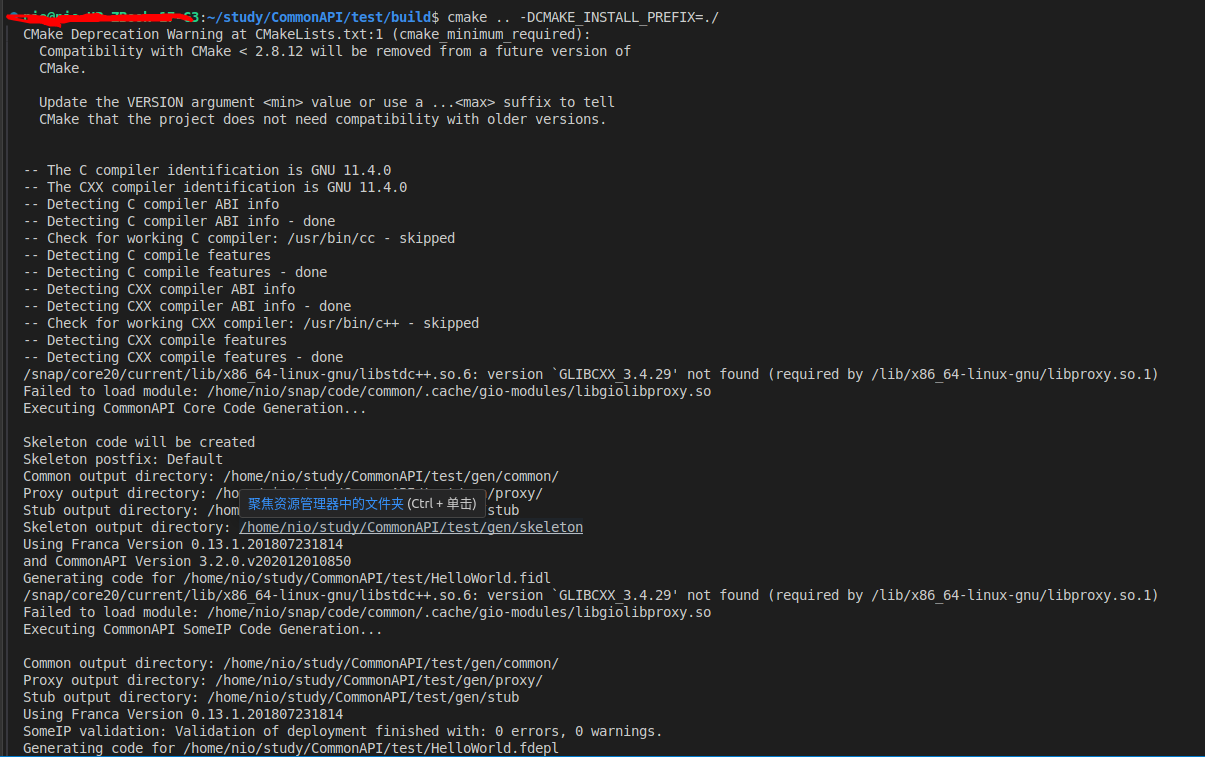
在执行cmake配置的时候可以看到python脚本被执行,代码被生成在gen目录中:






 扫一扫
扫一扫


 2317
2317

 被折叠的 条评论
为什么被折叠?
被折叠的 条评论
为什么被折叠?
 到【灌水乐园】发言





