



输入框+多选框
1. 用户单行输入TextInput
@Entry
@Component
struct Index {
  @State value: string = ''
  @State password: string = ''
  build() {
    Column({ space: 20 }) {
      Text('单行输入框')
        .fontSize(30)
      //两个参数,
      // 1:文本提示内容,
      // 2:输入框当前的文本内容(可双向数据绑定——获取用户输入的内容)-——类型是字符串
      TextInput({ placeholder: '文本提示内容', text: $$this.value })
        .backgroundColor('#999')
        .placeholderFont({size:20})//提示内容的字体大小
      Text(this.value)
        .fontSize(30)
      TextInput({ placeholder: '请输入密码', text: $$this.password })
        .backgroundColor(Color.Pink)
        .type(InputType.Password)//输入框的类型(密码框时需要加type的密码类型)
        .passwordIcon({
          onIconSrc: $r('app.media.ic_eyes_open'),//显示密码内容的图标
          offIconSrc: $r('app.media.ic_eyes_close')//不显示密码内容的图标
        })
    }
    .height('100%')
    .width('100%')
  }
}
2. 用户多行输入TextArea
@Entry
@Component
struct Page_TextAreaDemo {
  @State value:string=''
  build() {
    Column() {
    Text('多行输入框')
      .fontSize(30)
      //两个参数,
      // 1:文本提示内容,
      // 2:输入框当前的文本内容(可双向数据绑定——获取用户输入的内容)-——类型是字符串
      TextArea({placeholder:'发表言论~',text:$$this.value })
      .width('90%')
      .height(200)
      .backgroundColor(Color.Pink)
        .placeholderColor(Color.Orange)
        .placeholderFont({size:30})//提示内容的字体大小
        .maxLength(5)//可输入的最大字数
        .showCounter(true)//showCounter(true)//显示实时输入内容的个数(右下角)
    }
    .height('100%')
    .width('100%')
  }
}
3. 多选框Checkbox
@Entry
@Component
struct Page_CheckboxDemo {
  @State isSelected: boolean = false

  build() {
    Column() {
      Text('多选框')
        .fontSize(30)
      Checkbox({
        name: '1', //多选框的名称
        group: 'food'//选框组名
      })
        .select($$this.isSelected)//选中状态(布尔值,可双绑定)
        .selectedColor(Color.Blue)//选中后的颜色
        .width(30)//多选框大小
        .shape(CheckBoxShape.CIRCLE)//多选框形状(默认圆形)
        .shape(CheckBoxShape.ROUNDED_SQUARE) //正方形
    }
    .height('100%')
    .width('100%')
  }
}
4. demo:登录判断_输入框不为空_勾选协议
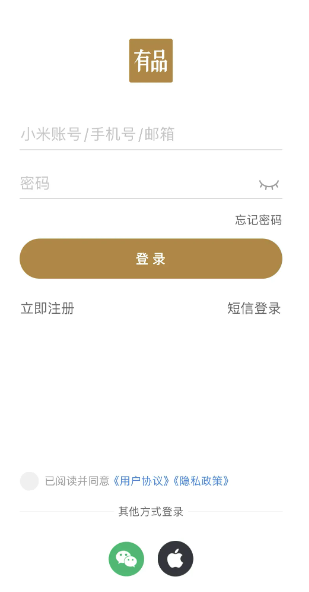
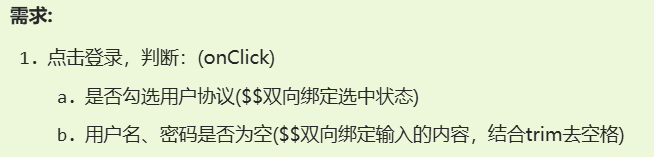
import { promptAction } from '@kit.ArkUI'

@Entry
@Component
struct Page04_Demo_Xiaomi {
  @State isShected: boolean = false
  @State username: string = ''
  @State password: string = ''

  build() {
    Column() {
      // 1. 顶部
      this.TopSectionBuilder()

      // 2. 登录区域
      Column() {
        Image($r('app.media.ic_xiaomi_logo'))
          .width(50)
        Stack() {
          // 登录信息+密码登录
          Column({ space: 20 }) {
            // 账号输入框
            TextInput({ placeholder: '小米账号/手机号/邮箱', text: $$this.username })
              .placeholderColor('#ccc')
              .backgroundColor(Color.Transparent)
              .border({ width: { bottom: .5 }, color: '#ccc' })
              .padding(0)
              .height(48)

            TextInput({ placeholder: '密码', text: $$this.password })
              .placeholderColor('#ccc')
              .backgroundColor(Color.Transparent)
              .border({ width: { bottom: .5 }, color: '#ccc' })
              .padding(0)
              .height(48)

              .type(InputType.Password)
              .passwordIcon({
                offIconSrc: $r('app.media.ic_eyes_open'),
                onIconSrc: $r('app.media.ic_eyes_close'),
              })

          }

        }
        .margin({ top: 30 })

        // 底部区域
        Column({ space: 15 }) {
          Row() {
            Text('忘记密码')
              .LinkTextExtends()
          }
          .width('100%')
          .justifyContent(FlexAlign.End)

          Button('登  录')
            .width('100%')
            .backgroundColor('#b6854e')
            .fontSize(14)
            .fontWeight(600)
            .onClick(() => {
              if (!this.username.trim()) {
                promptAction.openToast({
                  message: '用户名不能为空',
                  bottom:300
                })
                return
              }
              if (!this.password.trim()) {
                promptAction.openToast({
                  message: '密码不能为空',
                  bottom:300
                })
                return
              }

              if (!this.isShected) {
                promptAction.openToast({
                  message: '用户协议未勾选',
                  bottom:300
                })
                return
              }
            promptAction.openToast({
              message:'登陆成功',
              bottom:300
            })

            })

          Row() {
            Text('立即注册')
              .LinkTextExtends()
            Text('短信登录')
              .LinkTextExtends()

          }
          .width('100%')
          .justifyContent(FlexAlign.SpaceBetween)
        }
        .margin({ top: 15 })

      }
      .margin({ top: 60 })

      Blank()

      // 3. 底部登录区域
      Column({ space: 20 }) {
        Row() {
          Checkbox()
            .shape(CheckBoxShape.CIRCLE)
            .selectedColor('#af8756')
            .select($$this.isShected)
            .onClick(() => {
              this.isShected = true
            })
          Text() {
            Span('已阅读并同意')
            Span('《用户协议》')
              .fontColor('#9cbce8')
            Span('《隐私协议》')
              .fontColor('#9cbce8')
              .translate({ x: -10 })
          }
          .fontSize(12)
          .fontColor('#acacac')
        }

        Stack() {
          Divider()
            .strokeWidth(.5)
          Text('其他登录方式')
            .fontSize(12)
            .fontColor(Color.Gray)
            .backgroundColor(Color.White)
            .padding({ left: 5, right: 5 })
        }
        .width('100%')

        // 微信 和 苹果的登录
        Row({ space: 15 }) {
          Image($r('app.media.ic_applelogo'))
            .width(40)
          Image($r('app.media.ic_wechat'))
            .width(40)
        }

      }
    }
    .padding({
      top: 30,
      left: 30,
      right: 30,
      bottom: 50
    })
    .height('100%')
  }

  @Builder
  TopSectionBuilder() {
    // 1. 顶部
    Row() {
      Image($r('app.media.ic_public_arrow_left'))
        .width(24)
      Image($r('app.media.ic_public_question'))
        .width(24)
    }
    .width('100%')
    .justifyContent(FlexAlign.SpaceBetween)
  }
}

@Extend(Text)
function LinkTextExtends() {
  .fontColor(Color.Gray)
  .fontSize(14)
}
5. CheckboxGroup
6. 获取选中的结果
// 核心步骤
// 1.给 CheckBoxGroup 注册 onChange
// 2.CheckBox 添加 name 属性
// 3.在onChange的回调函数中获取选中的 name 属性
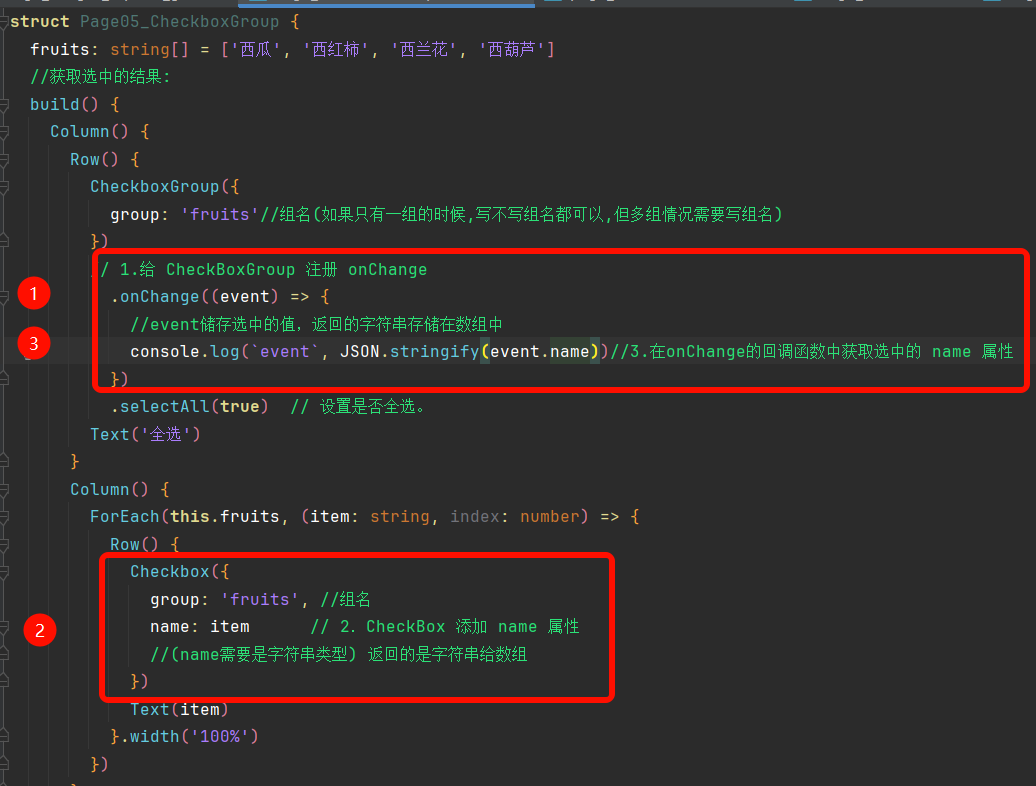
group: 'fruits' 分组
@Entry
@Component
struct Page05_CheckboxGroup {
  fruits: string[] = ['西瓜', '西红柿', '西兰花', '西葫芦']
  //获取选中的结果:
  // 核心步骤
  // 1.给 CheckBoxGroup 注册 onChange
  // 2.CheckBox 添加 name 属性
  // 3.在onChange的回调函数中获取选中的 name 属性
  build() {
    Column() {
      Row() {
        CheckboxGroup({
          group: 'fruits'//组名(如果只有一组的时候,写不写组名都可以,但多组情况需要写组名)
        })
        // 1.给 CheckBoxGroup 注册 onChange
          .onChange((event) => {//event储存选中的值,返回的字符串给数组
            // 通过event形参获取到name的值——方便操作被选中的多选框(以数组存储被选中的name值)
            console.log(`event`, JSON.stringify(event))
          })
          .selectAll(true)  // 设置是否全选。
        // 默认false,若同组的Checkbox 设置了select属性,则Checkbox的优先级高。支持$$
        Text('全选')
      }

      Column() {
        ForEach(this.fruits, (item: string, index: number) => {
          Row() {
            // 2.CheckBox 添加 name 属性
            Checkbox({
              group: 'fruits', //组名
              name: item//(name需要是字符串类型) 返回的是字符串给数组
            })
            Text(item)
          }.width('100%')
        })

      }
      .padding({ left: 50 })
    }

  }
}
正则
// *正则表达式->用来匹配字符串的规则
// 1.定义正则: let 变量 = /规则/(用字面量的方式定义的)
// 2.使用正则:正则.test(校验的字符串)返回值:符合规则true不符合false

let reg = /ARKTS/
console.log(``, reg.test('ARKTS')) //true
console.log(``, reg.test('ArkTs')) //false
替换replace和修饰符i,g
// // 检索规则:文本、正则
// // 替换内容:文本
// // 返回值:替换之后的结果
// 字符串.replace(检索规则,替换内容)

// // 替换和修饰符
const str = '欢迎大家学习ArkTS,相信大家一定能学好ArkTS!!!'
// 将 ArkTS 替换位 鸿蒙开发咋写? 分别用正则和字符串作为检索规则

str.replace(/ArkTS/gi,'鸿蒙开发')
// i 不区分大小写
// g 全局匹配(正则的匹配默认是懒惰模式,只匹配到第一个,后面还有的话,不匹配了)






 扫一扫
扫一扫


 1179
1179

 被折叠的 条评论
为什么被折叠?
被折叠的 条评论
为什么被折叠?
 到【灌水乐园】发言





