


Contents
- 1. Format description
- 2. Git Repository Link and Project deployment cloud server Link
- 3. Code Standards Link
- 4. Personal Software Process(PSP) Table
- 5. Presentation of the Finished Product
- 6. Extended features
- 7. Design and Implementation Process
- 8. Code Explanation
- 8.1 Back-end code
- 8.1.2 index.js - Server initialization and middleware configuration
- 8.1.3 index.js - Database Connection Management and Data Modeling
- 8.1.4 index.js - Contact Management RESTful API
- 8.1.5 package.json - Project dependencies and script configuration
- 8.1.6 vercel.json - Vercel platform deployment and configuration
- 8.1.7App.js - Data acquisition and search
- 8.2 Front-end code
- Personal Journey and Learnings
1. Format description
| Assignment1 | Front-end and back-end separation contacts programming |
|---|---|
| Course for This Assignment | EE308FZ[A] — Software Engineering (2025-26:Semester 1) |
| Name | Chen Tiantian |
| Student ID | MU : 23126493 FZU : 832301215 |
| Objectives of This Assignment | By implementing a front-end and back-end separated contact list project, cultivate full-stack development capabilities and master the complete process from development to deployment of modern Web applications. |
| front-end | contacts-frontend code |
| back-end | contacts-backend code |
2. Git Repository Link and Project deployment cloud server Link
Git Repository Link:
front end:https://github.com/Yunxiuuu/contacts-frontend
back-end:https://github.com/Yunxiuuu/contacts-backend
Project deployment cloud server Link:Click Here
(Note: It needs to be changed to a foreign IP address)
3. Code Standards Link
This project adheres to the following code standards:
Front-end development
Back-end development
Database
4. Personal Software Process(PSP) Table
| Stage | Task | Estimated Time (h) | Actual Time (h) | Notes |
|---|---|---|---|---|
| Planning | Requirements Analysis | 1.5 | 1.2 | Module division, technology stack selection |
| Technical Design | 1.0 | 0.8 | System architecture, API design | |
| Development | Environment Setup | 2.0 | 1.5 | Local development environment for both ends |
| Backend Development | 4.0 | 5.5 | API development, database integration | |
| Frontend Development | 4.0 | 6.0 | Page development, component creation | |
| Additional Features | 3.0 | 4.0 | Extra functionality implementation | |
| Testing | Unit Testing | 2.0 | 1.5 | Backend API testing, frontend component testing |
| Integration Testing | 2.0 | 2.5 | End-to-end testing, API integration | |
| Manual Testing | 1.0 | 1.0 | User acceptance testing | |
| Deployment | Server Configuration | 3.0 | 5.0 | Cloud deployment, Nginx setup |
| Database Deployment | 1.0 | 1.5 | Cloud database setup, data migration | |
| Version Control | 0.5 | 1.0 | Git repository management | |
| Documentation | Technical Documentation | 2.0 | 3.0 | API documentation, deployment guides |
| Blog Writing | 1.0 | 2.0 | 优快云 blog article | |
| Total | 27.0 | 35.5 | ||
5. Presentation of the Finished Product
5.1 Function: add
Function: add
- Basic operations for adding contacts, including name, phone number, etc. and store contacts information in a back-end database.
5.2 Function: modify
Function: modify
- Modify the contacts information. must be read from the back-end database, can not use the cache.
5.3 Function: delete
Function: delete
- Supports individual deletion and records of operation logs, but requires secondary confirmation.
6. Extended features
6.1 Function:CodeFieldManager
Function:CodeFieldManager
- Name and phone number are required fields and format verification is required. Others are optional fields.
6.2 Function:automatic sequence
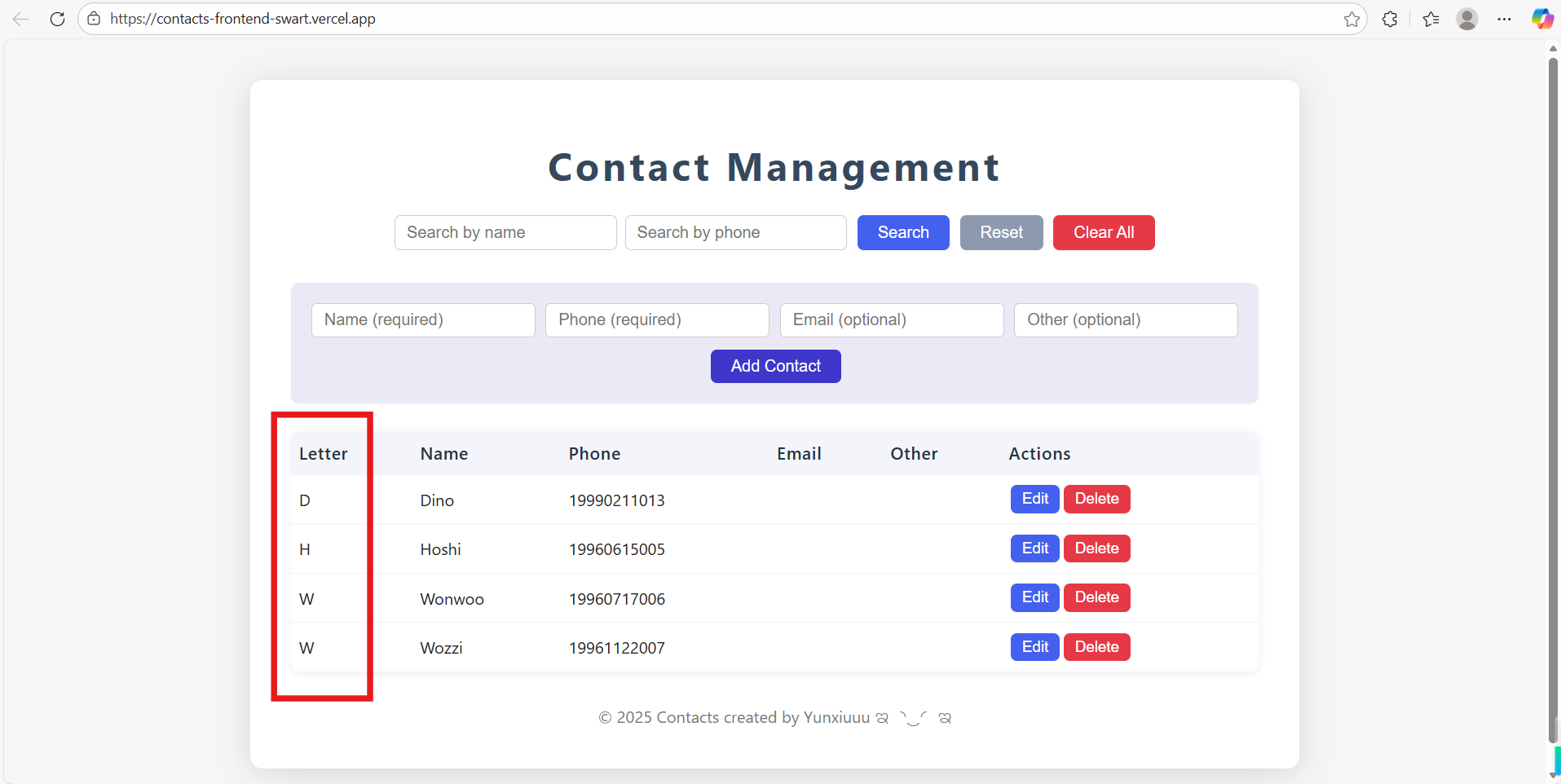
- By default, the sorting is done by the first letter of the pinyin of the name, and multiple sorting strategies are supported.
6.3 Function: search function
Function: search function-Name
Function: search function-Phone
- Provide two fuzzy search modes: name and phone number.
6.4 Function: Search reset function
Function: Search reset function
- Clear the existing search.
6.5 Function:One-click clear
Function:One-click clear
- Batch delete all contacts.
7. Design and Implementation Process
7.1 Architecture
-
User Browser ⇄ Static Frontend (Vercel)
-
Static Frontend /api/* Requests ⇄ Vercel Rewrites (or Direct Cross-Origin Requests) ⇄ Backend API (Express)
-
Backend ⇄ Database (MongoDB Atlas or other managed MongoDB instances)
-
Source Code Hosting: GitHub (Frontend/Backend can be in the same repository or split into two repositories)
-
CI/Deployment: Vercel (Automatically monitors GitHub repository and deploys)
7.2 Frontend Design and Implementation
-
Objective: Provide basic operations for contact list display, addition, editing, and deletion.
-
Use minimal dependencies (pure native JS + HTML/CSS), with entry files as index.html and index.js, facilitating deployment as a static site.
-
Structure Directory Diagram
contacts-frontend/
├── 📂 public/…
├── 📂 src/
│ ├── 🔹 App.css
│ ├── 🔹 App.js
│ ├── 🔹 App.test.js
│ ├── 🔹 index.css
│ ├── 🔹 index.js
│ ├── 🔹 logo.svg
│ ├── 🔹 reportWebVitals.js
│ └── 🔹 setupTests.js
│
├── 📄 .env
├── 📄 .gitignore
├── 📄 README.md
├── 📄 package.json
├── 📄 package-lock.json
└── 📄 vercel.json
7.3 Backend Design and Implementation
-
Objective: Provide RESTful APIs: GET /api/contacts, POST /api/contacts, PUT /api/contacts/:id, DELETE /api/contacts/:id.
-
Use MongoDB for data persistence, managed with Mongoose for models.
-
Structure Directory Diagram
contacts-backend/
├── 📂 node_modules/…
├── 📄 .gitignore
├── 📄 index.js
├── 📄 package-lock.json
├── 📄 package.json
└── 📄 vercel.json
7.4 GitHub Repository Management
- Dual repositories (frontend/backend), with independent deployment for frontend and backend for clearer structure.
7.5 Deployment Process
-
Push code to GitHub (main branch).
-
Vercel receives webhook and triggers build (check Build Logs in Vercel Dashboard).
-
Build completes and generates Production URL.
-
Check Runtime Logs and Network calls to confirm /api requests are forwarded and return 200.
-
Integration Testing and Debugging
-
Basic Testing
-
Open frontend URL in browser, observe if the page loads and displays contacts.
-
Check request targets in DevTools → Network to ensure they match expected URLs.
-
Use curl to verify backend APIs:
curl -i https://contacts-backend-nine.vercel.app/api/contacts
curl -i https://your-frontend.vercel.app/api/contacts
7.6 Common Issues and Solutions
- CORS Errors: Enable CORS in backend or use Vercel rewrites.
- 404 Errors: Check route prefixes (whether /api prefix or version number exists).
- 500/Database Errors: Verify MONGODB_URI correctness and database IP whitelist settings (Atlas typically allows all or configures by IP whitelist).
- Environment Variables Not Working: Ensure variables are set in Vercel console and redeploy. Check Vercel Build Logs for build information.
7.7 Functional structure diagram
8. Code Explanation
8.1 Back-end code
8.1.2 index.js - Server initialization and middleware configuration
const express = require('express');
const mongoose = require('mongoose');
const cors = require('cors');

const app = express();
app.use(express.json());

// 配置跨域访问
app.use(cors({
  origin: process.env.ALLOWED_ORIGIN || '*',
  methods: ['GET','POST','PUT','DELETE','OPTIONS'],
  credentials: true,
}));

// 基础路由:健康检查和图标处理
app.get('/', (req, res) => {
  res.send({ ok: true, message: 'Backend running (serverless).' });
});
app.get('/favicon.ico', (req, res) => res.status(204).end());
- Function: Create an Express server, configure JSON parsing, cross-domain access, and basic routing. Establish and optimize MongoDB connections to adapt to a serverless environment. Allow front-end applications to access the back-end API from different sources (domain names, ports).
8.1.3 index.js - Database Connection Management and Data Modeling
const MONGODB_URI = process.env.MONGODB_URI; // MongoDB connection string from environment variables

// Database connection handler optimized for serverless environments
async function connectToDatabase() {
  if (!MONGODB_URI) {
    throw new Error('MONGODB_URI environment variable not set');
  }

  // Return immediately if connection is already established
  if (mongoose.connection.readyState === 1) {
    return;
  }

  // Wait for existing connection promise to avoid race conditions
  if (global._mongooseConnectPromise) {
    await global._mongooseConnectPromise;
    return;
  }

  // Create and cache connection promise for concurrent requests
  global._mongooseConnectPromise = mongoose.connect(MONGODB_URI, {
    // Mongoose 6+ default options are sufficient
  });

  await global._mongooseConnectPromise;
  console.log('✅ MongoDB connected (serverless)');
}

// Define Contact schema with validation and timestamps
const contactSchema = new mongoose.Schema({
  name: { type: String, required: true }, // Mandatory name field
  phone: { type: String, required: true }, // Mandatory phone field
  email: String, // Optional email field
  other: String, // Optional additional information field
}, {
  timestamps: true // Automatically add createdAt and updatedAt fields
});

// Prevent model overwrite in serverless hot reload scenarios
const Contact = mongoose.models.Contact || mongoose.model('Contact', contactSchema);

// Global middleware to ensure database connection before handling API requests
app.use(async (req, res, next) => {
  try {
    await connectToDatabase();
    next(); // Proceed to route handler if connection successful
  } catch (err) {
    console.error('DB connection error:', err);
    return res.status(500).json({
      error: 'Database connection failed',
      detail: err.message
    });
  }
});
- Purpose: Establish MongoDB connection with serverless optimization and define data schema with validation rules and automatic timestamps.
8.1.4 index.js - Contact Management RESTful API
// GET /api/contacts - Retrieve contacts with optional search filtering
app.get('/api/contacts', async (req, res) => {
  try {
    const { name, phone } = req.query; // Extract search parameters from query string
    const filter = {}; // Initialize empty filter object

    // Add case-insensitive regex search for name if provided
    if (name) filter.name = { $regex: name, $options: 'i' };

    // Add case-insensitive regex search for phone if provided
    if (phone) filter.phone = { $regex: phone, $options: 'i' };

    // Execute database query with sorting by name ascending
    const contacts = await Contact.find(filter).sort({ name: 1 });
    res.json(contacts); // Return results as JSON
  } catch (err) {
    console.error('GET /api/contacts error:', err);
    res.status(500).json({
      error: 'Server error',
      detail: err.message
    });
  }
});

// POST /api/contacts - Create a new contact with validation
app.post('/api/contacts', async (req, res) => {
  try {
    // Validate required fields
    if (!req.body.name || !req.body.phone) {
      return res.status(400).json({
        error: 'Name and Phone are required.'
      });
    }

    // Create new contact instance from request body
    const contact = new Contact(req.body);

    // Save contact to database
    await contact.save();

    // Return created contact as response
    res.json(contact);
  } catch (err) {
    console.error('POST /api/contacts error:', err);
    res.status(500).json({
      error: 'Server error',
      detail: err.message
    });
  }
});

// PUT /api/contacts/:id - Update existing contact by ID
app.put('/api/contacts/:id', async (req, res) => {
  try {
    // Find and update contact, return updated document
    const contact = await Contact.findByIdAndUpdate(
      req.params.id, // Contact ID from URL parameter
      req.body, // Update data from request body
      { new: true } // Return updated document instead of original
    );
    res.json(contact);
  } catch (err) {
    console.error('PUT /api/contacts/:id error:', err);
    res.status(500).json({
      error: 'Server error',
      detail: err.message
    });
  }
});

// DELETE /api/contacts/:id - Remove specific contact by ID
app.delete('/api/contacts/:id', async (req, res) => {
  try {
    await Contact.findByIdAndDelete(req.params.id); // Delete contact by ID
    res.json({ msg: 'Deleted' }); // Return success message
  } catch (err) {
    console.error('DELETE /api/contacts/:id error:', err);
    res.status(500).json({
      error: 'Server error',
      detail: err.message
    });
  }
});

// DELETE /api/contacts - Clear all contacts from database
app.delete('/api/contacts', async (req, res) => {
  try {
    await Contact.deleteMany({}); // Delete all documents in collection
    res.json({ msg: 'All contacts cleared' }); // Return success message
  } catch (err) {
    console.error('DELETE /api/contacts error:', err);
    res.status(500).json({
      error: 'Server error',
      detail: err.message
    });
  }
});
- Purpose: Provide comprehensive CRUD (Create, Read, Update, Delete) operations for contact management with search capabilities and proper error handling.
8.1.5 package.json - Project dependencies and script configuration
{
  "name": "contacts-backend",
  "version": "1.0.0",
  "main": "index.js",
  "scripts": {
    "start": "node index.js"
  },
  "dependencies": {
    "cors": "^2.8.5",
    "express": "^5.1.0",
    "mongoose": "^8.19.2"
  }
}
- Function : Define the basic information of the project, run scripts, and third-party dependency packages.
8.1.6 vercel.json - Vercel platform deployment and configuration
{
  "version": 2,
  "builds": [
    {
      "src": "index.js",
      "use": "@vercel/node"
    }
  ],
  "routes": [
    {
      "src": "/(.*)",
      "dest": "index.js"
    }
  ]
}
- Function : Configure the build and routing rules for the Vercel serverless platform.## 前端代码
8.1.7App.js - Data acquisition and search
const fetchContacts = async (name = "", phone = "") => {
  let url = `${BASE_URL}/api/contacts?`;
  if (name) url += `name=${encodeURIComponent(name)}&`;
  if (phone) url += `phone=${encodeURIComponent(phone)}`;
  try {
    const res = await axios.get(url);
    setContacts(res.data);
  } catch (e) {
    console.error("Fetch error:", e);
    setError("Failed to fetch contacts.");
  }
};

useEffect(() => {
  fetchContacts();
}, []);

const handleSearch = () => {
  fetchContacts(searchName, searchPhone);
};

const handleReset = () => {
  setSearchName("");
  setSearchPhone("");
  fetchContacts();
};
- The contact list is automatically loaded when the component is mounted.
- Support search and filtering by name and phone number.
- Provide a reset function to clear search conditions.
8.2 Front-end code
8.2.1 App.js - Complete CRUD operations for contacts
const handleSubmit = async (e) => {
  e.preventDefault();
  setError("");
  if (!form.name.trim() || !form.phone.trim()) {
    setError("Name and phone are required.");
    return;
  }
  try {
    if (editing) {
      // 编辑模式:更新现有联系人
      await axios.put(`${BASE_URL}/api/contacts/${editing}`, form);
      setEditing(null);
    } else {
      // 新增模式:创建新联系人
      await axios.post(`${BASE_URL}/api/contacts`, form);
    }
    setForm(emptyForm);
    fetchContacts(searchName, searchPhone);
  } catch (e) {
    setError(e.response?.data?.error || "Error saving!");
  }
};

const handleEdit = (contact) => {
  setForm(contact);
  setEditing(contact._id);
};
const handleDelete = async (id) => {
  if (window.confirm("Are you sure you want to delete this contact?")) {
    try {
      await axios.delete(`${BASE_URL}/api/contacts/${id}`);
      fetchContacts(searchName, searchPhone);
    } catch (e) {
      setError("Failed to delete contact.");
    }
  }
};

const handleClearAll = async () => {
  if (window.confirm("Clear all contacts? This cannot be undone!")) {
    try {
      await axios.delete(`${BASE_URL}/api/contacts`);
      fetchContacts();
    } catch (e) {
      setError("Failed to clear contacts.");
    }
  }
};
- It provides complete functions for adding, deleting, modifying and querying contacts. Through unified form processing, new additions and editing operations are carried out. The form will intelligently determine the current mode and verify the required fields to ensure that the name and phone number are not left blank. The deletion operation includes two methods: individual deletion and batch clearing. Both are prevented from misoperation through confirmation dialog boxes. All data operations are synchronized in real time with the back-end API, and the contact list is refreshed immediately after a successful operation to maintain interface data consistency. At the same time, abnormal information during the operation process is captured and displayed through a comprehensive error handling mechanism to ensure a smooth user experience and data security.
8.2.2 App.js - Auxiliary functions interact with the UI
const handleChange = (e) => {
  setForm((prev) => ({ ...prev, [e.target.name]: e.target.value }));
};

const getFirstLetter = (name) => {
  return name && name[0] ? name[0].toUpperCase() : "#";
};
- Real-time processing of form input changes.
- Extract the first letter of the contact person’s name for visual identification.
Personal Journey and Learnings
This project marked my first comprehensive full-stack development experience, taking a contact management system from concept to deployment. Throughout this journey, I evolved from simply writing code to truly understanding software engineering - learning to estimate tasks more accurately in planning, adapting to unexpected challenges during development, and appreciating the importance of thorough testing. The most valuable lesson came from deployment hurdles, where I discovered that making software work locally is just the beginning, while making it reliable in production requires meticulous attention to configuration, environment variables, and cross-origin communication. This hands-on experience taught me that great software isn’t just about features, but about robustness, maintainability, and the humility to continuously debug and improve.





 扫一扫
扫一扫


 1036
1036

 被折叠的 条评论
为什么被折叠?
被折叠的 条评论
为什么被折叠?
 到【灌水乐园】发言





