


 这篇博客详细介绍了在Android平台上进行的一次上机实验,主要内容包括activity_main.xml、MainActivity.java和component.xml的代码实现,以及最终的运行效果展示,重点在于实现手机图标的搜索功能。
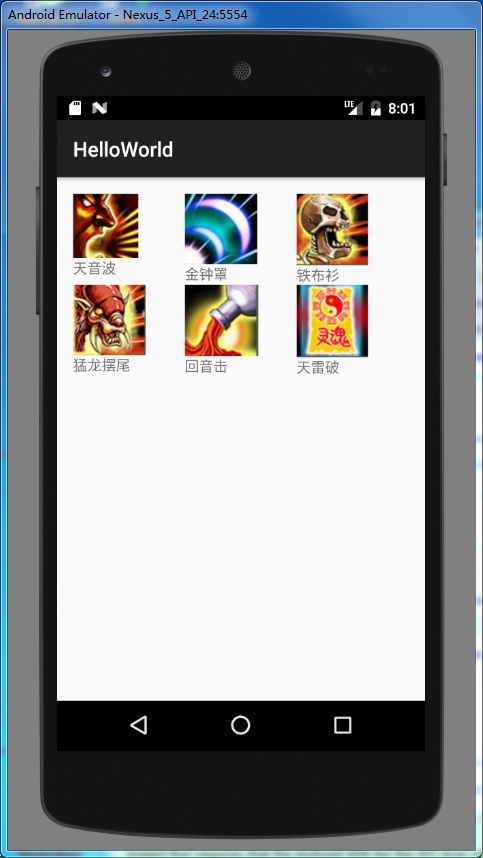
搜索保存手机图标。


activity_main.xml代码:
<?xml version="1.0" encoding="utf-8"?>
<RelativeLayout xmlns:android="http://schemas.android.com/apk/res/android"
xmlns:tools="http://schemas.android.com/tools"
android:id="@+id/activity_main"
android:layout_width="match_parent"
android:layout_height="match_parent"
android:paddingBottom="@dimen/activity_vertical_margin"
android:paddingLeft="@dimen/activity_horizontal_margin"
android:paddingRight="@dimen/activity_horizontal_margin"
android:paddingTop="@dimen/activity_vertical_margin"
tools:context="com.example.administrator.helloworld.MainActivity">

<GridView
    android:id="@+id/gridview"
    android:numColumns="3"
    android:layout_width="match_parent"
    android:layout_height="match_parent" />
</RelativeLayout>
MainActivity.java代码:
package com.example.administrator.helloworld;

import android.app.Activity;
import android.content.res.ObbInfo;
import android.os.Bundle;
import android.widget.GridView;
import android.widget.SimpleAdapter;

import java.util.ArrayList;
import java.util.HashMap;
import java.util.List;
import java.util.Map;

public class MainActivity extends Activity {

    public int[] ids = new int[]{R.drawable.jpg1,
            R.drawable.jpg2,
            R.drawable.jpg3,
            R.drawable.jpg4,
            R.drawable.jpg5,
            R.drawable.jpg6};
    public String[] names = new String[]{"天音波",
            "金钟罩","铁布衫","猛龙摆尾","回音击","天雷破"};
    @Override
    protected void onCreate(Bundle savedInstanceState) {
        super.onCreate(savedInstanceState);
        setContentView(R.layout.activity_main);

        List<Map<String,Object>> data = new ArrayList<Map<String,Object>>();
        for(int i=0;i<6;i++){
            Map<String,Object> map = new HashMap<String,Object>();
            map.put("id",ids[i]);
            map.put("name",names[i]);
            data.add(map);
        }

        GridView gridView = (GridView)findViewById(R.id.gridview);
        SimpleAdapter simpleAdapter = new SimpleAdapter(this, data, R.layout.component,
                new String[]{"id","name"}, new int[]{R.id.imageview,R.id.textview});
        gridView.setAdapter(simpleAdapter);

    }
}
component.xml代码:
<?xml version="1.0" encoding="utf-8"?>
<LinearLayout xmlns:android="http://schemas.android.com/apk/res/android"
    android:layout_width="match_parent"
    android:layout_height="match_parent"
    android:orientation="vertical">
    <ImageView
        android:id="@+id/imageview"
        android:layout_width="wrap_content"
        android:layout_height="wrap_content" />
    <TextView
        android:id="@+id/textview"
        android:layout_width="wrap_content"
        android:layout_height="wrap_content" />
</LinearLayout>
运行效果:





 扫一扫
扫一扫


 7186
7186

 被折叠的 条评论
为什么被折叠?
被折叠的 条评论
为什么被折叠?
 到【灌水乐园】发言





