





 当Linux VMware运行时提示缺少vmmon内核模块,且无法找到本地文件时,可以通过从官方网站重新下载并安装VMware来解决。安装过程包括变更文件权限、执行安装脚本等步骤,最终成功安装后,问题得以解决。
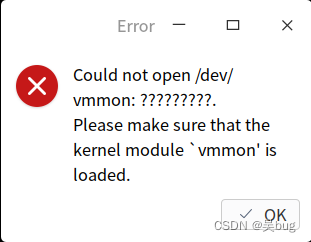
显示缺少 vmmon 内核模块,但是本地搜索没有相关文件,也不能直接加载此模块。
解决办法:
从官网重新下载 vmware并安装 【链接:Download VMware Workstation Pro】,即可解决上述问题。
uos:/home/wd/Downloads# ls
VMware-Workstation-Full-16.2.3-19376536.x86_64.bundle

uos:/home/wudan/Downloads# chmod +x ./VMware-Workstation-Full-16.2.3-19376536.x86_64.bundle
uos:/home/wudan/Downloads# ./VMware-Workstation-Full-16.2.3-19376536.x86_64.bundle
Extracting VMware Installer...done.
The following virtual machines and VMware applications
are running.  Please suspend or close them, and then press
'Enter' key to continue. Or directly press 'Enter' key to
do this automatically. You can also press any other key,
and then press 'Enter' key to cancel the installation.

> VMware Workstation
:

Installing VMware Workstation 16.2.3
    Configuring...
[######################################################################] 100%
Installation was successful.





 扫一扫
扫一扫


 1161
1161

 被折叠的 条评论
为什么被折叠?
被折叠的 条评论
为什么被折叠?
 到【灌水乐园】发言





