1.UI界面部分
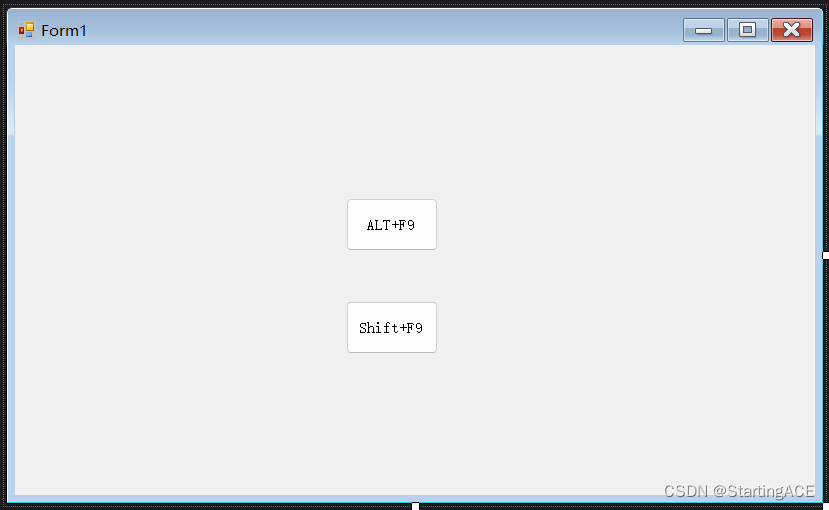
2..cs代码部分
using System;
using System.Collections.Generic;
using System.ComponentModel;
using System.Data;
using System.Drawing;
using System.Linq;
using System.Runtime.InteropServices;
using System.Text;
using System.Threading.Tasks;
using System.Windows.Forms;


namespace WindowsFormsApp2
{
    public partial class Form1 : Form
    {
        public Form1()
        {
            InitializeComponent();
        }

        #region bVk参数 常量定义

        public const byte vbKeyLButton = 0x1;    // 鼠标左键
        public const byte vbKeyRButton = 0x2;    // 鼠标右键
        public const byte vbKeyCancel = 0x3;     // CANCEL 键
        public const byte vbKeyMButton = 0x4;    // 鼠标中键
        public const byte vbKeyBack = 0x8;       // BACKSPACE 键
        public const byte vbKeyTab = 0x9;        // TAB 键
        public const byte vbKeyClear = 0xC;      // CLEAR 键
        public const byte vbKeyReturn = 0xD;     // ENTER 键
        public const byte vbKeyShift = 0x10;     // SHIFT 键
        public const byte vbKeyControl = 0x11;   // CTRL 键
        public const byte vbKeyAlt = 18;         // Alt 键  (键码18)
        public const byte vbKeyMenu = 0x12;      // MENU 键
        public const byte vbKeyPause = 0x13;     // PAUSE 键
        public const byte vbKeyCapital = 0x14;   // CAPS LOCK 键
        public const byte vbKeyEscape = 0x1B;    // ESC 键
        public const byte vbKeySpace = 0x20;     // SPACEBAR 键
        public const byte vbKeyPageUp = 0x21;    // PAGE UP 键
        public const byte vbKeyEnd = 0x23;       // End 键
        public const byte vbKeyHome = 0x24;      // HOME 键
        public const byte vbKeyLeft = 0x25;      // LEFT ARROW 键
        public const byte vbKeyUp = 0x26;        // UP ARROW 键
        public const byte vbKeyRight = 0x27;     // RIGHT ARROW 键
        public const byte vbKeyDown = 0x28;      // DOWN ARROW 键
        public const byte vbKeySelect = 0x29;    // Select 键
        public const byte vbKeyPrint = 0x2A;     // PRINT SCREEN 键
        public const byte vbKeyExecute = 0x2B;   // EXECUTE 键
        public const byte vbKeySnapshot = 0x2C;  // SNAPSHOT 键
        public const byte vbKeyDelete = 0x2E;    // Delete 键
        public const byte vbKeyHelp = 0x2F;      // HELP 键
        public const byte vbKeyNumlock = 0x90;   // NUM LOCK 键

        //常用键 字母键A到Z
        public const byte vbKeyA = 65;
        public const byte vbKeyB = 66;
        public const byte vbKeyC = 67;
        public const byte vbKeyD = 68;
        public const byte vbKeyE = 69;
        public const byte vbKeyF = 70;
        public const byte vbKeyG = 71;
        public const byte vbKeyH = 72;
        public const byte vbKeyI = 73;
        public const byte vbKeyJ = 74;
        public const byte vbKeyK = 75;
        public const byte vbKeyL = 76;
        public const byte vbKeyM = 77;
        public const byte vbKeyN = 78;
        public const byte vbKeyO = 79;
        public const byte vbKeyP = 80;
        public const byte vbKeyQ = 81;
        public const byte vbKeyR = 82;
        public const byte vbKeyS = 83;
        public const byte vbKeyT = 84;
        public const byte vbKeyU = 85;
        public const byte vbKeyV = 86;
        public const byte vbKeyW = 87;
        public const byte vbKeyX = 88;
        public const byte vbKeyY = 89;
        public const byte vbKeyZ = 90;

        //数字键盘0到9
        public const byte vbKey0 = 48;    // 0 键
        public const byte vbKey1 = 49;    // 1 键
        public const byte vbKey2 = 50;    // 2 键
        public const byte vbKey3 = 51;    // 3 键
        public const byte vbKey4 = 52;    // 4 键
        public const byte vbKey5 = 53;    // 5 键
        public const byte vbKey6 = 54;    // 6 键
        public const byte vbKey7 = 55;    // 7 键
        public const byte vbKey8 = 56;    // 8 键
        public const byte vbKey9 = 57;    // 9 键


        public const byte vbKeyNumpad0 = 0x60;    //0 键
        public const byte vbKeyNumpad1 = 0x61;    //1 键
        public const byte vbKeyNumpad2 = 0x62;    //2 键
        public const byte vbKeyNumpad3 = 0x63;    //3 键
        public const byte vbKeyNumpad4 = 0x64;    //4 键
        public const byte vbKeyNumpad5 = 0x65;    //5 键
        public const byte vbKeyNumpad6 = 0x66;    //6 键
        public const byte vbKeyNumpad7 = 0x67;    //7 键
        public const byte vbKeyNumpad8 = 0x68;    //8 键
        public const byte vbKeyNumpad9 = 0x69;    //9 键
        public const byte vbKeyMultiply = 0x6A;   // MULTIPLICATIONSIGN(*)键
        public const byte vbKeyAdd = 0x6B;        // PLUS SIGN(+) 键
        public const byte vbKeySeparator = 0x6C;  // ENTER 键
        public const byte vbKeySubtract = 0x6D;   // MINUS SIGN(-) 键
        public const byte vbKeyDecimal = 0x6E;    // DECIMAL POINT(.) 键
        public const byte vbKeyDivide = 0x6F;     // DIVISION SIGN(/) 键


        //F1到F12按键
        public const byte vbKeyF1 = 0x70;   //F1 键
        public const byte vbKeyF2 = 0x71;   //F2 键
        public const byte vbKeyF3 = 0x72;   //F3 键
        public const byte vbKeyF4 = 0x73;   //F4 键
        public const byte vbKeyF5 = 0x74;   //F5 键
        public const byte vbKeyF6 = 0x75;   //F6 键
        public const byte vbKeyF7 = 0x76;   //F7 键
        public const byte vbKeyF8 = 0x77;   //F8 键
        public const byte vbKeyF9 = 0x78;   //F9 键
        public const byte vbKeyF10 = 0x79;  //F10 键
        public const byte vbKeyF11 = 0x7A;  //F11 键
        public const byte vbKeyF12 = 0x7B;  //F12 键

        #endregion

        #region 引用win32api方法

        /// <summary>
        /// 导入模拟键盘的方法
        /// </summary>
        /// <param name="bVk" >按键的虚拟键值</param>
        /// <param name= "bScan" >扫描码,一般不用设置,用0代替就行</param>
        /// <param name= "dwFlags" >选项标志:0:表示按下,2:表示松开</param>
        /// <param name= "dwExtraInfo">一般设置为0</param>
        [DllImport("user32.dll")]
        public static extern void keybd_event(byte bVk, byte bScan, int dwFlags, int dwExtraInfo);

        #endregion

        /// <summary>
        /// 默认按下ctrl+shift切换输入法
        /// </summary>
        /// <param name= sender ></param>
        /// <param name= e ></param>
        private void button1_Click(object sender, EventArgs e)
        {
            //模拟按下ctrl键
            keybd_event(vbKeyAlt, 0, 0, 0);
            //模拟按下shift键
            keybd_event(vbKeyF9, 0, 0, 0);
            //松开按键ctrl
            keybd_event(vbKeyAlt, 0, 2, 0);
            //松开按键shift
            keybd_event(vbKeyF9, 0, 2, 0);
        }


        /// <summary>
        /// 使用QQ的截图快捷按键(前提:开启QQ)
        /// </summary>
        /// <param name="sender"></param>
        /// <param name="e"></param>
        private void button2_Click(object sender, EventArgs e)
        {
            //模拟按下ctrl键
            keybd_event(vbKeyControl, 0, 0, 0);
            //模拟按下Alt键
            keybd_event(vbKeyAlt, 0, 0, 0);
            //模拟按下A键
            keybd_event(vbKeyA, 0, 0, 0);
            //模拟松开ctrl键
            keybd_event(vbKeyControl, 0, 2, 0);
            //模拟松开Alt键
            keybd_event(vbKeyAlt, 0, 2, 0);
            //模拟松开A键
            keybd_event(vbKeyA, 0, 2, 0);
        }

        /// <summary>
        ///   ALT+F9
        /// </summary>
        /// <param name="sender"></param>
        /// <param name="e"></param>
        private void button1_Click_1(object sender, EventArgs e)
        {
            //模拟按下ctrl键
            keybd_event(vbKeyAlt, 0, 0, 0);
            //模拟按下shift键
            keybd_event(vbKeyF9, 0, 0, 0);
            //松开按键ctrl
            keybd_event(vbKeyAlt, 0, 2, 0);
            //松开按键shift
            keybd_event(vbKeyF9, 0, 2, 0);
        }

        /// <summary>
        ///   Shift+F9
        /// </summary>
        /// <param name="sender"></param>
        /// <param name="e"></param>
        private void button2_Click_1(object sender, EventArgs e)
        {
            //模拟按下Shift键
            keybd_event(vbKeyShift, 0, 0, 0);
            //模拟按下F9键
            keybd_event(vbKeyF9, 0, 0, 0);
            //松开按键Shift
            keybd_event(vbKeyShift, 0, 2, 0);
            //松开按键F9
            keybd_event(vbKeyF9, 0, 2, 0);
        }


        ///// <summary>
        ///// 模拟 Alt+F4按键 关闭窗体程序
        ///// </summary>
        ///// <param name="sender"></param>
        ///// <param name="e"></param>
        //private void button3_Click(object sender, EventArgs e)
        //{
        //    //模拟按下Alt键
        //    keybd_event(vbKeyAlt, 0, 0, 0);
        //    //模拟按下F4键
        //    keybd_event(vbKeyF4, 0, 0, 0);
        //    //松开按键Alt
        //    keybd_event(vbKeyAlt, 0, 2, 0);
        //    //松开按键F4
        //    keybd_event(vbKeyF4, 0, 2, 0);
        //}

        ///// <summary>
        ///// 模拟Ctrl+Alt+Z按键 显示已最小化QQ界面
        ///// </summary>
        ///// <param name="sender"></param>
        ///// <param name="e"></param>
        //private void button4_Click(object sender, EventArgs e)
        //{
        //    //模拟按下ctrl键
        //    keybd_event(vbKeyControl, 0, 0, 0);
        //    //模拟按下Alt键
        //    keybd_event(vbKeyAlt, 0, 0, 0);
        //    //模拟按下Z键
        //    keybd_event(vbKeyZ, 0, 0, 0);
        //    //模拟松开ctrl键
        //    keybd_event(vbKeyControl, 0, 2, 0);
        //    //模拟松开Alt键
        //    keybd_event(vbKeyAlt, 0, 2, 0);
        //    //模拟松开Z键
        //    keybd_event(vbKeyZ, 0, 2, 0);
        //}
    }

}





 扫一扫
扫一扫


 2498
2498

 被折叠的 条评论
为什么被折叠?
被折叠的 条评论
为什么被折叠?
 到【灌水乐园】发言





