 禁用ViewPager2+TabLayout的滚动动画:实现平滑切换与无动画切换



 本文介绍了如何通过修改TabLayoutMediator源码,取消ViewPager2和TabLayout之间的动画效果,以便在切换页面时实现无动画和平滑滚动的切换方式。适合希望定制类似微信风格应用的开发者。
ViewPager2+TabLayout、会遇到底部tab点击 过度滚动问题、 比如tab一共有四页、当从第1页切换到第四页、会有动画滚动效果、如何去除动画效果?请往下看、若没有此问题就不用往下看了;
控制ViewPager2+TabLayout 滚动效果得核心TabLayoutMediator、具体用法不再阐述、展示其核心代码: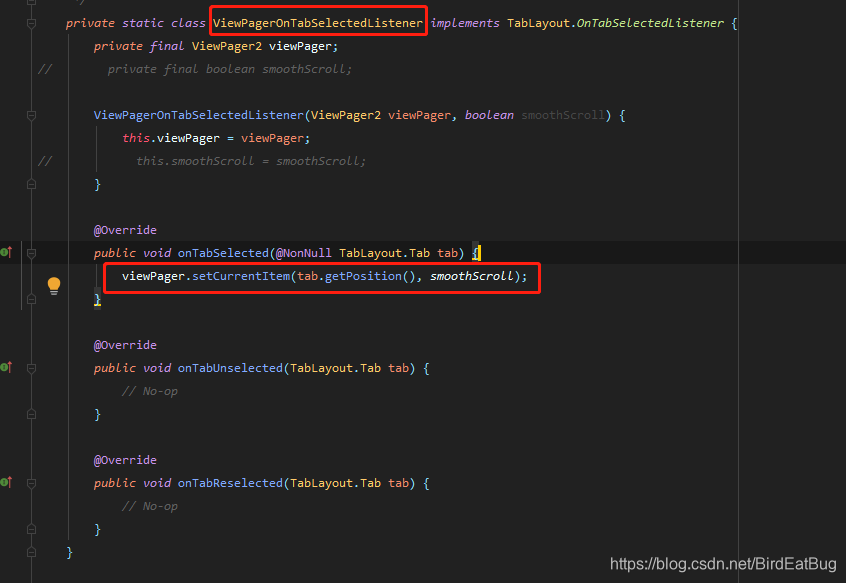
是的答案就在这里、
viewPager.setCurrentItem(tab.getPosition(), smoothScroll);讨厌的动画就是smoothScroll==true 导致的、这个值可以在初始化TabLayoutMediator时设置、用来取消滚动动画;
如下: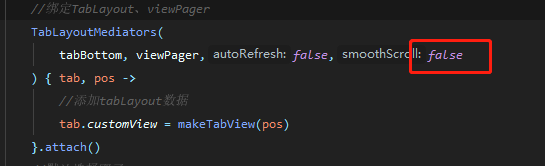
如果有这样的需求、点击tab无动画、滑动有动画(类似微信)? 请继续往下看;
TabLayoutMediator 是final类 且smoothScroll字段时私有的、我们没法继承重写、但是可以copy源码修改、不会有问题、核心修改如图
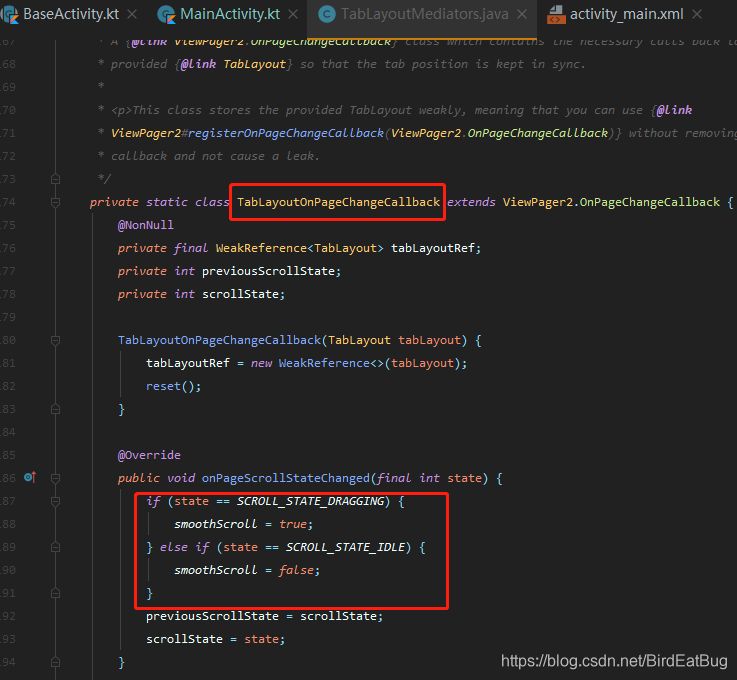
已下是修改好的完整代码
import androidx.annotation.NonNull;
import androidx.annotation.Nullable;
import androidx.recyclerview.widget.RecyclerView;
import androidx.viewpager2.widget.ViewPager2;
import com.google.android.material.tabs.TabLayout;
import java.lang.ref.WeakReference;
import static androidx.viewpager2.widget.ViewPager2.SCROLL_STATE_DRAGGING;
import static androidx.viewpager2.widget.ViewPager2.SCROLL_STATE_IDLE;
import static androidx.viewpager2.widget.ViewPager2.SCROLL_STATE_SETTLING;
public class TabLayoutMediators {
private TabLayout tabLayout;
private ViewPager2 viewPager;
private boolean autoRefresh;
private static boolean smoothScroll;
private TabConfigurationStrategy tabConfigurationStrategy;
@Nullable
private RecyclerView.Adapter<?> adapter;
private boolean attached;
@Nullable
private TabLayoutOnPageChangeCallback onPageChangeCallback;
@Nullable
private TabLayout.OnTabSelectedListener onTabSelectedListener;
@Nullable
private RecyclerView.AdapterDataObserver pagerAdapterObserver;
/**
* A callback interface that must be implemented to set the text and styling of newly created
* tabs.
*/
public interface TabConfigurationStrategy {
/**
* Called to configure the tab for the page at the specified position. Typically calls {@link
* TabLayout.Tab#setText(CharSequence)}, but any form of styling can be applied.
*
* @param tab The Tab whic 最低0.47元/天 解锁文章






 扫一扫
扫一扫


 1219
1219

 被折叠的 条评论
为什么被折叠?
被折叠的 条评论
为什么被折叠?
 到【灌水乐园】发言





