



 本文档介绍了如何使用SSM(Spring、SpringMVC、Mybatis)框架实现简单的增删改查功能。首先创建了一个maven的web项目,设置了相应的目录结构,并在pom.xml中添加了必要的依赖。接着,通过Mybatis的逆向工程生成了DAO层的相关文件,包括接口、映射文件、POJO类和Example类。然后配置了applicationContext.xml、springmvc.xml、db.properties和mybatis.xml等核心配置文件。在service层定义并实现了接口,在controller层编写了对应的控制逻辑。最后,配置了web.xml以整合Spring和SpringMVC。经过一系列的测试,成功实现了预期的增删改查功能。
1.创建maven的web项目,创建如下的简单目录结构:

2.在pom文件中添加相关jar包依赖以及配置tomcat插件:

<build>
		<plugins>
			<!-- tomcat插件 -->
			<plugin>
				<groupId>org.apache.tomcat.maven</groupId>
				<artifactId>tomcat7-maven-plugin</artifactId>
				<version>2.2</version>
				<configuration>
					<!-- 端口号 -->
					<port>8082</port>
					<!-- /表示访问路径 省略项目名 -->
					<path>/</path>
					<!-- 设置编码方式 -->
					<uriEncoding>utf-8</uriEncoding>
				</configuration>
			</plugin>
		</plugins>
	</build>
3.在/com-sb-ssm/src/main/resources目录下创建如下文件:

使用mybatis的逆向工程生成dao层的接口文件、映射文件、pojo类、pojoexample类:

4.配置文件的设置:
applicationContext.xml:
<?xml version="1.0" encoding="UTF-8"?>
<beans xmlns="http://www.springframework.org/schema/beans"
	xmlns:xsi="http://www.w3.org/2001/XMLSchema-instance"
	xmlns:context="http://www.springframework.org/schema/context"
	xmlns:aop="http://www.springframework.org/schema/aop"
	xsi:schemaLocation="http://www.springframework.org/schema/beans http://www.springframework.org/schema/beans/spring-beans.xsd
		http://www.springframework.org/schema/context http://www.springframework.org/schema/context/spring-context-4.3.xsd
		http://www.springframework.org/schema/aop http://www.springframework.org/schema/aop/spring-aop-4.3.xsd">
	<!-- 关联数据属性文件,注意加上classpath -->
	<context:property-placeholder location="classpath:db.properties"/>
	<!-- 开启扫描 -->
	<context:component-scan base-package="com.sb.service.impl"/>
	<!-- 配置数据源 -->
	<bean class="com.mchange.v2.c3p0.ComboPooledDataSource"
	id="dataSource" >
		<property name="driverClass" value="${driverName}"></property>
		<property name="jdbcUrl" value="${url}"></property>
		<property name="user" value="${names}"></property>
		<property name="password" value="${password}"></property>
	</bean>
	<!-- 整合mybatis -->
	<bean class="org.mybatis.spring.SqlSessionFactoryBean"
	id="sqlSessionFactoryBean">
		<!-- 关联数据源 -->
		<property name="dataSource" ref="dataSource"/>
		<!-- 关联mybatis的配置文件 ,注意加上classpath-->
		<property name="configLocation" value="classpath:mybatis.xml"/>
		<!-- 添加别名设置 -->
		<property name="typeAliasesPackage" value="com.sb.pojo"/>
	</bean>
	<!-- 配置映射文件扫描的路径 -->
	<bean class="org.mybatis.spring.mapper.MapperScannerConfigurer" >
		<property name="basePackage" value="com.sb.dao"/>
	</bean>
</beans>
springmvc.xml:
<?xml version="1.0" encoding="UTF-8"?>
<beans xmlns="http://www.springframework.org/schema/beans"
	xmlns:xsi="http://www.w3.org/2001/XMLSchema-instance"
	xmlns:context="http://www.springframework.org/schema/context"
	xmlns:aop="http://www.springframework.org/schema/aop"
	xmlns:mvc="http://www.springframework.org/schema/mvc"
	xsi:schemaLocation="http://www.springframework.org/schema/mvc http://www.springframework.org/schema/mvc/spring-mvc-4.3.xsd
		http://www.springframework.org/schema/beans http://www.springframework.org/schema/beans/spring-beans.xsd
		http://www.springframework.org/schema/context http://www.springframework.org/schema/context/spring-context-4.3.xsd
		http://www.springframework.org/schema/aop http://www.springframework.org/schema/aop/spring-aop-4.3.xsd">
	<!-- 开启扫描 -->
	<context:component-scan base-package="com.sb.controller"/>
	<mvc:annotation-driven>
	<!-- 添加fastjson的转换器 -->
		<mvc:message-converters>
			<bean class="com.alibaba.fastjson.support.spring.FastJsonHttpMessageConverter"></bean>
		</mvc:message-converters>
	</mvc:annotation-driven>
</beans>
db.properties:
driverName=com.mysql.jdbc.Driver
url=jdbc:mysql://localhost:3306/demo?characterEncoding=utf-8&useSSL=false
names=root
password=123521
mybatis.xml:
<?xml version="1.0" encoding="UTF-8" ?>
<!DOCTYPE configuration
  PUBLIC "-//mybatis.org//DTD Config 3.0//EN"
  "http://mybatis.org/dtd/mybatis-3-config.dtd">
<configuration>
 <settings>
 <!-- 开启延迟加载 -->
  	<setting name="lazyLoadingEnabled" value="true"/>
  	<setting name="aggressiveLazyLoading" value="false"/>
 </settings>
</configuration>
4.service层接口和实现类:
接口:
package com.sb.service;
import java.util.List;
import com.sb.pojo.Dept;
public interface IDeptService {
	public List<Dept> query();
	public List<Dept> queryById(Integer deptno);
	public int update(Dept dept);
	public int insert(Dept dept);
	public int delete(Integer deptno);
}
实现类:
package com.sb.service.impl;

import java.util.List;
import javax.annotation.Resource;
import org.springframework.stereotype.Service;
import com.sb.dao.DeptMapper;
import com.sb.pojo.Dept;
import com.sb.pojo.DeptExample;
import com.sb.pojo.DeptExample.Criteria;
import com.sb.service.IDeptService;
@Service
public class DeptServiceImpl implements IDeptService {
	@Resource
	private DeptMapper deptMapper;

	@Override
	public List<Dept> query() {
		DeptExample de = new DeptExample();
		return deptMapper.selectByExample(de);
	}

	@Override
	public List<Dept> queryById(Integer deptno) {
		DeptExample example = new DeptExample();
		Criteria criteria = example.createCriteria();
		criteria.andDeptnoEqualTo(deptno);
		return deptMapper.selectByExample(example);
	}

	@Override
	public int update(Dept dept) {
		return deptMapper.updateByPrimaryKey(dept);
	}

	@Override
	public int insert(Dept dept) {

		return deptMapper.insert(dept);
	}

	@Override
	public int delete(Integer deptno) {
		return deptMapper.deleteByPrimaryKey(deptno);
	}
}
5.controller层代码:
package com.sb.controller;

import java.util.List;
import javax.annotation.Resource;
import org.springframework.stereotype.Controller;
import org.springframework.ui.Model;
import org.springframework.web.bind.annotation.RequestMapping;
import org.springframework.web.bind.annotation.RequestParam;
import org.springframework.web.bind.annotation.ResponseBody;
import com.sb.pojo.Dept;
import com.sb.service.IDeptService;

@Controller
public class DeptController {
	@Resource
	private IDeptService deptService;
	@RequestMapping("/query")
	@ResponseBody
	public List<Dept> query(@RequestParam(value="id",required=false) Integer deptno) {
		if (deptno!=null) {
			return deptService.queryById(deptno);
		}else {
			return deptService.query();
		}
	}
	@RequestMapping("/update")
	@ResponseBody
	public String update() {
		Dept dept = new Dept();
		dept.setDeptno(44);
		dept.setDname("newname");
		dept.setLoc("henan");
		int result = deptService.update(dept);
		if (result==1) {
			return "OK";
		}
		return "False";
	}
	@RequestMapping("/insert")
	@ResponseBody
	public int insert() {
		Dept dept = new Dept();
		dept.setDeptno(45);
		dept.setDname("neme");
		dept.setLoc("hehehe");
		return deptService.insert(dept);
	}
	@RequestMapping("/delete")
	@ResponseBody
	public int delete() {
		return deptService.delete(80);
	}
}
6.web.xml的配置:关联spring与spring文件
<?xml version="1.0" encoding="UTF-8"?>
<web-app xmlns:xsi="http://www.w3.org/2001/XMLSchema-instance"
	xmlns="http://java.sun.com/xml/ns/javaee"
	xsi:schemaLocation="http://java.sun.com/xml/ns/javaee http://java.sun.com/xml/ns/javaee/web-app_2_5.xsd"
	id="WebApp_ID" version="2.5" >
	<!-- 关联spring配置文件 -->
	<context-param>
		<param-name>contextConfigLocation</param-name>
		<param-value>classpath:applicationContext.xml</param-value>
	</context-param>
	<listener>
		<listener-class>org.springframework.web.context.ContextLoaderListener</listener-class>
	</listener>
	<!-- 前端控制器 -->
	<servlet>
		<servlet-name>spring-mvc</servlet-name>
		<servlet-class>org.springframework.web.servlet.DispatcherServlet</servlet-class>
		<!-- 关联springmvc文件 -->
		<init-param>
			<param-name>contextConfigLocation</param-name>
			<param-value>classpath:springmvc.xml</param-value>
		</init-param>
	</servlet>
	<servlet-mapping>
		<servlet-name>spring-mvc</servlet-name>
		<url-pattern>/</url-pattern>
	</servlet-mapping>
	<filter>
		<filter-name>encodingFilter</filter-name>
		<filter-class>org.springframework.web.filter.CharacterEncodingFilter</filter-class>
		<init-param>
			<param-name>encoding</param-name>
			<param-value>UTF-8</param-value>
		</init-param>
	</filter>
	<filter-mapping>
		<filter-name>encodingFilter</filter-name>
		<url-pattern>/*</url-pattern>
	</filter-mapping>
	<servlet-mapping>
		<servlet-name>default</servlet-name>
		<url-pattern>*.jpg</url-pattern>
	</servlet-mapping>
	<servlet-mapping>
		<servlet-name>default</servlet-name>
		<url-pattern>*.js</url-pattern>
	</servlet-mapping>
	<servlet-mapping>
		<servlet-name>default</servlet-name>
		<url-pattern>*.css</url-pattern>
	</servlet-mapping>
</web-app>
测试1:

结果:

测试2:

结果:

测试3:

结果;

测试4:

结果:
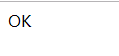
测试5:

结果:





 扫一扫
扫一扫


 782
782

 被折叠的 条评论
为什么被折叠?
被折叠的 条评论
为什么被折叠?
 到【灌水乐园】发言





