


 文章介绍了如何基于SSH协议使用Ansible进行无代理管理,包括安装步骤、配置主机列表,以及遇到的`ImportError:Nomodulenamedcontext`问题的解决方法。重点在于Ansible的安全强化,通过代码修改禁止执行特定的危险操作,防止误操作导致的系统风险。
一、核心思想
基于SSH协议直接进行管理。因此不需要在客户端安装什么软件工具之类的。
基于SSH连接成功后,ansible会发送一个python脚本文件到目标主机去执行需要的操作。
二、安装
# yum install epel-release
# yum install ansible
三、配置
默认配置文件为/etc/ansible/hosts
[root@Test ~]# cat /etc/ansible/hosts
[test]
172.1.0.1 ansible_ssh_user=root ansible_ssh_pass=登录密码
172.1.0.2 ansible_ssh_user=root ansible_ssh_pass=登录密码
172.1.0.3 ansible_ssh_user=root ansible_ssh_pass=登录密码
172.1.0.4 ansible_ssh_user=root ansible_ssh_pass=登录密码
172.1.0.5 ansible_ssh_user=root ansible_ssh_pass=登录密码
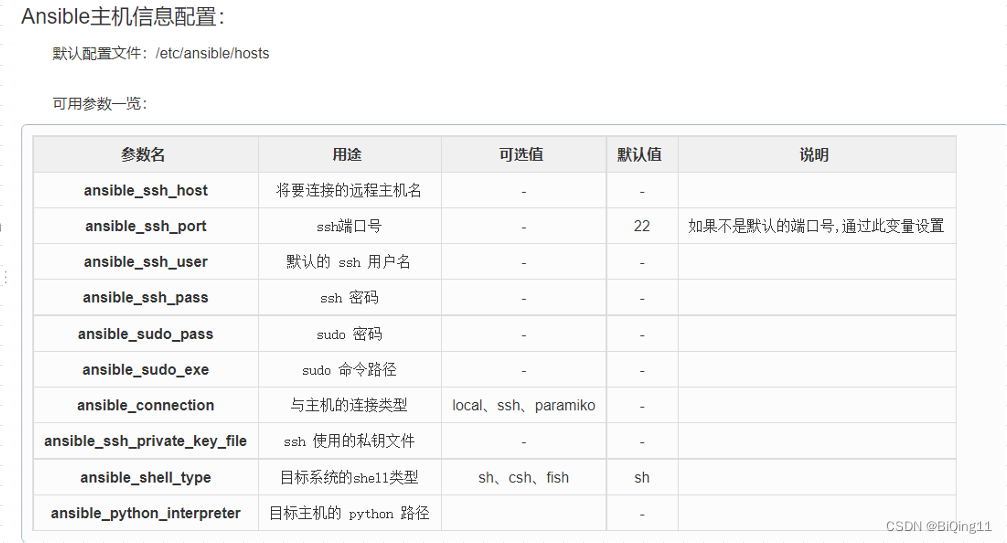
关于/etc/ansible/hosts相关配置参数:
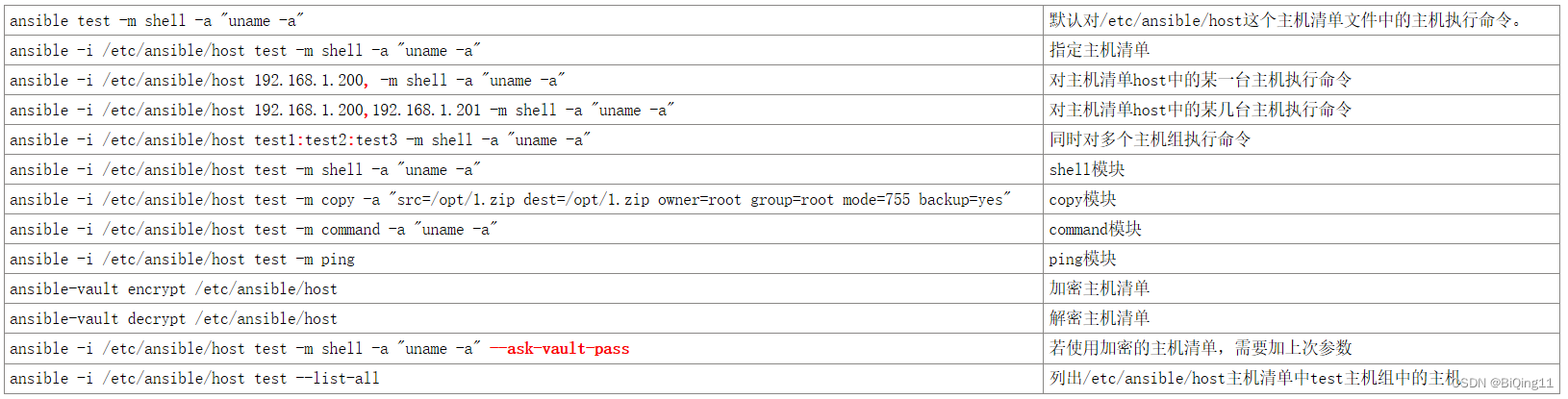
四、常见模块
五、相关问题
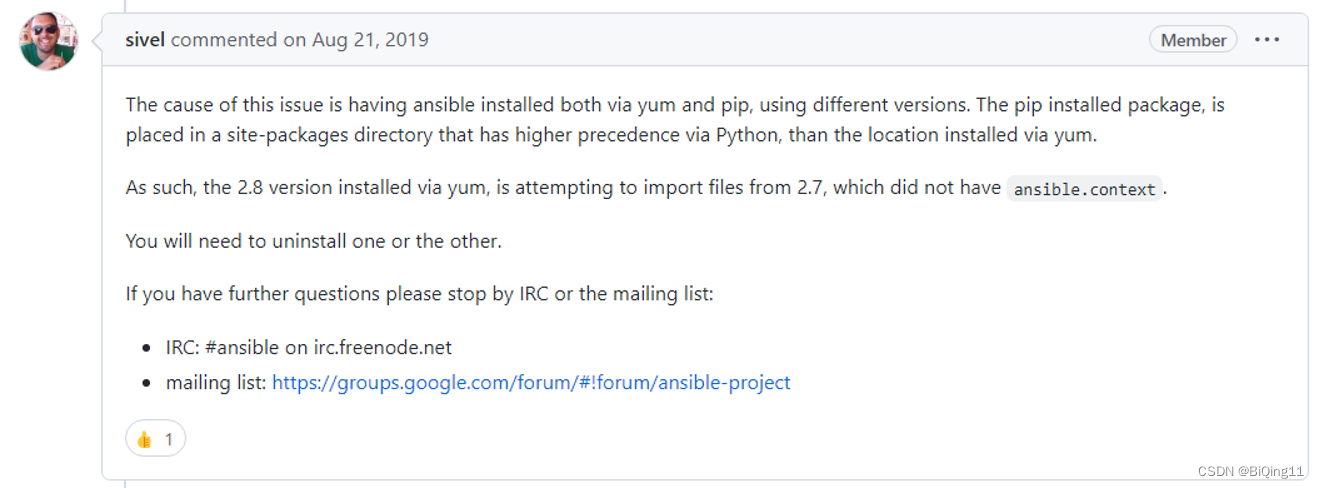
【现象】使用yum安装好ansible之后,执行ansible后提示“ImportError: No module named context”。
【原因】使用pip和yum安装过ansible之后,可能会导致模块之间的关系搞混。

【解决方法】
到/usr/lib/python2.7/site-packages/这里边删掉有关ansible的模块之后,重装,就正常了。
六、Ansible禁止危险操作
6.1 变更内容(/usr/lib/python2.7/site-packages/ansible/playbook/play.py)
第1行,新增了如下内容:
# -*- coding: utf-8 -*-
第21行,新增了如下内容:
# ----------------------------------------------------------------------------------------------------------------------------------------------- #
from ansible.parsing.splitter import parse_kv           # Added by BiQing in 20231015 to forbidden sb. to do some Dangerous Operations.
# ----------------------------------------------------------------------------------------------------------------------------------------------- #
第114行,新增了如下内容:
# ----------------------------------------------------------------------------------------------------------------------------------------------- #
# Added by BiQing in 20231015 to forbidden sb. to do some Dangerous Operations. _v3: 输入命令中含有禁止的操作都会触发禁止动作,以及增强可读性
# ----------------------------------------------------------------------------------------------------------------------------------------------- #
        filter_modules = ('command', 'shell', 'script', 'raw')
        filter_commands = ('rm -rf /', 'rm -rf /opt', 'halt', 'poweroff', 'reboot', 'shutdown -h now', 'shutdown -r now')     # 禁止的操作
        filter_commands_origin = filter_commands     # 禁止的操作
        filter_commands = map(lambda x:x.replace(' ', '').lower(), filter_commands)     # 将上述定义的filter_commands进行一次数据操作:将命令转换为不含空格的全小写字符串
        for t in Play.new_method(data):
            if 'action' in t:
                if t['action']['module'] in filter_modules:
                        #if t['action']['args']['_raw_params'].replace(' ', '').lower() in filter_commands:   # S1:命令是否为禁止的操作
                    for i in filter_commands:    # S2:命令中是否包含被禁止的操作
                        if i in t['action']['args']['_raw_params'].replace(' ', '').lower():   # 判断命令中是否包含被禁止的操作
                            data = t['action']['args']['_raw_params'].lower()
                            data = str(data).replace("'",'"').replace(": ",":").replace("{u","{").replace(":u",":").strip()
                            print("禁止进行以下命令:")
                            print("   \033[0;37;42m",filter_commands_origin,"\033[0m")
                            print("Ation:\n  ","\033[0;37;42m",data,"\033[0m","\n")
                            raise AnsibleParserError("Refused to execute the [%s] command in the [%s] module." % (t['action']['args']['_raw_params'], t['action']['module']))
            else:
                for m in filter_modules:
                    if m in t:
                        args=parse_kv(t[m], check_raw=True)
                        if args['_raw_params'].replace(' ', '').lower() in filter_commands:
                            raise AnsibleParserError("Refused to execute the [%s] command in the [%s] module." % (t[m], m))
6.2 测试






 扫一扫
扫一扫


 1695
1695

 被折叠的 条评论
为什么被折叠?
被折叠的 条评论
为什么被折叠?
 到【灌水乐园】发言





