



 本文介绍如何使用 AJAX 进行异步数据请求,包括 XMLHttpRequest 和 Fetch 方法,并通过 Flask 实现了一个简单的示例应用。
A synchronous data request is very much like we did with an HTML form submission.
Using AJAX to send data asynchronously
- Data request are either synchronous or async (asynchronous)
- Async data requests are requests that get sent to the server and back to the client without a page refresh.
- Async requests (AJAX requests) use one of two methods:
- XMLHttpRequest. That’s available natively on the window objects on the browser.
- Fetch (modern way)
Using XMLHttpRequest
<!-- Create the request objects -->
var xhttp = new XMLHttpRequest();

<!-- Fetch the data from the DOM that you're looking to send with your request -->
description = document.getElemenyById("description").value;

<!-- Open a connection, which we need to do with TCP/IP that would start a connection from the client to the server -->
<!-- First, passing in the method of the request. -->
<!-- Second, passing your route -->
<!-- Third, passing in data that you retrieved from the DOM -->
xhttp.open("GET", "/todos/create?description=" + description);

<!-- Send over that request to the server as well as close out the connection. -->
xhttp.send();

<!-- After we send off that request to the server, we typically then want
the view to react based on what the server comes back with.

Whereas, in a synchronous requests, when you finished processing your requests
on the server, the server dictates how the view should then uptake.

In an asynchronous request, it's on the client side that you reacts to the server and you figure out how to update the DOM that is already loaded on the client based on the response that you get. -->
XMLHttpRequest on success
Traditionally with XMLHttpRequest, we would define a function that is set equal to the onreadystatechange property on your request object.
<!-- Function gets triggered every single time that the state of the requests changes, whether it goes from starting to pending to operations exceeding,
and so this if block would guarantee that whatever you execute inside of here would be based on there being a successful response coming from the server. -->
xhttp.onreadystatechange = function() {
	// this.readyState === 4, indicates that the operation on a server has already been completed.
	// this.status === 200, indicates that the response was a successful response as HTTP status code 200 means a successful response.
	if (this.readyState === 4 && this.status === 200) {
		// on successful response
		console.log(xhttp.responseText);
	}
}
Using fetch
- fetch is another window object that lets you send HTTP requests.
fetch(<url-route>, <object of request parameters>)
fetch('/my/request',
	method: 'POST',
	// response body
	body: JSON.stringify({
		'description': 'some description here'
	}),
	// possible custom headers
	headers: {
		'Content-Type': 'application/json'
	}
});
整个代码:
from flask import Flask, render_template, request, redirect, url_for, jsonify
from flask_sqlalchemy import SQLAlchemy

app = Flask(__name__)
app.config['SQLALCHEMY_DATABASE_URI'] = 'postgres://username@localhost:5432/todoapp'
db = SQLAlchemy(app)

class Todo(db.Model):
    __tablename__ = 'todos'
    id = db.Column(db.Integer, primary_key=True)
    description = db.Column(db.String(), nullable=False)

    def __repr__(self):
        return f'<Todo {self.id} {self.description}>'

# Ensure the tables are created for all the models that we've created and they haven't been created.
db.create_all()

@app.route('/todos/create', methods=['POST'])
def create_todo():
    # get_json is that it fetches the JSON body that was sent to an object key description.
    description = request.get_json()['description']
    todo = Todo(description=description)
    db.session.add(todo)
    db.session.commit()
    # return a useful JSON object that includes that description.
    # jsonify will return JSON data to the client for us.
    # whatever we pass in as our JSON object.
    return jsonify({
        'description': todo.description
    })


@app.route('/')
def index():
    return render_template('index.html', data=Todo.query.all())
<!DOCTYPE html>
<html>
    <head>
        <title>Todo app</title>
        <style>
            .hidden {
                display:none;
            }
        </style>
    </head>
    <body>
        <form id="form">
            <input type="text" id="description" name="description" />
            <input type="submit" value="Create" />
        </form>
        <div id="error" class="hidden">Something went wrong!</div>
        <ul id="todos">
            {% for d in data %}
                <li>
                    {{ d.description }}
                </li>
            {% endfor %}
        </ul>
        <script>
            // Select on the form
            // onsubmit handler to default wound up sending information to the server
            // Using the event object, e
            document.getElementById('form').onsubmit = function(e) {
                // The default behaviro would have done that full page refresh and
                // submitted it using the method and action attributes up
                e.preventDefault();

                // Send the post requests asynchronously using fetch
                fetch('/todos/create', {
                    method: 'POST',
                    body: JSON.stringify({
                        // The value of whatever the user has typed into the description field.
                        'description': document.getElementById('description').value
                    }),
                    headers: {
                        'Content-Type': 'application/json'
                    }
                })
                // give back a promise by which we can then use the
                // then method
                // callback should give us back a response
                .then(function(response) {
                    // parse out the response which will initially be a string as a JSON response
                    return response.json();
                })
                // manipulate the JSON response
                .then(function(jsonResponse) {
                    console.log(jsonResponse);
                    // Append a child Li element here
                    const liItem = document.createElement('LI');
                    liItem.innerHTML = jsonResponse['description'];
                    document.getElementById('todos').appendChild(liItem);
                    // it did succeed
                    document.getElementById("error").className = 'hidden';
                })
                // catch handler
                .catch(function() {
                    // Remove the class name
                    document.getElementById("error").className = '';
                })
            }
        </script>
    </body>
</html>
运行命令:
$ FLASK_APP=app.py FLASK_DEBUG=true flask run
结果:
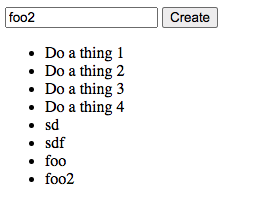
这回就不需要refresh网页,就可以将结果显示在页面。
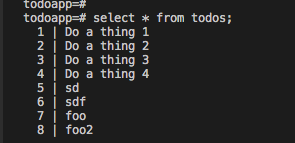
查看数据库:





 扫一扫
扫一扫


 被折叠的 条评论
为什么被折叠?
被折叠的 条评论
为什么被折叠?
 到【灌水乐园】发言





