



 本文详细介绍了在React中如何在Class组件内使用Props。通过具体示例代码展示了如何在render方法中通过this.props访问传递过来的Props,并提供了两种不同的Props解构方式,帮助开发者更好地理解和实践。
上一篇文章,提到如果用JSX格式来用props,应该怎么用。现在这一篇是写在class component里应该如何使用props呢。还是一样,在src 文件夹里创建一个Testprops.js文件,代码如下:
// Testprops.js 文件
import React, {Component} from 'react'

class testprops extends Component {
    render() {
        return (
        	// 如果在return里,为了保险,都是写在一个<div>里面
            <div>
                <h1>
                    Hello {this.props.name}, friend's name {this.props.friendName}
                </h1>
                {this.props.children}
            </div>
        )
    }
}

export default testprops;
在App.js 文件里:
// App.js 文件下
import React from 'react';
import './App.css';
import Testprops from './Testprops';

function App() {
  return (
    <div className="App">
      <Testprops name="AAA" friendName="DDD">
        <p>This is the first children</p>
      </Testprops>

      <Testprops name="BBB" friendName="EEE">
        <button>Action</button>
      </Testprops>
      <Testprops name="CCC" friendName="FFF"/>
    </div>
  );
}

export default App;
结果如下:
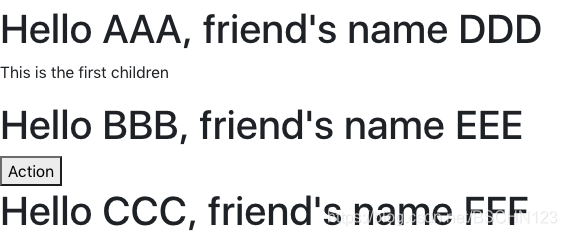
还有没有其他种方法来实现这个功能呢?答案是有的
// Testprops.js 文件
import React, {Component} from 'react'

class testprops extends Component {
    render() {
    	// 把这里修改成这样
        const {name, friendName, children} = this.props
        // 语法:
        // const {state1, state2, state3,...} = this.state
        return (
            <div>
                <h1>
                    Hello {name}, friend's name {friendName}
                </h1>
                {children}
            </div>
        )
    }
}

export default testprops;
App.js 文件还是保持一样,
// App.js 文件下
import React from 'react';
import './App.css';
import Testprops from './Testprops';

function App() {
  return (
    <div className="App">
      <Testprops name="AAA" friendName="DDD">
        <p>This is the first children</p>
      </Testprops>

      <Testprops name="BBB" friendName="EEE">
        <button>Action</button>
      </Testprops>
      <Testprops name="CCC" friendName="FFF"/>
    </div>
  );
}

export default App;
结果还是更上面结果一样。
如果有哪里写的不对,就请指出来吧!
如果写的不错的话,就用点个赞来取代五星好评吧!





 扫一扫
扫一扫


 480
480

 被折叠的 条评论
为什么被折叠?
被折叠的 条评论
为什么被折叠?
 到【灌水乐园】发言





