


Detect a written text's language

本文介绍了一种基于n-gram和单词出现频率比较的语言检测方法,适用于使用单词的任何语言,准确率介于70%到99.8%之间。

来自:http://www.codeproject.com/Articles/43198/Detect-a-written-text-s-language

Introduction

Quite some time ago, I published an article on how to detect the encoding of an given text. In this article, I describe the next step on the long way to text classification: the detection of language.

The given solution is based on n-gram and word occurrence comparison.

It is suitable for any language that uses words (this is actually not true for all languages).

Depending on the model and the length of the input text, the accuracy is between 70% (only short Norwegian, Swedisch and Danisch classified by the "all" model) and 99.8%, using the "default" model.

Background

The language detection of a written text is probably one of the most basic tasks in natural language processing (NLP). For any language depending processing of an unknown text, the first thing to know is which language the text is written in. Luckily, it is one of the easier challenges that NLP has to offer. The approach I have chosen to implement is widely known and pretty straightforward. The idea is that any language has a unique set of character (co-)occurrences.

The first step is to collect those statistics for all languages that should be detectable. This is not as easy as it may sound in the first place. The problem is to collect a large set of test data (plain text) that contains only one language and that is not domain specific. (Only newspaper articles may lack the use of the word “I” and direct speech. Using Shakespeare plays will not be the best approach to detect contemporary texts. Medical articles tend to contain too many domain specific terms which are not even language specific (major, minor, arteria etc…).) And if that would not be hard enough, the texts should not be copyrighted. (I am not sure if this is a true requirement. Are the results of statistical analytics of copyrighted texts also copyrighted?) I have chosen to use Wikipedia as my primary source. I had to do some filtering to "clean" the sources from the ever present English phrases that occur in almost any article – no matter what language they are written in (I actually used Babel itself to detect the English phrases). The clean up was in no way perfect. Wikipedia contains a lot of proper names (i.e., band names) that often contain a “the” or an “and”. This is why those words occur in many languages even if they are not part of the language. This must not necessarily be a disadvantage, because Anglicism is widely spread across many languages. I created three statistics for each language:

  • Character set

    Some languages have a very specific Character set (e.g., Chinese, Japanese, and Russian); for others, some characters give a good hint of what languages come in question (e.g., the German Umlauts).

  • N-Grams

    After tokenizing the text into words (where applicable), the occurrences of each 1, 2, and 3-grams were counted. Some n-grams are very language specific (e.g., the "TH" in English).

  • Word list

    The last source of disambiguation is the actually used words. Some languages (like Portuguese and Spanish) are almost identical in used characters and also the occurrences of the specific n-grams. Still, different words are used in different frequencies.

A set of statistics is called a model. I have created some subsets of the "all" model that meet my needs the best (see table below). The "common" model contains the 10 most spoken languages in the world. The “small” and “default” are based on my usage scenarios. If you are from another part of the world, your preferences might be different. So please take no offence in my choice of what languages are contained in which model.

All statistics are ordered and ranked by their occurrences. Within the demo application, all models can be studied in detail. Classification of an unknown text is straightforward. The text is tokenized and the three tables for the statistics are generated. The result table is compared to all tables in the model, and a distance is calculated. The comparison table from the model that has the smallest distance to the unknown text is most likely the language of the text.
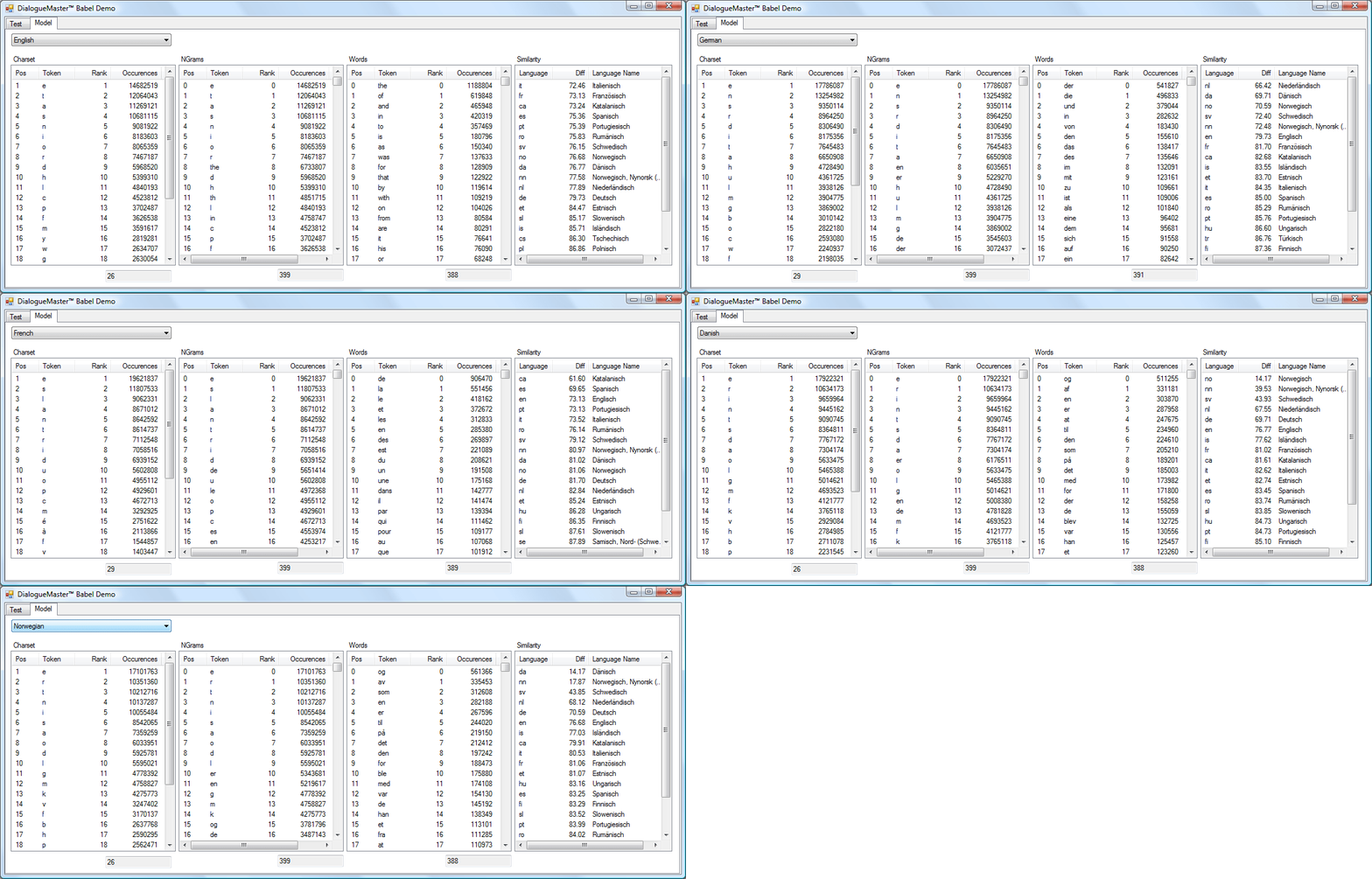
Sample model

Using the code

Quick word about the code

Babel is part of a larger project. I wanted the Babel assembly to work stand-alone. Since some of the used classes originally were scattered across many assemblies, I used the define "_DIALOGUEMASTER" to indicate whether to use the DialogueMaster™ assemblies or implement (a probably simpler) version in place.

Any impartand DialogueMaster™ class is remotable. The clients need only one assembly containing all the interface definitions. This is why Babel uses so many interfaces where they might seem to bloat the code in the first place. Additionally, DialogueMaster™ offers lots of PerformanceCounters. I chose to omit them for an easier usage of the assembly (no installation and no admin rights needed).

What I actually want to say is: the code is not as readable and clean as it could (and should) be.

Classify text

Usage of the code is straightforward. First, you must chose (or create your own) model. The ClassifyText method returns a ICategoryList which is a list of ICateogry (name-score pairs) items sorted descending by their score.

using System;

//
// Most simple samlple
//

class Program
{
    static void Main(string[] args)
    {
        DialogueMaster.Babel.BabelModel model = DialogueMaster.Babel.BabelModel._AllModel;
        String s = System.Console.ReadLine();
        while (s.Length > 0)
        {
            DialogueMaster.Classification.ICategoryList result = model.ClassifyText(s, 10);
            foreach (DialogueMaster.Classification.ICategory category in result)
            {
                System.Console.Out.WriteLine(" {0} : {1}", category.Name, category.Score);
            }

            s = System.Console.ReadLine();
        }
    }
}

Define your own model

From existing set

To define your own model from the existing set of languages, simply create a new BabelModel and add the required languages from the _AllModel.

class Program2
{
    static void Main(string[] args)
    {
        // Create a custom model 
        DialogueMaster.Babel.BabelModel model = new DialogueMaster.Babel.BabelModel();
        model.Add("de", DialogueMaster.Babel.BabelModel._AllModel["de"]);
        model.Add("en", DialogueMaster.Babel.BabelModel._AllModel["en"]);
        model.Add("sv", DialogueMaster.Babel.BabelModel._AllModel["sv"]);

        // ask the user for some input
        String s = System.Console.ReadLine();
        while (s.Length > 0)
        {
            // classify it 
            DialogueMaster.Classification.ICategoryList result = model.ClassifyText(s, 10);
            // and dump the result
            foreach (DialogueMaster.Classification.ICategory category in result)
            {
                System.Console.Out.WriteLine(" {0} : {1}", category.Name, category.Score);
            }

            s = System.Console.ReadLine();
        }
    }
}

Add new language

To add a new language is pretty straightforward. All you need is some learn data text.

class Program3
{
    static void Main(string[] args)
    {
        // Create a custom model 
        DialogueMaster.Babel.BabelModel model = new DialogueMaster.Babel.BabelModel();
        TokenTable klingonTable = new TokenTable(new FileInfo("LearnData\\Klingon.txt"));
        TokenTable vulcanTable = new TokenTable(new FileInfo("LearnData\\Vulcan.txt"));

        model.Add("kling", klingonTable);
        model.Add("vulcan", klingonTable);
        model.Add("en", DialogueMaster.Babel.BabelModel._AllModel["en"]);


        // ask the user for some input
        String s = System.Console.ReadLine();
        while (s.Length > 0)
        {
            // classify it 
            DialogueMaster.Classification.ICategoryList result = model.ClassifyText(s, 10);
            // and dump the result
            foreach (DialogueMaster.Classification.ICategory category in result)
            {
                System.Console.Out.WriteLine(" {0} : {1}", category.Name, category.Score);
            }

            s = System.Console.ReadLine();
        }
    }
}

Points of interest

Supported languages

Language Code Language Quality Default Common Large Small
nl Dutch 13 x   x  
en English 13 x x x x
ca Catalan 13        
fr French 13 x x x x
es Spanish 13 x x x x
no Norwegian 13 x   x  
da Danish 13 x   x  
it Italian 13     x x
sv Swedish 13 x   x  
de German 13 x x x x
pt Portuguese 13 x x x  
ro Romanian 13        
vi Vietnamese 13        
tr Turkish 13     x  
fi Finnish 12     x  
hu Hungarian 12     x  
cs Czech 12     x  
pl Polish 12     x  
el Greek 12     x  
fa Persian 12        
he Hebrew 12        
sr Serbian 12        
sl Slovenian 12        
ar Arabic 12   x    
nn Norwegian, Nynorsk (Norway) 12        
ru Russian 11   x x  
et Estonian 11        
ko Korean 10        
hi Hindi 10   x    
is Icelandic 10        
th Thai 9        
bn Bengali (Bangladesh) 9   x    
ja Japanese 9   x    
zh Chinese (Simplified) 8   x    
se Sami (Northern) (Sweden) 5        

References

History


import requests from bs4 import BeautifulSoup import re import time import os import random from fake_useragent import UserAgent from urllib.parse import urlparse, urljoin, urlunparse import logging # 配置日志 logging.basicConfig( level=logging.INFO, format='%(asctime)s - %(levelname)s - %(message)s', handlers=[ logging.FileHandler("novel_downloader.log"), logging.StreamHandler() ] ) # 创建用户代理生成器 ua = UserAgent() # 需要过滤的导航元素列表(已添加笔趣阁专用元素) NAV_ELEMENTS = [ "首页", "关灯", "字体:", "大", "中", "小", "上一页", "返回目录", "下一页", "加入书签", "推荐票", "返回书页", "目录", "设置", "书架", "加入书架", "上一章", "下一章", "书签", "投票", "举报", "本章未完,请点击下一页继续阅读", "本章结束,请点击下一章继续阅读", "返回", "电脑版", "手机版", "APP版", "客户端", "介绍", "足迹", "超大", "进书架", "本章未完 点击下一页继续阅读", "顶部", "底部", "页脚", "页眉", "章节列表", "加书签", "我的书架", "阅读历史", "本章已完", "请收藏本站", "请记住本书首发域名", "天才一秒记住本站地址", "顶点小说", "笔趣阁", "更新最快", "推荐阅读", "上一节", "下一节", "目录页", "返回顶部", "加入书签", "投票推荐", "章节报错","热门推荐", "新书推荐", "最新网址", "蚂蚁文学", "本章结束" "加入书签,方便阅读", # 笔趣阁专用 "本章未完,点击下一页继续阅读", # 笔趣阁专用 "热门推荐", "新书推荐", "推荐阅读", "完本小说", "排行榜单", "小说推荐","章节目录", "返回目录", "目录页", "章节列表", "书签", "投票", "推荐票", "加入书架", "我的书架", "阅读历史", "投推荐票", "加入书签", "下一章", "上一章", "←", "→", "上一节", "下一节", "猜你喜欢", "编辑推荐", "小说排行", "精品推荐", "最新小说" ] # 特殊换行保留标签 PRESERVE_LINEBREAK_TAGS = ["br", "p", "div", "pre", "blockquote"] # 常见内容容器选择器(添加笔趣阁专用选择器) CONTENT_SELECTORS = [ ('div', 'Readarea ReadAjax_content'), # 笔趣阁专用 ('div', 'content'), # 通用内容区 ('div', 'novel-content'), # 小说专用 ('div', 'size16 color5 pt-read-text'), ('div', 'pt-read-text'), ('div', 'chapter-content'), ('div', 'novelcontent'), ('div', 'chapter-content'), ('article', None), ('div', 'chapter_body'), ('div', 'read-content'), ('div', 'txt_cont'), ('div', 'content-body'), ('div', 'read-box'), ('div', 'chapter-content-inner'), ('div', 'chapter-text'), ('div', 'content-main'), ('div', 'chapter-container'), ('div', 'chapter-content'), ('div', 'chapter'), ('div', 'main-content'), ('div', 'entry-content'), ('div', 'article-content'), ('div', 'content-body'), ] # 下一页链接选择器(优化后的选择器) NEXT_PAGE_SELECTORS = [ # 优先匹配bottem区域 ('div', 'bottem1', 'a', re.compile(r'下一[页章]|继续阅读')), ('div', 'bottem2', 'a', re.compile(r'下一[页章]|继续阅读')), # 笔趣阁专用选择器 ('a', {'id': 'pt_next'}), # 优先匹配id=pt_next的链接 # 通用选择器 ('a', re.compile(r'下一页|下一章|下一节|继续阅读'), None), ('button', re.compile(r'下一页|下一章|下一节|继续阅读'), 'parent_a'), ('a', None, re.compile(r'next-page|next|next-chapter')), ('a', None, 'next'), ('a', None, 'bt_next'), ('a', None, 'btn-next'), ('a', None, 'nextChapter'), ('a', None, 'next_chapter'), ('a', None, 'chapter-next'), ('a', None, 'btn-next-page'), ('a', {'id': 'nextChapterBtn'}), ('a', {'id': 'next_chapter'}), ('a', {'id': 'next_page'}), ('a', {'id': 'btn_next'}), ('a', {'id': 'nextChapter'}), ('a', {'class': 'btn-info'}), ('a', {'class': 'next-page'}), ('a', {'class': 'next-chapter'}), ('a', {'class': 'next-button'}), ] def normalize_url(url, base_url): """规范化URL,确保正确处理相对路径和绝对路径""" parsed_base = urlparse(base_url) parsed_url = urlparse(url) # 如果URL是绝对路径,直接返回 if parsed_url.scheme and parsed_url.netloc: return url # 处理相对路径 if url.startswith('//'): return f"{parsed_base.scheme}:{url}" # 处理以/开头的路径 if url.startswith('/'): return f"{parsed_base.scheme}://{parsed_base.netloc}{url}" # 处理相对路径 base_path = parsed_base.path.rsplit('/', 1)[0] if '.' in parsed_base.path else parsed_base.path return f"{parsed_base.scheme}://{parsed_base.netloc}{base_path}/{url}" def extract_content_and_next_link(html, base_url): """从HTML中提取内容并找到下一页链接,优化换行处理""" soup = BeautifulSoup(html, 'html.parser') content_div = None # 尝试多种内容容器选择器 for selector in CONTENT_SELECTORS: tag, class_name = selector if class_name: content_div = soup.find(tag, class_=class_name) else: content_div = soup.find(tag) if content_div: logging.info(f"使用选择器: {selector} 找到内容容器") break # 兜底策略 if not content_div: logging.warning("使用body作为内容容器") content_div = soup.find('body') if not content_div: logging.error("无法找到内容容器") return "", None # ====== 广告过滤逻辑移动到此处 ====== # 新增过滤:移除推荐区域 for ad_section in content_div.find_all(class_=re.compile(r"recommend|hot|rank|footer_link|banner")): ad_section.decompose() # 移除特定ID的广告区块 for ad_id in ["hm_t_125039", "banner", "footer_link"]: ad_element = content_div.find(id=ad_id) if ad_element: ad_element.decompose() # 1. 移除导航元素 for nav_text in NAV_ELEMENTS: for element in content_div.find_all(string=re.compile(re.escape(nav_text))): element.extract() for nav_container in content_div.find_all(class_=re.compile(r"bottem|footer|header|nav")): nav_container.decompose() # 移除包含箭头符号的元素 for arrow_element in content_div.find_all(string=re.compile(r"←|→")): if any(nav_text in arrow_element for nav_text in NAV_ELEMENTS): arrow_element.extract() # 新增广告区块过滤 for ad_class in ["lm", "footer_link", "footer_cont", "reader_mark"]: for element in content_div.find_all(class_=ad_class): element.decompose() # 2. 移除script/style标签 for script in content_div.find_all(['script', 'style']): script.extract() # 3. 清理空白字符 for nbsp in content_div.find_all(string=re.compile(r'\u00a0')): nbsp.replace_with(nbsp.replace('\u00a0', ' ')) # 4. 处理换行标签 for tag in PRESERVE_LINEBREAK_TAGS: for element in content_div.find_all(tag): element.append('\n') # 5. 获取原始文本 raw_text = content_div.get_text(separator='\n', strip=False) # 6. 文本优化处理 cleaned_text = re.sub(r'\n{3,}', '\n\n', raw_text) # 多个连续换行合并 cleaned_text = re.sub(r'(\S)\n(\S)', r'\1 \2', cleaned_text) # 合并单字换行 cleaned_text = re.sub(r'\n\s+\n', '\n\n', cleaned_text) # 清理空白行 cleaned_text = re.sub(r'^\s+', '', cleaned_text, flags=re.MULTILINE) # 删除行首空白 # 在现有的文本清理之后添加 cleaned_text = re.sub(r'热门推荐.+?推荐阅读', '', cleaned_text, flags=re.DOTALL) cleaned_text = re.sub(r'新书推荐.+?加入书签', '', cleaned_text, flags=re.DOTALL) cleaned_text = re.sub(r'本章未完.+?继续阅读', '', cleaned_text) # 7. 添加章节标题(修改后) title_tag = soup.find('title') chapter_title = title_tag.text.split('-')[0] if title_tag else "未知章节" # 检查章节标题是否已经存在 if not cleaned_text.strip().startswith(chapter_title): cleaned_text = f"## {chapter_title} ##\n\n" + cleaned_text.strip() else: # 移除重复标题 cleaned_text = re.sub(rf'^{re.escape(chapter_title)}[\s\S]*?\n', '', cleaned_text, 1) cleaned_text = f"## {chapter_title} ##\n\n" + cleaned_text.strip() # 8. 保留诗歌格式 cleaned_text = re.sub(r'(\n {4,}.+?\n)\n+', r'\1\n', cleaned_text) cleaned_text = re.sub(r'\n{2,}', '\n\n', cleaned_text) # 新增箭头符号过滤 cleaned_text = re.sub(r'←\s*.*?\s*→', '', cleaned_text) # 移除箭头导航 cleaned_text = re.sub(r'上一[章节节]\s*←\s*下一[章节节]', '', cleaned_text) # 移除章节导航 # 查找下一页链接 - 优化后的逻辑 next_link = None # 1. 查找JavaScript变量(扩展匹配规则) script_tags = soup.find_all('script') for script in script_tags: if script.string: # 扩展正则表达式匹配更多变量名 match = re.search( r'var\s+(?:nexturl|nextUrl|next_page_url|next_page|nextChapterUrl)\s*=\s*["\'](.*?)["\'];', script.string ) if match: next_link = match.group(1) if '<' in next_link: link_soup = BeautifulSoup(next_link, 'html.parser') a_tag = link_soup.find('a') if a_tag and 'href' in a_tag.attrs: next_link = a_tag['href'] next_link = normalize_url(next_link, base_url) logging.info(f"通过JavaScript变量找到下一页: {next_link}") return cleaned_text + "\n\n", next_link # 2. 改进的选择器匹配逻辑 for selector in NEXT_PAGE_SELECTORS: try: # 处理四元素选择器(新增类型) if len(selector) == 4: parent_tag, parent_class, child_tag, text_pattern = selector parent_element = soup.find(parent_tag, class_=parent_class) if parent_element: element = parent_element.find(child_tag, string=text_pattern) if element and 'href' in element.attrs: next_link = element['href'] next_link = normalize_url(next_link, base_url) logging.info(f"通过选择器 {selector} 找到下一页: {next_link}") return cleaned_text + "\n\n", next_link # 处理三元素选择器 elif len(selector) == 3: tag, *params = selector element = None if isinstance(params[0], dict): # 属性选择器 element = soup.find(tag, attrs=params[0]) elif hasattr(params[0], 'match') and isinstance(params[1], str): # 文本和类名选择器 text_pattern, class_name = params element = soup.find(tag, string=text_pattern, class_=class_name) elif hasattr(params[0], 'match'): # 文本匹配 element = soup.find(tag, string=params[0]) elif isinstance(params[1], str): # 类名匹配 element = soup.find(tag, class_=params[1]) if element and 'href' in element.attrs: next_link = element['href'] next_link = normalize_url(next_link, base_url) logging.info(f"通过选择器 {selector} 找到下一页: {next_link}") return cleaned_text + "\n\n", next_link # 处理二元素选择器 elif len(selector) == 2: tag, param = selector element = None if isinstance(param, dict): element = soup.find(tag, attrs=param) elif isinstance(param, str): element = soup.find(tag, class_=param) elif hasattr(param, 'match'): element = soup.find(tag, string=param) if element and 'href' in element.attrs: next_link = element['href'] next_link = normalize_url(next_link, base_url) logging.info(f"通过选择器 {selector} 找到下一页: {next_link}") return cleaned_text + "\n\n", next_link except Exception as e: logging.warning(f"选择器 {selector} 匹配出错: {str(e)}") continue logging.warning("未找到下一页链接") return cleaned_text + "\n\n", None def get_random_headers(): """生成随机的请求头""" return { 'User-Agent': ua.random, 'Accept': 'text/html,application/xhtml+xml,application/xml;q=0.9,image/webp,*/*;q=0.8', 'Accept-Language': 'zh-CN,zh;q=0.8,en-US;q=0.5,en;q=0.3', 'Accept-Encoding': 'gzip, deflate, br', 'Connection': 'keep-alive', 'Upgrade-Insecure-Requests': '1', 'Cache-Control': 'max-age=0', 'DNT': '1', 'Referer': 'https://www.dbxsd.com/' } def detect_encoding(response): """智能检测页面编码""" if 'content-type' in response.headers: content_type = response.headers['content-type'].lower() if 'charset=' in content_type: return content_type.split('charset=')[-1] soup = BeautifulSoup(response.content, 'html.parser', from_encoding='iso-8859-1') meta_tag = soup.find('meta', charset=True) if meta_tag: return meta_tag['charset'] meta_tag = soup.find('meta', {'http-equiv': re.compile(r'content-type', re.I)}) if meta_tag and 'content' in meta_tag.attrs: content = meta_tag['content'].lower() if 'charset=' in content: return content.split('charset=')[-1] return 'utf-8' def download_novel(start_url, output_file="novel.txt", max_retries=5): """下载整本小说""" parsed_url = urlparse(start_url) base_url = f"{parsed_url.scheme}://{parsed_url.netloc}" session = requests.Session() session.headers.update({ 'Accept': 'text/html,application/xhtml+xml,application/xml;q=0.9,*/*;q=0.8', 'Accept-Language': 'zh-CN,zh;q=0.9,en;q=0.8', 'Connection': 'keep-alive', 'Cache-Control': 'max-age=0', 'DNT': '1', 'Upgrade-Insecure-Requests': '1' }) current_url = start_url chapter_count = 0 retry_count = 0 total_bytes = 0 visited_urls = set() output_dir = os.path.dirname(output_file) if output_dir and not os.path.exists(output_dir): os.makedirs(output_dir) logging.info(f"开始下载小说,起始URL: {start_url}") logging.info(f"基础URL: {base_url}") with open(output_file, 'w', encoding='utf-8') as f: while current_url and retry_count < max_retries: if current_url in visited_urls: logging.warning(f"检测到重复URL: {current_url},跳过") break visited_urls.add(current_url) chapter_count += 1 try: logging.info(f"正在下载第 {chapter_count} 章: {current_url}") delay = random.uniform(1.5, 4.0) time.sleep(delay) headers = get_random_headers() headers['Referer'] = base_url response = session.get(current_url, headers=headers, timeout=15) if response.status_code != 200: logging.error(f"错误: 无法获取页面,状态码: {response.status_code}") retry_count += 1 continue detected_encoding = detect_encoding(response) response.encoding = detected_encoding logging.info(f"检测到编码: {detected_encoding}") content, next_link = extract_content_and_next_link(response.text, current_url) if content and len(content.strip()) > 20: bytes_written = f.write(content) total_bytes += bytes_written f.flush() logging.info(f"成功写入第 {chapter_count} 章内容 ({len(content)} 字符)") retry_count = 0 else: logging.warning(f"未提取到有效内容,可能页面结构变化") debug_file = f"debug_ch{chapter_count}.html" with open(debug_file, 'w', encoding='utf-8') as debug_f: debug_f.write(response.text) logging.info(f"已保存调试文件: {debug_file}") retry_count += 1 continue if next_link and next_link != current_url: current_url = next_link else: current_url = None logging.info("已到达最后一章") except requests.exceptions.RequestException as e: logging.error(f"网络请求出错: {str(e)}") retry_count += 1 time.sleep(5) except Exception as e: logging.error(f"处理章节时出错: {str(e)}") retry_count += 1 time.sleep(5) logging.info(f"已保存到: {output_file}") logging.info(f"总章节数: {chapter_count}") logging.info(f"总字数: {total_bytes} 字节") if chapter_count > 0: logging.info(f"小说下载完成!") else: logging.error("下载失败,未获取到任何章节内容") return chapter_count, total_bytes def main(): """主函数,处理用户输入""" print("=" * 50) print("笔趣阁小说下载器 - 自动翻页版") print("=" * 50) start_url = input("请输入小说起始URL: ").strip() if not start_url: print("错误: 起始URL不能为空!") return output_file = input("请输入输出文件名(默认: novel.txt): ").strip() if not output_file: output_file = "novel.txt" start_time = time.time() chapter_count, total_bytes = download_novel(start_url, output_file) print("\n" + "=" * 50) if chapter_count > 0: print(f"下载完成! 共 {chapter_count} 章,{total_bytes} 字节") else: print("下载失败,请检查日志文件了解详情") print(f"耗时: {time.time() - start_time:.2f} 秒") print(f"文件已保存至: {os.path.abspath(output_file)}") print("=" * 50) if __name__ == "__main__": try: main() except KeyboardInterrupt: print("\n用户中断,程序退出") except Exception as e: print(f"程序发生错误: {str(e)}") logging.exception("程序发生未处理异常") 还是没有删除那部分的内容
09-02
评论
添加红包

请填写红包祝福语或标题

红包个数最小为10个

红包金额最低5元

当前余额3.43前往充值 >
需支付:10.00
成就一亿技术人!
领取后你会自动成为博主和红包主的粉丝 规则
hope_wisdom
发出的红包
实付
使用余额支付
点击重新获取
扫码支付
钱包余额 0

抵扣说明:

1.余额是钱包充值的虚拟货币,按照1:1的比例进行支付金额的抵扣。
2.余额无法直接购买下载,可以购买VIP、付费专栏及课程。

余额充值


