


SchoolDash Alpha冲刺随笔3 - Day 5
课程与作业信息
所属课程:软件工程实践
作业要求来源:第五次作业——Alpha冲刺
本篇目标:记录冲刺第5天进度
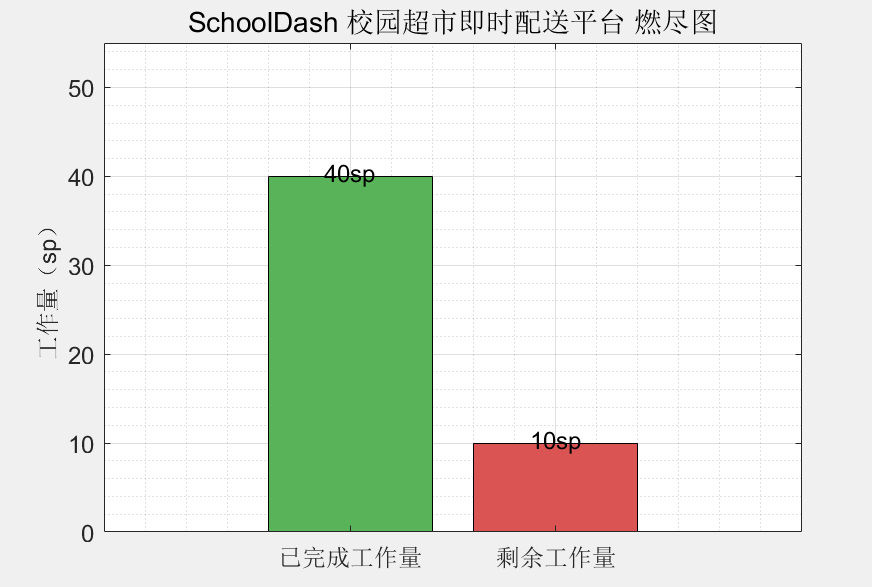
- 项目燃尽图(Burn-up Chart)
当前冲刺总Story Point:50 SP(已完成40 SP,剩余10 SP)
- 本日冲刺整体进展
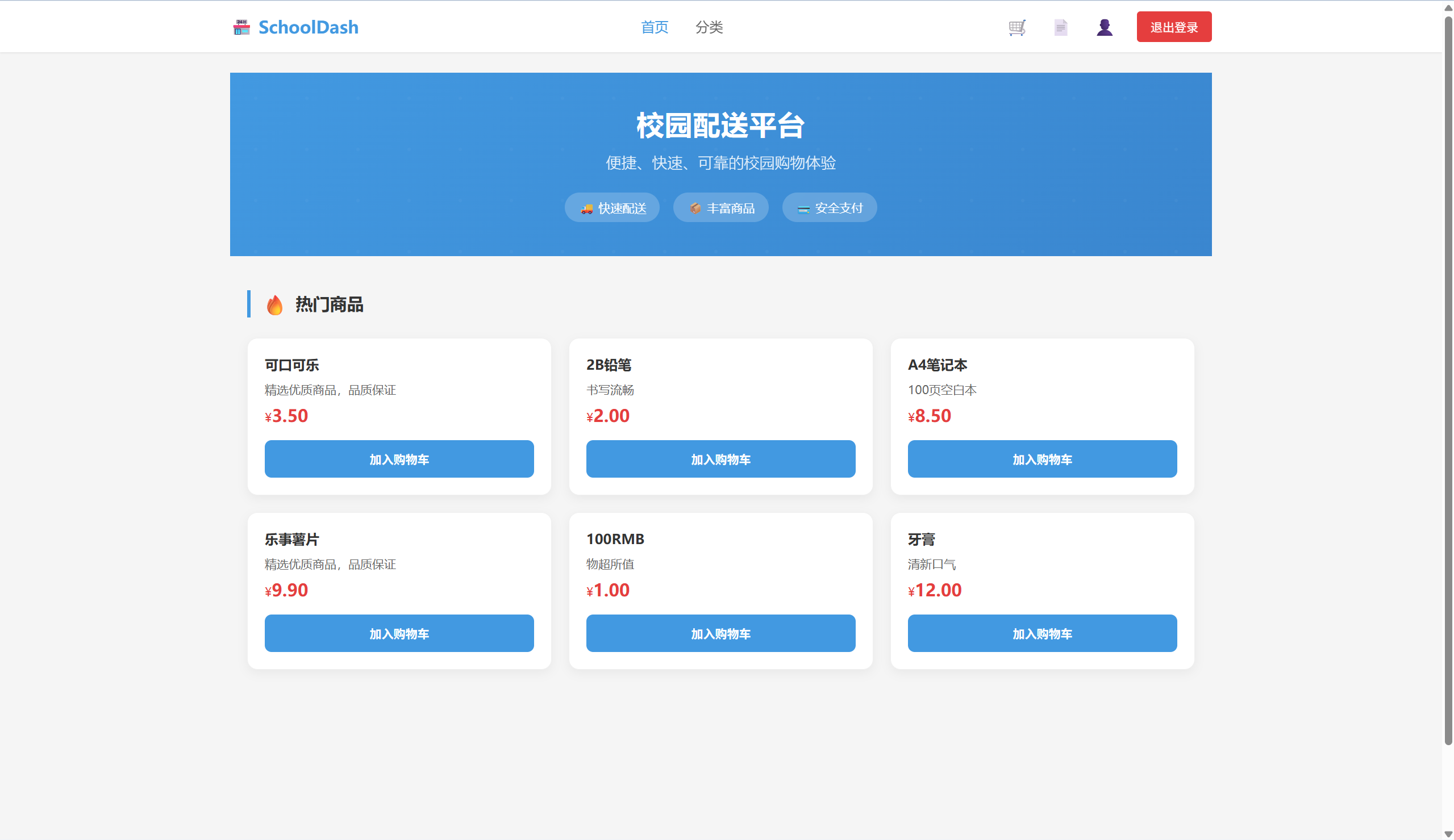
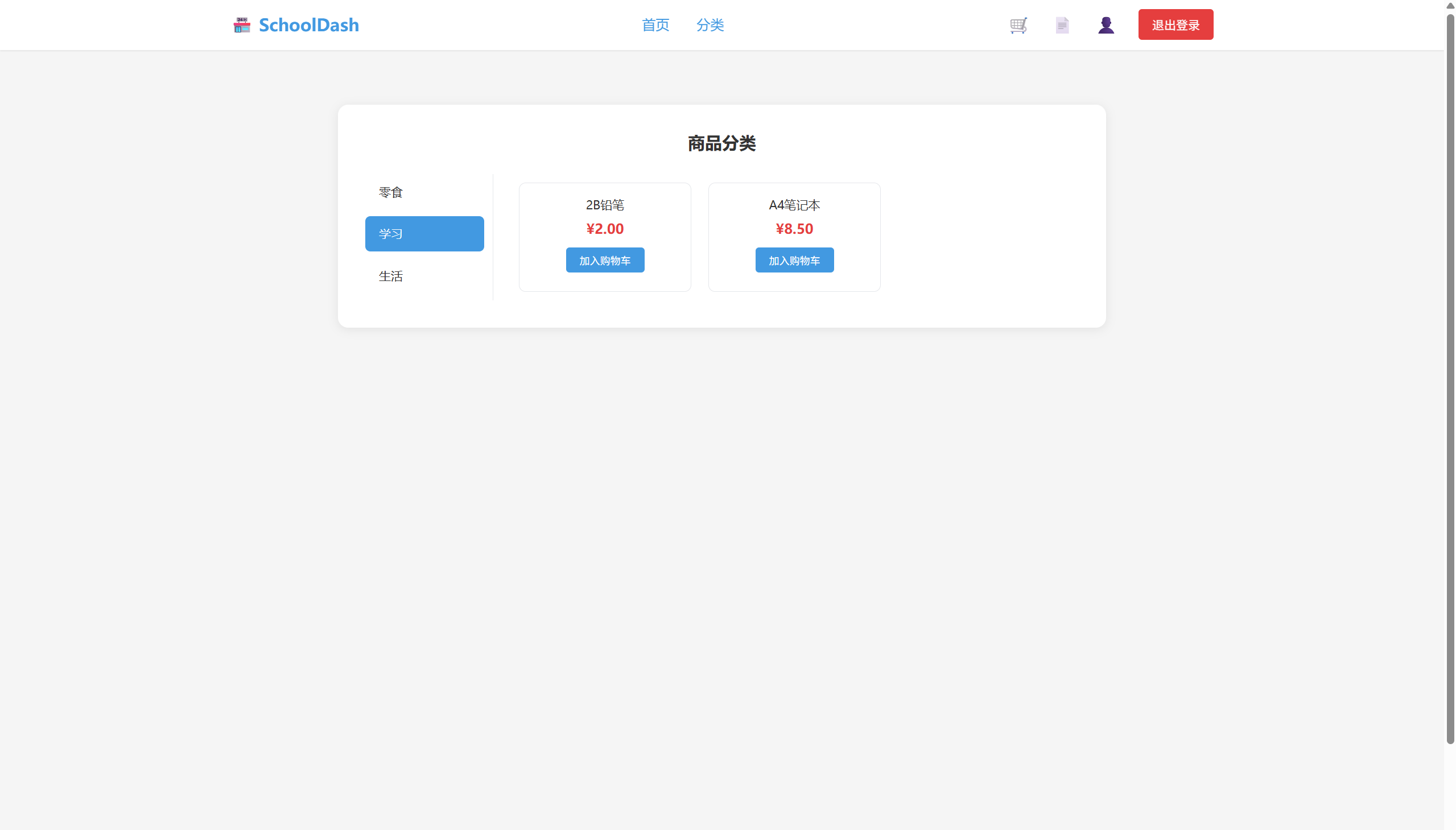
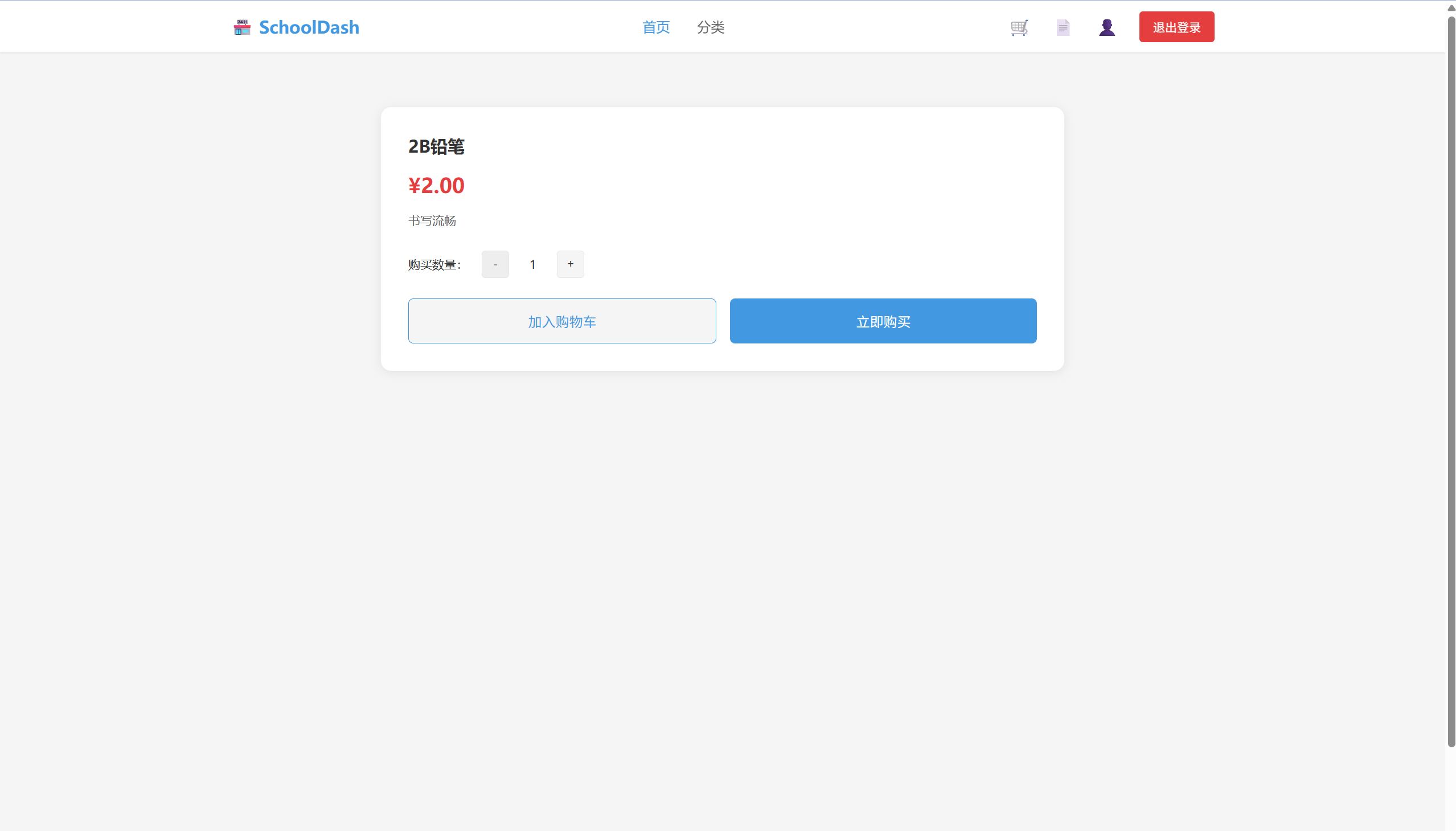
完成商品浏览、分类管理。
后端商品API就绪,前端列表页面适配Element Plus卡片布局。
- 项目最新运行效果
演示视频
SchoolDash商品浏览、分类管理界面演示视频
视频链接:https://live.youkuaiyun.com/v/506211
商品首页
商品分类界面
商品详情界面
- 今日工作成果
(后端开发)商品与分类路由
分类路由
const express = require('express');
const router = express.Router();
const Category = require('../../models/Category');
const { auth, checkRole } = require('../../middleware/auth');

// 获取所有分类
router.get('/', auth, checkRole(['admin']), async (req, res) => {
  console.log('分类列表API被调用,用户:', req.user ? req.user.username : '未认证');
  try {
    const categories = await Category.findAll();
    console.log('查询到分类数量:', categories.length);
    console.log('返回分类数据成功');
    res.json({
      code: 200,
      msg: '获取分类成功',
      data: categories
    });
  } catch (error) {
    console.error('获取分类失败:', error);
    res.status(500).json({ code: 500, msg: '获取分类失败' });
  }
});

// 添加分类
router.post('/', auth, checkRole(['admin']), async (req, res) => {
  try {
    const { name, description, icon } = req.body;
    if (!name) {
      return res.status(400).json({ code: 400, msg: '分类名称不能为空' });
    }
    const category = await Category.create({ name, description, icon });
    res.status(201).json({
      code: 200,
      msg: '添加分类成功',
      data: category
    });
  } catch (error) {
    res.status(500).json({ code: 500, msg: '添加分类失败' });
  }
});

// 更新分类
router.put('/:id', auth, checkRole(['admin']), async (req, res) => {
  try {
    await Category.update(req.body, { where: { id: req.params.id } });
    const updatedCategory = await Category.findByPk(req.params.id);
    res.json(updatedCategory);
  } catch (error) {
    res.status(500).json({ code: 500, msg: '更新分类失败' });
  }
});

// 删除分类
router.delete('/:id', auth, checkRole(['admin']), async (req, res) => {
  try {
    await Category.destroy({ where: { id: req.params.id } });
    res.json({ code: 200, msg: '删除成功' });
  } catch (error) {
    res.status(500).json({ code: 500, msg: '删除分类失败' });
  }
});

module.exports = router;
商品路由
const express = require('express');
const router = express.Router();
const Goods = require('../models/Goods');

// 热门商品接口(前端首页调用)
router.get('/hot-goods', async (req, res) => {
  try {
    // 按销量排序,取前6个
    const hotGoods = await Goods.findAll({
      limit: 6,
      order: [['sales', 'DESC']],
      include: [{ model: require('../models/Category'), attributes: ['name'] }] // 关联分类名称
    });

    // 确保price字段为数字类型,并排除imgUrl字段
    const formattedGoods = hotGoods.map(good => {
      const { imgUrl, ...goodData } = good.toJSON();
      return {
        ...goodData,
        price: parseFloat(good.price) || 0
      };
    });

    res.status(200).json({
      code: 200,
      msg: '获取热门商品成功',
      data: formattedGoods
    });
  } catch (err) {
    console.error('获取热门商品失败:', err);
    res.status(500).json({
      code: 500,
      msg: '服务器内部错误',
      data: null
    });
  }
});

// 商品详情接口
router.get('/goods/detail', async (req, res) => {
  try {
    const { id } = req.query;
    if (!id) {
      return res.status(400).json({
        code: 400,
        msg: '缺少商品ID',
        data: null
      });
    }

    const goods = await require('../models/Goods').findByPk(id, {
      include: [{ model: require('../models/Category'), attributes: ['name'] }]
    });

    if (!goods) {
      return res.status(404).json({
        code: 404,
        msg: '商品不存在',
        data: null
      });
    }

    // 确保price字段为数字类型,并排除imgUrl字段
    const { imgUrl, ...goodsData } = goods.toJSON();
    const formattedGoods = {
      ...goodsData,
      price: parseFloat(goods.price) || 0
    };

    res.status(200).json({
      code: 200,
      msg: '获取商品详情成功',
      data: formattedGoods
    });
  } catch (err) {
    console.error('获取商品详情失败:', err);
    res.status(500).json({
      code: 500,
      msg: '服务器内部错误',
      data: null
    });
  }
});

module.exports = router;
(前端开发)商品列表与详情页面
商品列表
<template>
  <div class="category-page">
    <div class="category-container">
      <!-- 标题 -->
      <div class="page-title">商品分类</div>
      <!-- 分类布局:左侧分类栏,右侧商品列表 -->
      <div class="category-layout">
        <!-- 左侧分类导航 -->
        <div class="category-nav">
          <div
            class="nav-item"
            v-for="item in categoryList"
            :key="item.id"
            :class="{ active: activeCategoryId === item.id }"
            @click="handleCategoryClick(item.id)"
          >
            {{ item.name }}
          </div>
        </div>
        <!-- 右侧商品列表 -->
        <div class="goods-list">
          <div class="goods-item" v-for="goods in goodsList" :key="goods.id" @click="$router.push(`/user/goods-detail?id=${goods.id}`)">
            <div class="goods-name">{{ goods.name }}</div>
            <div class="goods-price">¥{{ goods.price.toFixed(2) }}</div>
            <button class="add-cart-btn" @click.stop="handleAddCart(goods.id)">加入购物车</button>
          </div>
          <!-- 空状态 -->
          <div class="empty-state" v-if="!goodsList.length && activeCategoryId">
            <div class="empty-text">该分类下暂无商品</div>
          </div>
        </div>
      </div>
    </div>
  </div>
</template>

<script setup>
import { ref, onMounted } from 'vue';
import { useRouter } from 'vue-router';
import { ElMessage } from 'element-plus';
import request from '../../utils/request';

const router = useRouter();
const token = localStorage.getItem('token');

// 分类列表
const categoryList = ref([]);
// 当前选中分类ID
const activeCategoryId = ref('');
// 分类下商品列表
const goodsList = ref([]);

// 获取分类列表(后端接口:/category/list)
const getCategoryList = async () => {
  try {
    const res = await request({
      url: '/category/list',
      method: 'GET'
    });
    if (res && res.code === 200) {
      categoryList.value = res.data;
      // 默认选中第一个分类
      if (categoryList.value.length) {
        handleCategoryClick(categoryList.value[0].id);
      }
    }
  } catch (error) {
    ElMessage.error('获取分类列表失败');
  }
};

// 切换分类(后端接口:/category/goods,传category_id)
const handleCategoryClick = async (id) => {
  activeCategoryId.value = id;
  try {
    const res = await request({
      url: '/category/goods',
      method: 'GET',
      params: { category_id: id } // 后端接收category_id参数
    });
    if (res && res.code === 200) {
      goodsList.value = res.data.map(item => ({
        id: item.id,
        name: item.name,
        image: item.image || 'https://picsum.photos/120/120', // 默认图片
        price: item.price
      }));
    }
  } catch (error) {
    ElMessage.error('获取商品列表失败');
  }
};

// 加入购物车(后端接口:/cart/add,参数goods_id/num/user_id)
const handleAddCart = async (goodsId) => {
  if (!token) {
    ElMessage.warning('请先登录');
    router.push('/user/login');
    return;
  }
  try {
    const res = await request({
      url: '/cart/add',
      method: 'POST',
      data: { goods_id: goodsId, num: 1 }
    });
    if (res && res.code === 200) {
      ElMessage.success('加入购物车成功');
    }
  } catch (error) {
    ElMessage.error('加入购物车失败');
  }
};

onMounted(() => {
  getCategoryList();
});
</script>

<style scoped>
.category-page {
  min-height: 100vh;
  background-color: #f5f5f5;
  display: flex;
  align-items: flex-start;
  justify-content: center;
  padding: 20px;
  padding-top: 40px;
  box-sizing: border-box;
}
.category-container {
  width: 100%;
  max-width: 900px;
  background-color: #ffffff;
  padding: 32px;
  border-radius: 12px;
  box-shadow: 0 2px 12px rgba(0, 0, 0, 0.08);
  box-sizing: border-box;
}
.page-title {
  font-size: 20px;
  font-weight: 600;
  color: #333333;
  margin-bottom: 24px;
  text-align: center;
}
.category-layout {
  display: flex;
  gap: 20px;
}
/* 左侧分类导航 */
.category-nav {
  width: 150px;
  border-right: 1px solid #e5e7eb;
  padding-right: 10px;
}
.nav-item {
  padding: 12px 16px;
  font-size: 14px;
  color: #333;
  cursor: pointer;
  border-radius: 6px;
  margin-bottom: 8px;
  transition: all 0.2s ease;
}
.nav-item:hover {
  background-color: #f5f5f5;
}
.nav-item.active {
  background-color: #4299e1;
  color: #ffffff;
}
/* 右侧商品列表 */
.goods-list {
  flex: 1;
  display: grid;
  grid-template-columns: repeat(auto-fill, minmax(180px, 1fr));
  gap: 20px;
  padding: 10px;
}
.goods-item {
  display: flex;
  flex-direction: column;
  align-items: center;
  padding: 16px;
  border: 1px solid #e5e7eb;
  border-radius: 8px;
  cursor: pointer;
  transition: box-shadow 0.2s ease;
}
.goods-item:hover {
  box-shadow: 0 4px 12px rgba(0, 0, 0, 0.1);
}
.goods-name {
  font-size: 14px;
  color: #333;
  text-align: center;
  line-height: 1.4;
  margin-bottom: 8px;
  display: -webkit-box;
  line-clamp: 2;
  -webkit-line-clamp: 2;
  -webkit-box-orient: vertical;
  overflow: hidden;
}
.goods-price {
  font-size: 16px;
  color: #e53e3e;
  font-weight: 600;
  margin-bottom: 12px;
}
.add-cart-btn {
  padding: 6px 16px;
  background-color: #4299e1;
  color: #fff;
  border: none;
  border-radius: 4px;
  font-size: 12px;
  cursor: pointer;
  transition: background-color 0.2s;
}
.add-cart-btn:hover {
  background-color: #3a86cf;
}
.empty-state {
  grid-column: 1 / -1;
  padding: 40px 0;
  text-align: center;
}
.empty-text {
  font-size: 14px;
  color: #999;
}
</style>
商品详情页面
<template>
  <div class="goods-detail-page">
    <div class="goods-detail-container">
      <!-- 商品详情布局 -->
      <div class="goods-detail-layout" v-if="goodsInfo">
        <!-- 商品信息 -->
        <div class="goods-info">
          <div class="goods-name">{{ goodsInfo.name }}</div>
          <div class="goods-price">¥{{ goodsInfo.price.toFixed(2) }}</div>
          <div class="goods-desc">{{ goodsInfo.description || '暂无商品描述' }}</div>
          <!-- 数量选择 -->
          <div class="count-selector">
            <span class="selector-label">购买数量:</span>
            <button class="count-btn" @click="handleMinus" :disabled="num <= 1">-</button>
            <span class="count-num">{{ num }}</span>
            <button class="count-btn" @click="handlePlus">+</button>
          </div>
          <!-- 操作按钮 -->
          <div class="goods-actions">
            <button class="add-cart-btn" @click="handleAddCart">加入购物车</button>
            <button class="buy-btn" @click="handleBuy">立即购买</button>
          </div>
        </div>
      </div>
      <!-- 加载中/空状态 -->
      <div class="loading-state" v-else>
        <div class="loading-text">加载中...</div>
      </div>
    </div>
  </div>
</template>

<script setup>
import { ref, onMounted } from 'vue';
import { useRouter, useRoute } from 'vue-router';
import { ElMessage } from 'element-plus';
import request from '../../utils/request';

const router = useRouter();
const route = useRoute();
const token = localStorage.getItem('token');

const goodsInfo = ref(null);
const num = ref(1); // 后端字段:num(数量)

// 获取商品详情(后端接口:/goods/detail,传id)
const getGoodsDetail = async () => {
  const goods_id = route.query.id;
  if (!goods_id) {
    ElMessage.error('商品ID不能为空');
    router.push('/user/category');
    return;
  }
  try {
    const res = await request({
      url: '/home/goods/detail',
      method: 'GET',
      params: { id: goods_id } // 后端接收id参数
    });
    if (res && res.code === 200) {
      goodsInfo.value = {
        id: res.data.id,
        name: res.data.name,
        price: res.data.price,
        description: res.data.desc // 后端返回的是desc字段
      };
    }
  } catch (error) {
    ElMessage.error('获取商品详情失败');
  }
};

onMounted(() => {
  getGoodsDetail();
});

// 数量减
const handleMinus = () => {
  if (num.value > 1) {
    num.value -= 1;
  }
};

// 数量加
const handlePlus = () => {
  num.value += 1;
};

// 加入购物车(后端接口:/cart/add)
const handleAddCart = async () => {
  if (!token) {
    ElMessage.warning('请先登录');
    router.push('/user/login');
    return;
  }
  try {
    const res = await request({
      url: '/cart/add',
      method: 'POST',
      data: {
        goods_id: goodsInfo.value.id,
        num: num.value
      }
    });
    if (res && res.code === 200) {
      ElMessage.success('加入购物车成功');
    }
  } catch (error) {
    ElMessage.error('加入购物车失败');
  }
};

// 立即购买
const handleBuy = () => {
  if (!token) {
    ElMessage.warning('请先登录');
    router.push('/user/login');
    return;
  }
  // 跳转到结算页,携带商品ID和数量
  router.push({
    path: '/user/order-checkout',
    query: {
      goods_id: goodsInfo.value.id,
      num: num.value
    }
  });
};
</script>

<style scoped>
.goods-detail-page {
  min-height: 100vh;
  background-color: #f5f5f5;
  display: flex;
  align-items: flex-start;
  justify-content: center;
  padding: 20px;
  padding-top: 40px;
  box-sizing: border-box;
}
.goods-detail-container {
  width: 100%;
  max-width: 800px;
  background-color: #ffffff;
  padding: 32px;
  border-radius: 12px;
  box-shadow: 0 2px 12px rgba(0, 0, 0, 0.08);
  box-sizing: border-box;
}
.back-btn {
  padding: 8px 16px;
  background-color: #f5f5f5;
  color: #666;
  border: 1px solid #e5e7eb;
  border-radius: 6px;
  font-size: 14px;
  cursor: pointer;
  margin-bottom: 24px;
  display: flex;
  align-items: center;
}
.back-btn:hover {
  background-color: #e9e9e9;
}
.goods-detail-layout {
  display: flex;
  gap: 32px;
  align-items: flex-start;
}
.goods-info {
  flex: 1;
}
.goods-name {
  font-size: 20px;
  color: #333;
  font-weight: 600;
  margin-bottom: 16px;
  line-height: 1.4;
}
.goods-price {
  font-size: 24px;
  color: #e53e3e;
  font-weight: 600;
  margin-bottom: 16px;
}
.goods-desc {
  font-size: 14px;
  color: #666;
  line-height: 1.5;
  margin-bottom: 24px;
}
.count-selector {
  display: flex;
  align-items: center;
  margin-bottom: 24px;
}
.selector-label {
  font-size: 14px;
  color: #333;
  margin-right: 16px;
}
.count-btn {
  width: 32px;
  height: 32px;
  border: 1px solid #e5e7eb;
  background-color: #f5f5f5;
  color: #333;
  border-radius: 4px;
  cursor: pointer;
  display: flex;
  align-items: center;
  justify-content: center;
}
.count-btn:disabled {
  background-color: #eee;
  color: #999;
  cursor: not-allowed;
}
.count-num {
  width: 40px;
  text-align: center;
  font-size: 14px;
  margin: 0 8px;
}
.goods-actions {
  display: flex;
  gap: 16px;
}
.add-cart-btn {
  flex: 1;
  padding: 14px;
  background-color: #f5f5f5;
  color: #4299e1;
  border: 1px solid #4299e1;
  border-radius: 6px;
  font-size: 16px;
  cursor: pointer;
  transition: all 0.2s ease;
}
.add-cart-btn:hover {
  background-color: #e8f4f8;
}
.buy-btn {
  flex: 1;
  padding: 14px;
  background-color: #4299e1;
  color: #ffffff;
  border: none;
  border-radius: 6px;
  font-size: 16px;
  cursor: pointer;
  transition: background-color 0.2s ease;
}
.buy-btn:hover {
  background-color: #3a86cf;
}
.loading-state {
  padding: 40px 0;
  text-align: center;
}
.loading-text {
  font-size: 14px;
  color: #999;
}
</style>
(测试)
任务:商品API测试
成果:测试报告覆盖增删改查,无404错误
- 本日小结与明日计划
今日总结:核心浏览功能上线
明日计划:购物车模块
半程冲刺,保持节奏!





 扫一扫
扫一扫


 2776
2776

 被折叠的 条评论
为什么被折叠?
被折叠的 条评论
为什么被折叠?
 到【灌水乐园】发言





