






往期鸿蒙5.0全套实战文章必看:(文中附带全栈鸿蒙5.0学习资料)
FormMenu
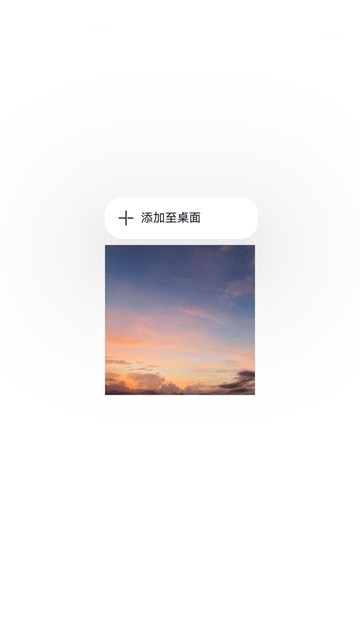
本组件封装了一个“添加至桌面”菜单,用于实现应用内长按组件生成“添加至桌面”菜单,点击该菜单,触发卡片添加至桌面操作。通过桌面访问该应用快捷卡片,可以直接访问该组件功能。在应用使用过程中,该组件作为留存和复访入口,可吸引用户将功能快捷添加到桌面。
本组件支持应用内支持长按菜单快捷添加卡片到桌面:
-
开发者将卡片数据以及应用内功能组件ID传给卡片框架。
-
点击事件会根据组件ID获取应用内功能组件的快照和位置,用于添加到桌面时的过渡动效。
-
卡片框架通过将加桌数据通知给桌面,触发卡片添加到桌面操作。
说明
该组件从API Version 12开始支持。后续版本如有新增内容,则采用上角标单独标记该内容的起始版本。
导入模块
import { AddFormMenuItem } from '@kit.ArkUI';子组件
无
属性
不支持通用属性。
AddFormMenuItem
AddFormMenuItem(
want: Want,
componentId: string,
options?: AddFormOptions
): void
装饰器类型:@Component
元服务API: 从API version 12开始,该接口支持在元服务中使用。
系统能力: SystemCapability.ArkUI.ArkUI.Full
参数:
| 名称 | 参数类型 | 必填 | 装饰器类型 | 说明 |
|---|---|---|---|---|
| want | Want | 是 | @Prop | 待发布功能组件的want信息。 |
| componentId | string | 是 | - | 应用内功能组件ID,组件ID对应的界面与待添加的服务卡片界面相似。 |
| AddFormOptions | AddFormOptions | 否 | - | 添加卡片选项。 |
AddFormOptions
元服务API: 从API version 12开始,该接口支持在元服务中使用。
系统能力: SystemCapability.ArkUI.ArkUI.Full
参数:
| 名称 | 参数类型 | 必填 | 说明 |
|---|---|---|---|
| formBindingData | formBindingData.FormBindingData | 否 | 卡片数据。 |
| callback | AsyncCallback<string> | 否 | 返回结果的回调。 |
| style | FormMenuItemStyle | 否 | 菜单自定义样式信息。 |
FormMenuItemStyle
元服务API: 从API version 12开始,该接口支持在元服务中使用。
系统能力: SystemCapability.ArkUI.ArkUI.Full
参数:
| 名称 | 参数类型 | 必填 | 说明 |
|---|---|---|---|
| options | MenuItemOptions | 否 | 包含设置MenuItem的各项信息。 |
说明
仅在 style配置为空或不配置时,使用默认的图标和menu文字。
事件
支持菜单点击事件。
示例
// index.ets
import { AddFormMenuItem } from '@kit.ArkUI';
import { formBindingData } from '@kit.FormKit';
import { hilog } from '@kit.PerformanceAnalysisKit';

const tag = 'AddFormMenuItem';

@Entry
@Component
struct Index {
  @State message: string = 'Long press show menu';
  private compId: string = 'addforms@d46313145';

  @Builder
  MyMenu() {
    Menu() {
      AddFormMenuItem(
        {
          bundleName: 'com.example.myapplication', // 包名
          abilityName: 'EntryFormAbility', // 模块ability名称
          parameters: {
            'ohos.extra.param.key.form_dimension': 2,
            'ohos.extra.param.key.form_name': 'widget',
            'ohos.extra.param.key.module_name': 'entry'
          },
        },
        this.compId,
        {
          formBindingData: formBindingData.createFormBindingData({}),
          // formBindingData: formBindingData.createFormBindingData({ data: 'share' }),
          callback: (error, formId) => {
            hilog.info(0x3900, tag, `callback info:error = ${JSON.stringify(error)}, formId = ${formId}`);
            if (error?.code === 0) {
              hilog.info(0x3900, tag, "添加至桌面成功")
            } else {
              hilog.info(0x3900, tag, "添加至桌面失败,请尝试其它添加方式")
            }
          },
          style: {
            // options: {
            //   startIcon: $r("app.media.icon"), // 菜单图标,可以自己提供。系统默认采用"sys.media.ic_public_add"
            //   content: "添加到桌面",  // 菜单内容,可以自己提供。默认使用"sys.string.ohos_add_form_to_desktop"
            //   endIcon: $r("app.media.icon") // 菜单图标,可以自己提供
            // }
          }
        }
      )
    }
  }

  build() {
    Row() {
      Column() {
        Image($r("app.media.startIcon"))   // 自定义图片
          .id(this.compId)
          .width(200)
          .height(200)
          .bindContextMenu(this.MyMenu, ResponseType.LongPress, {
            placement: Placement.TopLeft
          })
      }
      .width('100%')
    }
    .height('100%')
  }
}
// WidgetCard.ets
const local = new LocalStorage()
@Entry(local)
@Component
struct WidgetCard {
@LocalStorageProp('data') data: string = 'defaultdata'; // 定义需要刷新的卡片数据
/*
* The action type.
*/
readonly ACTION_TYPE: string = 'router';
/*
* The ability name.
*/
readonly ABILITY_NAME: string = 'EntryAbility';
/*
* The message.
*/
readonly MESSAGE: string = 'add detail';
/*
* The width percentage setting.
*/
readonly FULL_WIDTH_PERCENT: string = '100%';
/*
* The height percentage setting.
*/
readonly FULL_HEIGHT_PERCENT: string = '100%';
build() {
Row() {
Column() {
Text(this.data)
.fontSize($r('app.float.font_size'))
.fontWeight(FontWeight.Medium)
.fontColor($r('app.color.item_title_font'))
}
.width(this.FULL_WIDTH_PERCENT)
}
.height(this.FULL_HEIGHT_PERCENT)
.backgroundImage($r('app.media.startIcon'))
.backgroundImageSize({ width: '100%', height: '100%' })
.onClick(() => {
postCardAction(this, {
action: this.ACTION_TYPE,
abilityName: this.ABILITY_NAME,
params: {
message: this.MESSAGE
}
});
})
}
}高级自定义控件界面
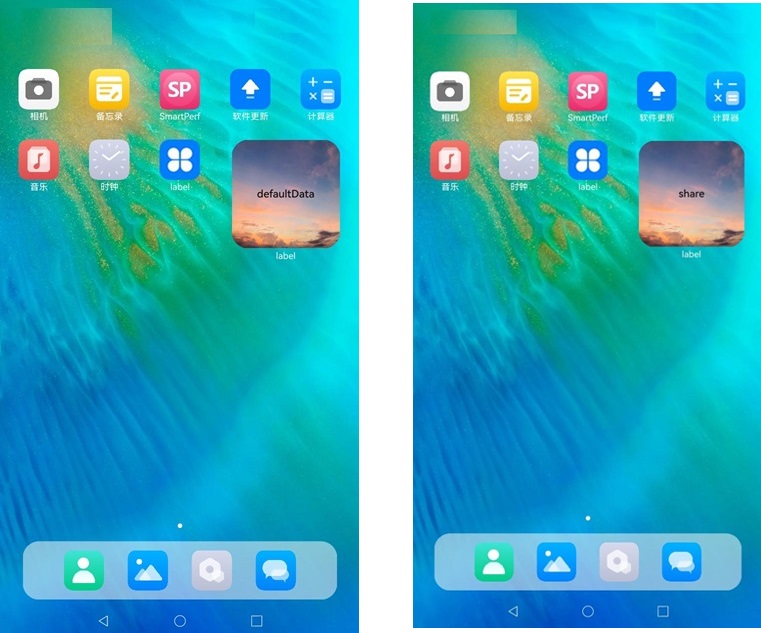
调用高级自定义控件桌面加桌结果
左侧是formbdingdata为空加桌结果,右侧是formbindingdata为{ data: 'share' }的加桌结果。





 扫一扫
扫一扫


 1206
1206

 被折叠的 条评论
为什么被折叠?
被折叠的 条评论
为什么被折叠?
 到【灌水乐园】发言





