Android之页面5大布局

Android Studio | 页面布局 1、相对布局——RelativeLayout 阅读详情

原本也是自己新浪博客的一篇文章,搬移至此!!!

原文链接:http://blog.sina.com.cn/s/blog_87736c410100tt3g.html


所谓布局是给开发者程序员提供一种描述程序中各种界面元素相互之间位置关系的途径,使页面上的组件最大程度的按照开发者所构思的排布在用户界面上。


     Android操作系统中的布局采用离散数学中的“树”的思想。整个屏幕是唯一的根节点,其余的界面元素按照层次关系组织,最后显示的组件就好似是“树叶”。在XML布局文件中的书写格式尤其体现了“树”的层次结构。


     Android系统显示用户界面时需要两次扫描布局文件。

     第一次是评估记录每个元素需要占用屏幕的空间。第二次是从整个屏幕(或者说是“树跟”)出发,逐层推进,每个父元素根据子元素的属性和布局规则对其进行适当的摆放。系统会尽量使每个子元素都在屏幕上显示出来。


    下面就让我们来慢慢了解Android系统的5大常用布局吧!


一.LinearLayout(线性布局):

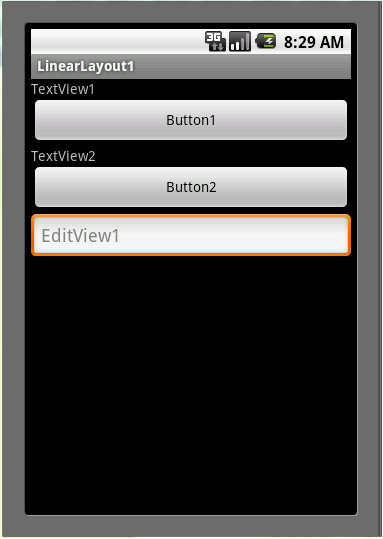
    这是我们写HelloWorld时系统初始化时使用的布局。也是最长用的布局。按照LinearLayout布局,其元素线性排列,一行或者一列。一行时所有的组件高度都和最高的组件一样;一列时所有组件宽度都和最宽的一样。

二.FrameLayout(框架布局):

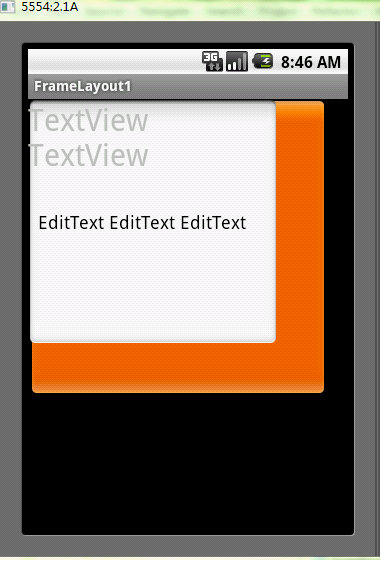
    这个布局一般只用于单个组件的显示。组件被置于屏幕的左上角。若存在多个组件,则会叠加显示或者覆盖。

三.TableLayout(表格布局):

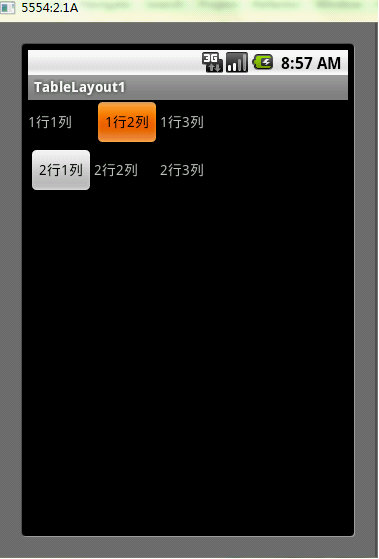
    和名字一样,这个布局是将组件按照表格的形式进行排列。并且在排列时会以一行或者一列中最高的或者最宽的单元个,以保持表格的美观。

四.AbsoluteLayout(绝对位置布局):

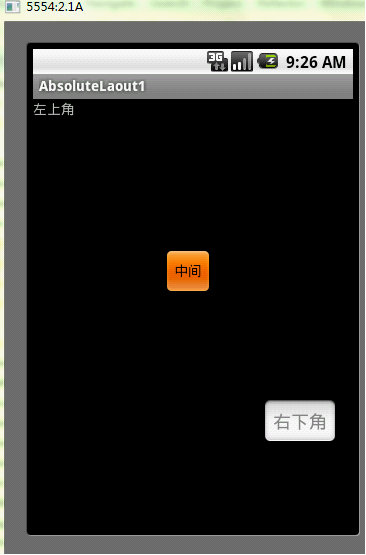
    绝对位置布局会不通过系统而进行页面布置。绝对位置布局可以定义组件的坐标,使其完全按照开发者的意图进行显示。但缺点就是在一个特定机型上可以完好的运行和显示的程序可能到另一个手机机型上无法显示或者和预期的不一样。就好比Android系统中的尺寸可以有多种描述,px,dip,sp,pts,in...举例其中的px是以像素为单位标记的尺寸大小,无论一个设备的物理尺寸多大,指定了像素不变则在不同像素分辨率显示设备上显示出来的尺寸未必相同。

五.RelativeLayout(相对位置布局):

相对位置布局也好理解,根据其他组件的相对位置进行组件摆放定位。


下面让我们来看看怎么实现吧!


下面只列举最最简单XML布局文件的实现方法,以便大家理解。


1.LinearLayout(线性布局):

 <?xml version="1.0" encoding="utf-8"?>

<LinearLayout xmlns:android="http://schemas.android.com/apk/res/android"

    android:orientation="vertical"

    android:layout_width="fill_parent"

    android:layout_height="fill_parent"

    >

    <!-- orientation属性是设置竖排(vertical)还是 横排(horizontal)-->

<TextView  

    android:layout_width="fill_parent" 

    android:layout_height="wrap_content" 

    android:text="TextView1"

    />

<Button 

    android:layout_width="fill_parent"

    android:layout_height="wrap_content"

    android:text="Button1"

    />

<TextView  

    android:layout_width="fill_parent" 

    android:layout_height="wrap_content" 

    android:text="TextView2"

    />

<Button 

    android:layout_width="fill_parent"

    android:layout_height="wrap_content"

    android:text="Button2"

    />

<EditText 

    android:layout_width="fill_parent"

    android:layout_height="wrap_content" 

    android:hint="EditView1"

    />

</LinearLayout>

显示结果:

2.FrameLayout(框架布局):

<?xml version="1.0" encoding="utf-8"?>

<FrameLayout xmlns:android="http://schemas.android.com/apk/res/android"

    android:orientation="vertical"

    android:layout_width="fill_parent"

    android:layout_height="fill_parent"

    >

<Button  

    android:layout_width="300dip" 

    android:layout_height="300dip"

    android:text="Button Button Button Button"

    />

<EditText 

    android:layout_width="250dip" 

    android:layout_height="250dip"

    android:text="EditText EditText EditText"

    />

<TextView 

    android:layout_width="150dip"

    android:layout_height="150dip"

    android:text="TextView TextView"

    android:textSize="30dip"

    />

</FrameLayout>


3.TableLayout(表格布局):

<?xml version="1.0" encoding="utf-8"?>

<TableLayout xmlns:android="http://schemas.android.com/apk/res/android"

    android:orientation="vertical"

    android:layout_width="fill_parent"

    android:layout_height="fill_parent"

    >

    <TableRow 

        android:layout_width="fill_parent"

        android:layout_height="wrap_content"

        >

        <TextView 

            android:layout_width="wrap_content"

            android:layout_height="wrap_content"

            android:text="1行1列"

            />

        <Button 

            android:layout_width="wrap_content"

            android:layout_height="wrap_content"

            android:text="1行2列"

            />

        <TextView 

            android:layout_width="wrap_content"

            android:layout_height="wrap_content"

            android:text="1行3列"

            />

    </TableRow>

    <TableRow 

        android:layout_width="fill_parent"

        android:layout_height="wrap_content"

        >

        <Button 

            android:layout_width="wrap_content"

            android:layout_height="wrap_content"

            android:text="2行1列"

            />

        <TextView 

            android:layout_width="wrap_content"

            android:layout_height="wrap_content"

            android:text="2行2列"

            />

        <TextView 

            android:layout_width="wrap_content"

            android:layout_height="wrap_content"

            android:text="2行3列"

            />

    </TableRow>

</TableLayout>


4.AbsoluteLayout(绝对位置布局):

<?xml version="1.0" encoding="utf-8"?>

<AbsoluteLayout xmlns:android="http://schemas.android.com/apk/res/android"

    android:orientation="vertical"

    android:layout_width="fill_parent"

    android:layout_height="fill_parent"

    >

   <TextView  

       android:layout_width="wrap_content"

       android:layout_height="wrap_content" 

       android:layout_x="0dip"

       android:layout_y="0dip"

       android:text="左上角"

       />

    <Button 

       android:layout_width="wrap_content"

       android:layout_height="wrap_content"

       android:layout_x="130dip"

       android:layout_y="150dip"

       android:text="中间"

       />

    <EditText 

       android:layout_width="wrap_content"

       android:layout_height="wrap_content"

       android:layout_x="230dip"

       android:layout_y="300dip"

       android:hint="右下角"

       />

</AbsoluteLayout>


5.RelativeLayout(相对位置布局):

  <?xml version="1.0" encoding="utf-8"?>

<RelativeLayout xmlns:android="http://schemas.android.com/apk/res/android"

    android:orientation="vertical"

    android:layout_width="fill_parent"

    android:layout_height="fill_parent"

    >

<TextView 

    android:id="@+id/TextView01" 

    android:layout_width="wrap_content"

    android:layout_height="wrap_content" 

    android:text="文本1"

    android:gravity="top"

    />

<Button 

    android:id="@+id/Button01"

    android:layout_width="wrap_content"

    android:layout_height="wrap_content"

    android:text="按钮1"

    android:layout_toRightOf="@+id/TextView01"

    />

<TextView 

    android:id="@+id/TextView02" 

    android:layout_width="wrap_content"

    android:layout_height="wrap_content" 

    android:text="文本2"

    android:layout_below="@+id/Button01"

    />

<Button 

    android:id="@+id/Button02" 

    android:layout_width="wrap_content"

    android:layout_height="wrap_content" 

    android:text="按钮2"

    android:layout_toRightOf="@+id/Button01"

    />

</RelativeLayout>
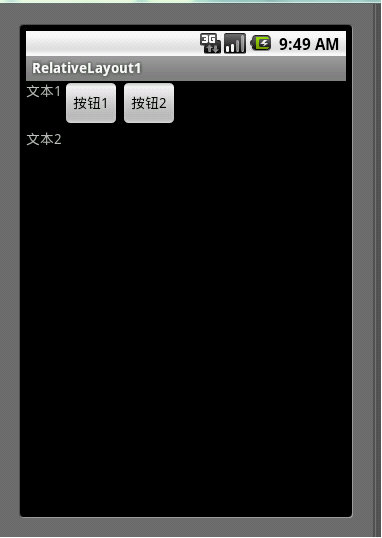

上面只是一些基本代码,关于这些布局的属性设置还有很多。


并且根据树的思想,布局中也是可以嵌套布局的。


在设置用户页面时,需要反复调试,不断改进,需要耐心。

【5年Android从零复盘系列之五】关于页面布局控件开发总结 1.Android开发常用布局 LinearLayout 【高频】 RelativeLayout 【高频】 FrameLayout 【较少】 FlexboxLayout 【较少】 ConstraintLayout 【中频】 AbsoluteLayout 【极少】 TableLayout 【极少】 GridLayout 【较少】 NestedScrollView 【中频】 HorizontalScrollView【较少】 PercentRelativeLayout 【较少】使用全解-> Percent 阅读详情

相关推荐

当FPGA遇上Codesys:用Verilog实现ModbusTCP协议栈的3种方法(Xilinx/Vivado实测)

本文详细介绍了在Xilinx FPGA上使用Verilog实现Modbus TCP协议栈的三种方法,并与Codesys环境无缝集成。从基础架构设计到纯Verilog实现、基于AXI总线的混合方案,再到与Codesys的集成方法,为开发者提供了完整的工业自动化通信解决方案。通过实测数据对比,帮助开发者选择最优实现方案。

weixin_29172963的博客 525

android界面布局

用来设置布局宽度。用来设置布局高度。以上两个属性在布局管理器中一般设置为match_parent,即与父容器相同。设置底内边距。设置左内边距。设置右内边距。设置顶内边距。以上四个属性可以设置为具体数值,比如16dp;也可以使用尺寸资源进行定义一.相对布局是一个以相对位置显示子视图的视图组。每个视图的位置可以指定为相对于同级元素的位置(例如,在另一个视图的左侧或下方)或相对于父级区域的位置(例如在底部、左侧或中心对齐)。

... 5073

Autodesk Genuine Service卸载失败?试试这个隐藏文件删除法(Win8-Win11通用)

本文针对Autodesk Genuine Service在Windows系统(Win8-Win11)中卸载失败的常见难题,提供了深度解析与根治方案。核心方法是手动定位并删除两个关键的隐藏文件(ProductInformation.pit和id.dat),以解除文件锁定或数据损坏导致的卸载障碍,随后再通过标准流程即可成功卸载。该方法通用性强,能有效解决这一困扰设计师和工程师的顽固问题。

weixin_29220405的博客 1477

Android的页面布局

LinearLayout线性布局RelativeLayout相对布局TableLayout表格布局FrameLayout帧布局(框架布局)ConstrantLayout约束布局(AndroidStudio默认布局)用于拖拽的。

weixin_57543920的博客 2104

AHB不对称半桥反激电路设计(三)主要器件参数规格计算

本文介绍了AHB拓扑变压器的设计步骤与核心参数计算,包括主控芯片选择、工作原理分析及参数计算。作者选择DK87XXD集成MOS方案,详细阐述了输入电压范围、反射电压限定、匝比计算、工作频率设定、原副边电流值、电感量计算、磁芯选择、匝数计算、谐振电容设计等关键步骤。通过公式推导与实例计算,展示了150W电源的变压器设计过程,最终确定匝比5.5、原边22匝、副边4匝、电感量200uH等参数。文章还讨论了谐振电容与漏感的关系,为后续调试提供理论基础。该设计方法结合理论分析与工程实践,适用于AHB拓扑电源开发。

【Simon】的博客 3339

深入解读ES8388寄存器:从录音到播放,如何用代码控制这颗音频Codec

本文深入解析ES8388音频编解码器的寄存器设置,从录音到播放的完整控制流程。详细介绍了寄存器架构、录音通道配置、播放通道优化以及直通(Bypass)模式的高级应用,帮助开发者通过代码精准控制这颗高性能音频Codec,解决实际开发中的音质问题。

weixin_30275415的博客 551

Android常见界面布局

第2章 Android常见界面布局 第2章 Android常见界面布局2.1 View视图2.2 界面布局编写方式2.2.1 在XML文件中编写布局2.2.2 在Java代码中编写布局2.3 常见界面布局2.3.1 布局的通用性2.3.2 RelativeLayout相对布局2.3.3 LinearLayout线性布局2.3.4 TableLayout表格布局2.3.5 FrameLayout帧布局2.3.6 ConstraintLayout约束布局 2.1 View视图 An

小菜鸡的小博客 8415

新能源知识库(68)复叠压缩式热泵蒸汽系统介绍

复叠压缩式热泵蒸汽系统通过多级压缩技术将低品位热能转化为高品位蒸汽,在汽车电镀场景中实现了高效、精准的能源利用。随着超高温工质与智能联供系统的发展,该技术将深度赋能电镀行业的高质量可持续发展。​:±1℃控温保障镀层均匀性,提升产品良率;多台复叠热泵+储热装置(如纺织厂6台热泵)复叠热泵+余热回收+智能控制(化工厂案例)​:无燃烧设计契合汽车行业ESG目标。单台高温热泵机组(如92P型号)复叠压缩式热泵蒸汽系统以。67.4万元(↓22%)600万–1200万元。事故率 ↓90%​​。150万–600万元。

竹君子之家 1425

Android常见的界面布局

本篇主要讲解在android中一些常见的界面布局

zhyhgx的博客 3566

ABAQUS中CDP模型在钢筋混凝土节点低周反复荷载模拟的关键技术解析

本文深入解析了ABAQUS中CDP模型在钢筋混凝土节点低周反复荷载模拟中的关键技术。通过详细介绍CDP模型的核心价值、建模关键技术、滞回曲线优化方法及典型问题排查指南,帮助工程师精准模拟混凝土的拉伸开裂和压缩压碎行为,提升抗震分析效率。文章还提供了实用的工程应用技巧,如快速建模模板和后处理自动化脚本。

weixin_30555125的博客 527

SoC芯片时钟树优化实战:如何用分段CTS解决DDRPHY与Memory Controller的时序难题

本文深入探讨了SoC芯片时钟树优化中的分段CTS技术,重点解决DDRPHY与Memory Controller之间的时序难题。通过分析多域时钟架构的复杂性,提出三级分段CTS策略,并结合28nm移动SoC实战案例,展示如何通过Guide Buffer插入和本地段重构实现72%的跨域偏差改善。文章还涵盖5nm以下工艺的线阻变异、热梯度效应等特殊考量,为数字IC设计提供时钟树综合的高阶解决方案。

kkk56的博客 906

Android页面的布局

1.在design页面下--->componenttree--->ConstrainLayout右键--->Convertview...--->选择LinearLayout点击Apply。RelativeLayout布局提供了一些常用的布局设置属性用于确定组件在视图中的相对位置。从名称上可以看出,这种布局方式是以一种。layout_alignBottom对齐参考组件的下边界。layout_alignRight对齐参考组件的右边界。layout_alignLeft对齐参考组件的左边界。...

weixin_63261150的博客 2364

Win11 系统下 VisualStudio2022 配置点云库 PCL1.11.1

安装完成之后打开文件夹E:\PCL 1.11.1\3rdParty\OpenNI2双击 并选择路径 (E:\PCL 1.11.1\3rdParty\OpenNI2) 安装即可全部安装完成之后,将pcl-1.11.1-pdb-msvc2019-win64.zip解压后的 .pdb文件拷贝到(E:\PCL 1.11.1\bin)中设置环境变量:到此,环境变量配置完成。

qq_53545309的博客 1128

Android实现页面跳转

一. Android实现页面跳转有两种方式,一种为.MainActivity跳转;第二种是Relatelayout布局跳转,首先看第一种方式 *1. MainActivity区域设置* public class MainActivity extends AppCompatActivity { @Override protected void onCreate(Bundle savedInstanceState) { super.onCreate(savedInstance

lzh623015455的博客 3万+

Data-Structures-and-Algorithm-Analysis-in-Java.pdf

作者: Weiss, Mark A. 出版社: Addison Wesley Data Structures and Algorithm Analysis in Java is an “advanced algorithms” book that fits between traditional CS2 and Algorithms Analysis courses. In the old ACM Curriculum Guidelines, this course was known as CS7. This text is for readers who want to learn good programming and algorithm analysis skills simultaneously so that they can develop such programs with the maximum amo...

Devexpress16.2.6破解工具

Devexpress16.2.6破解工具Devexpress16.2.6破解工具Devexpress16.2.6破解工具Devexpress16.2.6破解工具

【安卓小笔记】android的页面布局

一共有五种页面布局: 1.LinearLayout  线性布局 2.RelativeLayout 相对布局 3.FreameLayout 帧布局(框架布局) 4.AbsoluteLayout  绝对布局 5.TableLayout 表格布局 --------LinearLayout线性布局 LinearLayout是线性布局控件,它包含的子控件将以横向或纵向的

Paul的博客 831

最新的sdio 4.0 spec 协议标准 带书签 高清完整PDF版

Part-E1-SDIO-Specification-Ver4.00-Final-120220.pdf:最新的sdio 4.0 spec 协议标准 带书签 高清完整PDF版,包括SDIO 接口的外设,SDIO 接口官方协议等。

安卓前端布局Android,Android开发的几种常见布局

目前正在从事iOS开发,对于安卓就是大学的时候自学了点,做过几个小的项目,软件外包大赛、计算机设计大赛、移动应用大赛都拿过奖项,呵呵。。。现在回想起来以前大学做的安卓比赛是多么的幼稚。 从现在开始我要从头一步一步回顾安卓,作为一个前端开发工程师要崛起了。。。。哈哈。。。请大家支持的我创作,多提提宝贵的意见。步入正题!!!!!!!关于Android的几种常见的布局其实很简单的,是一个入门的关键。主要...

weixin_32019909的博客 259

TMS_WebGMaps_1.9.8.0_Full_Source

TMS_WebGMaps_1.9.8.0_Full_Source 全源码 delphi cbuilder

【Android】安卓中的布局与事件

【Android】安卓开发中的布局与事件 1、Android Studio下载配置 非常简单的百度然后点击下载安装就好了。注意的是,本来我是打算使用评价还不错的Genymotion这个软件来充当虚拟机的,捆版下载VirtualBox先不说,安装了之后还报错无法启动,找了一下午也未解决,最后导致VirtualBox还卸载不了,搞得人头大,所以最终使用了AS自带的虚拟机。 如何配置虚拟机呢,为了不让他下载到C盘,需要改一个环境变量 ANDROID_SDK_HOME D:\Environment\Android\

woodwhale的博客 922

安卓开发笔记三:安卓布局分类及布局和页面的关系

1、布局种类2、布局和页面关系3、布局背景颜色,背景图4、常用布局之相对布局5、常用布局之线性布局6、相对布局属性有哪些7、线性布局属性有哪些8、做出一个智能家居布局图(新大陆2016年物联网国赛题目)

m0_53809203的博客 247

安卓开发--按键跳转页面

安卓开发--按键跳转页面,按键按下变色

LQ_001的博客 2000

android 界面布局教程,安卓页面布局技巧

安卓布局技巧1.include2.最外层为FrameLayout以及不用考虑background时使用merge(合并)3.用TextView同时显示图片和文字xml: drawableTop、drawableLeft.....代码:setCompoundDrawables(Drawable left, Drawable top, Drawable right, Drawable bottom)4...

weixin_31968223的博客 854

android View页面布局总结 最全总结。

下面是我在工作中总结的内容,希望对大家有帮助。   一、布局 View的几种布局显示方式有下面几种:线性布局(LinearLayout)、相对布局(RelativeLayout)、表格布局(TableLayout)、网络视图(GridView)、标签布局(TabLayout)、列表视图(ListView)、绝对布局(AbsoluteLayout)。 1.     view的布局显示概述

wanzdhan的专栏 1万+

安卓注册页面并返回注册信息

安卓的一个注册页面,点击确定按钮并在此页面返回注册信息 布局页面: Java文件: package com.example.pinformation; import com.example.pinformation.R; import android.os.Bundle; import com.example.pinformation....

anglagirl的博客 1466

Android安卓——UI布局

安卓应用在用户面前所呈现出来的就是一个布局方式。 一、页面布局概述1、界面布局(Layout)是用户界面结构的描述,定义了界面中所有的元素、结构和相互关系 2、声明Android程序的界面布局有两种方法 1)、使用XML文件描述界面布局 2)、在程序运行时动态添加或修改界面布局 3、用户既可以独立使用任何一种声明界面布局的方式,也可以同时使用两种方式 4、使用XML文件声明界面

Deniece_X的博客 1062

安卓(android)五大布局总结以及实例演示

下面来介绍一下安卓开发中必不可少的五大布局的使用。 1、线性布局LinearLayout : 这种布局会自动按照属性中设置好的水平或者垂直方向进行控件的编排,使用起来比较简单。比较重要的一个属性orientation用于设置线性布局的布局方向,分为水平方向(horizontal)和垂直方向(vertical)。 举例如下: <LinearLayout androi

luoshiwutai的博客 1335

Html5(移动端)开发,安卓机上的软键盘顶起影响页面布局

1.可能会出现的bug 一是:页面有输入卡框,在iphone手机上测试,点击输入框时,软键盘弹出,页面正常显示,在安卓机上测试,点击输入框时,软键盘弹出,页面出现压缩 具体压缩现象: 1.当所有元素的高度都设置为百分比,或者vh时,都会被压缩(写死固定值不现实) 2.例如banner区域设有轮播图,软键盘弹起时图片会被压缩,变窄 3.当底部设有button按钮的时候,iphone中不会被

sinat_36193631的博客 1万+
上一篇: 搭建Android开发环境详述
下一篇: 程序语言发展简述
山禾_Abel
博客等级 码龄15年 30粉丝 34原创
评论
成就一亿技术人!
拼手气红包6.0元
还能输入1000个字符
 
 条评论被折叠 查看
添加红包

请填写红包祝福语或标题

个

红包个数最小为10个

元

红包金额最低5元

当前余额3.43元 前往充值 >
需支付:10.00元
成就一亿技术人!
领取后你会自动成为博主和红包主的粉丝 规则
hope_wisdom
发出的红包
实付元
使用余额支付
点击重新获取
扫码支付
钱包余额 0

抵扣说明:

1.余额是钱包充值的虚拟货币,按照1:1的比例进行支付金额的抵扣。
2.余额无法直接购买下载,可以购买VIP、付费专栏及课程。

余额充值