


一、Window、DecorView、ViewRoot、WIndowManager关系
在Activity的onCreate中通过setContentView加载完布局,但并未对布局文件中的控件进行测量、布局、绘制。从Acitivity的各个生命周期可知,在onCreate时Activity并不可见,onStart虽然可见,但并未显示在前台,无法与用户进行操作,因此google将测量、布局、绘制流程放在了onResume中。回看ActivityThread的handleResumeActivity
    @Override
    public void handleResumeActivity(IBinder token, boolean finalStateRequest, boolean isForward,
            String reason) {


            //获取DecorView
            View decor = r.window.getDecorView();
            decor.setVisibility(View.INVISIBLE);
            //获取ViewManager,其实是WindowManager
            ViewManager wm = a.getWindowManager();
            WindowManager.LayoutParams l = r.window.getAttributes();
            a.mDecor = decor;
            l.type = WindowManager.LayoutParams.TYPE_BASE_APPLICATION;
            l.softInputMode |= forwardBit;
            if (r.mPreserveWindow) {


                a.mWindowAdded = true;
                r.mPreserveWindow = false;
                // Normally the ViewRoot sets up callbacks with the Activity
                // in addView->ViewRootImpl#setView. If we are instead reusing
                // the decor view we have to notify the view root that the
                // callbacks may have changed.
                ViewRootImpl impl = decor.getViewRootImpl();
                if (impl != null) {


                    impl.notifyChildRebuilt();
                }
            }
            if (a.mVisibleFromClient) {


                if (!a.mWindowAdded) {


                    a.mWindowAdded = true;
                   //将DeocrView添加到WindowManager
                    wm.addView(decor, l);
                } else {


                    // The activity will get a callback for this {@link LayoutParams} change
                    // earlier. However, at that time the decor will not be set (this is set
                    // in this method), so no action will be taken. This call ensures the
                    // callback occurs with the decor set.
                    a.onWindowAttributesChanged(l);
                }
            }
看到 wm.addView(decor, l);跟进ViewManager发现是一个接口,其实现类为WindowManager,但WindowMaanger同样也是接口,其具体实现类为WindowManagerImpl。
//该类控制布局添加、移除、更新,类似于控制者
public interface ViewManager
{


    /**
     * Assign the passed LayoutParams to the passed View and add the view to the window.
     * <p>Throws {@link android.view.WindowManager.BadTokenException} for certain programming
     * errors, such as adding a second view to a window without removing the first view.
     * <p>Throws {@link android.view.WindowManager.InvalidDisplayException} if the window is on a
     * secondary {@link Display} and the specified display can't be found
     * (see {@link android.app.Presentation}).
     * @param view The view to be added to this window.
     * @param params The LayoutParams to assign to view.
     */
    public void addView(View view, ViewGroup.LayoutParams params);
    public void updateViewLayout(View view, ViewGroup.LayoutParams params);
    public void removeView(View view);
}
    public void addView(@NonNull View view, @NonNull ViewGroup.LayoutParams params) {


        applyDefaultToken(params);
        mGlobal.addView(view, params, mContext.getDisplayNoVerify(), mParentWindow,
                mContext.getUserId());
    }
在WindowManagerImpl的addView中看到继续调用WindowManagerGlobal的addView,此处省略一些代码,看主要的,view是DecorView、root是ViewRootImpl、wparams是WindowManager.LayoutParams。
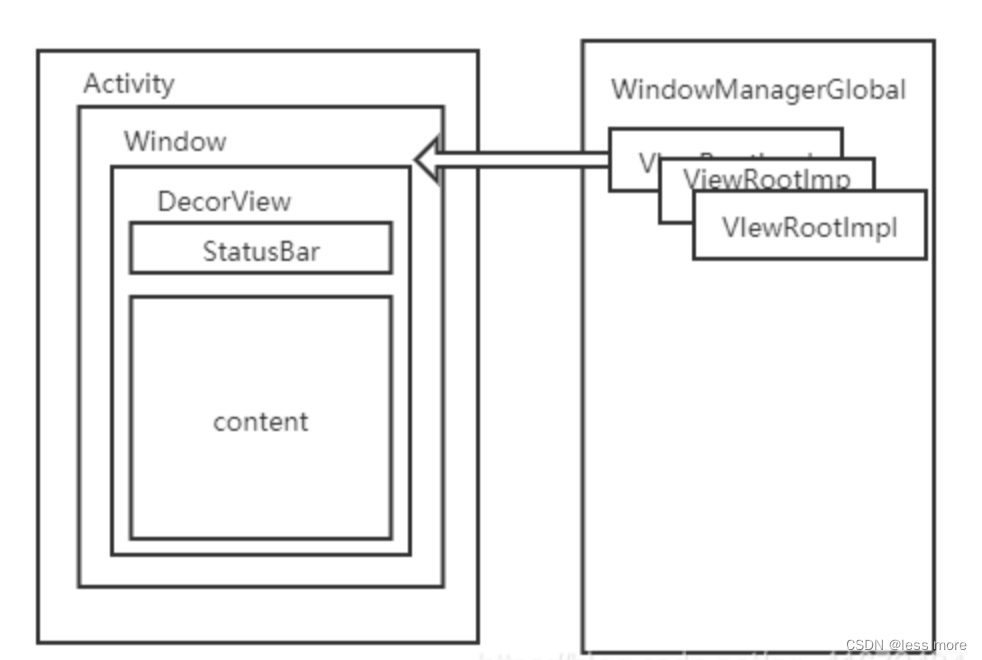
从上一篇文章中我们了解到,每一个Acitcity持有一个Window、每个Window又会持有一个DecorView、而DecorView是所有布局控件的父布局控件。试想一下,既然这样,那么当我们的Acitivity退出时,那么DecorView是不是应该被设置为GONE呢,而GONE被设置为了GONE,那么若是像Toast、Dialog等全局悬浮框怎么办,应该放在哪里呢?
为了解决这种情况,每个DecorView都会由单独一个ViewRootImpl进行管理,而WindowManagerImpl管理和多个ViewRootImpl,最终WindowManagerGlobal管理Android中的所有Window.
@UnsupportedAppUsage
private final ArrayList<View> mViews = new ArrayList<View>();
@UnsupportedAppUsage
private final ArrayList<ViewRootImpl> mRoots = new ArrayList< 最低0.47元/天 解锁文章






 扫一扫
扫一扫


 1158
1158

 被折叠的 条评论
为什么被折叠?
被折叠的 条评论
为什么被折叠?
 到【灌水乐园】发言





