



-
背景
公司需求需要设置邮箱发送,需要注册一个企业邮箱,发现阿里云邮箱配置授权码有些坑,记录一下 -
开始
- 首先我们注册完企业邮箱,postmaster开头的管理员账号,其中这个是不能开启SMTP 服务,需要开通注册一个员工账号才可以,不过主体postmaster账号需要设置一些东西才行
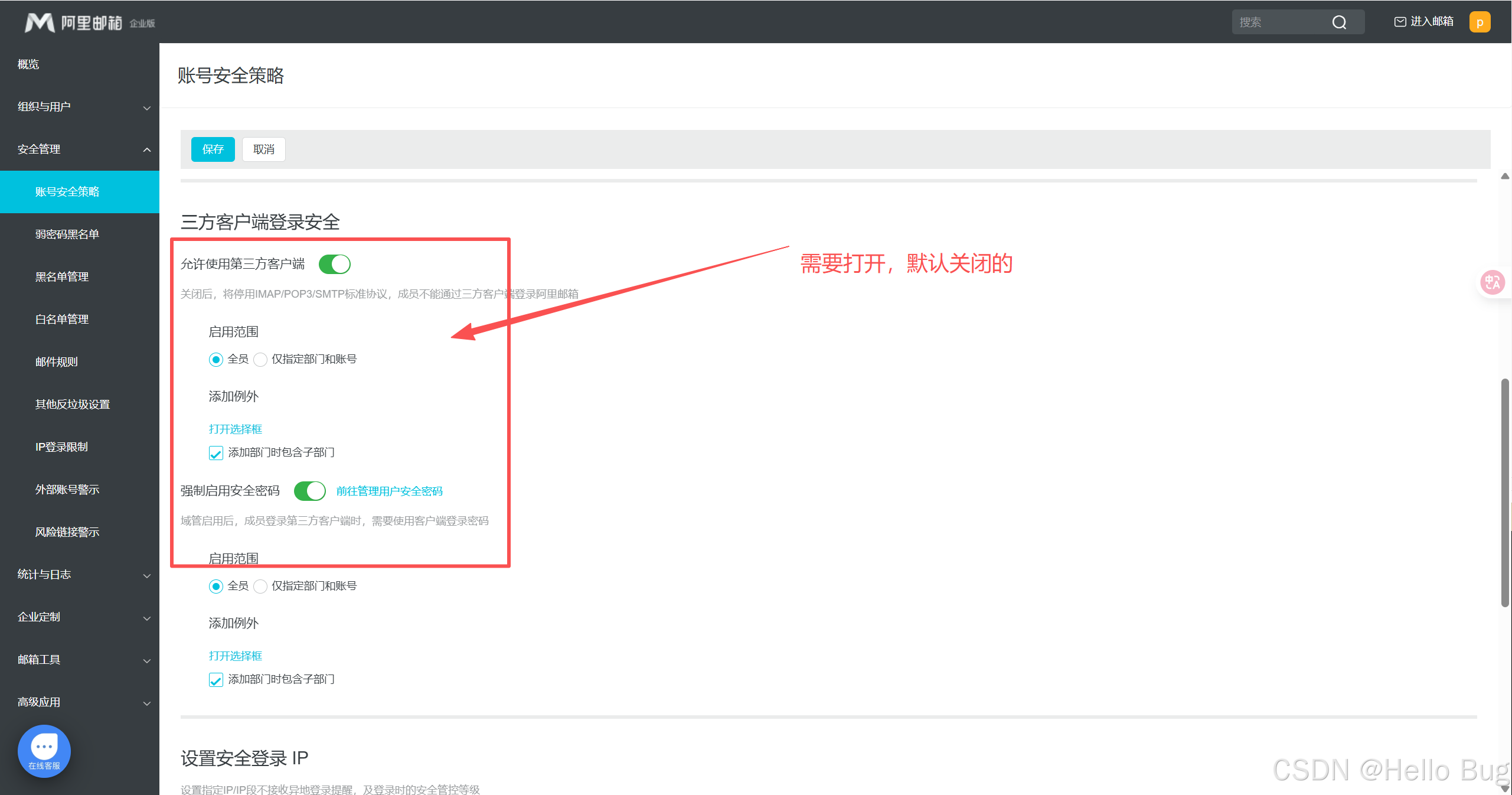
- 登录员工账号开通授权码
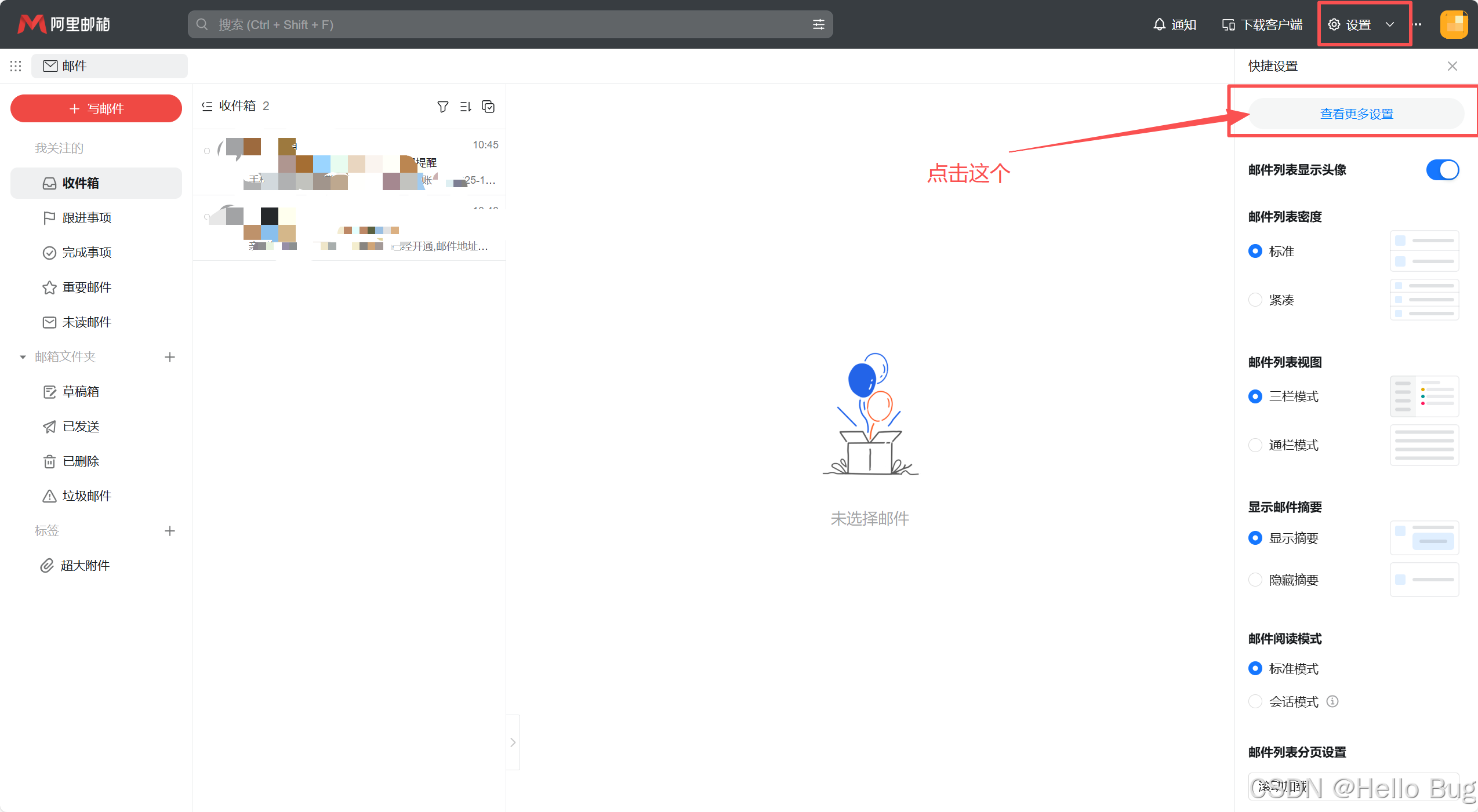
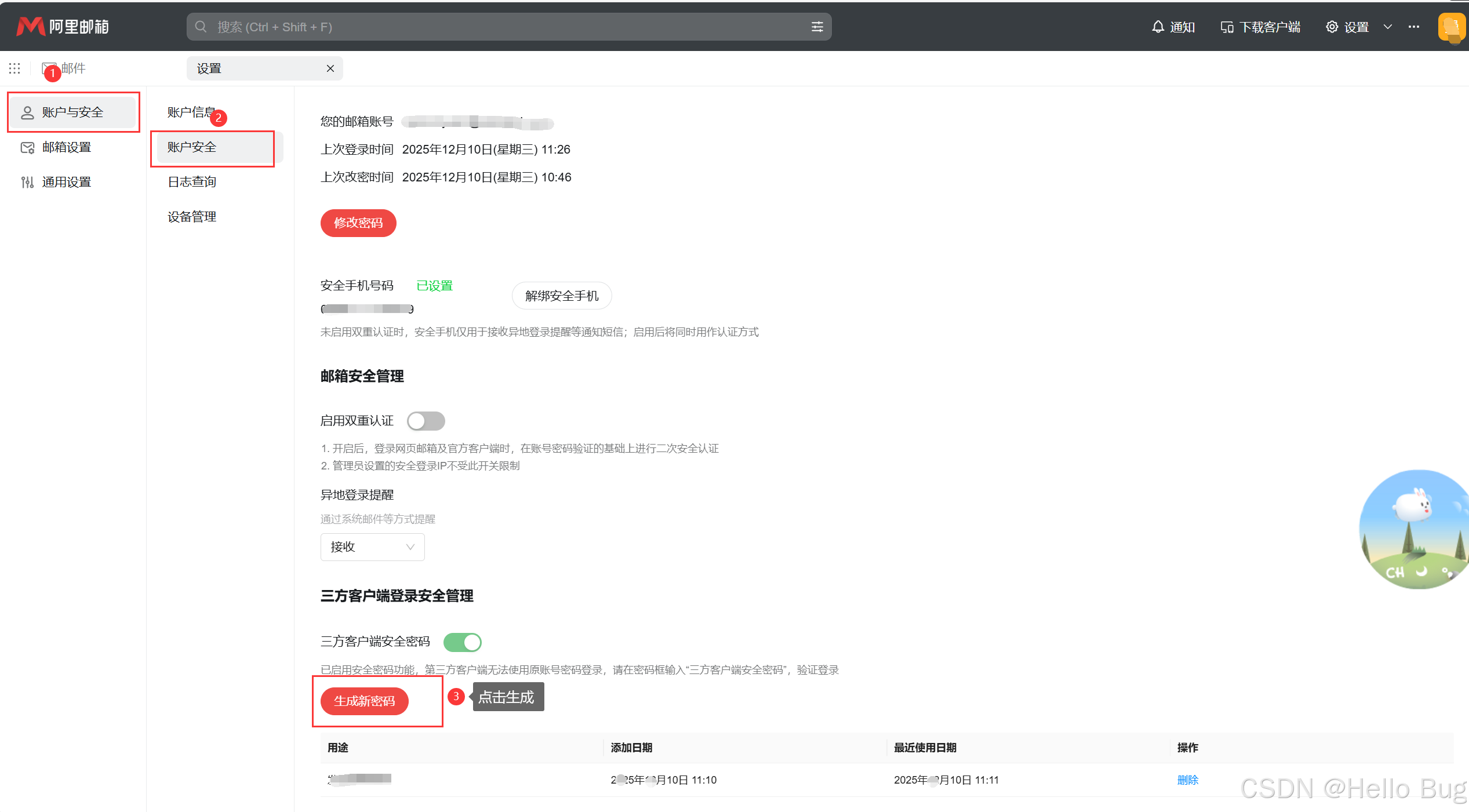
到这里就是完成了配置授权码关键部分
- 代码部分
- 导入依赖分别是pom.xml和gradle,根据不同的项目导入即可
pom.xml
<!-- JavaMail 核心依赖 -->
<dependency>
    <groupId>javax.mail</groupId>
    <artifactId>javax.mail-api</artifactId>
    <version>1.6.2</version>
</dependency>
<dependency>
    <groupId>com.sun.mail</groupId>
    <artifactId>javax.mail</artifactId>
    <version>1.6.2</version>
</dependency>
<!-- 简化配置的工具类(可选) -->
<dependency>
    <groupId>org.apache.commons</groupId>
    <artifactId>commons-lang3</artifactId>
    <version>3.14.0</version>
</dependency>
build.gradle
plugins {
    id 'java'
}

repositories {
    mavenCentral() // 必须配置中央仓库,拉取邮件依赖
}

dependencies {
    // JavaMail 核心依赖(兼容Java 8+)
    implementation 'javax.mail:javax.mail-api:1.6.2'
    implementation 'com.sun.mail:javax.mail:1.6.2'

    // 可选:简化字符串/日期处理(示例中用到)
    implementation 'org.apache.commons:commons-lang3:3.14.0'

    // 测试依赖(可选)
    testImplementation 'junit:junit:4.13.2'
}

// 可选:指定Java版本(根据你的项目调整)
java {
    sourceCompatibility = JavaVersion.VERSION_1_8
    targetCompatibility = JavaVersion.VERSION_1_8
}
- 测试逻辑代码
import javax.mail.*;
import javax.mail.internet.InternetAddress;
import javax.mail.internet.MimeMessage;
import java.util.Properties;

/**
 * Gradle项目 - 邮箱阈值提醒工具类
 */
public class EmailThresholdAlert {

    // ========== 请修改为你的实际配置 ==========
    private static final String SMTP_HOST = "smtp.qiye.aliyun.com"; // QQ邮箱填smtp.qq.com
    private static final String SMTP_PORT = "465"; // SSL端口,无需修改
    private static final String SENDER_EMAIL = "企业邮箱地址"; // 发送方邮箱
    private static final String SENDER_PASSWORD = "授权码"; // 邮箱授权码(非登录密码)
    private static final String RECEIVER_EMAIL = "接收方的邮箱"; // 接收方邮箱(多个用逗号分隔)
    // =========================================

    /**
     * 发送阈值提醒邮件
     */
    public static void sendAlertEmail(String subject, String content) throws MessagingException {
        // 1. 配置SMTP参数
        Properties props = new Properties();
        props.put("mail.smtp.host", SMTP_HOST);
        props.put("mail.smtp.port", SMTP_PORT);
        props.put("mail.smtp.auth", "true");
        props.put("mail.smtp.ssl.enable", "true");
        props.put("mail.smtp.socketFactory.class", "javax.net.ssl.SSLSocketFactory");

        // 2. 邮箱认证
        Authenticator auth = new Authenticator() {
            @Override
            protected PasswordAuthentication getPasswordAuthentication() {
                return new PasswordAuthentication(SENDER_EMAIL, SENDER_PASSWORD);
            }
        };

        // 3. 创建邮件会话
        Session session = Session.getInstance(props, auth);
        session.setDebug(false); // 生产环境关闭调试

        // 4. 构建邮件
        MimeMessage message = new MimeMessage(session);
        message.setFrom(new InternetAddress(SENDER_EMAIL));
        message.setRecipients(Message.RecipientType.TO, InternetAddress.parse(RECEIVER_EMAIL));
        message.setSubject(subject, "UTF-8"); // 解决中文乱码
        message.setContent(content, "text/html;charset=UTF-8"); // 支持HTML格式
        message.saveChanges();

        // 5. 发送邮件
        Transport.send(message);
        System.out.println("阈值提醒邮件发送成功!");
    }

    /**
     * 阈值判断核心逻辑
     * @param currentValue 当前监控值(如CPU负载、库存、订单量)
     * @param threshold 触发阈值
     * @param monitorName 监控项名称
     */
    public static void checkThresholdAndAlert(double currentValue, double threshold, String monitorName) {
        if (currentValue > threshold) { // 可修改判断逻辑:> / < / >= / <=
            // 构建告警邮件内容
            String subject = String.format("[告警] %s 超过阈值", monitorName);
            String content = String.format(
                    "<html>" +
                            "<body>" +
                            "<h3>监控项:%s</h3>" +
                            "<p>当前值:<font color='red'>%.2f</font></p>" +
                            "<p>阈值:%.2f</p>" +
                            "<p>触发时间:%s</p>" +
                            "</body>" +
                            "</html>",
                    monitorName, currentValue, threshold, java.time.LocalDateTime.now()
            );

            // 异步发送邮件(避免阻塞主流程,Gradle项目通用)
            new Thread(() -> {
                try {
                    sendAlertEmail(subject, content);
                } catch (MessagingException e) {
                    System.err.println("邮件发送失败:" + e.getMessage());
                    e.printStackTrace();
                }
            }).start();
        } else {
            System.out.printf("%s 当前值%.2f未超过阈值%.2f,无需提醒%n", monitorName, currentValue, threshold);
        }
    }

    // 测试入口
    public static void main(String[] args) {
        // 示例1:CPU负载阈值80,当前85 → 触发告警
        checkThresholdAndAlert(85.5, 80.0, "系统CPU负载");
        // 示例2:库存阈值100,当前90 → 不触发
        checkThresholdAndAlert(90, 100.0, "商品A库存");
    }
}
邮箱参考
| 邮箱类型 | SMTP 服务器 | 端口(SSL) |
|---|---|---|
| 163 邮箱 | smtp.163.com | 465 |
| QQ 邮箱 | smtp.qq.com | 465 |
| Gmail | smtp.gmail.com | 465 |
| 阿里邮箱 | smtp.qiye.aliyun.com | 465 |
效果这样
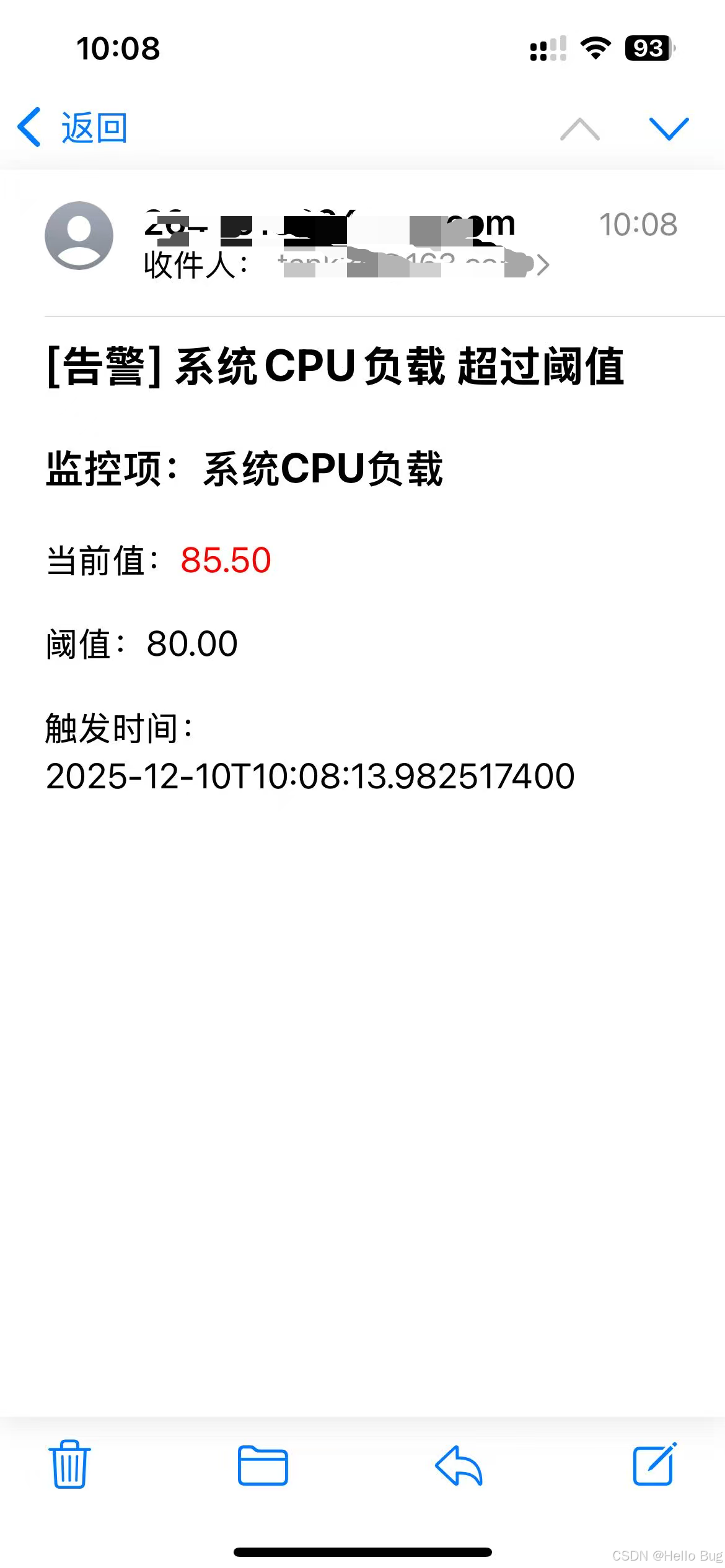
到这里差不多就结束了,如果发现博文有问题,欢迎指点一二,欢迎打赏





 扫一扫
扫一扫


 1162
1162

 被折叠的 条评论
为什么被折叠?
被折叠的 条评论
为什么被折叠?
 到【灌水乐园】发言





