



 本文档提供了在Ubuntu系统上安装和配置多种软件的详细步骤,包括输入法、压缩解压缩工具、源代码编辑器NotepadQQ及文本编辑器Notepad++的中文乱码解决方案。涵盖了软件安装命令、快捷键使用及特定设置方法。
https://blog.youkuaiyun.com/u013554213/article/details/78487546
shurufa
https://blog.youkuaiyun.com/huangyifei_1111/article/details/79258056
压缩、解压缩软件
https://jingyan.baidu.com/article/7f766daff281c84101e1d08d.html
sudo apt-get install rar
sudo apt-get install unrar
sudo apt-get install p7zip-rar
sudo apt-get install p7zip*
常见快捷键:
Ctrl + H: 隐藏/显示文件和文件夹
SI安装
https://blog.youkuaiyun.com/wxchbhd/article/details/81487343
安装用的Source Insight 4.0.96.rar,liscence使用的sourceinsight4093的
安装notepadqq
sudo add-apt-repository ppa:notepadqq-team/notepadqq
sudo apt-get update
sudo apt-get install notepadqq
卸载notepadqq命令如下:
sudo apt-get remove notepadqq
解决Ubuntu下Notepad++中文乱码问题
https://www.linuxidc.com/Linux/2019-03/157484.htm
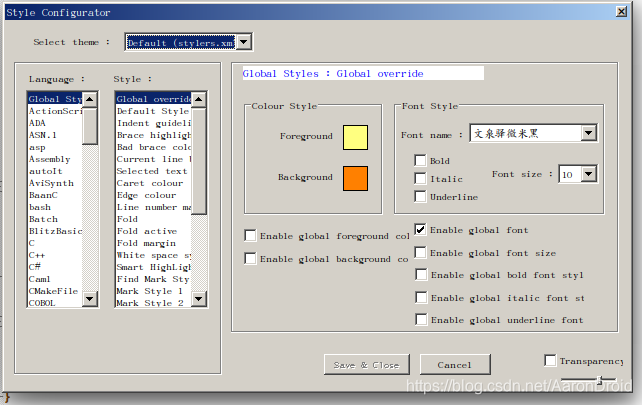
Settings->Style Configurator-> EnableGlobal Font
FontName: 各种中文字体 或者 各种Unicode MS 例如:MS Yahei, Arial unicode MS。如下图:





 扫一扫
扫一扫


 被折叠的 条评论
为什么被折叠?
被折叠的 条评论
为什么被折叠?
 到【灌水乐园】发言





