



 本文介绍了如何使用Python进行文件处理,包括批量删除文件、移动文件以及实现文件分类的方法,通过示例代码展示了具体的操作过程,帮助读者掌握Python在文件管理中的实用技巧。
用python进行文件整理,特别是从手机导出的照片和视频,不要太方便快速,再也不用手动移动分类了!!!
三个函数分别实现以下功能:
1)删除指定类型的文件
2)按文件类型分类
3)按文件修改时间分类
注意这两个方法的区别:
os.walk() 返回三个值:1、文件目录路径;2、文件中的子文件夹;3、文件中的非文件夹内容,会一直类似遍历下去,不断深入文件的最底层
os.listdir() 直接访问指定文件夹内的内容,不会再嵌套的继续访问下去,返回列表
在一个目录下面只有文件时可以使用os.listdir()
当一个目录下面既有文件又有目录(文件夹),可使用os.walk()读取里面所有文件
import shutil, os, time


def delete_files(path):
    """
    删除指定类型的文件
    :param path: 文件路径
    :return:
    """
    for root, dirs, files in os.walk(path):
        for name in files:
            # if name.startswith("Screenshot"):
            if name.endswith(".HEIC"):
                os.remove(os.path.join(root, name))
                print("Delete File: " + os.path.join(root, name))


def move_files_type(path):
    """
    根据一个文件夹中的文件类型建立相应的文件夹,将同一种类型的文件放在一个文件夹中
    :param path:
    :return:
    """
    files = os.listdir(path)
    for f in files:
        folder_name = path + f.split('.')[-1]
        if not os.path.exists(folder_name):
            os.makedirs(folder_name)
            shutil.move(f, folder_name)
        else:
            shutil.move(f, folder_name)


def move_files_time(path):
    """
    文件按时间分类:获取对应目录下所有文件,按创建时间,以年月为区分,创建文件夹,然后移动文件至对应文件夹
    :param path: 文件所在路径
    :return:
    """
    for root, dirs, files in os.walk(path, topdown=False):
        for name in files:
            file_path_str = os.path.join(root, name)
            t = os.stat(file_path_str)
            move_path_dst = path + r"\year" + str(time.localtime(t.st_mtime).tm_year) + r"\month" + str(
                time.localtime(t.st_mtime).tm_mon)
            print(move_path_dst)
            if os.path.exists(move_path_dst):
                shutil.move(file_path_str, move_path_dst)
            else:
                os.makedirs(move_path_dst)    # 递归创建目录,有子目录
                shutil.move(file_path_str, move_path_dst)
        # for name in dirs:
        #     move_files_time(name)


if __name__ == "__main__":
    path_type = r'E:\lxvidio'
    move_files_time(path_type)
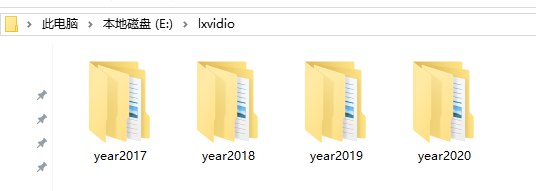
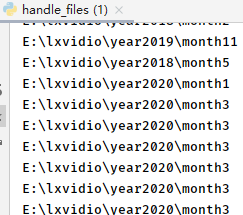
运行结果展示:





 扫一扫
扫一扫


 214
214

 被折叠的 条评论
为什么被折叠?
被折叠的 条评论
为什么被折叠?
 到【灌水乐园】发言





