


 该案例展示了如何利用平台的矢量文件,进行Sentinel-2 L2A影像的数据检索、筛选、拼接和裁剪操作,并最终将处理后的数据导出至阿里云的'我的数据'。主要步骤包括初始化环境、定义检索区域、执行数据检索和影像导出。
本次分享案例为使用平台内置或自主上传的矢量文件,进行数据的检索(以 Sentine-2 L2A 为例),再进行数据筛选、拼接、裁剪等操作后,将数据导出至我的数据中。
01 初始化环境
import aie
aie.Authenticate()
aie.Initialize()
02 定义矢量区域
使用 FeatureCollection 引用平台内置或自主上传的矢量边界,定义检索数据的区域。利用 aie.Map 构造一个地图组件 Map 对象,通过 aie.Map.addLayer 用于地图可视化渲染不同图层。
region = aie.FeatureCollection('China_Province') \
            .filter(aie.Filter.eq('province', '浙江省')) \
            .geometry()

map = aie.Map(
    center=region.getCenter(),
    height=800,
    zoom=6
)
vis_params = {
    'color': '#00FF00'
}
map.addLayer(
    region,
    vis_params,
    'region',
    bounds=region.getBounds()
)
map
03 Sentinel-2数据检索
定义函数 s2_collection ,实现按区域、时间、云量等条件的 Sentinel-2 数据检索,返回哨兵单景 s2 image 和进行镶嵌、裁剪后的 s2 mosaic image 。
def s2_collection(start_date, end_date):
    s2 = aie.ImageCollection('SENTINEL_MSIL2A') \
            .filterBounds(region) \
            .filterDate(start_date, end_date) \
            .filter('eo:cloud_cover<20')
    mosaic_image = s2.median().clip(region)
    return s2, mosaic_image

s2, s2_mosaic = s2_collection('2021-04-01', '2022-08-30')
04 影像导出
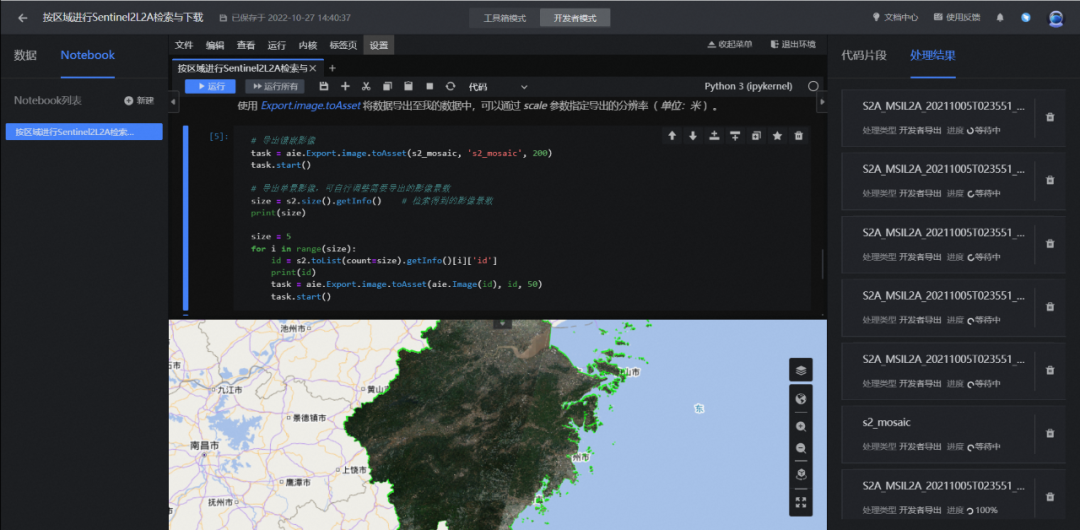
使用 Export.image.toAsset 将数据导出至平台 我的数据 模块中,可以通过 scale 参数指定导出的分辨率( 单位:米 )。
#导出镶嵌影像
task = aie.Export.image.toAsset(s2_mosaic, 's2_mosaic', 200)
task.start()
#批量实现单景影像的导出
size = s2.size().getInfo()    # 检索得到的影像景数
print(size)

size = 5
for i in range(size):
    id = s2.toList(count=size).getInfo()[i]['id']
    print(id)
    task = aie.Export.image.toAsset(aie.Image(id), id, 50)
    task.start()





 扫一扫
扫一扫


 582
582


 到【灌水乐园】发言



