public String getPrintPalletItext(ExcelTrackPrintDTO parameter) {
        String upload;
        File outFile;
        try {
            // 1. 先创建临时文件
            outFile = File.createTempFile("pallet-", ".pdf");
            List<WaybillHead> printPalletList = this.baseMapper.getPrintPalletList(parameter);
            // 2. 生成PDF内容
            PrintPDFUtils.printPalletPDF(Files.newOutputStream(outFile.toPath()), printPalletList);
            // 3. 确认文件已生成
            if (!outFile.exists() || outFile.length() == 0) {
                throw new I18nException(SampleI18nMessage.ERROR_IN_DATA, "PDF生成失败");
            }
            // 4. 创建MultipartFile
            MultipartFile multipartFile = new MockMultipartFile(outFile.getName(), outFile.getName(),
                    ContentType.APPLICATION_OCTET_STREAM.toString(), new FileInputStream(outFile));
            // 5. 上传到MinIO
            upload = minioUtil.upload(multipartFile);
            outFile.delete();
        } catch (Exception e) {
            throw new I18nException(SampleI18nMessage.ERROR_IN_DATA, e.getMessage());
        }
        return upload;
    }


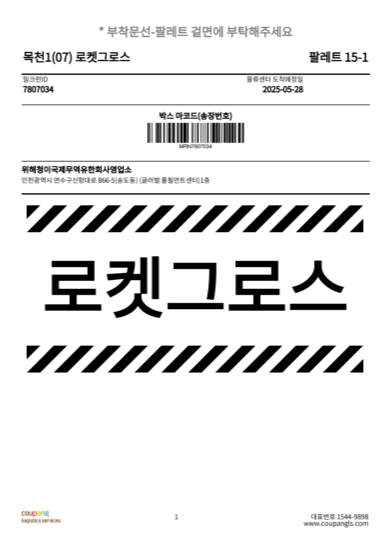
public static OutputStream printPalletPDF(OutputStream os, List<WaybillHead> list) throws IOException {
        Document document = new Document(PageSize.A4);

        byte[] normalPATH = toByteArray(PrintPDFUtils.class.getResourceAsStream("/templates/fonts/SourceHanSansK-Normal.ttf"));
        byte[] logoPATH = toByteArray(PrintPDFUtils.class.getResourceAsStream("/templates/img/CPLOGO.png"));
        try {
            PdfWriter writer = PdfWriter.getInstance(document, os);
            document.open();
            int i = 1;
            for (WaybillHead head : list) {
                // 设置中文字体
                BaseFont bf = BaseFont.createFont("SourceHanSansK-Normal.ttf", BaseFont.IDENTITY_H, BaseFont.NOT_EMBEDDED, true, normalPATH, null);
                Font titleFont = new Font(bf, 18, Font.BOLD, BaseColor.GRAY);
                // 添加标题
                Paragraph title = new Paragraph("* 부착문선-팔레트 겉면에 부탁해주세요", titleFont);
                title.setAlignment(Element.ALIGN_CENTER);
                document.add(title);
                // 添加内容
                document.add(new Paragraph(" ")); // 空行
                Font contentFont = new Font(bf, 18, Font.BOLD);
                // 创建一个表格,有2列
                PdfPTable table = new PdfPTable(2);
                table.setWidthPercentage(100); // 设置表格宽度为100%
                // 第一列(左边显示内容)
                PdfPCell leftCell = new PdfPCell(new Phrase("목천1(07) 로켓그로스", contentFont));
                leftCell.setBorder(PdfPCell.NO_BORDER); // 去掉边框
                leftCell.setHorizontalAlignment(Element.ALIGN_LEFT); // 左对齐
                table.addCell(leftCell);
                // 第二列(右边显示内容)
                PdfPCell rightCell = new PdfPCell(new Phrase("팔레트 " + list.size() + "-" + i, contentFont));
                rightCell.setBorder(PdfPCell.NO_BORDER); // 去掉边框
                rightCell.setHorizontalAlignment(Element.ALIGN_RIGHT); // 右对齐
                table.addCell(rightCell);
                // 将表格添加到文档中
                document.add(table);
                // =============== 添加粗体分割线 ===============
                Paragraph separator = new Paragraph();
                separator.add(new Chunk(new LineSeparator(2f, 100f, BaseColor.BLACK, Element.ALIGN_CENTER, -1)));
                document.add(separator);
                // 创建一个表格,有2列
                PdfPTable table2 = new PdfPTable(2);
                Font contentFontS = new Font(bf, 12, Font.BOLD);
                Font contentFontSTwo = new Font(bf, 10, Font.NORMAL);
                table2.setWidthPercentage(100); // 设置表格宽度为100%
                // 第一列(左边显示内容)
                PdfPCell leftCell2 = new PdfPCell(new Phrase("밀크런ID ", contentFontSTwo));
                leftCell2.setBorder(PdfPCell.NO_BORDER); // 去掉边框
                leftCell2.setHorizontalAlignment(Element.ALIGN_LEFT); // 左对齐
                table2.addCell(leftCell2);
                // 第二列(右边显示内容)
                PdfPCell rightCell2 = new PdfPCell(new Phrase("물류센터 도착예정일", contentFontSTwo));
                rightCell2.setBorder(PdfPCell.NO_BORDER); // 去掉边框
                rightCell2.setHorizontalAlignment(Element.ALIGN_RIGHT); // 右对齐
                rightCell2.setPaddingRight(100f);
                table2.addCell(rightCell2);
                // 将表格添加到文档中
                document.add(table2);
                // 创建一个表格,有2列
                PdfPTable table3 = new PdfPTable(2);
                table3.setWidthPercentage(100); // 设置表格宽度为100%
                // 第一列(左边显示内容)
                PdfPCell leftCell3 = new PdfPCell(new Phrase(head.getMilkrunNumber(), contentFontS));
                leftCell3.setBorder(PdfPCell.NO_BORDER); // 去掉边框
                leftCell3.setHorizontalAlignment(Element.ALIGN_LEFT); // 左对齐
                table3.addCell(leftCell3);
                // 第二列(右边显示内容)
                //2025-05-28T09:00
                String dateTimeStr = String.valueOf(head.getMakeTime());
                SimpleDateFormat isoFormat = new SimpleDateFormat("yyyy-MM-dd'T'HH:mm");
                Date date = isoFormat.parse(dateTimeStr);
                SimpleDateFormat outputFormat = new SimpleDateFormat("yyyy-MM-dd");
                String printDate = outputFormat.format(date);
                PdfPCell rightCell3 = new PdfPCell(new Phrase(printDate, contentFontS));
                rightCell3.setBorder(PdfPCell.NO_BORDER); // 去掉边框
                rightCell3.setHorizontalAlignment(Element.ALIGN_RIGHT); // 右对齐
                rightCell3.setPaddingRight(100f);
                table3.addCell(rightCell3);
                // 将表格添加到文档中
                document.add(table3);
                // =============== 添加细分割线 ===============
                Paragraph separator2 = new Paragraph();
                separator2.add(new Chunk(new LineSeparator(1f, 100f, BaseColor.BLACK, Element.ALIGN_CENTER, -1)));
                document.add(separator2);
                // 添加条形码区域
                PdfPTable table4 = new PdfPTable(1);
                table3.setWidthPercentage(100); // 设置表格宽度为100%
                // 1. 先添加标题行
                PdfPCell titleCell = new PdfPCell(new Phrase("박스 마코드(송장번호)", contentFontS));
                titleCell.setBorder(PdfPCell.NO_BORDER);
                titleCell.setHorizontalAlignment(Element.ALIGN_CENTER);
                titleCell.setVerticalAlignment(Element.ALIGN_BOTTOM);
                titleCell.setPaddingTop(10);
                titleCell.setPaddingBottom(5); // 标题与条形码的间距
                table4.addCell(titleCell);
                String trackNo = "MRN" + head.getMilkrunNumber();
                PdfPCell table6C1 = new PdfPCell(createBarcode(writer, trackNo, false, 30, 1.08f), false);
                table6C1.setHorizontalAlignment(Element.ALIGN_CENTER);
                table6C1.setVerticalAlignment(Element.ALIGN_BOTTOM);
                table6C1.setBorder(0);
                table6C1.setPadding(1);
                table4.addCell(table6C1);
                document.add(table4);
                // =============== 添加细分割线 ===============
                document.add(separator2);
                document.add(new Paragraph("위해청이국제무역유한회사영업소", contentFontS));
                document.add(new Paragraph(head.getShipmentOrigin(), contentFontSTwo));
                // =============== 添加粗体分割线 ===============
                document.add(separator);
                // 斑马行
                PdfPTable zebraRow = new PdfPTable(1);
                zebraRow.setWidthPercentage(100);
                zebraRow.setSpacingBefore(10f);  // 与上一行的间距
                zebraRow.setSpacingAfter(10f);    // 与下一行的间距
                // 创建斑马纹行(高度40像素)
                PdfPCell zebraCell2 = createDiagonalZebraCell(writer,bf,"", 500, 40);
                zebraRow.addCell(zebraCell2);
                // 添加到文档中
                document.add(zebraRow);
                //大字体
                Font titleFontThree = new Font(bf, 100, Font.BOLD, BaseColor.BLACK);
                // 创建一个单列表格(占满页面宽度)
                PdfPTable centerTable = new PdfPTable(1);
                centerTable.setWidthPercentage(100); // 占满整行
                // 添加单元格(内容自动居中)
                PdfPCell cell = new PdfPCell(new Phrase("로켓그로스", titleFontThree));
                cell.setHorizontalAlignment(Element.ALIGN_CENTER);
                cell.setBorder(PdfPCell.NO_BORDER); // 去掉边框
                centerTable.addCell(cell);
                document.add(centerTable);
                // 创建斑马纹行 添加到文档中
                PdfPTable zebraRow2 = new PdfPTable(1);
                zebraRow2.setWidthPercentage(100);
                zebraRow2.setSpacingBefore(40f);  // 与上一行的间距
                zebraRow2.setSpacingAfter(200f);    // 与下一行的间距
                zebraRow2.addCell(zebraCell2);
                document.add(zebraRow2);
                // 添加页脚
                PdfPTable footerTable = getPdfPTable(3, new int[]{5, 30, 10});
                footerTable.setWidthPercentage(100);
                // 左下角logo
                Image logo = Image.getInstance(logoPATH);
                PdfPCell logoCell = new PdfPCell(logo, true);
                logoCell.setBorder(PdfPCell.NO_BORDER);
                logoCell.setHorizontalAlignment(Element.ALIGN_LEFT);
                // 中间页数
                PdfPCell pageNumCell = new PdfPCell(new Phrase(String.valueOf(writer.getPageNumber()), contentFontSTwo));
                pageNumCell.setBorder(PdfPCell.NO_BORDER);
                pageNumCell.setHorizontalAlignment(Element.ALIGN_CENTER);
                // 右下角联系方式
                Paragraph contactInfo = new Paragraph();
                contactInfo.add(new Chunk("대표번호 1544-9898\n", contentFontSTwo));
                contactInfo.add(new Chunk("www.coupangls.com", contentFontSTwo));
                PdfPCell contactCell = new PdfPCell(contactInfo);
                contactCell.setBorder(PdfPCell.NO_BORDER);
                contactCell.setHorizontalAlignment(Element.ALIGN_RIGHT);
                footerTable.addCell(logoCell);
                footerTable.addCell(pageNumCell);
                footerTable.addCell(contactCell);
                // 将页脚添加到文档
                document.add(footerTable);
                document.newPage();
                i++;
            }
            document.close();
            return os;
        } catch (Exception e) {
            e.printStackTrace();
            if (os != null) {
                try {
                    os.close();
                } catch (IOException e1) {
                    e1.printStackTrace();
                }
            }
        }
        return null;
    }


 // 创建斜向平行四边形斑马纹行的方法
    private static PdfPCell createDiagonalZebraCell(PdfWriter writer, BaseFont bf, String text, float width, float height) throws DocumentException, IOException {
        // 创建模板用于绘制斜向条纹
        PdfTemplate template = writer.getDirectContent().createTemplate(width, height);

        // 设置条纹参数
        float stripeWidth = 20f; // 单个条纹宽度
        float angle = 40f;       // 倾斜角度(控制斜度)
        int stripeCount = (int) (width / stripeWidth * 1.5); // 确保覆盖整个宽度

        // 绘制斜向条纹
        for (int i = 0; i < stripeCount; i++) {
            // 交替设置黑白填充色(无描边)
            if (i % 2 == 0) {
                template.setColorFill(BaseColor.BLACK);
            } else {
                template.setColorFill(BaseColor.WHITE);
            }
            // 绘制平行四边形路径并填充(不描边) 正向
//            template.moveTo(i * stripeWidth, 0);
//            template.lineTo(i * stripeWidth + stripeWidth, 0);
//            template.lineTo(i * stripeWidth + stripeWidth - angle, height);
//            template.lineTo(i * stripeWidth - angle, height);

            // 绘制反向平行四边形
            template.moveTo(i * stripeWidth, height);                 // 左下
            template.lineTo(i * stripeWidth + stripeWidth, height);    // 右下
            template.lineTo(i * stripeWidth + stripeWidth - angle, 0); // 右上
            template.lineTo(i * stripeWidth - angle, 0);              // 左上
            template.closePath();
            template.fill();  // 仅填充,不描边
        }

        // 4. 创建无边框单元格
        Image stripeImage = Image.getInstance(template);
        PdfPCell cell = new PdfPCell(stripeImage, true);
        cell.setBorder(Rectangle.NO_BORDER);  // 确保无边框

        // 5. 添加文本(可选)
        if (text != null && !text.isEmpty()) {
            cell.setPhrase(new Phrase(text, new Font(bf, 12, Font.BOLD, BaseColor.BLACK)));
            cell.setHorizontalAlignment(Element.ALIGN_CENTER);
            cell.setVerticalAlignment(Element.ALIGN_MIDDLE);
        }

        cell.setPadding(8);
        return cell;
    }








 扫一扫
扫一扫


 412
412

 被折叠的 条评论
为什么被折叠?
被折叠的 条评论
为什么被折叠?
 到【灌水乐园】发言





