



配置Nat策略
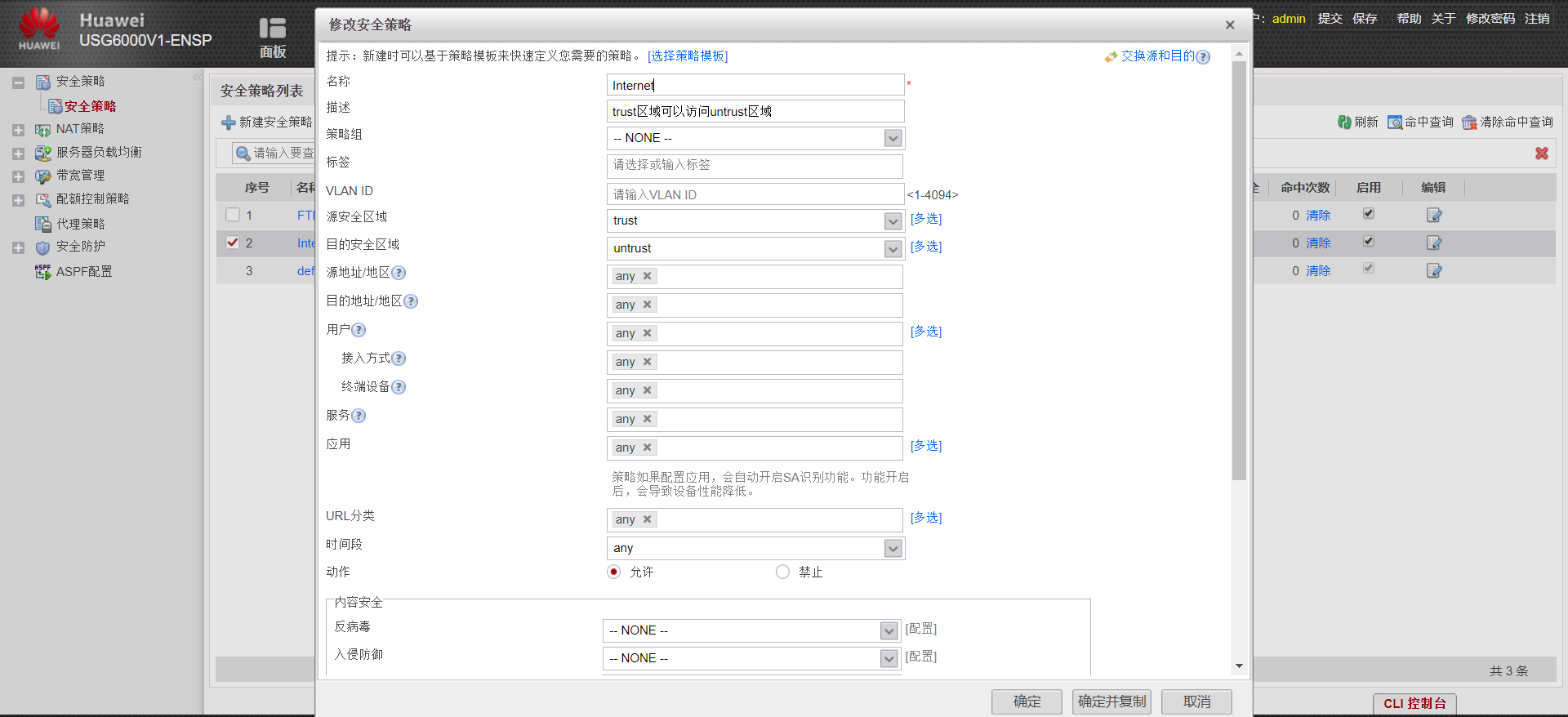
配置策略,使得trust区域可以访问untrust区域
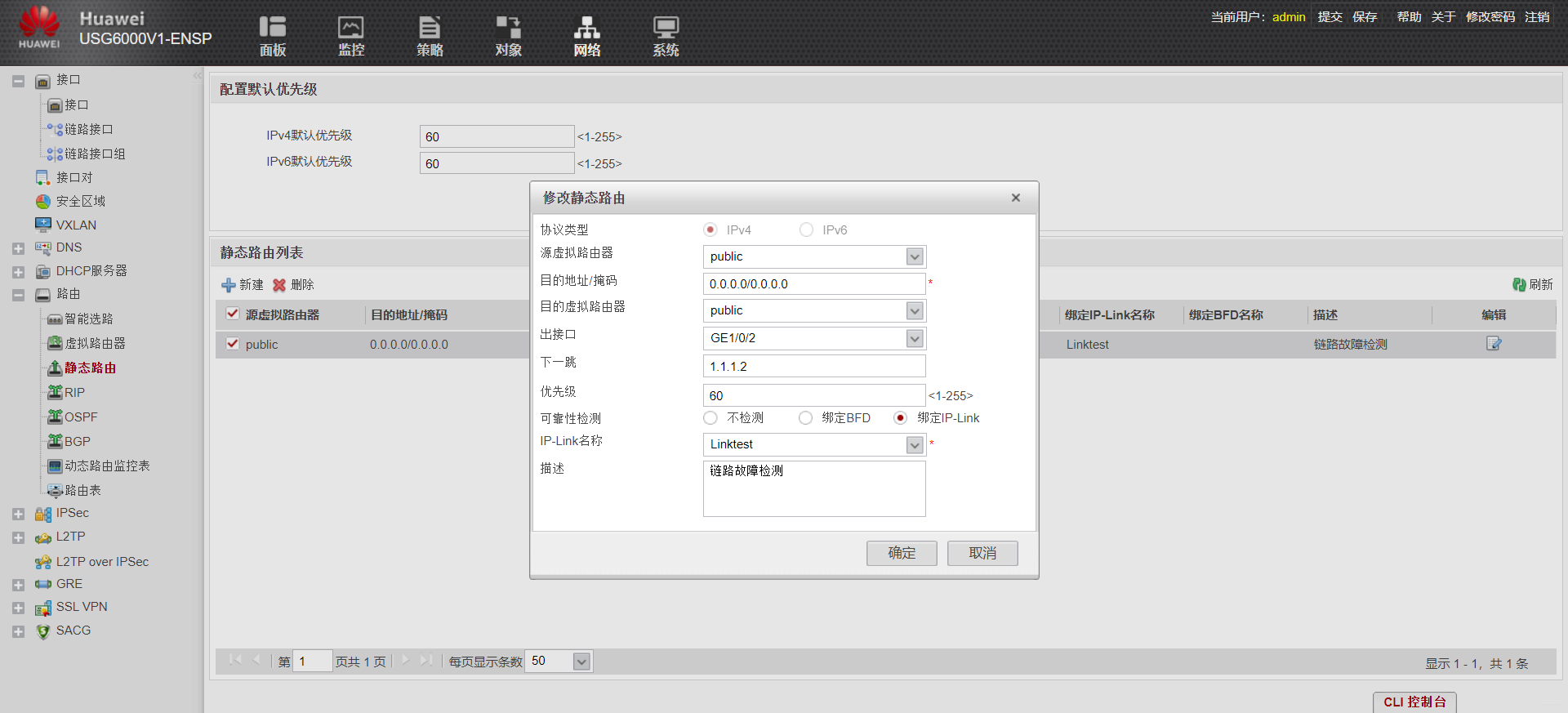
配置默认路由,指向R1
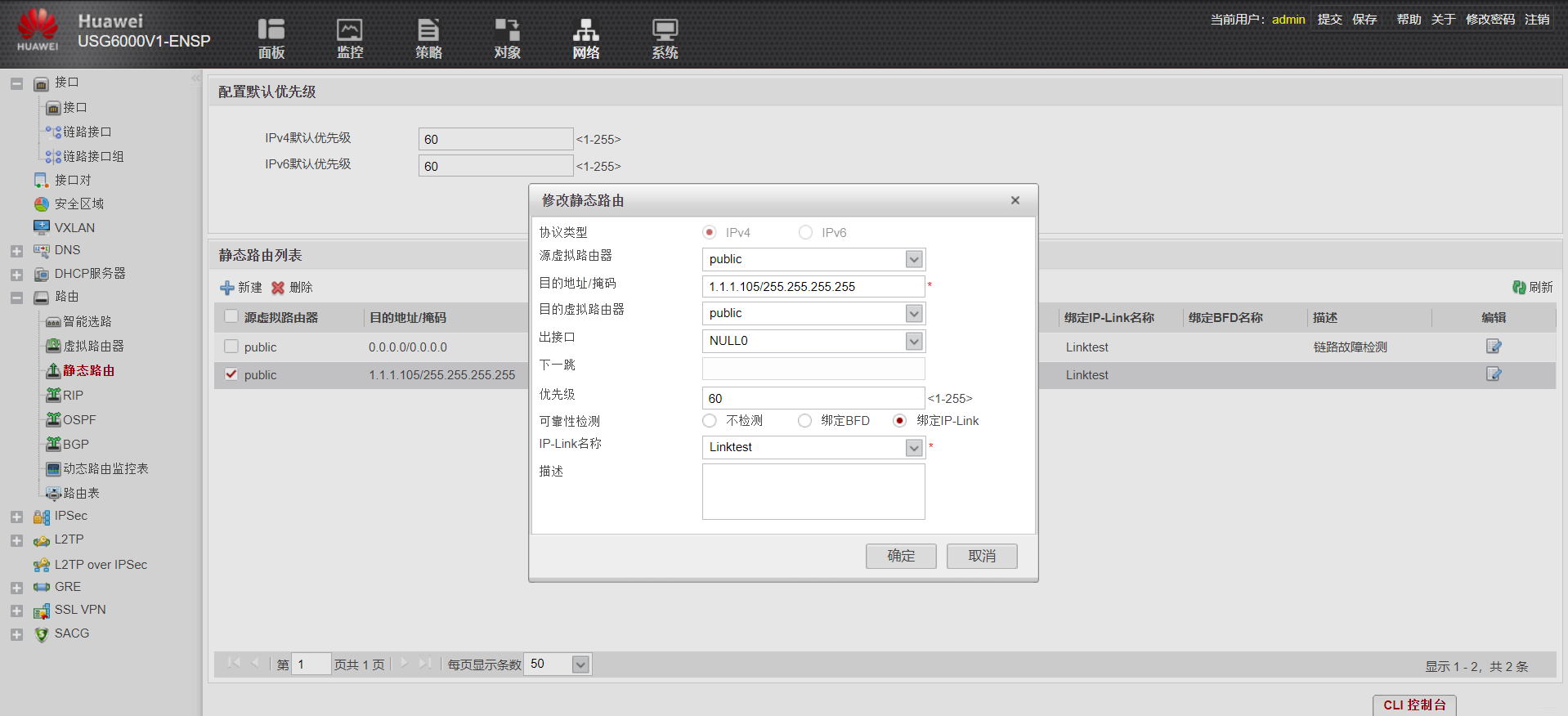
设置到达Nat Pool的静态路由,指向一个空接口,防止路由黑洞
配置防火墙使得外网用户能访问企业DMZ区域的FTP服务器(双向nat)
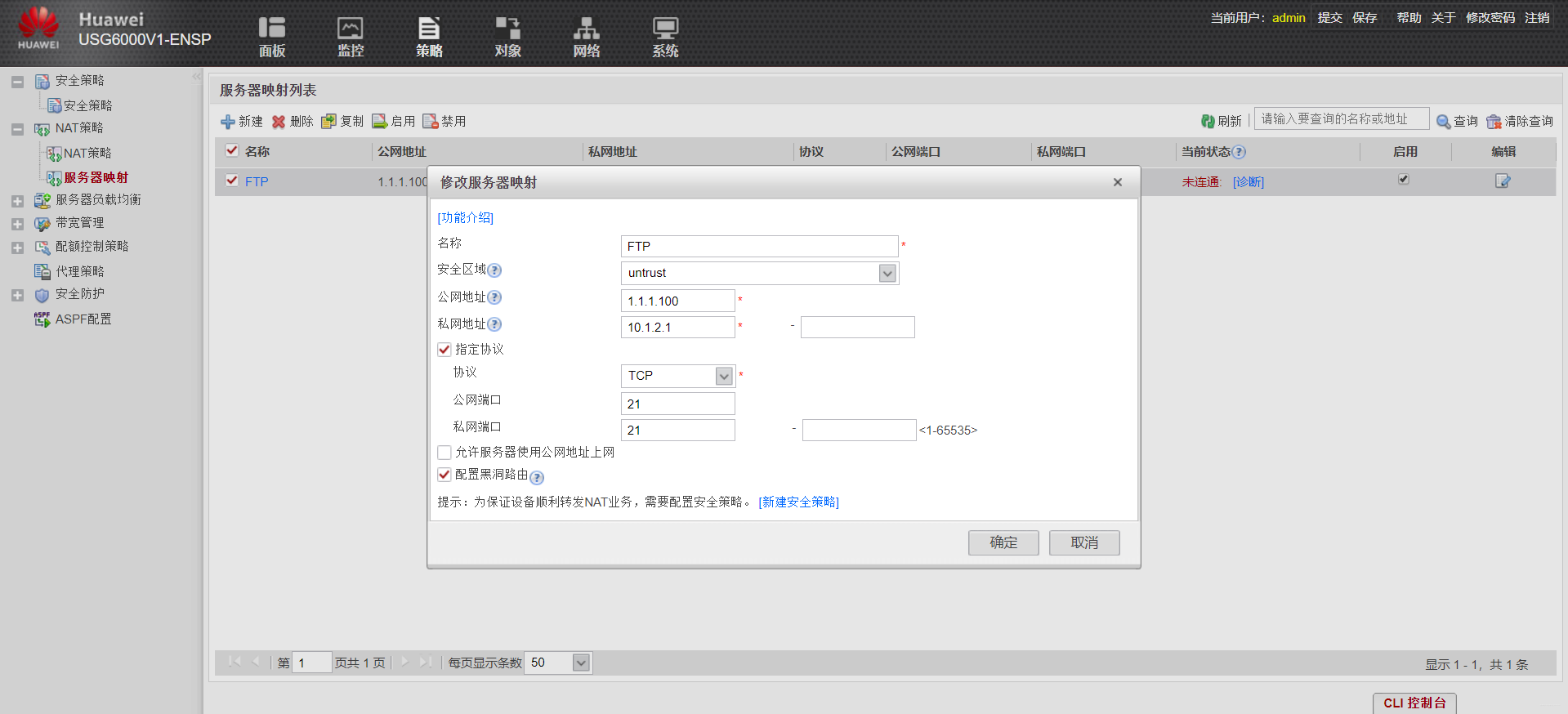
先配置服务器对外静态映射
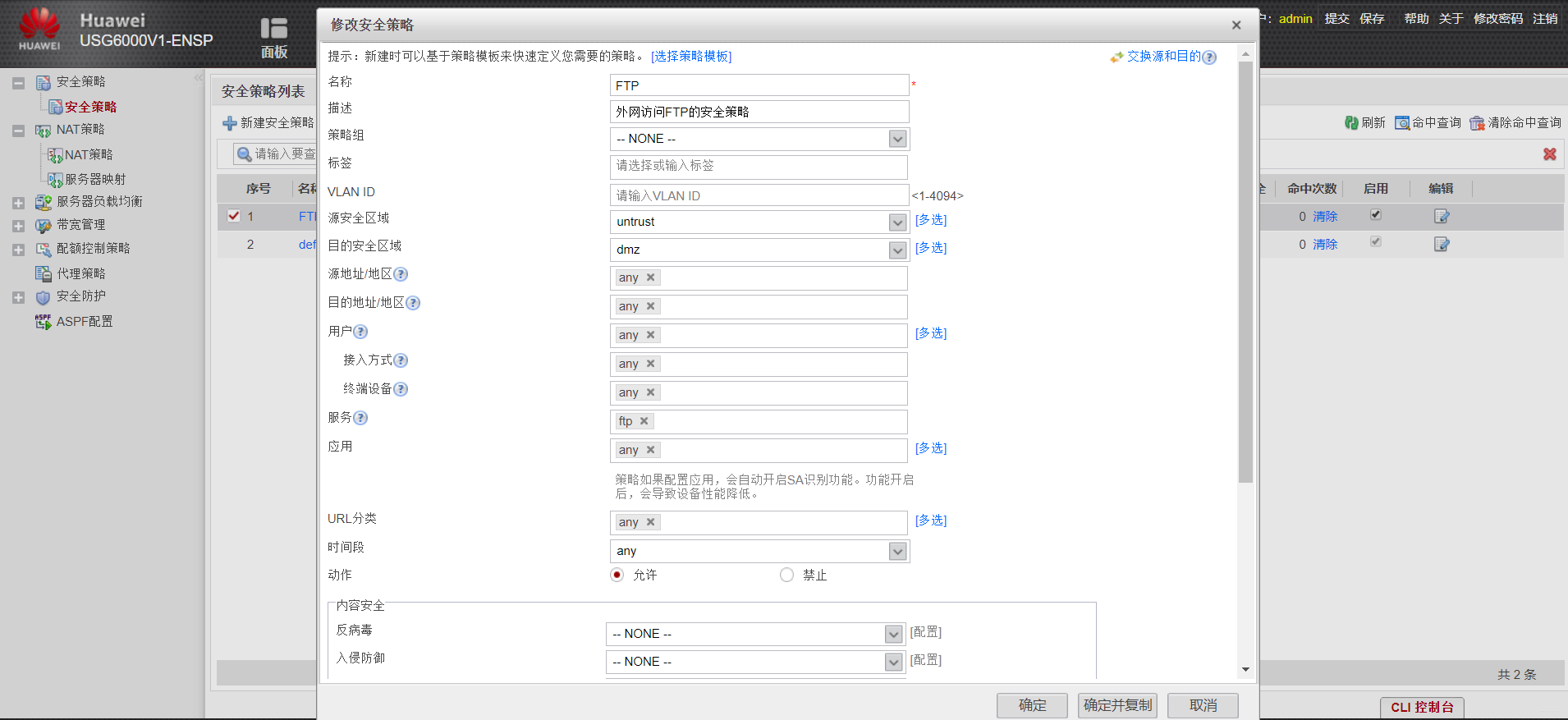
防火墙上配置一个策略,使得untrust区域能访问DMZ区域
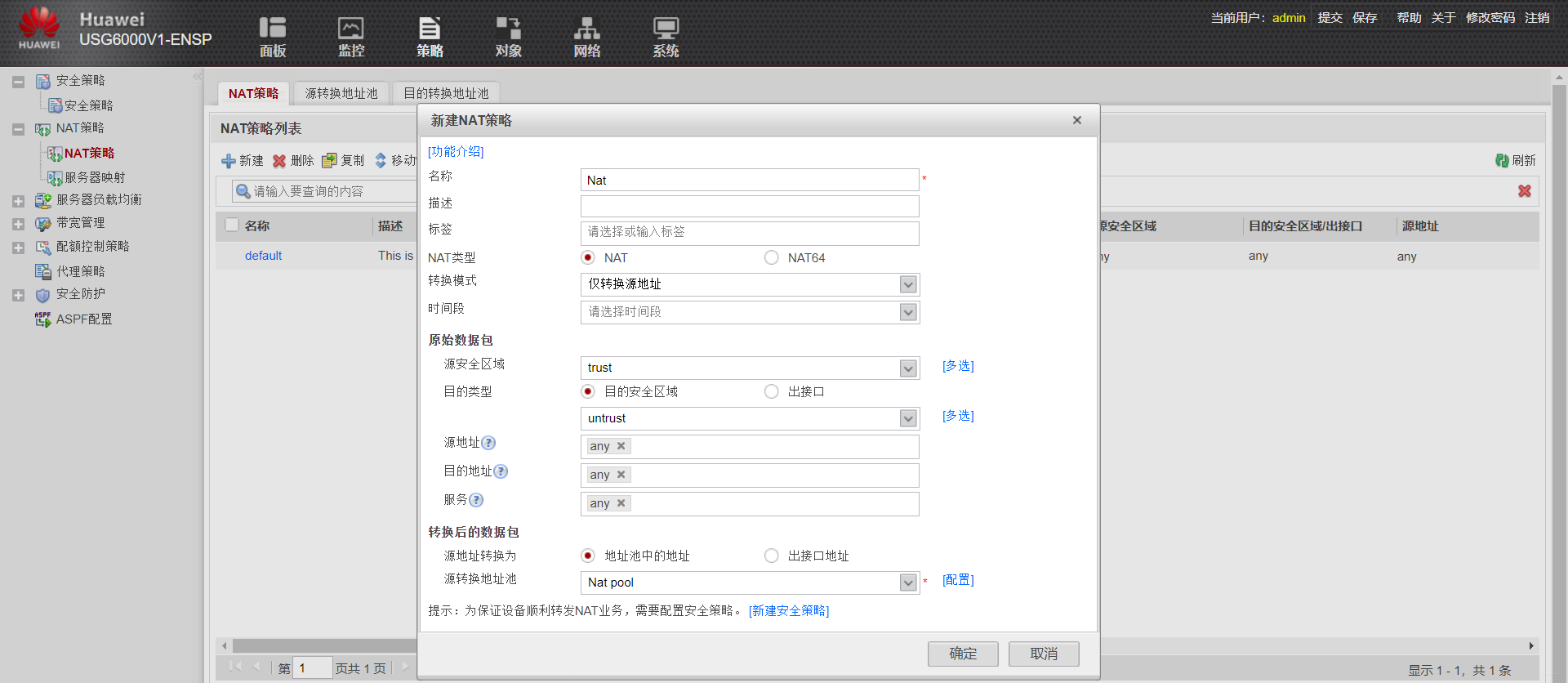
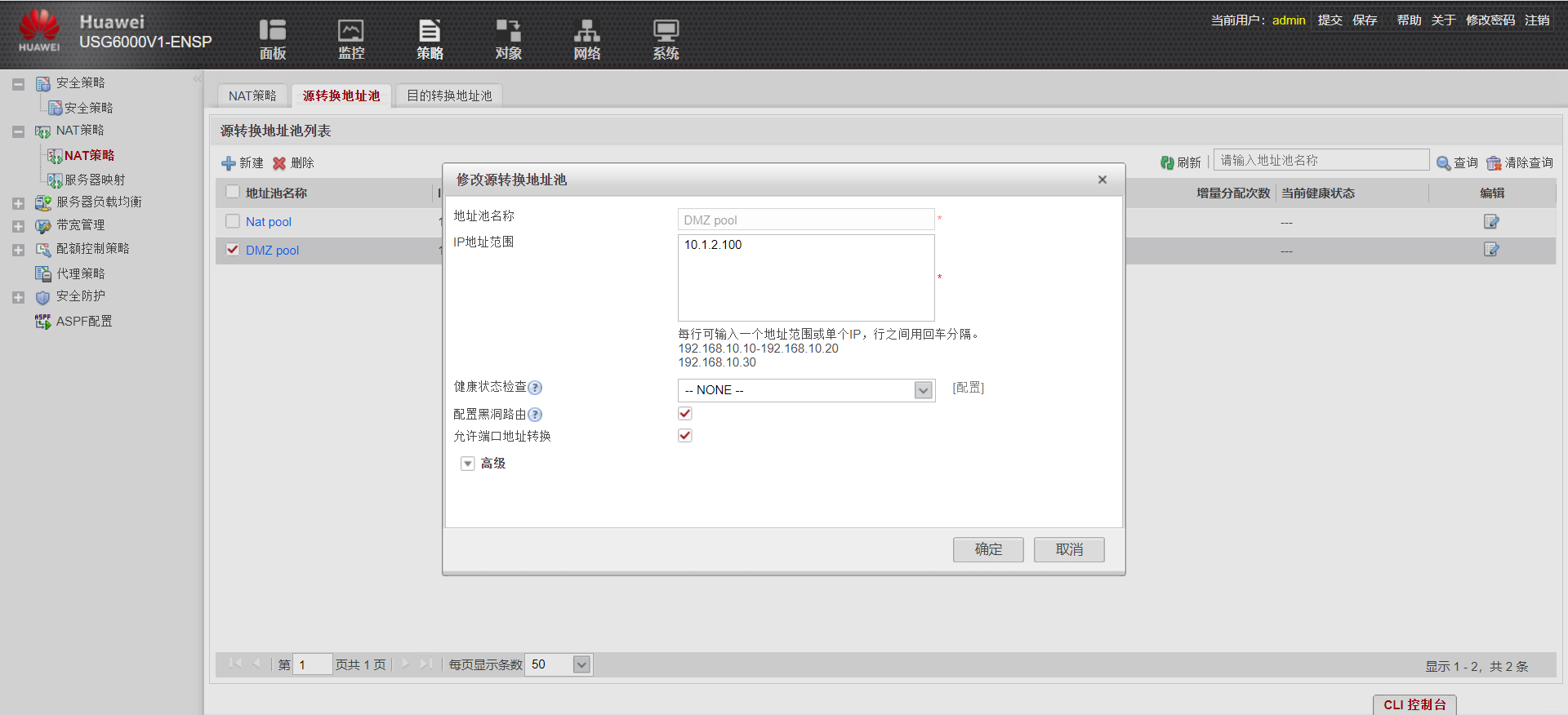
配置nat pool地址池,目的是作为外网用户访问内网服务器后nat的内网地址
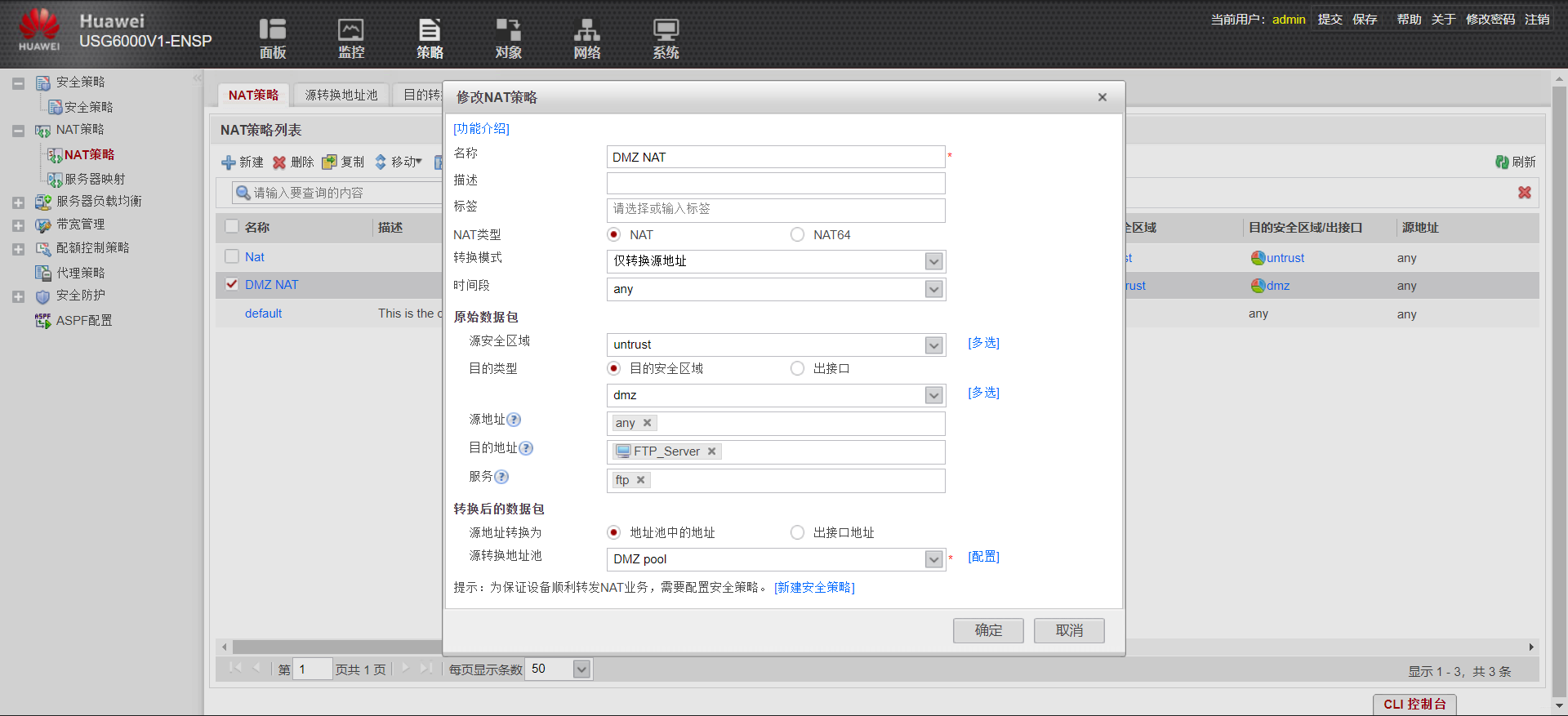
配置一个nat策略。注意,这个nat策略和内网nat外网有所不同!!!
最后配置一个到达服务器对外地址的静态路由,防止路由黑洞
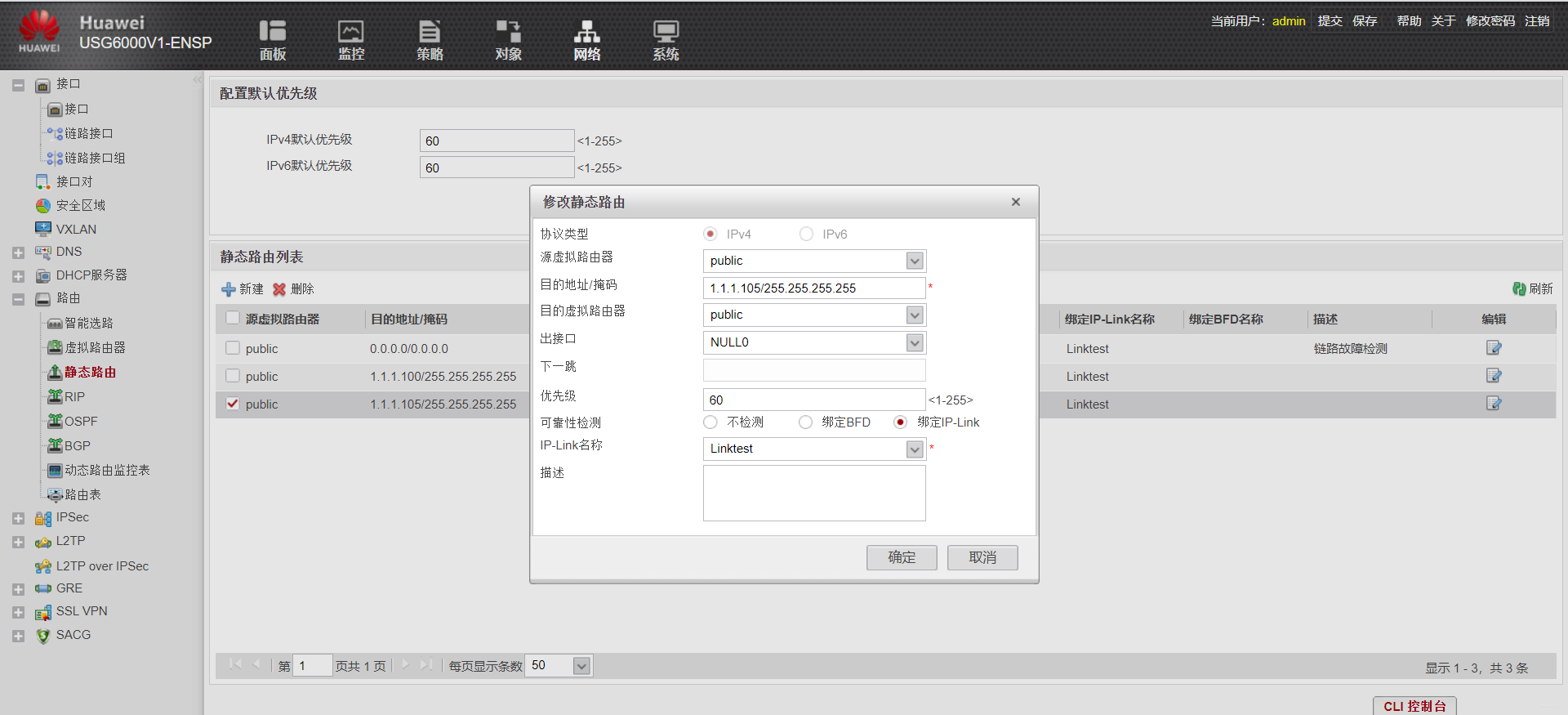
WEB界面配置完成
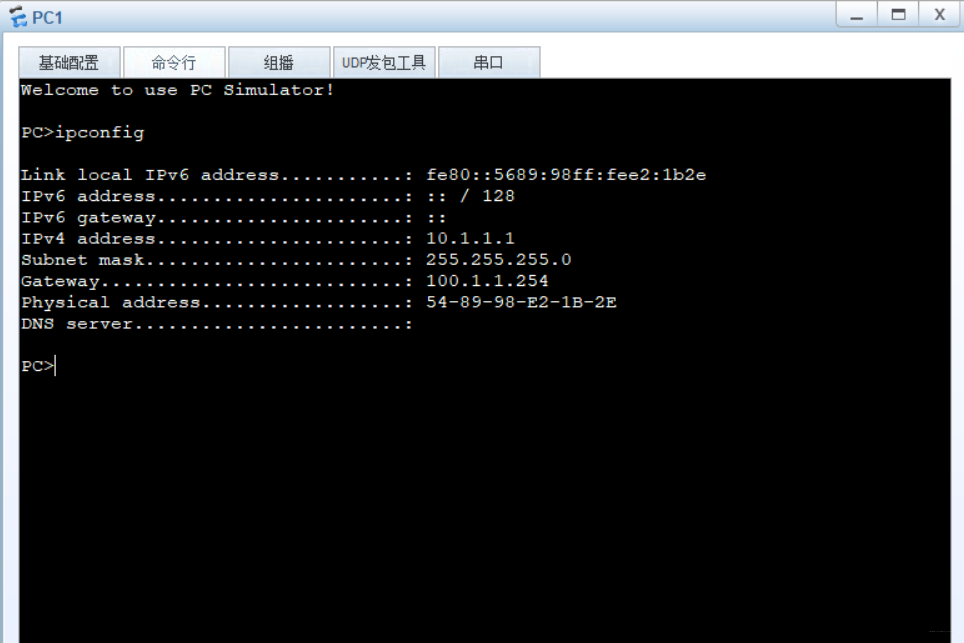
- PC1
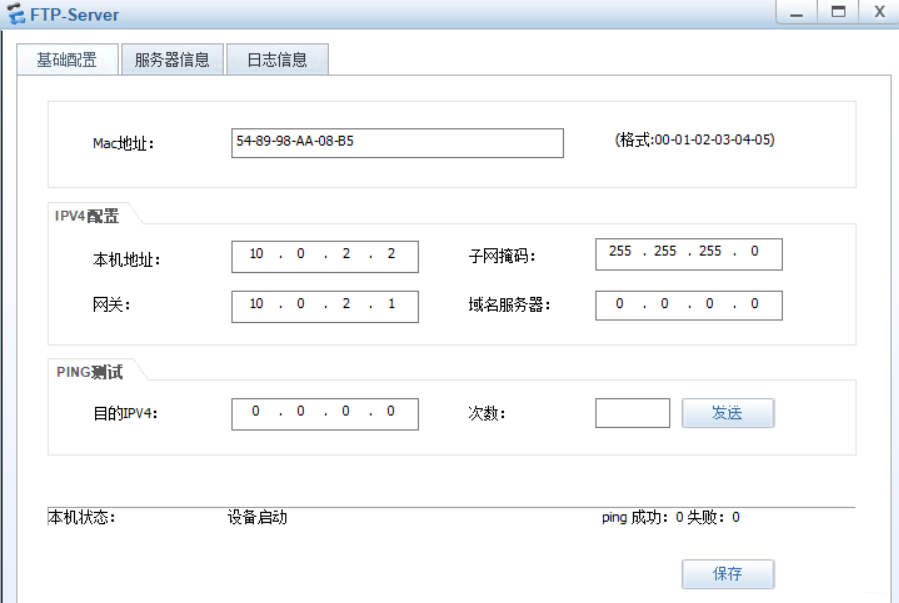
- FTP-Server
- FW
dis current-configuration 显示防火墙的运行配置
- 1
[USG6000V1]dis current-configuration
2020-12-02 05:10:12.380
!Software Version V500R005C10SPC300
sysname FW
l2tp domain suffix-separator @
ipsec sha2 compatible enable
undo telnet server enable
undo telnet ipv6 server enable
update schedule location-sdb weekly Sun 04:29
firewall defend action discard
banner enable
user-manage web-authentication security port 8887
undo privacy-statement english
undo privacy-statement chinese
page-setting
user-manage security version tlsv1.1 tlsv1.2
password-policy
level high
user-manage single-sign-on ad
user-manage single-sign-on tsm
user-manage single-sign-on radius
user-manage auto-sync online-user
web-manager security version tlsv1.1 tlsv1.2
web-manager enable
web-manager security enable
firewall dataplane to manageplane application-apperceive default-action drop
undo ips log merge enable
decoding uri-cache disable
feedback type threat-log enable
feedback type pdns enable
update schedule ips-sdb daily 01:03
update schedule av-sdb daily 01:03
update schedule sa-sdb daily 01:03
update schedule cnc daily 01:03
update schedule file-reputation daily 01:03
ip vpn-instance default
ipv4-family
ip-link check enable
ip-link name Linktest vpn-instance default
destination 0.0.0.0/0.0.0.0 interface GigabitEthernet0/0/0 mode icmp next-hop 1
.1.1.2
ip address-set FTP_Server type object
address 0 10.1.2.100 mask 32
time-range worktime
period-range 08:00:00 to 18:00:00 working-day
ike proposal default
encryption-algorithm aes-256 aes-192 aes-128
dh group14
authentication-algorithm sha2-512 sha2-384 sha2-256
authentication-method pre-share
integrity-algorithm hmac-sha2-256
prf hmac-sha2-256
aaa
authentication-scheme default
authentication-scheme admin_local
authentication-scheme admin_radius_local
authentication-scheme admin_hwtacacs_local
authentication-scheme admin_ad_local
authentication-scheme admin_ldap_local
authentication-scheme admin_radius
authentication-scheme admin_hwtacacs
authentication-scheme admin_ad
authorization-scheme default
accounting-scheme default
domain default
service-type internetaccess ssl-vpn l2tp ike
internet-access mode password
reference user current-domain
manager-user audit-admin
password cipher @%@%Zrwy:l}UIXr(g+IYOVqbq${UL$9Sr[@{C_yFj6fV)btq@%@%
service-type web terminal
level 15
manager-user api-admin
password cipher @%@%RbIt"|>Pz2NW1b@+[5@*lAb@{Q@w,<X<:FM\"=aDmHAbCl@%@%
level 15
manager-user admin
password cipher @%@%/#t."\i!CN:fcaLL.SLY9e%>]n*,Vrv~4DZU.{ &N6r8:e%A9@%@%
service-type web terminal
level 15
role system-admin
role device-admin
role device-admin(monitor)
role audit-admin
bind manager-user audit-admin role audit-admin
bind manager-user admin role system-admin
==================================================================
l2tp-group default-lns
==================================================================
interface GigabitEthernet0/0/0
undo shutdown
ip binding vpn-instance default
ip address 192.168.0.1 255.255.255.0
alias GE0/METH
service-manage http permit
service-manage https permit
service-manage ping permit
service-manage ssh permit
service-manage snmp permit
service-manage telnet permit
interface Virtual-if0
==================================================================
interface NULL0
==================================================================
firewall zone local
set priority 100
==================================================================
firewall zone trust
set priority 85
add interface GigabitEthernet0/0/0
==================================================================
firewall zone untrust
set priority 5
==================================================================
firewall zone dmz
set priority 50
==================================================================
ip route-static 0.0.0.0 0.0.0.0 GigabitEthernet1/0/2 1.1.1.2 track ip-link Linkt
est description 链路故障检测
ip route-static 1.1.1.100 255.255.255.255 NULL0 track ip-link Linktest
ip route-static 1.1.1.105 255.255.255.255 NULL0 track ip-link Linktest
==================================================================
undo ssh server compatible-ssh1x enable
ssh authentication-type default password
ssh server cipher aes256_ctr aes128_ctr
ssh server hmac sha2_256 sha1
ssh client cipher aes256_ctr aes128_ctr
ssh client hmac sha2_256 sha1
==================================================================
firewall detect ftp
==================================================================
nat server FTP zone untrust protocol tcp global 1.1.1.100 ftp inside 10.1.2.1 f
tp no-reverse unr-route
==================================================================
user-interface con 0
authentication-mode aaa
user-interface vty 0 4
authentication-mode aaa
protocol inbound ssh
user-interface vty 16 20
==================================================================
pki realm default
==================================================================
sa
==================================================================
location
==================================================================
nat address-group “Nat pool” 0
mode pat
section 0 1.1.1.105 1.1.1.106
==================================================================
nat address-group “DMZ pool” 1
mode pat
route enable
section 0 10.1.2.100 10.1.2.100
==================================================================
multi-linkif
mode proportion-of-weight
==================================================================
right-manager server-group
==================================================================
device-classification
device-group pc
device-group mobile-terminal
device-group undefined-group
==================================================================
user-manage server-sync tsm
==================================================================
security-policy
rule name FTP
description 外网访问FTP的安全策略
source-zone untrust
destination-zone dmz
service ftp
action permit
==================================================================
auth-policy
==================================================================
traffic-policy
==================================================================
policy-based-route
==================================================================
nat-policy
rule name Nat
source-zone trust
destination-zone untrust
action source-nat address-group “Nat pool”
rule name “DMZ NAT”
source-zone untrust
destination-zone dmz
destination-address address-set FTP_Server
service ftp
action source-nat address-group “DMZ pool”
==================================================================
quota-policy
==================================================================
pcp-policy
==================================================================
dns-transparent-policy
==================================================================
rightm-policy
==================================================================
return
-
1
-
2
-
3
-
4
-
5
-
6
-
7
-
8
-
9
-
10
-
11
-
12
-
13
-
14
-
15
-
16
-
17
-
18
-
19
-
20
-
21
-
22
-
23
-
24
-
25
-
26
-
27
-
28
-
29
-
30
-
31
-
32
-
33
-
34
-
35
-
36
-
37
-
38
-
39
-
40
-
41
-
42
-
43
-
44
-
45
-
46
-
47
-
48
-
49
-
50
-
51
-
52
-
53
-
54
-
55
-
56
-
57
-
58
-
59
-
60
-
61
-
62
-
63
-
64
-
65
-
66
-
67
-
68
-
69
-
70
-
71
-
72
-
73
-
74
-
75
-
76
-
77
-
78
-
79
-
80
-
81
-
82
-
83
-
84
-
85
-
86
-
87
-
88
-
89
最后
自我介绍一下,小编13年上海交大毕业,曾经在小公司待过,也去过华为、OPPO等大厂,18年进入阿里一直到现在。
深知大多数初中级Android工程师,想要提升技能,往往是自己摸索成长,自己不成体系的自学效果低效漫长且无助。
因此收集整理了一份《2024年Web前端开发全套学习资料》,初衷也很简单,就是希望能够帮助到想自学提升又不知道该从何学起的朋友,同时减轻大家的负担。

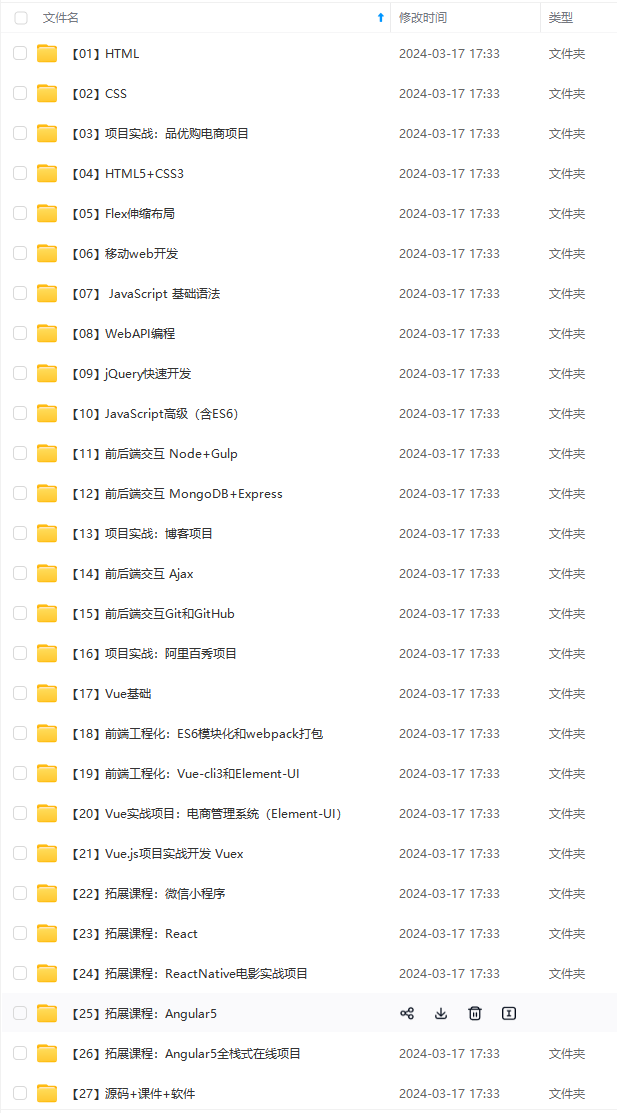
既有适合小白学习的零基础资料,也有适合3年以上经验的小伙伴深入学习提升的进阶课程,基本涵盖了95%以上Android开发知识点!不论你是刚入门Android开发的新手,还是希望在技术上不断提升的资深开发者,这些资料都将为你打开新的学习之门!
如果你觉得这些内容对你有帮助,需要这份全套学习资料的朋友可以戳我获取!!
由于文件比较大,这里只是将部分目录截图出来,每个节点里面都包含大厂面经、学习笔记、源码讲义、实战项目、讲解视频,并且会持续更新!
-
60
-
61
-
62
-
63
-
64
-
65
-
66
-
67
-
68
-
69
-
70
-
71
-
72
-
73
-
74
-
75
-
76
-
77
-
78
-
79
-
80
-
81
-
82
-
83
-
84
-
85
-
86
-
87
-
88
-
89
最后
自我介绍一下,小编13年上海交大毕业,曾经在小公司待过,也去过华为、OPPO等大厂,18年进入阿里一直到现在。
深知大多数初中级Android工程师,想要提升技能,往往是自己摸索成长,自己不成体系的自学效果低效漫长且无助。
因此收集整理了一份《2024年Web前端开发全套学习资料》,初衷也很简单,就是希望能够帮助到想自学提升又不知道该从何学起的朋友,同时减轻大家的负担。
[外链图片转存中…(img-WRovEAyX-1715137512223)]
[外链图片转存中…(img-B8gIaDEZ-1715137512223)]
[外链图片转存中…(img-wNRExFwR-1715137512224)]
既有适合小白学习的零基础资料,也有适合3年以上经验的小伙伴深入学习提升的进阶课程,基本涵盖了95%以上Android开发知识点!不论你是刚入门Android开发的新手,还是希望在技术上不断提升的资深开发者,这些资料都将为你打开新的学习之门!
如果你觉得这些内容对你有帮助,需要这份全套学习资料的朋友可以戳我获取!!
由于文件比较大,这里只是将部分目录截图出来,每个节点里面都包含大厂面经、学习笔记、源码讲义、实战项目、讲解视频,并且会持续更新!





 扫一扫
扫一扫


 1万+
1万+

 被折叠的 条评论
为什么被折叠?
被折叠的 条评论
为什么被折叠?
 到【灌水乐园】发言





