作用域
1.作用
2.绑定的作用域对象
Items{
		anchors.left:parent.left
}
3.组件作用域
- QML文件每个组件(ex Rectangel Button label)都定义了一个逻辑作用域
- 每个文件都至少有一个根组件(Window)
4.作用域使用技巧
代码
import QtQuick 2.15
import QtQuick.Window 2.15
import QtQuick.Controls 2.0
Window {
id:root
width: 640
height: 480
visible: true
title: qsTr("Hello World")
property int mywidth:200
Rectangle{
id:firstRec
width:root.mywidth
height:fheight
anchors.centerIn: parent
color: "red"
property int fheight: 150
Text {
id: text
text: qsTr("hello")
anchors.fill:parent
horizontalAlignment: Text.AlignHCenter
verticalAlignment: Text.AlignVCenter
}
}
Rectangle{
id:secondRec
width:mywidth
height:100
color: "blue"
anchors.left: parent.left
anchors.bottom: parent.bottom
Label{
id:label
color: "gray"
font.bold:true
font.pixelSize: 20
anchors.horizontalCenter: parent.horizontalCenter
anchors.verticalCenter: parent.verticalCenter
text:"label"
}
}
Button{
id:buttton
width: 200
height: 100
anchors.right: parent.right
anchors.bottom: parent.bottom
text: "button"
background: Rectangle{
color: "gray"
}
onClicked: {
console.log("firstRec.fheight: " + firstRec.fheight)
console.log("label.text: " + label.text)
}
}
}
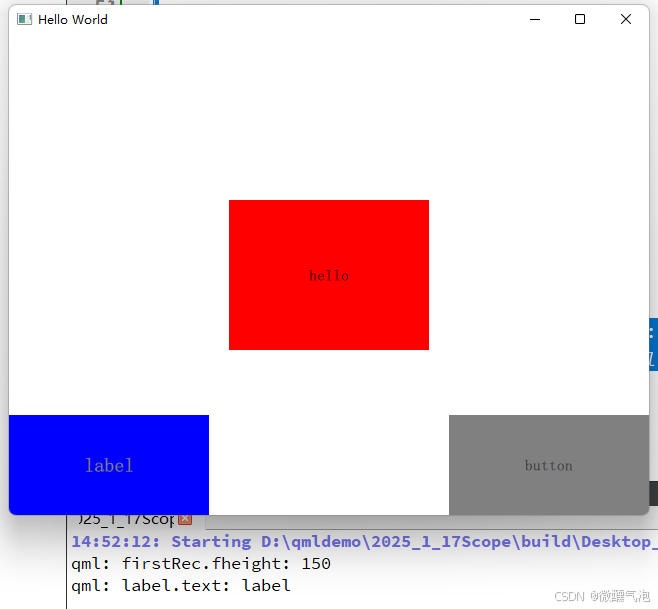
运行结果








 扫一扫
扫一扫


 246
246

 被折叠的 条评论
为什么被折叠?
被折叠的 条评论
为什么被折叠?
 到【灌水乐园】发言





