



 本文介绍了CSS在HTML中的应用,包括老式HTML、内联CSS、id与class的区别、内部CSS和外部CSS的使用,以及CSS优先级规则。通过示例展示了如何通过CSS改变字体、颜色、布局,并添加分页符和页脚。
在前一章中,我们研究了Java代码的不同片段。
在本章中,我们将对每个示例使用相同的代码段:
public void createPdf(String html, String dest) throws IOException {
    HtmlConverter.convertToPdf(html, new FileOutputStream(dest));
}
我们不看Java代码的不同片段,而是看HTML和CSS的不同片段。
老式HTML
在示例C02E01_ NoCss.java中,我们使用诸如 [blockcode]<i>[/blockcode] 和 [blockcode]<font>[/blockcode] 的标记将样式定义为斜体和不同的字体大小,请参见 1_no_css.html:
<html>
    <head>
        <title>Colossal</title>
        <meta name="description" content="Gloria is an out-of-work party girl ..." />
    </head>
    <body>
        <img src="img/colossal.jpg" width="120px" align="right" />
        <h1>Colossal (2016)</h1>
        <i>Directed by Nacho Vigalondo</i>
        <div>
        Gloria is an out-of-work party girl forced to leave her life in New York City,
        and move back home. When reports surface that a giant creature is
        destroying Seoul, she gradually comes to the realization that she is
        somehow connected to this phenomenon.
        </div>
        <font size="-1">Read more about this movie on
        <a href="www.imdb.com/title/tt4680182">IMDB</a></font>
    </body>
</html>
基于该HTML页面创建的HTML页面和PDF如图2.1所示。
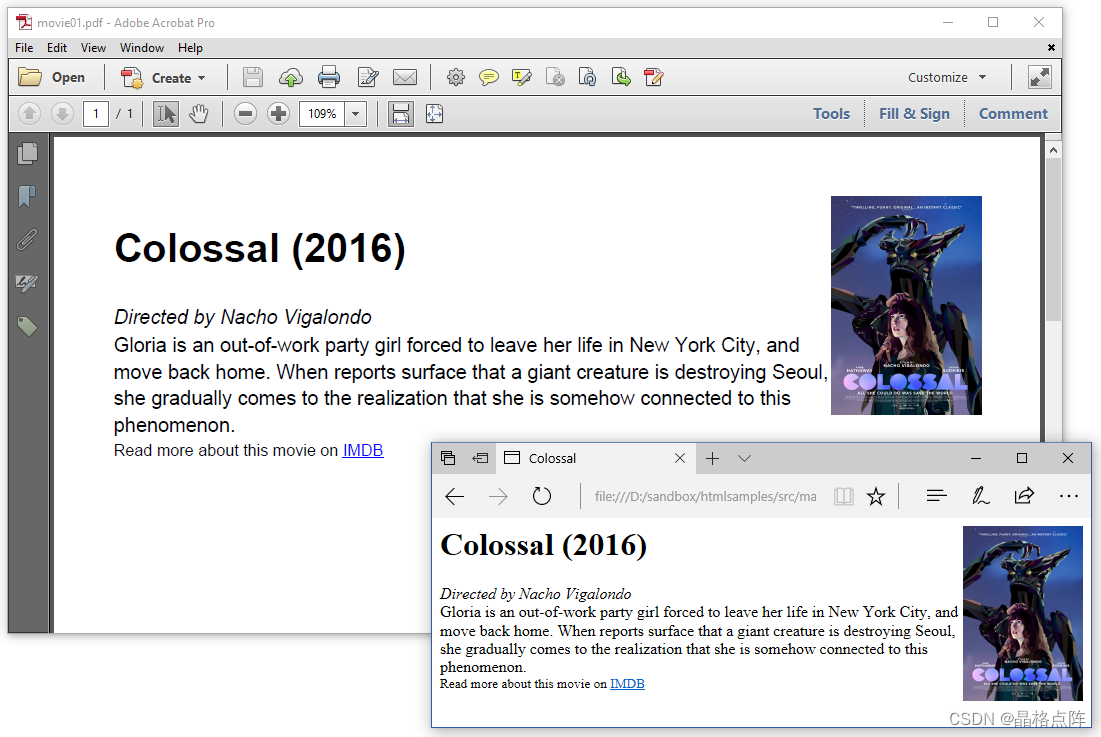
图2.1:没有CSS的HTML页面
我们称之为老式——有人会称之为低级趣味——因为现在HTML只用于定义内容及其结构。如今,所有样式–如宽度、高度、字体选择、字体大小、字体颜色、字体重量等…–使用级联样式表(CSS)定义。这是一种更优雅的方法,因为它在内容和呈现之间创建了一个清晰的分离。
让我们重写HTML页面,并介绍一些CSS。
内联CSS
在浏览器中打开时,2_inline_css.html HTML文件与上一个示例之间没有明显区别:
<html>
    <head>
        <title>Colossal</title>
        <meta name="description" content="Gloria is an out-of-work party girl ..." />
    </head>
    <body>
        <img src="img/colossal.jpg" style="width: 120px;float: right" />
        <h1>Colossal (2016)</h1>
        <div style="font-style: italic">Directed by Nacho Vigalondo</div>
        <div>
        Gloria is an out-of-work party girl forced to leave her life in New York City,
        and move back home. When reports surface that a giant creature is
        destroying Seoul, she gradually comes to the realization that she is
        somehow connected to this phenomenon.
        </div>
        <div style="font-size: 0.8em">Read more about this movie on
        <a href="www.imdb.com/title/tt4680182">IMDB</a></div>
    </body>
</html>
Colossal
图像的宽度及其位置现在在样式属性中定义。导演使用的字体样式以及IMDB链接的字体大小也是如此。从图2.2可以看出,这个例子的输出与前一个例子的输出没有区别。
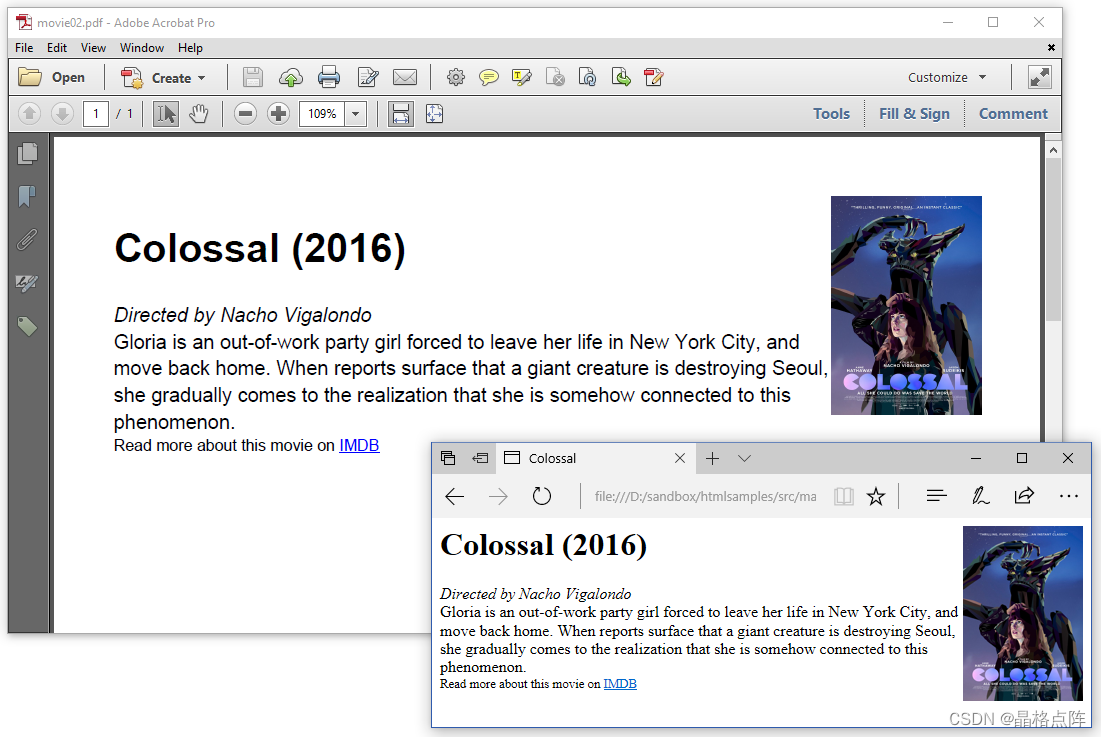
图2.2:带有内联CSS的HTML页面
我们也可以使用id或class属性,而不是使用style属性。两者都由 pdfHTML 支持。
id和class之间有什么区别?
-
id是唯一的:每个元素只能有一个id;每个页面只能有一个具有该id的元素。
-
类不是唯一的:可以在多个元素上使用同一个类;可以在同一个元素上使用多个类。
-
在下一个示例中,我们将定义一些类,并将它们放在HTML页面的标题部分。
内部CSS
在 3_header_css.html html文件中,我们将所有样式捆绑在html文件头的 [blockcode]style[/blockcode] 部分中。
<html>
    <head>
        <title>Colossal</title>
        <meta name="description" content="Gloria is an out-of-work party girl ..." />
        <style>
            .poster { width: 120px;float: right; }
            .director { font-style: italic; }
            .description { font-family: serif; }
            .imdb { font-size: 0.8em; }
            a { color: red; }
        </style>
    </head>
    <body>
        <img src="img/colossal.jpg" class="poster" />
        <h1>Colossal (2016)</h1>
        <div class="director">Directed by Nacho Vigalondo</div>
        <div class="description">
        Gloria is an out-of-work party girl forced to leave her life in New York City,
        and move back home. When reports surface that a giant creature is
        destroying Seoul, she gradually comes to the realization that she is
        somehow connected to this phenomenon.
        </div>
        <div class="imdb">Read more about this movie on
        <a href="www.imdb.com/title/tt4680182">IMDB</a></div>
    </body>
</html>
与前两个示例相比,我们做了一些更改。我们将链接的颜色更改为红色(而不是使用默认颜色,即蓝色),并为描述选择了 serif 字体(而不是使用默认字体)。
当您在HTML文件中不定义字体时,大多数浏览器将以 serif 字体显示文档。历史上,iText 使用的默认字体一直是 Helvetica ,这是一种 sans-serif 字体。这解释了到目前为止示例中原始 HTML 文件和生成的 PDF 之间的差异。
您可以在body元素级别将 font-family 定义为 serif,以便在HTML和PDF之间更好地匹配。在这个简单的例子中,我们选择不这样做;因此,我们可以在图2.3中清楚地看到 serif 和 sans-serif 字体之间的差异:
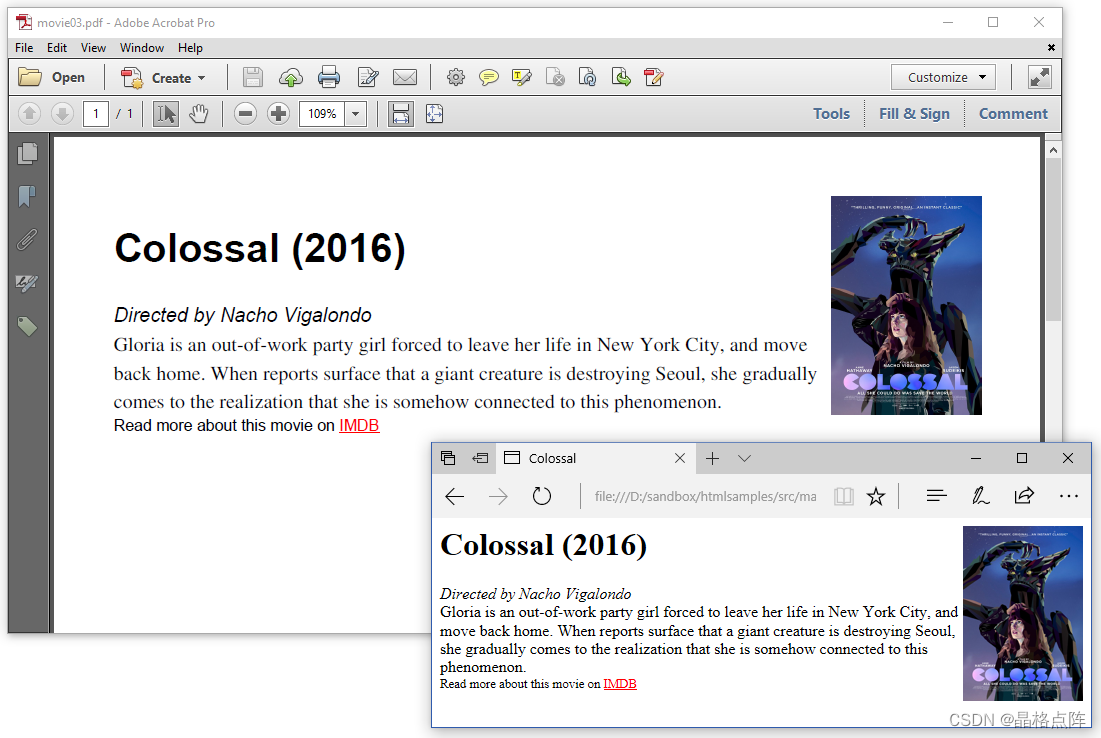
图2.3:标题部分带有CSS的HTML页面
标题、带有导演姓名的行和IMDB段落仍在Helvetica中,但描述以 Serif 字体呈现。
将CSS放在标题中很好,但一旦涉及到更多样式,最好将CSS放在HTML文件之外的单独文件中。
外部CSS
在 4_external_css 中。html,我们在标题部分没有 [blockcode]<style>[/blockcode] 块。相反,我们引用了一个名为movie 的样式表。css使用[blockcode]<link>[/blockcode]标记。
<html>
    <head>
        <title>Colossal</title>
        <meta name="description" content="Gloria is an out-of-work party girl ..." />
        <link rel="stylesheet" type="text/css" href="css/movie.css">
    </head>
    <body>
        <img src="img/colossal.jpg" class="poster" />
        <h1>Colossal (2016)</h1>
        <div class="director">Directed by Nacho Vigalondo</div>
        <div class="description">
        Gloria is an out-of-work party girl forced to leave her life in New York City,
        and move back home. When reports surface that a giant creature is
        destroying Seoul, she gradually comes to the realization that she is
        somehow connected to this phenomenon.
        </div>
        <div class="imdb">Read more about this movie on
        <a href="www.imdb.com/title/tt4680182">IMDB</a></div>
    </body>
</html>
外部CSS文件 movie.css,如下所示:
.poster {
    width: 120px;
    float: right;
}
.director {
    font-style: italic;
}
.description {
    font-family: serif;
}
.imdb {
    font-size: 0.8em;
}
a {
    color: green;
}
除了我们将[blockcode]<a>[/blockcode]-标记的内容颜色更改为绿色之外,图2.4和图2.3之间没有太大差异。
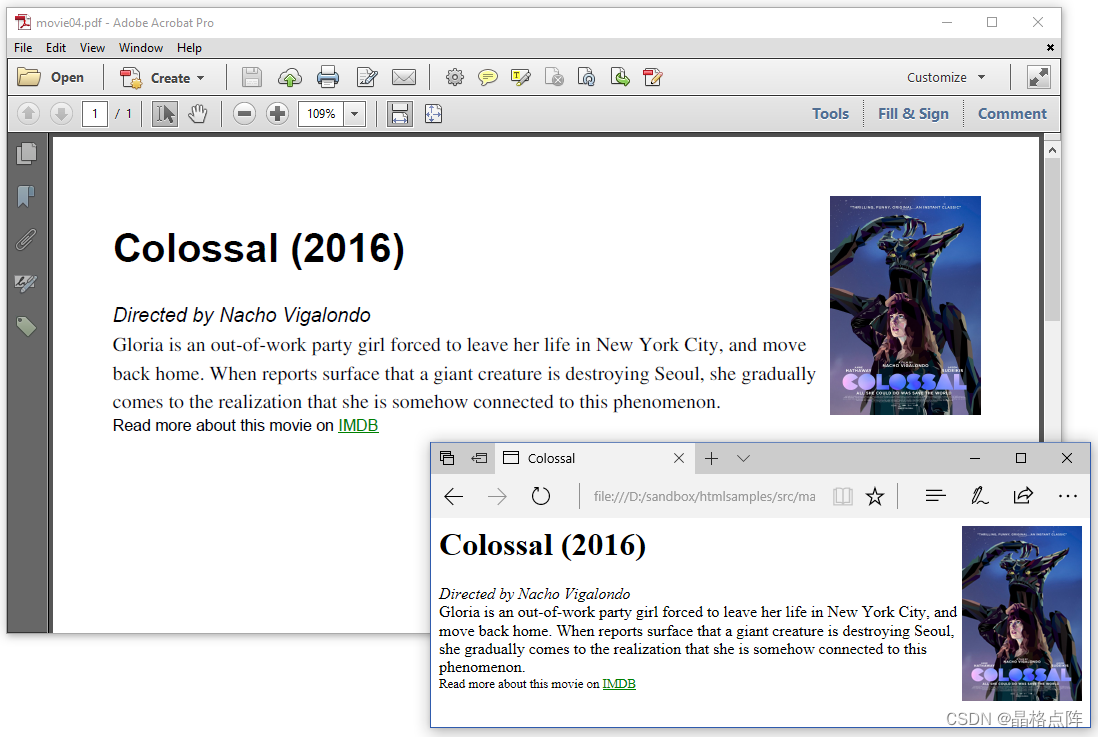
图2.4:带有外部CSS的HTML页面
您可以混合和匹配内联CSS、标题中的CSS和外部CSS。您甚至可以在一个位置定义在另一个位置被替代的样式。
当CSS在不同的地方定义时,哪个CSS优先?
CSS代表级联样式表,不同级别上定义的样式“级联”到新的虚拟样式表中,通过以下规则组合样式:
-
首先是浏览器使用的样式表。此样式表用于没有特定样式的情况。pdfHTML插件附带了自己的样式表,例如,它解释了为什么[blockcode]<a>[/blockcode]标记的内容以蓝色呈现。
-
浏览器使用的样式表可以被外部样式表覆盖。
-
HTML文件标题部分中的内部样式表可以覆盖所有先前定义的样式。
-
内联样式(在HTML元素内)具有最高优先级。在样式属性中定义样式时,它会覆盖先前定义的样式属性。
在这些示例中,我们通过创建名为poster的类来定位图像。我们使用CSS定义宽度,并使用浮点将图像定位到右侧。在下一个示例中,我们将使用绝对位置。
使用绝对位置
在 posters.html 中,我们使用距页面顶部和左侧的距离来定义绝对位置。
<html>
    <head><title>SXSW movies</title></head>
    <body>
        <img src="img/68_kill.jpg"
            style="position: absolute; top: 5; left: 5; width: 60;">
        <img src="img/a_bad_idea_gone_wrong.jpg"
            style="position: absolute; top: 5; left: 70; width: 60;">
        <img src="img/a_critically_endangered_species.jpg"
            style="position: absolute; top: 5; left: 135; width: 60;">
        <img src="img/big_sick.jpg"
            style="position: absolute; top: 5; left: 200; width: 60;">
        <img src="img/california_dreams.jpg"
            style="position: absolute; top: 5; left: 265; width: 60;">
        <img src="img/colossal.jpg"
            style="position: absolute; top: 5; left: 330; width: 60;">
        <img src="img/daraju.jpg"
            style="position: absolute; top: 5; left: 395; width: 60;">
        <img src="img/drib.jpg"
            style="position: absolute; top: 5; left: 460; width: 60;">
        <img src="img/hot_summer_nights.jpg"
            style="position: absolute; top: 5; left: 525; width: 60;">
        <img src="img/unrest.jpg"
            style="position: absolute; top: 5; left: 590; width: 60;">
        <img src="img/hounds_of_love.jpg"
            style="position: absolute; top: 120; left: 5; width: 60;">
        <img src="img/lane1974.jpg"
            style="position: absolute; top: 120; left: 70; width: 60;">
        <img src="img/madre.jpg"
            style="position: absolute; top: 120; left: 135; width: 60;">
        <img src="img/mfa.jpg"
            style="position: absolute; top: 120; left: 200; width: 60;">
        <img src="img/mr_roosevelt.jpg"
            style="position: absolute; top: 120; left: 265; width: 60;">
        <img src="img/nobody_speak.jpg"
            style="position: absolute; top: 120; left: 330; width: 60;">
        <img src="img/prevenge.jpg"
            style="position: absolute; top: 120; left: 395; width: 60;">
        <img src="img/the_archer.jpg"
            style="position: absolute; top: 120; left: 460; width: 60;">
        <img src="img/the_most_hated_woman_in_america.jpg"
            style="position: absolute; top: 120; left: 525; width: 60;">
        <img src="img/this_is_your_death.jpg"
            style="position: absolute; top: 120; left: 590; width: 60;">
    </body>
</html>
图2.5显示了结果。

图2.5:图像位于绝对位置的HTML页面
使用此功能时要小心。您为HTML页面选择的位置并不总是适合PDF页面。无论是在设计HTML还是定义PDF文档的默认页面大小时,都必须考虑到这一点。
pdf HTML 还支持at-rules。
使用@Page规则添加“第X页,共Y页”
在 movies.html 中,我们有一个20部电影的列表,这些电影使用 movie.css 作为样式。此外,我们还在页面标题中定义了CSS at-rule。
<html>
    <head>
        <title>Movies</title>
        <meta name="description" content="Selection of movies screened at SXSW 2017" />
        <link rel="stylesheet" type="text/css" href="css/movie.css">
        <style>
            @page {
                @bottom-right {
                    content: "Page " counter(page) " of " counter(pages);
                }
            }
        </style>
    </head>
    <body>
        <div style="width: 320pt;">
            <img src="img/68_kill.jpg" class="poster" />
            <h1>68 Kill (2017)</h1>
            <div class="director">Directed by Trent Haaga</div>
            <div class="description">
                 A punk-rock after hours about femininity,
                 masculinity and the theft of $68,000.
            </div>
            <div class="imdb">Read more about this movie on
            <a href="www.imdb.com/title/tt5189894">IMDB</a></div>
            <hr>
        </div>
        <div style="width: 320pt;">
            <img src="img/a_bad_idea_gone_wrong.jpg" class="poster" />
            <h1>A Bad Idea Gone Wrong (2017)</h1>
            <div class="director">Directed by Jason Headley</div>
            <div class="description">
                Two would-be thieves forge a surprising relationship with with an
                unexpected housesitter when they accidentally trap themselves in
                a house they just broke into.
            </div>
            <div class="imdb">Read more about this movie on
            <a href="www.imdb.com/title/tt5212918">IMDB</a></div>
            <hr>
        </div>
        ...
    </body>
</html>
使用@page,我们定义了一个位于 @bottom right- 的页脚,其中内容由“第X页,共Y页”组成,其中X是当前页码的值,Y是总页数。在图2.6中,我们看到页面右下角的第1页,共6页。
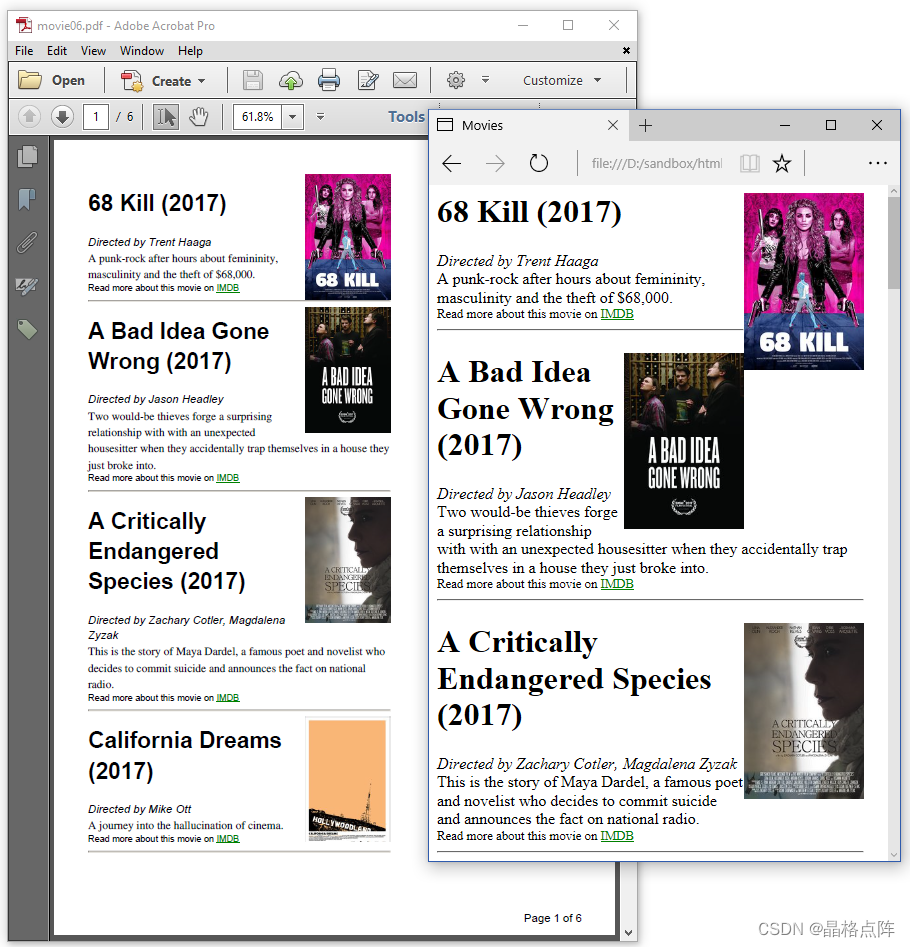
图2.6:带有“第X页,共Y页”页脚的HTML页面
现在假设我们希望每部电影都从新的一页开始。在这种情况下,我们将引入分页符。
添加分页符
我们只在 movies2.html 中做了一个改动。我们在以下内容后添加了分页符:始终在每部电影的顶部 <div> ,但最后一部除外:
<html>
    <head>
        <title>Movies</title>
        <meta name="description" content="Selection of SXSW movies" />
        <link rel="stylesheet" type="text/css" href="css/movie.css">
        <style>
            @page {
                @bottom-right {
                    content: "Page " counter(page) " of " counter(pages);
                }
            }
        </style>
    </head>
    <body>
        <div style="page-break-after: always; width: 320pt;">
            <img src="img/68_kill.jpg" class="poster" />
            <h1>68 Kill (2017)</h1>
            <div class="director">Directed by Trent Haaga</div>
            <div class="description">
                 A punk-rock after hours about femininity,
                 masculinity and the theft of $68,000.
            </div>
            <div class="imdb">Read more about this movie on
            <a href="www.imdb.com/title/tt5189894">IMDB</a></div>
            <hr>
        </div>
        ...
    </body>
</html>
电影概述现在是一个有20页的文档,每部电影一页,如图2.7所示。
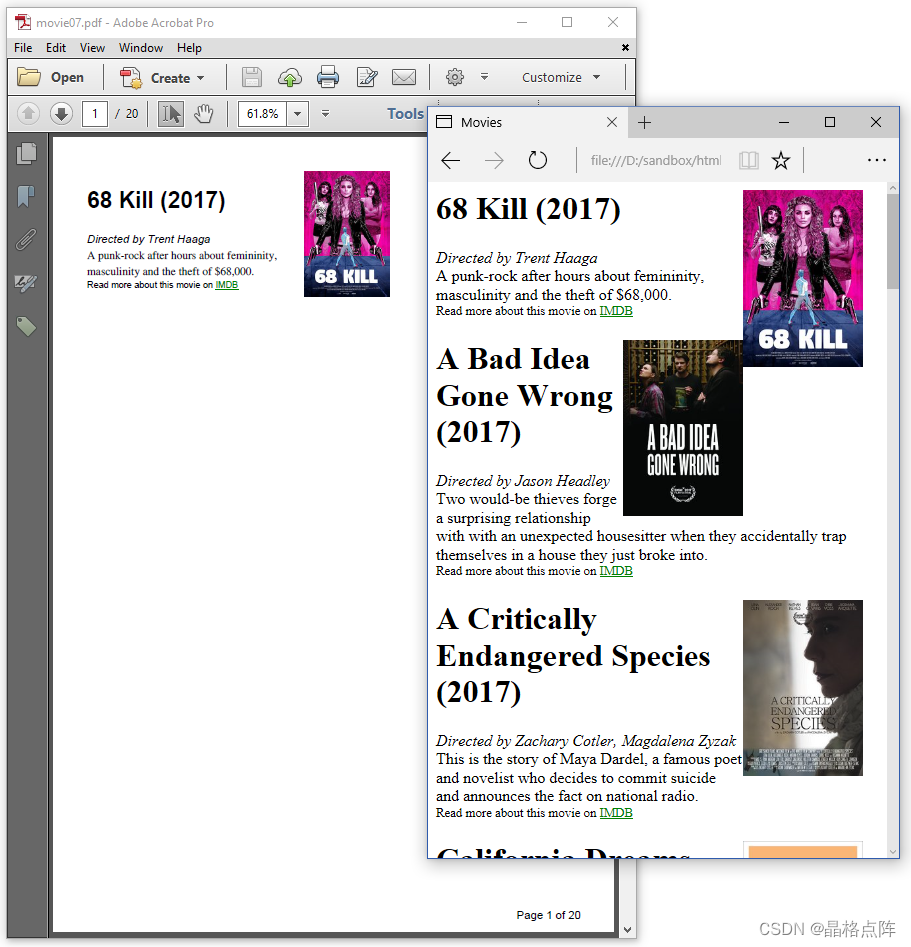
图2.7:带分页符的HTML页面
我们可以用CSS做更多的事情,但让我们看看到目前为止我们做了什么。
总结
在本章中,我们学习了内联CSS、标题中的CSS和外部CSS。在上一个示例中,我们甚至组合了内联CSS来强制分页符,在页眉中使用内部CSS来添加页脚,以及在字体、颜色等方面使用外部CSS。在下一章中,我们将使用更多的CSS,在媒体查询的上下文中更具体地说。





 扫一扫
扫一扫


 被折叠的 条评论
为什么被折叠?
被折叠的 条评论
为什么被折叠?
 到【灌水乐园】发言





