



在 SpringCloud 体系中,通用使用 nacos 或者 consul 等来保存微服务的配置文件信息,它们都是独立的配置软件。但是在 k8s 中,并没有独立的配置中心概念,而是通过一组原生资源对象(Resource) 和模式(Pattern) 来扮演配置中心的角色。其核心思想是 “配置即数据”,将配置与容器镜像解耦,从而实现灵活的配置管理。核心资源对象就是 ConfidMap 和 Secret。
当然,k8s 也支持外挂配置中心,nacos 等也可以应用于 k8s 系统中,但这往往是针对大型系统有复杂的配置,或者需要更高的安全机制等,简单的环境就用 ConfigMap 和 Secret 即可。
ConfigMap 一般用来存储不敏感的配置数据,Secret 用来存储敏感数据,两者的配置使用方法基本类似,本文仅以 ConfigMap 为例。
结合上一篇文章创建的微服务,我们增加一个自定义配置,并且在接口中输出
application.properties:
spring.application.name=cloud-demo-service-a
management.endpoints.web.exposure.include=health
management.endpoint.health.show-details=always
custom.property=default-value
HelloController.java:
@RestController
@RequestMapping("/service-a")
public class HelloController {

    @Value("${spring.application.name}")
    private String serviceName;

    @Value("${custom.property}")
    private String customProperty;

    @GetMapping("/hello")
    public String hello() {
        return "hello, this is 【" + serviceName + "】, custom property is 【" + customProperty + "】";
    }

}
应用部署之后,访问接口 https://k8s.test.com/cloud-demo-service-a/service-a/hello,可以看到如下输出:

然后,定义一个配置文件 application.properties,将默认配置文件中的 custom.property 值改成 test-value
custom.property=test-value使用指令创建 ConfigMap:
kubectl create configmap service-a-test-config --from-file=application.properties --namespace=cloud-services
然后可以通过指令 kubectl describe cm -n cloud-services service-a-test-config 查看配置文件信息
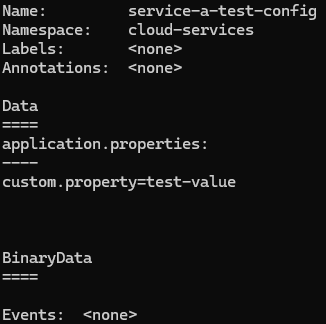
接下来,修之前文章中的 deply-demo-service-a.yaml,将配置文件挂载
kind: Deployment
metadata:
  name: cloud-demo-service-a
  namespace: cloud-services
spec:
  replicas: 1 # 希望运行的副本数量(Pod)
  selector:
    matchLabels:
      app: cloud-demo-service-a
  template:
    metadata:
      labels:
        app: cloud-demo-service-a
    spec:
      containers:
      - name: cloud-demo-service-a
        image: wx.ankoninc.com.cn/cloud-demo-service-a:0.0.1 # 镜像地址
        ports:
        - containerPort: 8080  # 容器内应用监听的端口
        resources:
          requests:
            memory: "256Mi"
            cpu: "250m"
          limits:
            memory: "512Mi"
            cpu: "500m"
        volumeMounts:
        - name: config-volume
          mountPath: /app/config  # SpringBoot 启动时会加载 config 目录下的配置文件
      volumes: # 定义 volume 并载入配置文件
      - name: config-volume
        configMap:
          name: service-a-test-config
---
apiVersion: v1
kind: Service
metadata:
  name: cloud-demo-service-a
  namespace: cloud-services
spec:
  selector:
    app: cloud-demo-service-a # 这个选择器必须匹配上面Deployment的Pod标签
  ports:
    - protocol: TCP
      port: 443 # Service对外暴露的端口
      targetPort: 8080 # 请求转发到Pod的哪个端口(与containerPort一致)
  type: ClusterIP # 默认类型,仅在集群内部可访问
然后启动容器, 访问接口 https://k8s.test.com/cloud-demo-service-a/service-a/hello 可以看到配置文件已经生效






 扫一扫
扫一扫


 2244
2244

 被折叠的 条评论
为什么被折叠?
被折叠的 条评论
为什么被折叠?
 到【灌水乐园】发言





