



安装和配置
1.以vue2为基础进行开发
# Vue 2 项目,安装 Vant 2:
npm i vant -S

# Vue 3 项目,安装 Vant 3:
npm i vant@next -S
自动按需引入组件
配置babel-plugin-import 插件,它会在编译过程中将 import 的写法自动转换为按需引入的方式(官方推荐做法)
# 安装插件
npm i babel-plugin-import -D
改配置 plugins
在项目 .babelrc 文件或者babel.config.js文件修改配置 plugins
"plugins": [
    ["import", {
        "libraryName": "vant",
        "libraryDirectory": "es",
        "style": true
    }]
]
引用vant组件
在 main.js 里面导入 Vant ,按需导入 vant 的 Button 组件
import { Button } from 'vant';
import 'vant/lib/index.css';
Vue.use(Button);
使用组件
<van-button type="primary">主要按钮</van-button>导入优化方案
如果使用了较多的vant组件,不建议都直接写在main.js文件中,会很臃肿。解决办法为:
1. 在src目录文件夹下新建一个文件夹,这里我命名的是ui。里面创建vant.js文件,内容如下:
import { Overlay, Button, Loading, Uploader, Toast } from 'vant'

const vant = {
  install: function(Vue) {
    Vue.use(Overlay)
    Vue.use(Button)
    Vue.use(Loading)
    Vue.use(Uploader)
    Vue.use(Toast)
  }
}

export default vant
2.main.js文件里引入
// vant 按需引用
import vant from './ui/vant'
import 'vant/lib/index.css';
Vue.use(vant)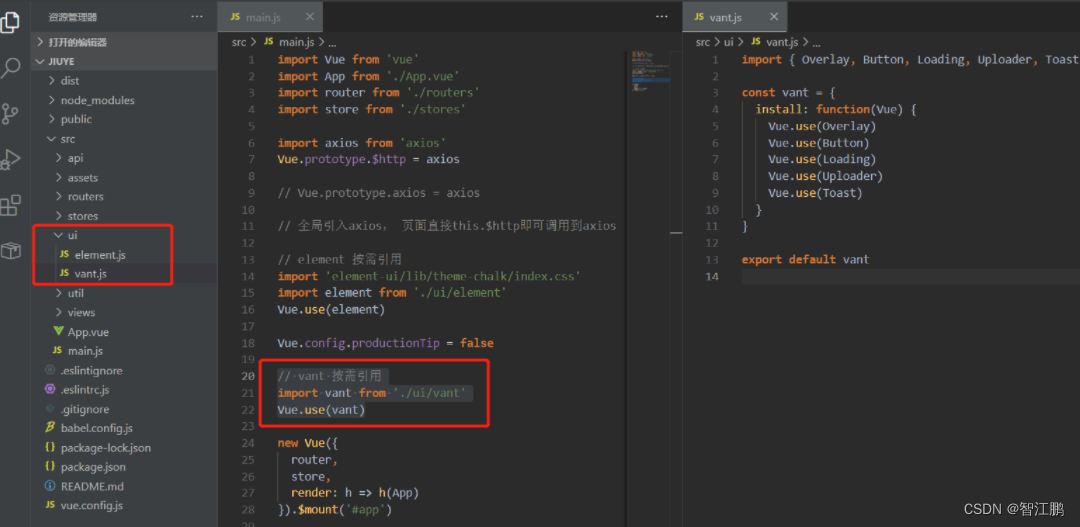
设置APP.vue代码
<template>
  <div id="app">
    <router-view />
  </div>
</template>

<script>
export default {
  name: 'App'
}
</script>
安装路由
npm install --save vue-router@3.4.9

//有需要可以先卸载掉其他版本
npm uninstall vue-router
创建路由
1.在src目录中新建router文件夹,并新建index文件(大概写法,根据实际情况来)
import Vue from 'vue'
import Router from 'vue-router'
import Base from '../components/Base.vue'
import Table from '../components/Table.vue'
import Table2 from '../components/Table2.vue'
import Home from '../components/Home.vue'
import Login from '../components/Login.vue'
import Form from '../components/Form.vue'
import Report from '../components/report/report.vue'

Vue.use(Router)

const router = new Router({
	mode: 'history',
	routes: [{
			path: '/',
			redirect: '/base'
		},
		{
			path: '/base',
			component: Base
		},
		{
			path: '/table',
			component: Table
		},
		{
			path: '/home',
			component: Home
		},
		{
			path: '/report',
			component: Report
		} ,
		{
			path: '/login',
			component: Login
		},

		{
			path: '/table2',
			component: Table2
		},

		{
			path: '/form',
			component: Form
		}

	]
})
export default router
引入路由
import Vue from 'vue'
import App from './App.vue'
//引入路由
import router from './router'
import { Button } from 'vant';
import 'vant/lib/index.css';


Vue.use(Button);
Vue.config.productionTip = false
//配置路由
new Vue({
	router,
  render: h => h(App),
}).$mount('#app')
启动项目
npm run serve安装指定版本的node-sass
Node-sass是一个库,它将Node.js绑定到LibSass(流行样式表预处理器Sass的C版本)。它允许用户以令人难以置信的速度将.scss文件本地编译为css,并通过连接中间件自动编译。
"node-sass": "^6.0.1",
"sass-loader": "^10.2.0"





 扫一扫
扫一扫


 1393
1393

 被折叠的 条评论
为什么被折叠?
被折叠的 条评论
为什么被折叠?
 到【灌水乐园】发言





