



 本文介绍了如何利用SpringBoot的Actuator模块进行健康检查和监控。首先,需要添加相关依赖,并配置application.yaml或application.properties,注意依赖snakeyaml以解析变量。接着,为了限制访问权限,可引入spring-security。通过访问特定URL如/actuator/health和/actuator/metrics,可以查看应用的健康状况和各种指标。启用权限访问后,登录即可查看详细监控信息。
本篇博文主要是初步学习如何通过actuator 来实现springboot 的健康检查以及监控能力。
1.添加依赖
<dependency>
     <groupId>org.springframework.boot</groupId>
     <artifactId>spring-boot-starter-actuator</artifactId>
</dependency>
<dependency>
    <groupId>org.springframework.boot</groupId>
	<artifactId>spring-boot-starter-security</artifactId>
</dependency>
<dependency>
	<groupId>org.yaml</groupId>
	<artifactId>snakeyaml</artifactId>
</dependency>
2. 配置application.yaml
management:
  endpoints:
    web:
      exposure:
        include: '*'
  endpoint:
    health:
      show-details: always

info:
  app:
    name: @project.name@
    description: @project.description@
    version: @project.version@
    encoding: @project.build.sourceEncoding@
    java:
      version: @java.version@

spring:
  security:
    user:
      name: actuator
      password: actuator
      roles: ACTUATOR_ADMIN
或 application.properties 的配置
info.app.name=@project.name@
 #spring-boot-actuator
info.app.description = @project.description@
info.app.version= @project.version@
info.app.encoding = @project.build.sourceEncoding@
info.app.java= @java.version@
info.app.test=test

management.endpoints.web.exposure.include=*
management.endpoint.health.show-details=always
#management.endpoints.web.base-path=/manage
# Use "*" to expose all endpoints, or a comma-separated list to expose selected ones
management.endpoints.jmx.exposure.include=*
management.endpoints.jmx.exposure.exclude=
# open or close actuator
management.endpoint.shutdown.enabled=true

# Spring Security Default user name and password
spring.security.user.name = actuator
spring.security.user.password = actuator
spring.security.user.roles = ACTUATOR_ADMIN
说明使用 @project.name@ 需要加入依赖 snakeyaml ,否则不能解析。可以使用maven 中的变量,动态的配置 应用属性。
添加登录用户访问,而不直接匿名访问需要增加spring-security 包。通过security 安全机制进行校验。
3. 查看监控项内容
访问:http://localhost:8080/actuator
{"_links":{"self":{"href":"http://localhost:8080/actuator","templated":false},
"auditevents":{"href":"http://localhost:8080/actuator/auditevents","templated":false},
"beans":{"href":"http://localhost:8080/actuator/beans","templated":false},
"caches-cache":{"href":"http://localhost:8080/actuator/caches/{cache}","templated":true},
"caches":{"href":"http://localhost:8080/actuator/caches","templated":false},
"health-component":{"href":"http://localhost:8080/actuator/health/{component}","templated":true},
"health-component-instance":{"href":"http://localhost:8080/actuator/health/{component}/{instance}","templated":true},"health":{"href":"http://localhost:8080/actuator/health","templated":false},
"conditions":{"href":"http://localhost:8080/actuator/conditions","templated":false},
"shutdown":{"href":"http://localhost:8080/actuator/shutdown","templated":false},
"configprops":{"href":"http://localhost:8080/actuator/configprops","templated":false},
"env":{"href":"http://localhost:8080/actuator/env","templated":false},
"env-toMatch":{"href":"http://localhost:8080/actuator/env/{toMatch}","templated":true},
"info":{"href":"http://localhost:8080/actuator/info","templated":false},
"loggers":{"href":"http://localhost:8080/actuator/loggers","templated":false},
"loggers-name":{"href":"http://localhost:8080/actuator/loggers/{name}","templated":true},
"heapdump":{"href":"http://localhost:8080/actuator/heapdump","templated":false},
"threaddump":{"href":"http://localhost:8080/actuator/threaddump","templated":false},
"metrics":{"href":"http://localhost:8080/actuator/metrics","templated":false},
"metrics-requiredMetricName":{"href":"http://localhost:8080/actuator/metrics/{requiredMetricName}","templated":true},"scheduledtasks":{"href":"http://localhost:8080/actuator/scheduledtasks","templated":false},
"httptrace":{"href":"http://localhost:8080/actuator/httptrace","templated":false},
"mappings":{"href":"http://localhost:8080/actuator/mappings","templated":false}}}
health: http://localhost:8080/actuator/health
{"status":"UP","details":{"diskSpace":{"status":"UP","details":{"total":107389222912,"free":10910683136,"threshold":10485760}}}}info: http://localhost:8080/actuator/info
{"app":{"name":"spring-boot-actuator","description":"Demo project for Spring Boot","version":"1.0.0-SNAPSHOT","encoding":"UTF-8","java":"1.8.0_131","test":"test"}}metrics:
{"names":["jvm.memory.max","jvm.threads.states","http.server.requests","jvm.gc.memory.promoted","tomcat.cache.hit","tomcat.servlet.error","tomcat.cache.access","jvm.memory.used","jvm.gc.max.data.size","jvm.gc.pause","jvm.memory.committed","system.cpu.count","logback.events","tomcat.global.sent","jvm.buffer.memory.used","tomcat.sessions.created","jvm.threads.daemon","system.cpu.usage","jvm.gc.memory.allocated","tomcat.global.request.max","tomcat.global.request","tomcat.sessions.expired","jvm.threads.live","jvm.threads.peak","tomcat.global.received","process.uptime","tomcat.sessions.rejected","process.cpu.usage","tomcat.threads.config.max","jvm.classes.loaded","jvm.classes.unloaded","tomcat.global.error","tomcat.sessions.active.current","tomcat.sessions.alive.max","jvm.gc.live.data.size","tomcat.servlet.request.max","tomcat.threads.current","tomcat.servlet.request","jvm.buffer.count","jvm.buffer.total.capacity","tomcat.sessions.active.max","tomcat.threads.busy","process.start.time"]}具体某个metric的值:http://localhost:8080/actuator/metrics/system.cpu.usage
{"name":"system.cpu.usage","description":"The \"recent cpu usage\" for the whole system","baseUnit":null,"measurements":[{"statistic":"VALUE","value":0.22383118804042224}],"availableTags":[]}通过以上的各项内容,可以查看应用指标监控情况,应用信息,可以进行堆dump,线程dump等,具体就不列举了,在使用过程中可以多进行了解。
4. 访问权限启用
@Configuration
@EnableWebSecurity
public class ActuatorSecurityConfig extends WebSecurityConfigurerAdapter {


    @Override
    protected void configure(HttpSecurity http) throws Exception {

     http.formLogin().and().authorizeRequests().antMatchers("/actuator/*").authenticated();
    }
加入后,访问会跳到此登录页面:
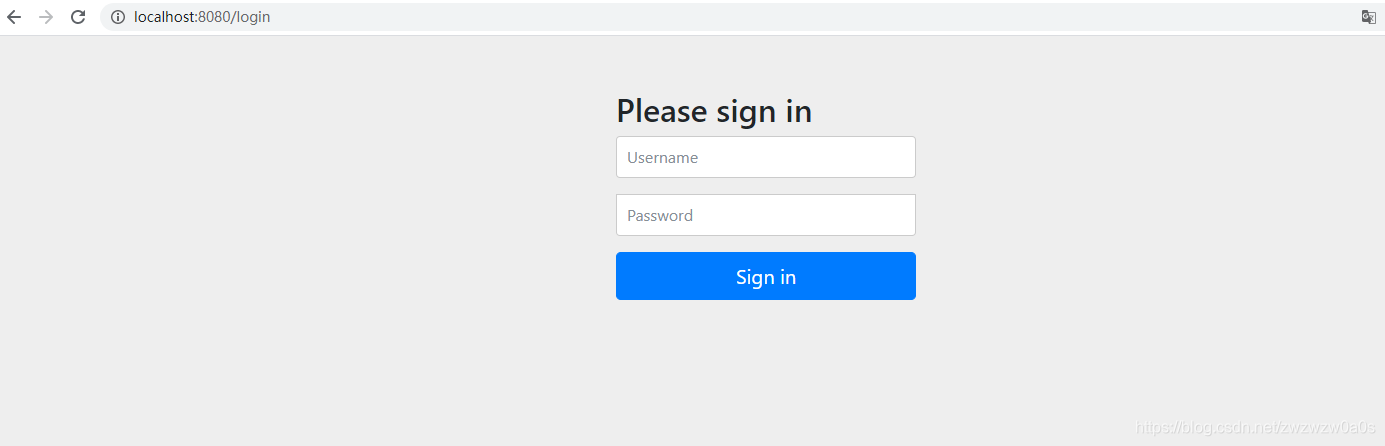
登录后即可进行相应监控内容的访问。





 扫一扫
扫一扫


 398
398

 被折叠的 条评论
为什么被折叠?
被折叠的 条评论
为什么被折叠?
 到【灌水乐园】发言





