

给Beaglebone Black安装Android

本文提供了一步一步的指导,教你如何使用特定的安卓镜像为BeagleBone Black设备进行刷机。从下载镜像、解压、选择正确的SD卡盘符到写入镜像,直至开机验证,全程详细解析。

1、首先下载img镜像,http://icculus.org/~hendersa/BBB_JB_Android_3_8_13.img.bz2 这个镜像不错。

2、将下载的镜像解压,sudo bunzip2 BBB_JB_Android_3_8_13.img.bz2会得到BBB_JB_Android_3_8_13.img文件

3、下载“ Win32DiskImager”并将其解压缩。并启动可执行文件(Win32DiskImager.exe)如下图所示。
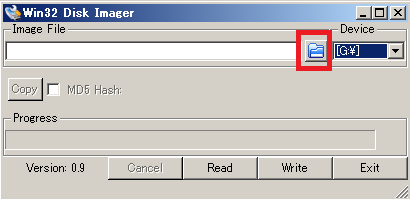
4、选择刚才解压缩的BBB_JB_Android_3_8_13.img镜像
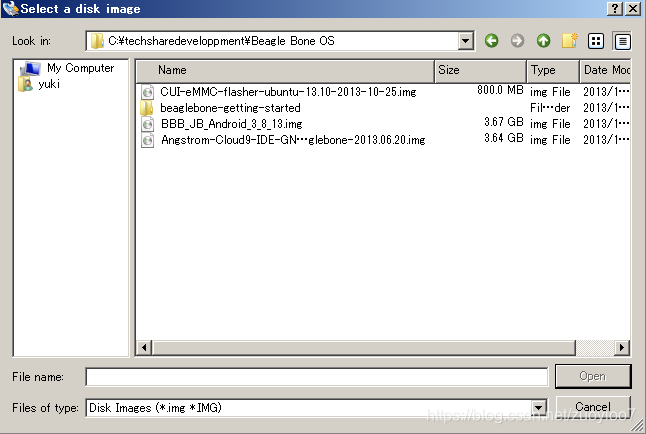
5、点击“Write”按钮将镜像写入SD卡。
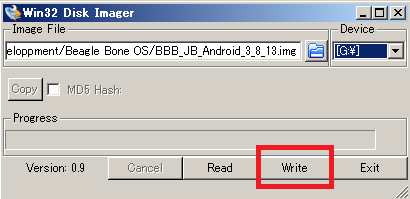
但是,如果识别出多个SD卡,确定好是哪个盘符。

执行写入如下图所示:
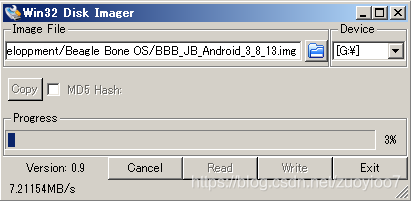
6、写入完成后,将显示一个对话框,提示“成功''。将写入的microSD卡插入BeagleBone Black的卡槽中。

7、按住插槽“S2(BOOT按钮)”知道四个User灯闪烁,再释放按钮,等待大约2秒种即可看到android的标了。

后记:如果你像我一样使用的4.3寸屏的话,打开boot盘的uEnv.txt文件将ip=off 后面的video=720x480-16@60 qemu=1删掉即可。


Title: Android for the BeagleBone Black Author: Andrew Henderson, Aravind Prakash Length: 120 pages Edition: 1 Language: English Publisher: Packt Publishing Publication Date: 2015-02-27 ISBN-10: 1784392162 ISBN-13: 9781784392161 Design and implement Android apps that interface with your own custom hardware circuits and the BeagleBone Black About This Book Design custom apps that interact with the outside world via BeagleBone Black Modify Android to recognize, configure, and communicate with sensors, LEDs, memory, and more A step-by-step guide full of practical Android app examples that will help the users to create Android controlled devices that will use BeagleBone as hardware Who This Book Is For If you are an Android app developer who wants to experiment with the hardware capabilities of the BeagleBone Black platform, then this book is ideal for you. You are expected to have basic knowledge of developing Android apps but no prior hardware experience is required. In Detail This book explores using the Android OS on the BeagleBone Black hardware platform and provides an introduction to Android's unique approach to hardware interfacing. You'll be walked through the process of installing and configuring Android on your BeagleBone Black, as well as preparing your PC development environment to create Android applications that directly interface with hardware devices. Several example projects within this book introduce you to using the GPIO, SPI, and I2C hardware interfaces of the BeagleBone Black. You'll create Android apps that communicate directly with actual hardware components such as sensors, memory chips, switches, and LEDs. Step-by-step guidance through both the software and hardware portions of these projects is provided. Combining all of the previous projects into a single project that uses GPIO, SPI, and I2C together, you will explore the details of creating an advanced hardware interfacing app. Finally, you'll be provided with information on transitioning prototype code into code suitable for deployment on an Android-based device. With a variety of example apps that demonstrate key hardware communication concepts, this book will help you become an Android hardware interfacing pro in no time. Table of Contents Chapter 1. Introduction to Android and the BeagleBone Black Chapter 2. Interfacing with Android Chapter 3. Handling Inputs and Outputs with GPIOs Chapter 4. Storing and Retrieving Data with I2C Chapter 5. Interfacing with High-speed Sensors Using SPI Chapter 6. Creating a Complete Interfacing Solution Chapter 7. Where to Go from Here
评论
成就一亿技术人!
拼手气红包6.0元
还能输入1000个字符
 
红包 添加红包
表情包 插入表情
 条评论被折叠 查看
添加红包

请填写红包祝福语或标题

红包个数最小为10个

红包金额最低5元

当前余额3.43前往充值 >
需支付:10.00
成就一亿技术人!
领取后你会自动成为博主和红包主的粉丝 规则
hope_wisdom
发出的红包
实付
使用余额支付
点击重新获取
扫码支付
钱包余额 0

抵扣说明:

1.余额是钱包充值的虚拟货币,按照1:1的比例进行支付金额的抵扣。
2.余额无法直接购买下载,可以购买VIP、付费专栏及课程。

余额充值


