


16. nextTick
1. 总结
- 语法:
this.$nextTick(回调函数) - 作用:在下一次 DOM 更新结束后执行其指定的回调。
- 什么时候用:当改变数据后,要基于更新后的新DOM进行某些操作时,要在nextTick所指定的回调函数中执行。
2. 案例
实现点击点击,输入框自动获取焦点
MyItem.vue
<template>
  <div>
    <li>
      <label>
        <!-- 使用props传参方式改变选中or不选 -->
        <!-- <input
          type="checkbox"
          :checked="todo.done"
          @click="handleCheck(todo.id)"
        /> -->
        <input
          type="checkbox"
          :checked="todo.done"
          @change="handleCheck(todo.id)"
        />
        <!-- 使用v-model方法改变选中or不选 -->
        <!-- 如下代码也能实现功能,但是不太推荐,因为有点违反原则,因为修改了props,只不过vue没检测到 -->
        <!-- <input type="checkbox" v-model="todo.done" /> -->
        <span v-show="!todo.isEdit">{{ todo.title }}</span>
        <input
          v-show="todo.isEdit"
          type="text"
          :value="todo.title"
          @blur="handleBlur(todo, $event)"
          ref="inputTitle"
        />
      </label>
      <button class="btn btn-danger" @click="handleDelete(todo.id)">
        删除
      </button>
      <button
        v-show="!todo.isEdit"
        class="btn btn-edit"
        @click="handleEdit(todo)"
      >
        编辑
      </button>
    </li>
  </div>
</template>

<script scoped>
import pubsub from "pubsub-js";
export default {
  name: "MyItem",
  // 声明接受todo对象
  props: ["todo"],
  methods: {
    // 勾选or取消勾选
    handleCheck(id) {
      // console.log(id);
      // 通知App组件将对用的todo对象的done值取反
      // this.checkTodo(id);
      this.$bus.$emit("checkTodo", id);
    },
    // 删除
    handleDelete(id) {
      if (confirm("确定删除吗?")) {
        // 通知App组件将对应的todo对象删除
        // this.deleteTodo(id);
        // this.$bus.$emit("deleteTodo", id);
        pubsub.publish("deleteTodo", id);
      }
    },
    // 编辑
    handleEdit(todo) {
      // hasOwnProperty判断对象是否存在
      if (todo.hasOwnProperty.call("isEdit")) {
        console.log("如果todo身上有isEdit");
        todo.isEdit = true;
      } else {
        console.log("如果todo身上没有isEdit");
        this.$set(todo, "isEdit", true);
      }
      this.$nextTick(() => {
        this.$refs.inputTitle.focus();
      });
    },
    // 失去焦点回调(真正智兴修改逻辑
    handleBlur(todo, e) {
      todo.isEdit = false;
      if (!e.target.value.trim()) return alert("输入不能为空");
      console.log("updateTodo", todo.id, e.target.value);
      this.$bus.$emit("updateTodo", todo.id, e.target.value);
    },
  },
};
</script>

<style scoped>
/*item*/
li {
  list-style: none;
  height: 36px;
  line-height: 36px;
  padding: 0 5px;
  border-bottom: 1px solid #ddd;
}

li label {
  float: left;
  cursor: pointer;
}

li label li input {
  vertical-align: middle;
  margin-right: 6px;
  position: relative;
  top: -1px;
}

li button {
  float: right;
  display: none;
  margin-top: 3px;
}

li:before {
  content: initial;
}

li:last-child {
  border-bottom: none;
}
li:hover {
  background-color: #ddd;
}
li:hover button {
  display: block;
}
</style>
17. Vue封装的过度与动画
1. 总结
-
操作 css 的 trasition 或 animation
-
vue 会给目标元素添加/移除特定的 class
-
作用:在插入、更新或移除 DOM元素时,在合适的时候给元素添加样式类名。
-
图示:
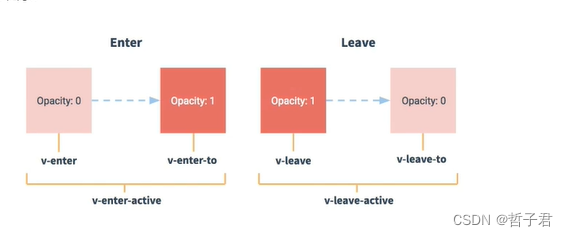
-
写法:
-
准备好样式:
-
如果设置name则为
name的名称-enter,如果没设置name则为v- 元素进入的样式:
- v-enter:进入的起点
- v-enter-active:进入过程中
- v-enter-to:进入的终点
- 元素离开的样式:
- v-leave:离开的起点
- v-leave-active:离开过程中
- v-leave-to:离开的终点
- 元素进入的样式:
-
使用
<transition>包裹要过度的元素,并配置name属性:<transition name="hello"> <h1 v-show="isShow">你好啊!</h1> </transition> -
备注:若有多个元素需要过度,则需要使用:
<transition-group>,且每个元素都要指定key值。 -
基本过渡动画的编码
-
在目标元素外包裹
-
定义 class 样式
-
指定过渡样式: transition
-
指定隐藏时的样式: opacity/其它
-
-
-
-
使用插件
-
插件: animate.style
-
安装:
Install with npm:
npm install animate.css --saveInstall with yarn:
yarn add animate.css -
Animate.css详细class列表
Attention seekers animate__bounce 弹跳 animate__flash 闪光 animate__pulse 脉冲 animate__rubberBand 橡皮筋 animate__shakeX 摇晃X轴 animate__shakeY 摇晃Y轴 animate__headShake 摇头 animate__swing 摇摆 animate__tada 然后 animate__wobble 摇晃 animate__jello 果冻 animate__heartBeat 心跳 Back entrances animate__backInDown 后退 animate__backInLeft 后退左 animate__backInRight 后右 animate__backInUp 后退下都上 Back exits animate__backOutDown 后退 animate__backOutLeft 后退左 animate__backOutLeft 后退右 animate__backOutUp 后退上 Bouncing entrances animate__bounceIn 弹跳 animate__bounceInDown 弹跳向下 animate__bounceInLeft 向左反弹 animate__bounceInRight 右弹跳 animate__bounceInUp 反弹 Bouncing exits animate__bounceOut 弹跳 animate__bounceOutDown 弹跳向下 animate__bounceOutLeft 向左反弹 animate__bounceOutRight 弹跳向右 animate__bounceOutUp 弹跳向上 Fading entrances animate__fadeIn 淡入 animate__fadeInDown 淡入淡出 animate__fadeInDownBig 淡入淡出大 animate__fadeInLeft 向左淡入淡出 animate__fadeInLeftBig 淡入左大 animate__fadeInRight 向右淡入淡出 animate__fadeInRightBig 淡入右大 animate__fadeInUp 淡入向上 animate__fadeInUpBig 淡入大 animate__fadeInTopLeft 淡入左上 animate__fadeInTopRight 右上淡入淡出 animate__fadeInBottomLeft 淡入左下 animate__fadeInBottomRight 淡入右下 Fading exits animate__fadeOut 消退 animate__fadeOutDown 淡出淡出 animate__fadeOutDownBig 淡出淡出大 animate__fadeOutLeft 淡出左 animate__fadeOutLeftBig 淡出左大 animate__fadeOutRight 淡出右移 animate__fadeOutRightBig 淡出右大 animate__fadeOutUp 淡出向上 animate__fadeOutUpBig 淡出向上大 animate__fadeOutTopLeft 淡出左上角 animate__fadeOutTopRight 淡出右上角 animate__fadeOutBottomRight 淡出右下角 animate__fadeOutBottomLeft 淡出左下角 Flippers animate__flip 翻动 animate__flipInX 翻转X轴 animate__flipInY 翻转Y轴 animate__flipOutX 翻转输出X轴 animate__flipOutY 翻转输出Y轴 Lightspeed animate__lightSpeedInRight 右光速弹动 animate__lightSpeedInLeft 左光速弹动 animate__lightSpeedOutRight 右光速弹动消失 animate__lightSpeedOutLeft 左光速弹动消失 Rotating entrances animate__rotateIn 旋转输入 animate__rotateInDownLeft 向左下旋转 animate__rotateInDownRight 向右下旋转 animate__rotateInUpLeft 向左上旋转 animate__rotateInUpRight 向右上旋转 Rotating exits animate__rotateOut 旋转输出 animate__rotateOutDownLeft 向左旋转消失 animate__rotateOutDownRight 向右旋转消失 animate__rotateOutUpLeft 向左上旋转消失 animate__rotateOutUpRight 向右上旋转消失 Specials animate__hinge 合页 animate__jackInTheBox 旋转闪烁弹动 animate__rollIn 滚入 animate__rollOut 推出 Zooming entrances animate__zoomIn 放大 animate__zoomInDown 缩小放大弹出 animate__zoomInLeft 向左放大 animate__zoomInRight 向右放大 animate__zoomInUp 由下向上放大 Zooming exits animate__zoomOut 缩小 animate__zoomOutDown 放大缩小消失 animate__zoomOutLeft 向左缩小 animate__zoomOutRight 向右缩小 animate__zoomOutUp 由下向上缩小 Sliding entrances animate__slideInDown 向下滑入 animate__slideInLeft 向左滑入 animate__slideInRight 向右滑入 animate__slideInUp 向上滑入 Sliding exits animate__slideOutDown 向下滑出 animate__slideOutLeft 向左滑出 animate__slideOutRight 向右滑出 animate__slideOutUp 向上滑出
-
2. 实例
1. App.vue
<template>
  <div>
    <Test></Test>
    <Test2></Test2>
    <Test3></Test3>
  </div>
</template>
<script>
import Test from "./components/Test";
import Test2 from "./components/Test2.vue";
import Test3 from "./components/Test3.vue";
export default {
  name: "App",
  components: { Test, Test2, Test3 },
  data() {
    return {};
  },
};
</script>
<style></style>
2. Test.vue
<template>
  <div>
    <button @click="isShow = !isShow">显示/隐藏</button>
    <!-- 动画 -->
    <transition name="hello" appear>
      <h1 v-show="isShow">你好啊!</h1>
    </transition>
  </div>
</template>
<script>
export default {
  name: "Test",
  data() {
    return {
      isShow: true,
    };
  },
};
</script>
<style lang="less" scoped>
h1 {
  background-color: orange;
}

// 如果transition 设置了name 那么标签样式也要用name的参数,如果没有默认为v
// 进入时激活的样式
.hello-enter-active {
  animation: atguigu 0.5s linear;
}
// 离开时激活的样式
.hello-leave-active {
  animation: atguigu 0.5s linear reverse;
}
@keyframes atguigu {
  from {
    transform: translateX(-100%);
  }
  to {
    transform: translateX(0px);
  }
}
</style>
3. Test2.vue
<template>
  <div>
    <button @click="isShow = !isShow">显示/隐藏</button>
    <!-- 动画 -->
    <!--
        transition只能使用一个元素
        transition-group可以是使用多个元素
     -->
    <!-- <transition name="hello" appear>
      <h1 v-show="isShow">你好啊!</h1>
    </transition> -->
    <transition-group name="hello" appear>
      <h1 v-show="!isShow" key="1">你好啊!</h1>
      <h1 v-show="isShow" key="2">尚硅谷!</h1>
    </transition-group>
  </div>
</template>
<script>
export default {
  name: "Test2",
  data() {
    return {
      isShow: true,
    };
  },
};
</script>
<style lang="less" scoped>
h1 {
  background-color: orange;
  transition: 0.5s linear;
}
// 进入的起点、离开的终点
.hello-enter,
.hello-leave-to {
  transform: translateX(-100%);
}
.hello-enter-active,
.hello-leave-active {
  transition: 0.5s linear;
}
// 进入的终点、离开的起点
.hello-enter-to,
.hello-leave {
  transform: translateX(0);
}
</style>
4. Test3.vue
<template>
  <div>
    <button @click="isShow = !isShow">显示/隐藏</button>
    <!-- 动画 -->
    <!--
        transition只能使用一个元素
        transition-group可以是使用多个元素
     -->
    <!-- <transition name="hello" appear>
      <h1 v-show="isShow">你好啊!</h1>
    </transition> -->
    <transition-group
      name="animate__animated animate__bounce"
      enter-active-class="animate__swing"
      leave-active-class="animate__backOutUp"
      appear
    >
      <h1 v-show="!isShow" key="1">你好啊!</h1>
      <h1 v-show="isShow" key="2">尚硅谷!</h1>
    </transition-group>
  </div>
</template>
<script>
import "animate.css";
export default {
  name: "Test3",
  data() {
    return {
      isShow: true,
    };
  },
};
</script>
<style lang="less" scoped>
h1 {
  background-color: orange;
}
</style>
18. TodoList案例_动画
MyList.vue
<template>
  <ul class="todo-main">
    <!-- 使用props传参方式改变选中or不选 -->
    <transition-group name="todo" appear="">
      <MyItem v-for="todoObj in todos" :key="todoObj.id" :todo="todoObj" />
    </transition-group>

    <!-- 使用v-model方法改变选中or不选 -->
    <!-- <MyItem
      v-for="todoObj in todos"
      :key="todoObj.id"
      :todo="todoObj"
    /> -->
  </ul>
</template>

<script scoped>
import MyItem from "./MyItem";
export default {
  name: "MyList",
  components: { MyItem },
  // 声明接收App传递过来的数据
  props: ["todos"],
  data() {
    return {};
  },
};
</script>

<style scoped>
/*main*/
.todo-main {
  margin-left: 0px;
  border: 1px solid #ddd;
  border-radius: 2px;
  padding: 0px;
}

.todo-empty {
  height: 40px;
  line-height: 40px;
  border: 1px solid #ddd;
  border-radius: 2px;
  padding-left: 5px;
  margin-top: 10px;
}
.todo-enter-active {
  animation: atguigu 0.5s linear;
}
/* 离开时激活的样式 */
.todo-leave-active {
  animation: atguigu 0.5s linear reverse;
}
@keyframes atguigu {
  from {
    transform: translateX(100%);
  }
  to {
    transform: translateX(0px);
  }
}
</style>





 扫一扫
扫一扫


 1599
1599

 被折叠的 条评论
为什么被折叠?
被折叠的 条评论
为什么被折叠?
 到【灌水乐园】发言





