


 本文详细介绍了如何使用OracleGoldenGate(OGG)在Oracle数据库和PostgreSQL数据库之间进行实时数据复制和迁移的过程,包括源端和目标端的OGG软件安装、配置、数据库参数设置、表空间和用户的创建、ODBC配置、数据验证等步骤。
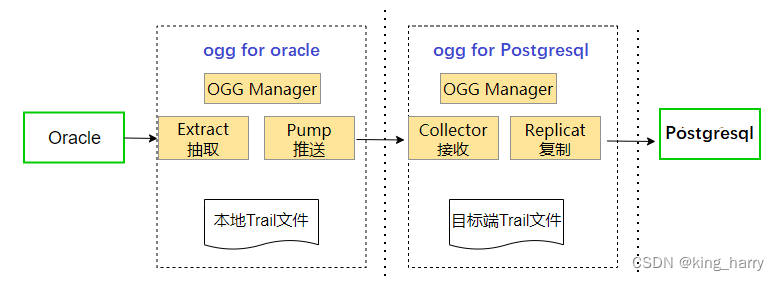
环境:
--源端:
IP:10.0.4.16
hostname:tencent
Oracle数据库版本:12.2.0.1.0
ogg for oracle版本:19.1.0.0.4
SID:orcl
--目标端:
IP:10.0.4.16
hostname:tencent
postgresql数据库版本:14.6
ogg for postgresql版本:21.3.0.0.0
db:ogg
2、安装和配置OGG软件(源端),以下操作都是在源端操作
2.1创建安装目录
mkdir -p /oracle/ogg
2.2设置oracle环境变量
export ORACLE_BASE=/oracle/app/oracle
export ORACLE_HOME=$ORACLE_BASE/product/12.2.0/db_1
export PATH=$ORACLE_HOME/bin:/oracle/ogg:$PATH
export OGGHOME=/oracle/ogg
export ORACLE_SID=orcl
export LD_LIBRARY_PATH=$ORACLE_HOME/lib:$OGGHOME:$LD_LIBRARY_PATH
export TNS_ADMIN=$ORACLE_HOME/network/admin
2.3建立OGG表空间和用户
create tablespace oggtbs datafile '/oradata/orcl/oggtbs.dbf' size 200M autoextend on;
create user ogg identified by ogg default tablespace ogg;
grant connect, resource TO ogg;
grant select any dictionary, select any table TO ogg;
grant flashback any table TO ogg;
grant execute on dbms_flashback TO ogg;
grant ALTER ANY TABLE to ogg;
grant insert any table to ogg;
grant update any table to ogg;
grant delete any table to ogg;
grant create table,create sequence to ogg;
grant execute on utl_file to ogg;
grant dba to ogg;
alter system set enable_goldengate_replication=true;
2.4添加附加日志和force logging,并切换日志
如果源端不开启归档,需添加多组日志。
alter database force logging;
alter database add SUPPLEMENTAL log data;
SQL>select NAME,OPEN_MODE,FORCE_LOGGING,SUPPLEMENTAL_LOG_DATA_MIN from v$database;
NAME OPEN_MODE FORCE_LOGGING SUPPLEME
ORCL READ WRITE YES YES
2.5 创建OGG的管理工作目录
在配置OGG进程之前,首先需要创建OGG的管理目录,执行以下操作:
GGSCI (tencent) 3> create subdirs
Creating subdirectories under current directory /oracle/ogg
Parameter file /oracle/ogg/dirprm: created.
Report file /oracle/ogg/dirrpt: created.
Checkpoint file /oracle/ogg/dirchk: created.
Process status files /oracle/ogg/dirpcs: created.
SQL script files /oracle/ogg/dirsql: created.
Database definitions files /oracle/ogg/dirdef: created.
Extract data files /oracle/ogg/dirdat: created.
Temporary files /oracle/ogg/dirtmp: created.
Credential store files /oracle/ogg/dircrd: created.
Masterkey wallet files /oracle/ogg/dirwlt: created.
Dump files /oracle/ogg/dirdmp: created.
只有提交事务的record才会被捕获。抽取、投递、应用日志的单位是record,而不是trail文件。
2.6配置MGR参数文件,并启动mgr
mgr进程是这些进程的管理和守护进程,目标端的mgr进程还与源端进行通信
edit params mgr
PORT 7809
GGSCI (tencent) 7> start mgr
Manager started.
GGSCI (tencent) 8> info all
Program Status Group Lag at Chkpt Time Since Chkpt
MANAGER RUNNING
2.7添加extract进程 抽取进程:负责抓取需要传输的数据(添加进程的时候为抽取点,而不是启动进程的时候) 从21开始OGG需要配置tns #查看当前数据库语言 SQL> select userenv('language') from dual; USERENV('LANGUAGE')
AMERICAN_AMERICA.ZHS16GBK
--配置extract进程
#编辑参数
GGSCI (tencent as ogg@orcl) 21> edit params exta
extract exta
SETENV (NLS_LANG=AMERICAN_AMERICA.ZHS16GBK)
SETENV (ORACLE_HOME=/oracle/app/oracle/product/12.2.0/db_1)
SETENV (ORACLE_SID=orcl)
USERID ogg@orcl, PASSWORD ogg
DISCARDF
 最低0.47元/天 解锁文章






 扫一扫
扫一扫


 6328
6328

 被折叠的 条评论
为什么被折叠?
被折叠的 条评论
为什么被折叠?
 到【灌水乐园】发言





