 解决CollapsingToolbarLayout异常


 本文介绍在使用CollapsingToolbarLayout时遇到的异常及其解决办法。异常源于同时设置了系统提供的ActionBar和自定义的Toolbar,导致冲突。通过修改主题样式可以有效避免此问题。
在使用CollapsingToolbarLayout添加标题栏的时候,遇到了异常,
异常信息:
Caused by: java.lang.IllegalStateException: This Activity already has an action bar supplied by the window decor. Do not request Window.FEATURE_SUPPORT_ACTION_BAR and set windowActionBar to false in your theme to use a Toolbar instead.
问题原因:
在当前环境中:
1、当在activity中调用了setSupportActionBar(toolbar);

android:theme="@style/AppTheme" >
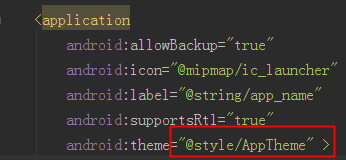
3、且,style资源文件中的parent为
parent="Theme.AppCompat.Light.DarkActionBar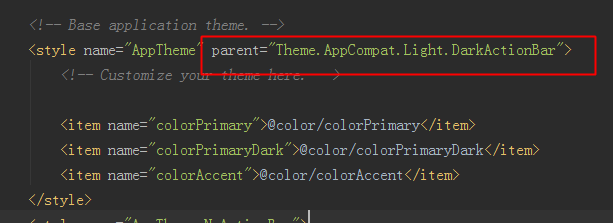
就会报这个异常。
问题分析:
Using Theme.AppCompat.Light tells Android that you want the framework to provide an ActionBar for you. However, you are creating your own ActionBar (a Toolbar),
so you are giving the framework mixed signals as to where you want the ActionBar to come from.
解决方法:
1、在style配置文件中加上
<item name="windowActionBar">false</item><item name="windowNoTitle">true</item>
或者,将parent改为
parent="Theme.AppCompat.Light.NoActionBar"
2、在AndroidManifest.xml 对应的Activity标签的android:theme引用该style中的修改的主题
3、如果有多个Activity,那么只需要在需要使用CollapsingToolbarLayout的Activity中直接添加:
<activity android:name=".SecondActivity"
android:theme="@style/Theme.AppCompat.Light.NoActionBar">

</activity>





 扫一扫
扫一扫


 6519
6519

 被折叠的 条评论
为什么被折叠?
被折叠的 条评论
为什么被折叠?
 到【灌水乐园】发言





