



下载压缩文件,解压后找到ecg文件,并使用wavesurfer.js绘制心电图波形。
这段代码是一个 Vue 组件,用于在网页中展示心电图(ECG)波形。它使用了 WaveSurfer.js 进行波形渲染,并通过解析一个 ZIP 压缩包中的 .ecg 文件来加载原始 ECG 数据。整体流程涉及 网络请求 → 解压 ZIP → 解析二进制 ECG 数据 → 上采样 → 转换为 WAV → 播放波形。
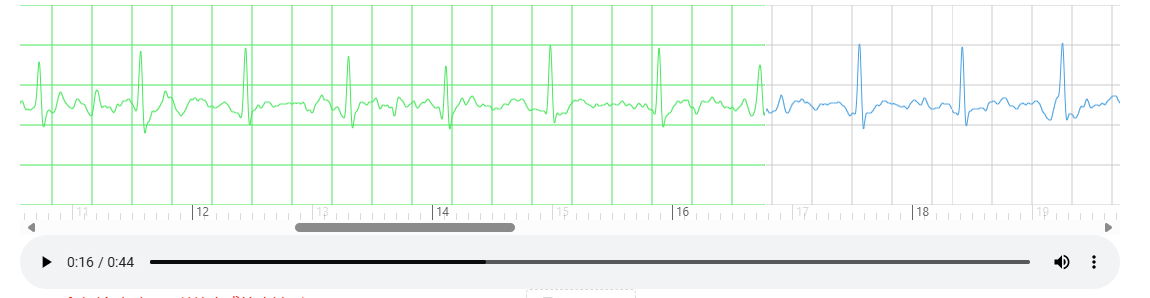
一、源码:
<template>
  <div>
    <div>
      <div ref="waveform" class="waveform"></div>
      <div v-if="loading" class="loading-indicator">
        音频加载中... {{ progress }}%
        <div class="progress-bar">
          <div class="progress-fill" :style="{ width: progress + '%' }"></div>
        </div>
      </div>
      <div v-if="error" class="error-message">{{ error }}</div>
    </div>

    <div style="display: inline">
      <span class="zoom-tips">Tips:鼠标滚动时,可以放大或缩小波形; </span>
      <span v-if="zoomLevel > 0"> 当前缩放级别:{{ zoomLevel }}(px/s); </span>
    </div>

    <div style="display: inline; margin-left: 20px">
      <!-- <a-button type="dashed" icon="save" @click="downloadAudio" :disabled="loading">下载音频</a-button> -->
      <a slot="tabBarExtraContent" v-if="zipUrl" :href="zipUrl" class="ant-btn ant-btn-primary" download>
        下载音频压缩包
      </a>
    </div>
  </div>
</template>

<script>
import Vue from 'vue'
import { ROLE_ID } from '@/store/mutation-types'
import WaveSurfer from 'wavesurfer.js'
import TimelinePlugin from 'wavesurfer.js/dist/plugins/timeline.esm.js'
import ZoomPlugin from 'wavesurfer.js/dist/plugins/zoom.esm.js'
import JSZip from 'jszip'

export default {
  name: 'SingleEcgWaveSurfer',
  props: {
    zipUrl: String, // 总音频文件URL
    status: Number,
  },
  data() {
    return {
      wavesurfer: null,
      timelinePlugin: null,
      zoomPlugin: null,
      loading: false,
      error: null,
      progress: 0,
      zoomLevel: 120, //默认1秒显示的像素
      canRegion: false,
      ecgMetadata: null,
    }
  },
  watch: {
    zipUrl: {
      async handler(newVal) {
        console.log('zipUrl=', newVal)
        // await this.downloadAndProcessZip(newVal)
      },
    },
  },
  async mounted() {
    var roleId = Vue.ls.get(ROLE_ID)
    if ((roleId == 11 || roleId == 15) && this.status < 300) {
      this.canRegion = true
    } else {
      this.canRegion = false
    }
    console.log(
      'SingleEcgWaveSurfer',
      'zipUrl=',
      this.zipUrl,
      'roleId=',
      roleId
    )
    await this.initWaveSurfer()
    if (this.zipUrl) {
      await this.downloadAndProcessZip(this.zipUrl)
    }
  },
  beforeDestroy() {
    this.cleanup()
  },
  methods: {
    async initWaveSurfer() {
      console.log('初始化 WaveSurfer', this.zoomLevel)
      // 初始化波形和频谱图
      this.wavesurfer = WaveSurfer.create({
        container: this.$refs.waveform,
        waveColor: '#48a1e0',
        progressColor: '#48e65dff',
        cursorColor: '#fff',
        height: 200,
        mediaControls: true,

        // 自定义渲染函数(适配Int16数据范围)
        renderFunction: (channels, ctx) => {
          const width = ctx.canvas.width
          const height = ctx.canvas.height
          const centerY = height / 2
          const maxMillimeter = 5 * 5 // 与原有逻辑一致:25格
          const zoom = height / maxMillimeter
          const gain = this.gain || 10 // 可从 data 或 props 获取动态值

          // 清除画布并绘制网格背景
          ctx.clearRect(0, 0, width, height)

          // 绘制网格线
          const drawGrid = (ctx, step) => {
            ctx.strokeStyle = '#ccc'
            ctx.lineWidth = 1
            const rowSpace = (height / maxMillimeter) * step

            // 垂直线(时间轴方向)
            for (let x = 0; x * rowSpace <= width; x++) {
              ctx.beginPath()
              ctx.moveTo(x * rowSpace, 0)
              ctx.lineTo(x * rowSpace, height)
              ctx.stroke()
            }

            // 水平线
            for (let y = 0; y <= maxMillimeter; y += step) {
              const yPos = y * (height / maxMillimeter)
              ctx.beginPath()
              ctx.moveTo(0, yPos)
              ctx.lineTo(width, yPos)
              ctx.stroke()
            }
          }

          // 绘制粗线(每5mm)
          ctx.lineWidth = 2
          drawGrid(ctx, 5)

          // 获取第一个声道数据
          if (!channels || channels.length === 0) return
          const int16Data = channels[0] // 单声道数据(Int16Array)

          // 绘制波形
          ctx.beginPath()
          ctx.strokeStyle = '#48a1e0'
          ctx.lineWidth = 1

          let lastX = null
          const dataSize = int16Data.length
          // 每20个点取一个绘制(优化性能)
          for (let i = 0; i < dataSize; i += 20) {
            // 转换Int16值到波形坐标(范围映射:-32768~32767 → 0~height)
            const value = int16Data[i] // 它已经是归一化后的信号,实际上是 -1 ~ +1 的浮点数
            // if (i < 100) {
            //   console.log('绘图ad值:', value)
            // }

            let y = Math.floor(centerY - value * gain * zoom)
            y = Math.max(0, Math.min(y, height)) // 钳位在画布范围内

            const x = (i / dataSize) * width

            if (lastX === null) {
              ctx.moveTo(x, y)
            } else {
              ctx.lineTo(x, y)
            }

            lastX = x
          }

          ctx.stroke()
        },
      })

      // 监听用户交互事件
      this.wavesurfer.on('interaction', () => {
        this.isUserInteraction = true
      })

      // 监听波形图进度变化
      this.wavesurfer.on('timeupdate', (currentTime) => {
        if (this.isUserInteraction) {
          this.isUserInteraction = false // 重置标志
        }
      })

      // 音频加载完成后,强制频谱图重新绘制
      this.wavesurfer.on('ready', () => {
        if (this.timelinePlugin) {
          this.timelinePlugin.destroy()
        }
        if (this.zoomPlugin) {
          this.zoomPlugin.destroy()
        }

        this.wavesurfer.setTime(0)
        this.registerWavePlugin()
      })

      this.wavesurfer.on('zoom', (currentZoom) => {
        this.zoomLevel = Math.round(currentZoom)
      })

      this.wavesurfer.on('finish', () => {
        this.wavesurfer.setTime(0)
      })
    },
    async downloadAudio() {
      console.log('下载音频附件')
    },

    // 修改下载和处理方法(使用Int16Array存储原始数据)
    async downloadAndProcessZip(url) {
      console.log('📥 开始下载并处理 ZIP:', url)
      if (!url) {
        console.error('❌ zipUrl 不存在')
        return
      }
      try {
        const response = await fetch(url)
        if (!response.ok) throw new Error('下载失败')
        const zipData = await response.arrayBuffer()
        const zip = await JSZip.loadAsync(zipData)

        // 有文件头:
        const rawDataFile = zip.file(/raw_data\.ecg$/i)[0]
        if (!rawDataFile) throw new Error('未找到 raw_data.ecg 文件')

        const bufferData = await rawDataFile.async('arraybuffer')
        const parsedData = this.parseECGData(bufferData)
        const ecgData = parsedData.samples
        const sampleRate = parsedData.metadata.sampleRate

        if (!ecgData) {
          console.log('❌ ecgData is undefined')
          return
        }

        // 1. 解析12bit ECG数据(基于Int16原始值)
        const originalData = this.parse12BitECGData(ecgData)

        // 2. 上采样到3000Hz
        const targetRate = 3000
        const upsampledData = this.upsampleECGData(originalData, sampleRate, targetRate)

        // 3. 转换为16bit WAV格式
        const wavData = this.convertToWAV(upsampledData, targetRate)

        // 4. 创建Blob URL
        const blob = new Blob([wavData], { type: 'audio/wav' })
        this.wavesurfer.loadBlob(blob)
      } catch (error) {
        console.error('❌ 处理ECG数据出错:', error.message)
        this.error = '加载音频失败: ' + error.message
      }
    },
    parseECGData(arrayBuffer) {
      // 数据验证
      if (!arrayBuffer || arrayBuffer.byteLength < 56) {
        console.error('无效的ECG数据: 数据长度不足')
        return null
      }
      if (!(arrayBuffer instanceof ArrayBuffer)) {
        console.error('Invalid argument: Expected ArrayBuffer')
        return null
      }

      const dataView = new DataView(arrayBuffer)
      let offset = 0

      // 1. 解析文件头信息
      const headerLength = dataView.getUint16(offset, true) // 小端格式
      offset += 2

      // UUID (36字节)
      const uuidBytes = new Uint8Array(arrayBuffer, offset, 36)
      const uuid = String.fromCharCode.apply(null, uuidBytes)
      offset += 36

      // 采样率 (2字节)
      const sampleRate = dataView.getUint16(offset, true)
      offset += 2

      // 开始时间 (16字节)
      const startTimeBytes = new Uint8Array(arrayBuffer, offset, 16)
      const startTime = String.fromCharCode.apply(null, startTimeBytes)
      offset += 16

      // 患者姓名 (剩余头长度)
      const nameBytes = new Uint8Array(arrayBuffer, offset, headerLength - offset)
      const patientName = this.gb2312ToString(nameBytes)

      // 2.  使用 DataView 安全读取非对齐的 16-bit 数据
      const dataStart = headerLength
      const dataLength = arrayBuffer.byteLength - dataStart

      // 创建用于存储采样的 Uint16Array
      const samples = new Uint16Array(dataLength / 2) // 总共 dataLength/2 个采样点

      for (let i = 0; i < samples.length; i++) {
        // 从 dataStart 开始,每 2 字节读一个 uint16(小端)
        samples[i] = dataView.getUint16(dataStart + i * 2, true) // true = little-endian
      }

      return {
        metadata: {
          headerLength,
          uuid,
          sampleRate,
          startTime,
          patientName,
        },
        samples: samples,
        duration: samples.length / sampleRate,
      }
    },

    // GB2312解码函数
    gb2312ToString(bytes) {
      try {
        const decoder = new TextDecoder('gb2312')
        return decoder.decode(bytes)
      } catch (error) {
        console.error('GB2312解码失败,尝试UTF-8:', error)
        try {
          const decoder = new TextDecoder('utf-8')
          return decoder.decode(bytes)
        } catch (e) {
          let result = ''
          for (let i = 0; i < bytes.length; i++) {
            if (bytes[i] !== 0) {
              result += String.fromCharCode(bytes[i])
            }
          }
          return result
        }
      }
    },

    // 解析12bit ECG数据(基于Int16原始值)
    parse12BitECGData(int16Data) {
      const sampleCount = int16Data.length
      const result = new Float32Array(sampleCount) // 存储以基准线为中心的数值
      const baseline = 2048 // 原始心电数据的基准线

      for (let i = 0; i < sampleCount; i++) {
        var adValue = int16Data[i] // 直接返回 0~4096 的原始 AD 值

        // 减去基准线,让数据围绕0波动(恢复心电信号的物理意义)
        const offsetValue = adValue - baseline // 范围:-2048 ~ 2047
        result[i] = offsetValue // ✅ 返回以0为中心的值
      }

      return result
    },

    // 上采样 ECG 数据(双线性插值)
    upsampleECGData(originalData, originalRate, targetRate) {
      const ratio = targetRate / originalRate // 3000 / 250 = 12
      const upsampledLength = Math.floor(originalData.length * ratio)
      const upsampledData = new Float32Array(upsampledLength)

      for (let i = 0; i < upsampledLength; i++) {
        // 计算当前输出点对应原始数据中的位置(浮点)
        const floatIndex = i / ratio
        const lowIndex = Math.floor(floatIndex)
        const highIndex = Math.min(lowIndex + 1, originalData.length - 1)

        // 双线性插值
        const t = floatIndex - lowIndex
        const a = originalData[lowIndex]
        const b = originalData[highIndex]
        upsampledData[i] = a * (1 - t) + b * t // 线性插值
      }

      return upsampledData
    },

    // WAV转换方法 convertToWAV 中正确映射 0~4096 → 0~32767(或中心化到 -32768~32767)
    convertToWAV(pcmData, sampleRate) {
      const buffer = new ArrayBuffer(44 + pcmData.length * 2)
      const view = new DataView(buffer)
      const bitsPerSample = 16
      const channels = 1

      // --- 写 WAV 头 ---
      this.writeString(view, 0, 'RIFF')
      view.setUint32(4, 36 + pcmData.length * 2, true)
      this.writeString(view, 8, 'WAVE')
      this.writeString(view, 12, 'fmt ')
      view.setUint32(16, 16, true)
      view.setUint16(20, 1, true)
      view.setUint16(22, channels, true)
      view.setUint32(24, sampleRate, true)
      view.setUint32(28, sampleRate * channels * (bitsPerSample / 8), true)
      view.setUint16(32, channels * (bitsPerSample / 8), true)
      view.setUint16(34, bitsPerSample, true)
      this.writeString(view, 36, 'data')
      view.setUint32(40, pcmData.length * 2, true)

      // --- 数据填充 ---
      let offset = 44
      for (let i = 0; i < pcmData.length; i++) {
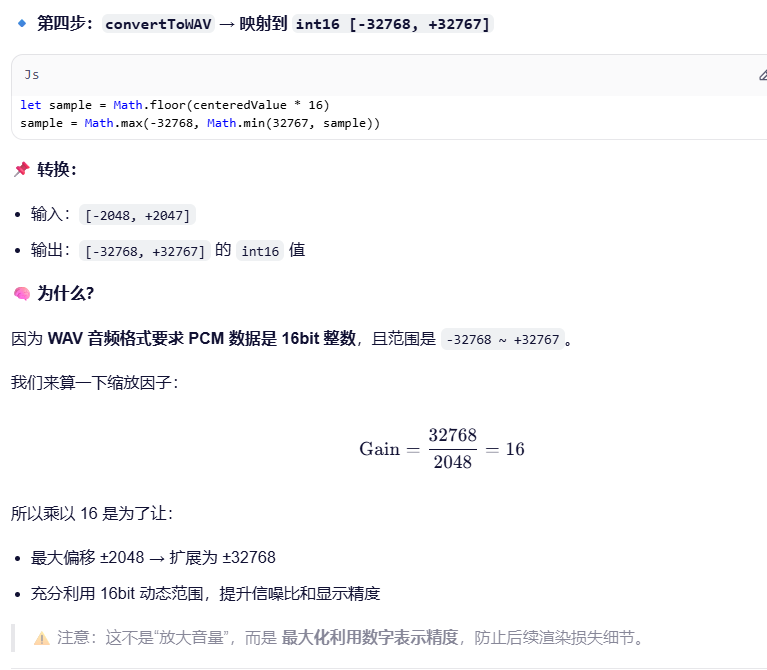
        const centeredValue = pcmData[i] // 现在是 -2048 ~ 2048

        // 映射到 -32768 ~ 32767
        // 公式:sample = centeredValue * (32768 / 2048) = centeredValue * 16
        let sample = Math.floor(centeredValue * 16)
        sample = Math.max(-32768, Math.min(32767, sample))

        view.setInt16(offset + i * 2, sample, true)
      }

      return buffer
    },

    // 辅助函数:写入字符串到DataView
    writeString(view, offset, string) {
      for (let i = 0; i < string.length; i++) {
        view.setUint8(offset + i, string.charCodeAt(i))
      }
    },

    registerWavePlugin() {
      this.timelinePlugin = this.wavesurfer.registerPlugin(
        TimelinePlugin.create({
          height: 15,
          timeInterval: 0.1,
          primaryLabelInterval: 2,
          secondaryLabelInterval: 1,
          style: {
            fontSize: '12px',
            color: '#666',
          },
        })
      )

      this.zoomPlugin = this.wavesurfer.registerPlugin(
        ZoomPlugin.create({
          scale: 0.05,
          maxZoom: 1000,
          minZoom: 10,
        })
      )

      this.wavesurfer.zoom(this.zoomLevel)
    },

    cleanup() {
      if (this.wavesurfer) {
        this.wavesurfer.destroy()
      }
    },
  },
}
</script>

<style scoped>
.zoom-tips {
  margin: 18px 0;
  font-size: 16px;
  color: #ff0000;

  span {
    color: #000;
  }
}
.waveform {
  width: 1100px;
}
.loading-indicator {
  position: absolute;
  top: 50%;
  left: 50%;
  transform: translate(-50%, -50%);
  color: #333;
  background: rgba(255, 255, 255, 0.9);
  padding: 10px 20px;
  border-radius: 8px;
  font-size: 14px;
  text-align: center;
}

.progress-bar {
  width: 100%;
  height: 6px;
  background: #eee;
  margin-top: 8px;
  border-radius: 3px;
  overflow: hidden;
}

.progress-fill {
  height: 100%;
  background: #48a1e0;
  transition: width 0.2s;
}

.error-message {
  color: red;
  font-size: 14px;
  padding: 10px;
  background: #ffe5e5;
  border-radius: 4px;
}
</style>
二、核心流程图
[开始]
   ↓
加载组件(mounted)
   ↓
初始化 WaveSurfer 实例(initWaveSurfer)
   ↓
监听 zipUrl 变化(watch)
   ↓
触发 downloadAndProcessZip(zipUrl)
   ↓
     ┌──────────────────────┐
     ↓                      ↓
  fetch(zipUrl)       失败 → 显示错误信息
     ↓
  arrayBuffer ← 响应体
     ↓
  JSZip.loadAsync(arrayBuffer)
     ↓
  查找 raw_data.ecg 文件
     ↓
  读取为 ArrayBuffer
     ↓
  parseECGData(buffer) → 解析文件头 + 提取 Uint16 样本数据
     ↓
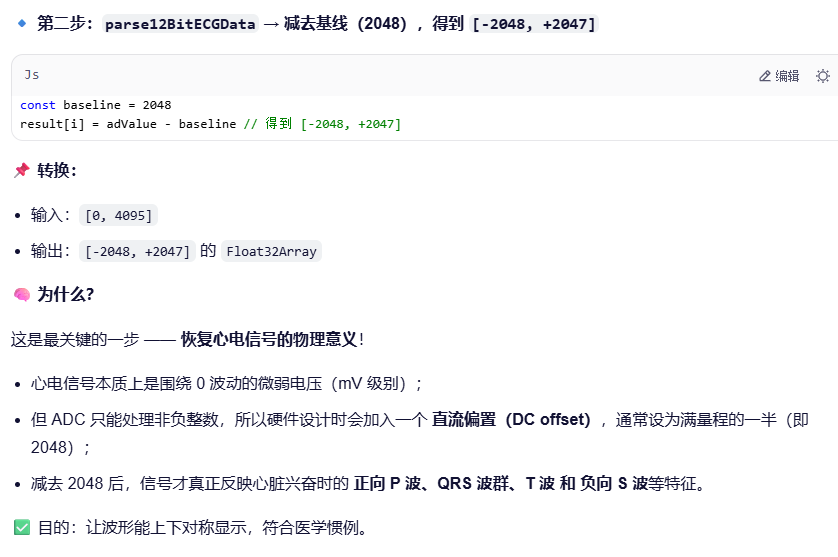
  parse12BitECGData(samples) → 减去基线 (2048),转为中心对称的 Float32Array
     ↓
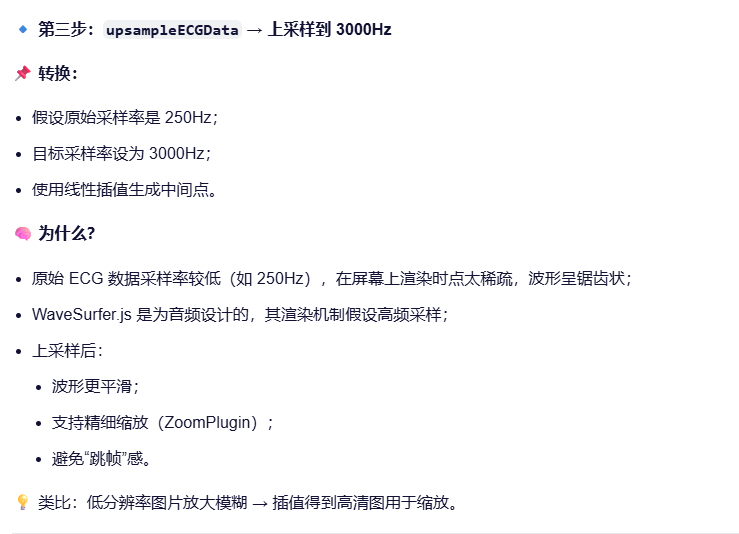
  upsampleECGData(data, 250Hz → 3000Hz) → 线性插值上采样
     ↓
  convertToWAV(data, 3000) → 映射到 -32768~32767,打包成 WAV 二进制
     ↓
  创建 Blob URL 并 loadBlob 到 wavesurfer
     ↓
  WaveSurfer 渲染波形(调用 renderFunction 自定义绘图)
     ↓
  注册 TimelinePlugin 和 ZoomPlugin 插件
     ↓
用户可交互:滚动缩放、播放、下载
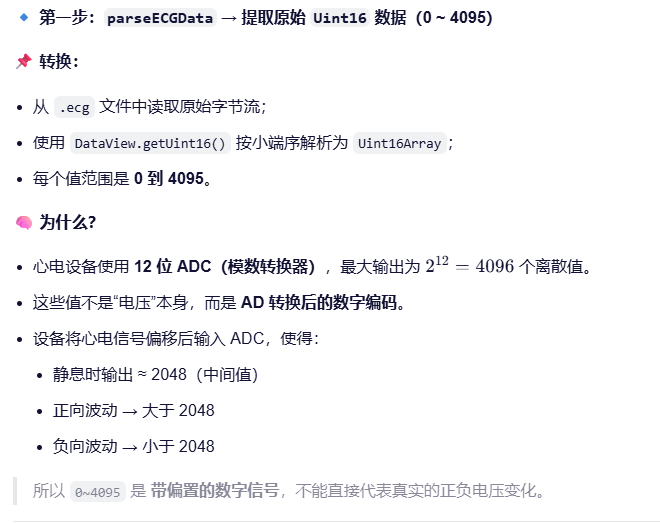
三、数据流 转换详解:
原始 ZIP 包
    ↓
raw_data.ecg (二进制文件)
    ↓
Uint16Array: [0, 4095] → 原始 AD 值(未归零)
    ↓
Float32Array: [-2048, +2047] → 减去基线,恢复真实电压波动
    ↓
上采样至 3000Hz → 提高时间分辨率,使波形更平滑
    ↓
映射为 int16: [-32768, +32767] → 转换为标准音频 PCM 格式
    ↓
封装成 WAV 文件 → 浏览器可识别的音频格式
    ↓
WaveSurfer.js 渲染 → 可视化心电波形
3.1、详细转换步骤与原理
3.2、过程中遇到的问题:
1、.ecg 是自定义二进制格式,不是标准音频格式,需要按照文档解析;
2、wavesurfer.js 要求 采样率最低3000,否则报错,所以,心电数据需要上采样。
The sample rate provided (250) is outside the range [3000, 768000];
3、自定义渲染函数(renderFunction()),采样率低于3000就不执行;
4、12bit 数据流的解析转换很容易报错;





 扫一扫
扫一扫


 1918
1918

 被折叠的 条评论
为什么被折叠?
被折叠的 条评论
为什么被折叠?
 到【灌水乐园】发言





