


 本文介绍了一个使用React构建的待办事项应用实例,包括组件拆分、状态管理和父子组件间通信等关键技术点。
1 效果
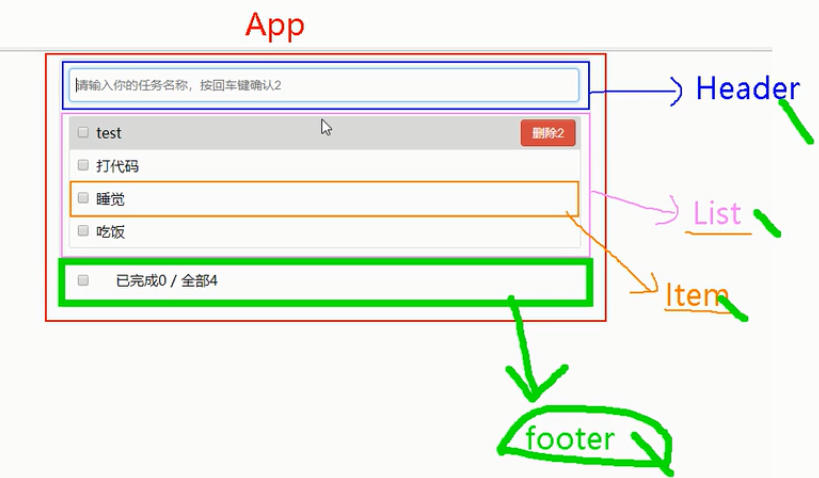
我们要做的实例效果如下:
上面一个输入框,当我们按回车时可以添加一个待完成任务,
中间列表展示待完成的任务,且鼠标进入背景色深色显示;每一行有个删除按钮
下面展示已完成/全部。且可以支持全选和取消全选。且有一个按钮"删除全部已完成"
2 组件拆分
我们可以把页面拆分为3个组件,头部Header,中间List,下部Footer。其中中间每一行是一个组件Item
3 代码实现
该用例使用的技术和js相关的基础知识对于初学者非常有帮助,如果可能的话,最好参照实例手敲一遍代码。
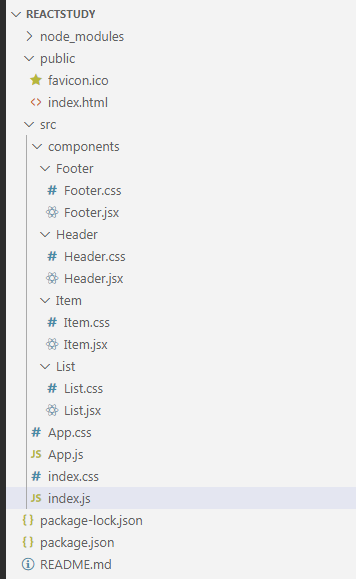
项目结构
3.1 index.html
<!doctype html>
<html lang="en">
  <head>
  </head>
  <body>
    <div id="root"></div>
  </body>
</html>
3.2 index.js
import React from 'react';
import ReactDOM from 'react-dom';
import App from './App';
import './index.css';

ReactDOM.render(<App/>, document.getElementById('root'));
index.css
body {
  margin: 0;
  padding: 0;
  font-family: sans-serif;
}
3.3 App组件
需要注意的问题:
1 中间列表组件List展示的数据,我们直接想的话,展示的数据要放到List组件中,但是,Footer组件需要获取List组件的状态用于展示数目,所以我们不能把展示的数据放到List中,应该放到父组件App中,我们通过props属性把数据传递给List和Footer组件。
2 同时,Header中添加一条数据的时候,这条数据要展示到List组件中,而List组件的数据在其父组件App中,所以我们要想办法把Header输入框中的数据传递给App组件没然后由App组件更新state,进而触发子组件List重新渲染,使新数据展示在List中。此处我们用的方式是回调函数(或者叫高阶函数)的方式把Header中的数据传递给父组件App。
import React, { Component } from 'react';
import PropTypes from 'prop-types'
import './App.css'
import Footer from './components/Footer/Footer';
import Header from './components/Header/Header';
import List from './components/List/List';

class App extends Component {
  static propTypes = {
    addTodo:PropTypes.func.isRequired
  }

  state = {
    todos: [
      {id:'001', name:'吃饭', done:true},
      {id:'002', name:'睡觉', done:true},
      {id:'003', name:'打代码', done:false},
    ]
  }

  //用于添加一个todo,接收的参数是todo对象
  addTodo = (todoObj)=>{
    const {todos} = this.state
    const newTodos = [todoObj,...todos]
    this.setState({todos:newTodos})
  }

  //
  updateTodo = (id,done)=>{
    const {todos} = this.state
    const newTodos = todos.map((todoObj)=>{
      if(todoObj.id === id) return {...todoObj,done:done}
      else return todoObj
    })
    this.setState({todos:newTodos})
  }

  //用于删除一个todo,接收的参数是id
  deleteTodo = (id)=>{
    const {todos} = this.state
    const newTodos = todos.filter((todoObj)=>{
      return todoObj.id !== id
    })
    this.setState({todos:newTodos})
  }

  //用于
  checkAllTodo = (done)=>{
    const {todos} = this.state
    const newTodos = todos.map((todoObj)=>{
      return {...todoObj,done:done}
    })
    this.setState({todos:newTodos})
  }

  //清除所有已经完成的
  clearAllDone = ()=>{
    const {todos} = this.state
    const newTodos = todos.filter((todoObj)=>{
      return !todoObj.done
    })
    this.setState({todos:newTodos})
  }

  render() {
    return (
      <div className="todo-container">
        <div className="todo-wrap">
          <Header addTodo={this.addTodo}/>
          <List todos={this.state.todos} updateTodo={this.updateTodo} deleteTodo={this.deleteTodo}/>
          <Footer todos={this.state.todos} checkAllTodo={this.checkAllTodo} clearAllDone={this.clearAllDone}/>
        </div>
      </div>
    );
  }
}

export default App;
App.css
body {
  background: #fff;
}

.btn {
  display: inline-block;
  padding: 4px 12px;
  margin-bottom: 0;
  font-size: 14px;
  line-height: 20px;
  text-align: center;
  vertical-align: middle;
  cursor: pointer;
  box-shadow: inset 0 1px 0 rgba(255, 255, 255, 0.2), 0 1px 2px rgba(0, 0, 0, 0.05);
  border-radius: 4px;
}

.btn-danger {
  color: #fff;
  background-color: #da4f49;
  border: 1px solid #bd362f;
}

.btn-danger:hover {
  color: #fff;
  background-color: #bd362f;
}

.btn:focus {
  outline: none;
}

.todo-container {
  width: 600px;
  margin: 0 auto;
}

.todo-container .todo-warp {
  padding: 10px;
  border: 1px solid #ddd;
  border-radius: 5px;
}
3.4 List组件
import React, { Component } from 'react';
import PropTypes from 'prop-types'
import Item from '../Item/Item'
import './List.css'

export default class List extends Component {
    static propTypes = {
        todos:PropTypes.array.isRequired,
        updateTodo:PropTypes.func.isRequired,
        deleteTodo:PropTypes.func.isRequired
    }
    render() {
        const {todos, updateTodo, deleteTodo} = this.props
        return (
            <ul className="todo-main">
                {
                    todos.map((todo)=>{
                        return <Item key={todo.id} {...todo} updateTodo={updateTodo} deleteTodo={deleteTodo}/>
                    })
                }
            </ul>
        );
    }
}
List.css
.todo-main {
    margin-left: 0px;
    border: 1px solid #ddd;
    border-radius: 2px;
    padding: 0px;
}

.todo-empty {
    height: 40px;
    line-height: 40px;
    border: 1px solid #ddd;
    border-radius: 2px;
    padding-left: 5px;
    margin-top: 10px;
}
3.5 Item组件
import React, { Component } from 'react';
import './Item.css'

export default class Item extends Component {
    state = {mouse:false}
    handleMouse = (flag)=>{
        return ()=>{
            this.setState({mouse:flag})
        }
    }
    //勾选取消勾选
    handleCheck = (id)=>{
        return (event)=>{
            this.props.updateTodo(id,event.target.checked)
        }
    }
    //删除按钮
    handleDelete = (id)=>{
        if(window.confirm('确定删除吗?')) {
            this.props.deleteTodo(id)
        }
    }
    render() {
        const {id,name,done} = this.props
        const {mouse} = this.state
        return (
            <li style={{backgroundColor:mouse ? '#ddd' : 'white'}} onMouseEnter={this.handleMouse(true)} onMouseLeave={this.handleMouse(false)}>
                <label>
                    <input type="checkbox" checked={done} onChange={this.handleCheck(id)}/>
                    <span>{name}</span>
                </label>
                <button onClick={()=>{this.handleDelete(id)}} className="btn btn-danger" style={{display:mouse ? 'block' : 'none'}}>删除</button>
            </li>
        );
    }
}
Item.css
li {
    list-style: none;
    height:36px;
    line-height: 36px;
    padding:0 5px;
    border-bottom: 1px solid #ddd;
}

li label {
    float: left;
    cursor: pointer;
}

li label li input {
    vertical-align: middle;
    margin-right: 6px;
    position: relative;
    top: -1px;
}

li button {
    float: right;
    display: none;
    margin-top: 3px;
}

li:before {
    content: initial;
}

li:last-child {
    border-bottom: none;
}
3.6 Header组件
import React, { Component } from 'react';
// import {nanoid} from 'nanoid'
import './Header.css'

export default class Header extends Component {
    handleKeyUp =(e)=>{
        //判断是否是回车
        if(e.keyCode !== 13) return
        if(e.target.value.trim() === '') {alert('输入不能为空');return}
        console.log(e.target.value)
        //准备好一个todo对象
        const todoObj = {id:new Date(),name:e.target.value,done:false}
        //传递给父组件
        this.props.addTodo(todoObj)
        // this.target.value = ''
    }
    render() {
        return (
            <div className="todo-header">
                <input onKeyUp={this.handleKeyUp} type="text" placeholder="请输入你的任务名称,按回车键确认"></input>
            </div>
        );
    }
}
Header.css
.todo-header input {
    width: 560px;
    height: 28px;
    font-size: 14px;
    border: 1px solid #ccc;
    border-radius: 4px;
    padding: 4px 7px;
  }

  .todo-header input:focus {
    outline: none;
    border-color: rgba(82, 168, 236, 0.8);
    box-shadow: inset 0 1px 1px rgba(0, 0, 0, 0.075), 0 0 8px rgba(82, 168, 236, 0.6);
  }
3.7 Footer组件
import React, { Component } from 'react';
import './Footer.css'

export default class Footer extends Component {

    handleCheckAll=(event)=>{
        this.props.checkAllTodo(event.target.checked)
    }

    handleClearAllDone=()=>{
        this.props.clearAllDone()
    }

    render() {
        const {todos} = this.props
        //计算已完成的
        const doneCount = todos.reduce((pre,todo)=>{return pre+(todo.done ? 1 : 0)},0)
        //总数
        const total = todos.length
        return (
            <div className="todo-footer">
                <label>
                    <input type="checkbox" onChange={this.handleCheckAll} checked={doneCount===total && total !== 0 ? true:false}/>
                </label>
                <span>
                    <span>已完成{doneCount}</span> / 全部{total}
                </span>
                <button onClick={this.handleClearAllDone} className="btn btn-danger">清除已完成任务</button>
            </div>
        );
    }
}
Footer.css
.todo-footer {
    height: 40px;
    line-height: 40px;
    padding-left: 6px;
    margin-top: 5px;
}

.todo-footer label {
    display: inline-block;
    margin-right: 20px;
    cursor: pointer;
}

.todo-footer label input {
    position: relative;
    top: -1px;
    vertical-align: middle;
    margin-right: 5px;
}

.todo-footer button {
    float: right;
    margin-top: 5px;
}
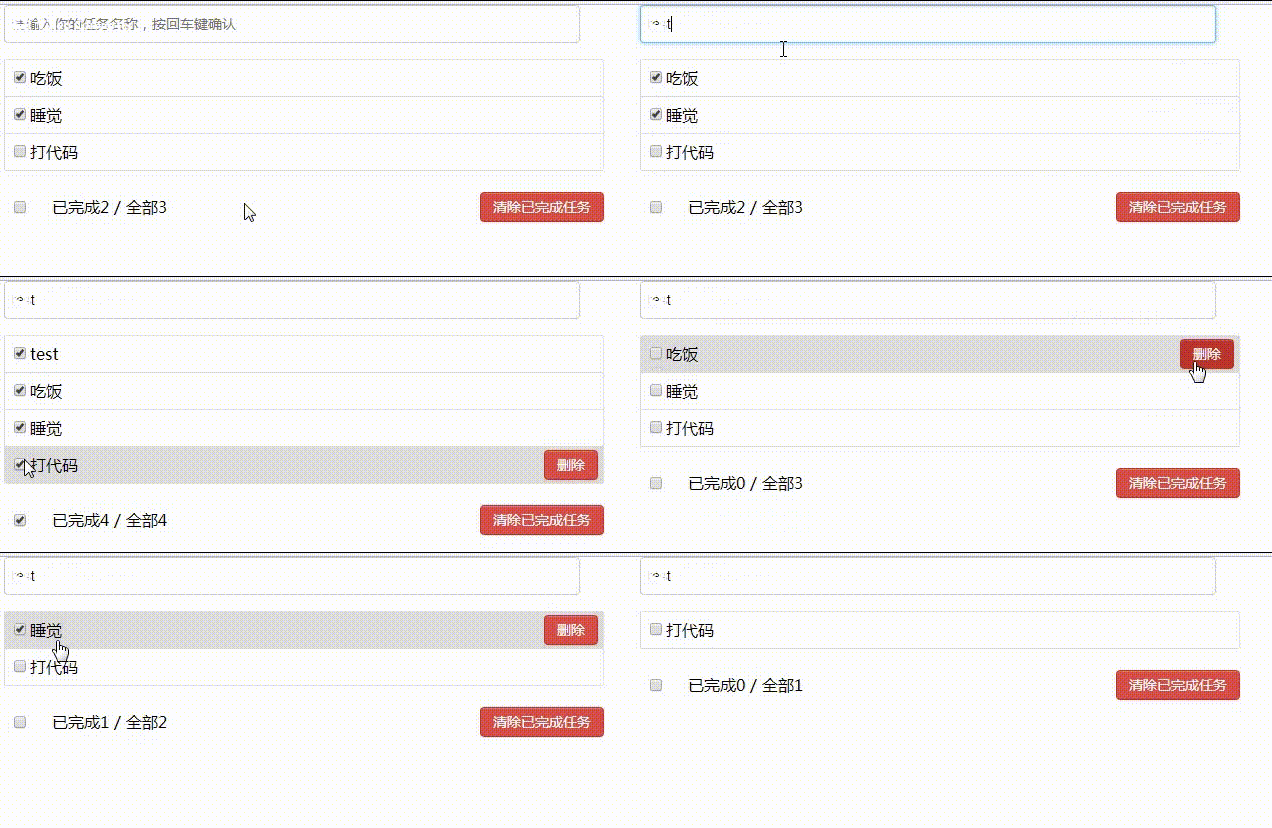
4 成果演示
5 总结
1 如何确定将数据放到哪个组件的state中?
某个组件使用:放在其自身的state中
某些组件使用:放到他们共同的父组件state中(官方称此操作为:状态提升)
2 关于父子之间的通信
【父组件】给【子组件】专递数据:通过props传递
【子组件】给【父组件】传递数据:通过props传递,要求父组件提前给子组件传递一个函数
3 注意defaultChecked和checked的区别
4 状态在哪里,操作状态的方法就在哪里
代码后面会上传到github,reactstudy/src_todos





 扫一扫
扫一扫


 1479
1479

 被折叠的 条评论
为什么被折叠?
被折叠的 条评论
为什么被折叠?
 到【灌水乐园】发言





