



Windows_10_System_Programming_1,Foundations
Foundations
Windows Architecture Overview
Processes
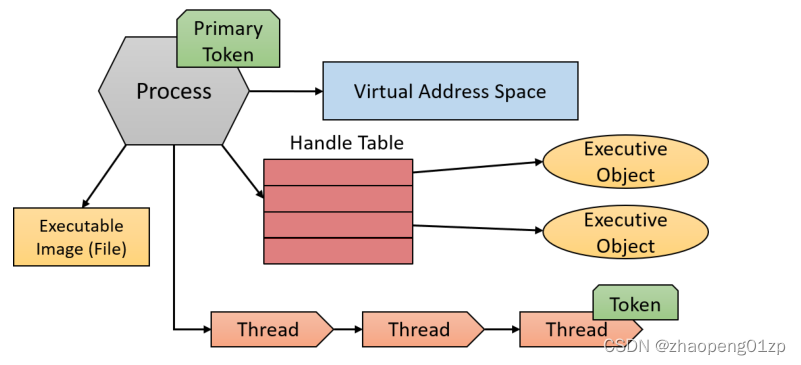
These elements of a process are depicted similar to the following:
一个进程的这些要素被描述得与下面类似:
Dynamic Link Libraries
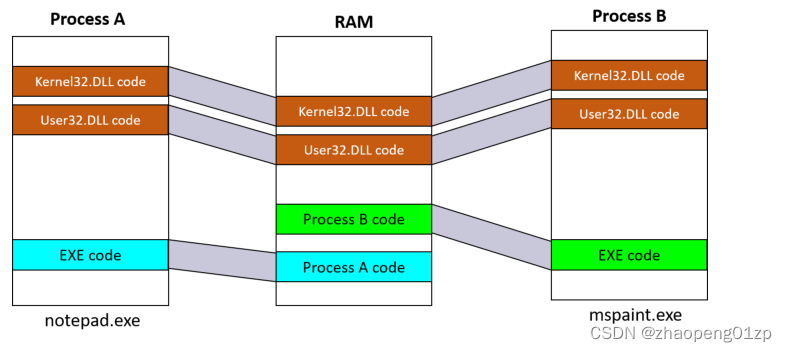
The following Figure shows Two processes using shared DLLs mapped to the same physical (and virtual) addresses.
下图显示了两个使用共享DLLs的进程映射到相同的物理(和虚拟)地址。
General System Architecture
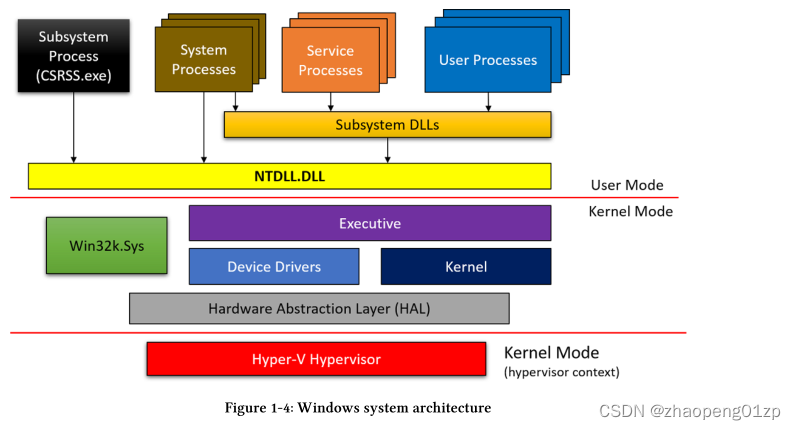
The following Figure shows the general architecture of Windows, comprising of user-mode and kernel-mode components.
下图显示了Windows的一般结构,包括用户模式和内核模式的组件。
Windows Application Development
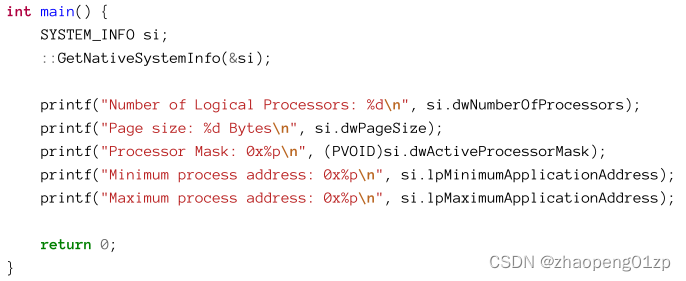
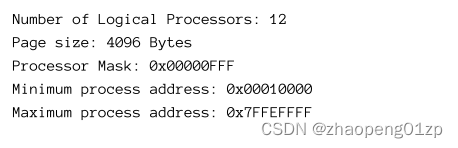
If you run the application by pressing F5 (Debug menu, Start Debugging), the console window will appear and very quickly disappear when the application exits. Using Ctrl+F5 adds a convenient “Press any key to continue” prompt which lets you view the console output before dismissing the window.
如果通过按F5(调试菜单,开始调试)运行应用程序,控制台窗口将会出现,并在应用程序退出时很快消失。使用Ctrl+F5添加了一个方便的“按任意键继续”提示,让您在关闭窗口之前查看控制台输出。
Visual Studio typically creates two solution platforms (x86 and x64), which can be switched easily with the Solution Platforms combobox located in the main toolbar. By default, x86 is selected which would produce the output above. If you switch the platform to x64 and rebuild (assuming you’re running an Intel/AMD 64 bit version of Windows of course), you’ll get a slightly different output:
Visual Studio通常创建两个解决方案平台(x86和x64),可以通过主工具栏中的解决方案平台组合框轻松切换。默认情况下,会选择x86,这将产生上面的输出。如果您将平台切换到x64并重新构建(当然,假设您运行的是Intel/AMD 64位版本的Windows),您将获得略有不同的输出:
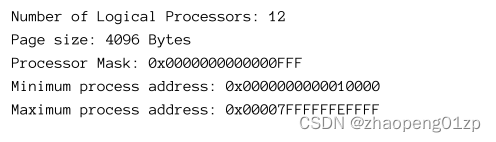
The differences stem from the fact that 64-bit processes use pointers which are 8 bytes in size, while 32-bit processes use 4 bytes pointers. The address space address information from the SYSTEM_INFO structure is typed as pointers, so their sizes vary by process “bitness”.
差异源于64位进程使用8字节大小的指针,而32位进程使用4字节的指针。SYSTEM_INFO结构中的地址空间地址信息被类型化为指针,因此它们的大小因进程“位数”而异。
Working with Strings
UTF-8 - the prevalent encoding used for web pages. This encoding uses one byte for Latin characters that are part of the ASCII set, and more bytes per character for other languages, such as Chinese, Hebrew, Arabic, and many others. This encoding is popular because if the text is mostly English, it’s compact in size. In general, UTF-8 uses from one to four bytes for each character.
UTF 8-用于网页的流行编码。这种编码对属于ASCII集的拉丁字符使用一个字节,对其他语言(如中文、希伯来文、阿拉伯文和其他许多语言)的每个字符使用更多字节。这种编码很受欢迎,因为如果文本主要是英文,它的大小就很紧凑。一般来说,UTF-8为每个字符使用一到四个字节。
UTF-16 - uses two bytes per character in most cases and encompasses all languages in just two bytes. Some more esoteric characters from Chinese and Japanese may require four bytes, but these are rare.
UTF-16 -大多数情况下每个字符使用两个字节,仅用两个字节就涵盖了所有语言。来自中文和日文的一些更深奥的字符可能需要四个字节,但这些是罕见的。
UTF-32 - uses four bytes per character. The easiest to work with, but potentially the most wasteful.
UTF-32 -每个字符使用四个字节。最容易使用,但也可能是最浪费的。
UTF-8 may be the best when size matters, but from a programming standpoint, it’s problematic because random access cannot be used. For example, to get to the 100th character in a UTF-8 string, the code needs to scan from the start of the string and work its way sequentially because there is no way to know where the 100th character may be.
当大小很重要时,UTF-8可能是最好的,但从编程的角度来看,它是有问题的,因为不能使用随机存取。例如,要到达UTF-8字符串中的第100个字符,代码需要从字符串的开头开始扫描,并按顺序进行,因为没有办法知道第100个字符可能在哪里。
On the other hand, UTF-16 is much more convenient to work with programmatically (if we disregard the esoteric cases) because accessing the 100th character means adding 200 bytes to the string’s start address.
另一方面,以编程方式使用UTF-16要方便得多(如果我们不考虑深奥的情况),因为访问第100个字符意味着向字符串的起始地址添加200个字节。
UTF-32 is too wasteful and is rarely used.
UTF-32太浪费,很少用。
Fortunately, Windows uses UTF-16 within its kernel, where each character is exactly 2 bytes.
The Windows API follows suit and uses UTF-16 encoding as well, which is great as strings don’t need to be converted when API calls eventually land in the kernel. However, there is a slight complication with the Windows API.
幸运的是,Windows 在其内核中使用 UTF-16,其中每个字符恰好是 2 个字节。
Windows API 也效仿并使用 UTF-16 编码,这非常好,因为当 API 调用最终进入内核时不需要转换字符串。但是,Windows API 有一点复杂。
It’s best to leave the one byte per character strings alone and use the UTF-16 functions only. Using the ASCII functions will cause the string to be converted to UTF-16 and then used with the UTF-16 function.
最好不要使用每个字符一个字节的字符串,而只使用UTF-16函数。使用ASCII函数将导致字符串被转换为UTF-16,然后用UTF-16函数来使用。
UTF-16 is also beneficial when interoperating with the .NET Framework, because .NET’s string type stored UTF-16 characters only. This means passing a UTF-16 string to .NET does not require any conversion or copying.
UTF-16在与.NET Framework进行互操作时也很有用,因为.NET的字符串类型只存储UTF-16字符。这意味着向.NET传递UTF-16字符串不需要任何转换或复制。
The In_opt and other similar annotations are called Syntax Annotation Language (SAL) and are used to convey metadata information to function and structure definitions. This may be useful for humans as well as static analysis tools. The C++ compiler currently ignores these annotations, but the static analyzer available in Visual Studio Enterprise editions uses it to detect potential errors before actually running the program.
_In_opt_和其他类似的注释被称为语法注释语言(SAL),用于向函数和结构定义传递元数据信息。这可能对人类以及静态分析工具有用。C++编译器当前忽略这些注释,但Visual Studio Enterprise版本中提供的静态分析器在实际运行程序之前使用它来检测潜在的错误。
Let’s break LPCTSTR down:
让我们来分解一下:
L=Long P=Pointer C=Constant STR=String.
The only mystery is the T in between. LPCTSTR is in fact a typedef with one of the following definitions:
唯一的谜团是介于两者之间的T。LPCTSTR实际上是一个具有以下定义之一的typedef:

The term “long pointer” means nothing today. All pointers are the same size in a particular process (4 bytes in 32-bit processes and 8 bytes in 64-bit processes). The terms “long” and “short” (or “near”) are remnants from 16-bit Windows where such terms actually had different meanings. Also, the types LPCTSTR and similar have another equivalent - without the L - PCTSTR, PCWSTR, etc. These are generally preferred in source code.
“长指针”一词在今天毫无意义。在特定进程中,所有指针的大小都相同(32位进程中为4个字节,64位进程为8个字节)。术语“长”和“短”(或“近”)是16位Windows的残余,这些术语实际上有不同的含义。此外,LPCTSTR和类似的类型有另一个等效的-没有L-PCTSTR,PCWSTR等。这些通常是源代码中的首选。
The definition of the UNICODE compilation constant makes LPCTSTR expand to a UTF-16 string, and its absence to an ASCII string. This also means CreateMutex cannot be a function, because the C language does not allow function overloading, where a single function name may have multiple prototypes. CreateMutex is a macro, expanding to CreateMutexW (UNICODE defined) or CreateMutexA (UNICODE not defined). Visual Studio defines the UNICODE constant by default in all new projects, which is a good thing. We always want to use the UTF-16 functions to prevent the conversion from ANSI to UTF-16 (and of course for strings that contain non-ASCII characters, such a conversion is bound to be lossy).
UNICODE编译常量的定义使得LPCTSTR扩展为一个UTF- 16的字符串,而没有它则扩展为 ASCII 字符串。这也意味着CreateMutex不能是一个函数,因为C语言不允许函数重载,即一个函数名可以有多个原型。CreateMutex是一个宏,扩展为CreateMutexW(UNICODE定义)或CreateMutexA(UNICODE未定义)。Visual Studio在所有新项目中默认定义了UNICODE常量,这是一件好事。我们总是希望使用UTF-16函数来防止从ANSI到UTF-16的转换(当然对于包含非ASCII字符的字符串,这样的转换必然是有损失的)。
If the code needs to use a constant UTF-16 string, prefix the string with L to instruct the compiler to convert the string to UTF-16. Here are two versions of a string, one ASCII and the other UTF-16:
如果代码需要使用一个常量UTF-16字符串,请在该字符串前面加上L,以指示编译器将该字符串转换为UTF-16。以下是字符串的两个版本,一个是ASCII,另一个是UTF-16:

Using the macros begs the question of how can we compile code that uses constant strings without explicitly choosing ASCII vs. Unicode? The answer lies with another macro, TEXT.
Here is an example for CreateMutex:
使用宏会引出一个问题,即我们如何在不显式选择 ASCII 与 Unicode 的情况下编译使用常量字符串的代码?答案在于另一个宏,TEXT。
这是 CreateMutex 的示例:

The TEXT macro expands to the constant string with or without the “L” prefix depending on whether the UNICODE macro is defined or not. Since the ASCII functions are more expensive since they convert their values to Unicode before calling the wide functions, we should never use the ASCII functions. This means we can simply use the “L” prefix without the TEXT macro.
TEXT 宏扩展为带有或不带“L”前缀的常量字符串,具体取决于是否定义了 UNICODE 宏。由于 ASCII 函数在调用 wide 函数之前将其值转换为 Unicode,因此成本更高,因此我们永远不应该使用 ASCII 函数。这意味着我们可以简单地使用“L”前缀而不使用 TEXT 宏。
There is a shorter version of the TEXT macro called _T defined in . They are equivalent. Using these macros is still a fairly common practice, which is not bad in itself.
However, I tend not to use it.
<tchar.h> 中定义了一个名为 _T 的 TEXT 宏的较短版本。它们是等价的。使用这些宏仍然是一种相当普遍的做法,这本身并不坏。
但是,我倾向于不使用它。
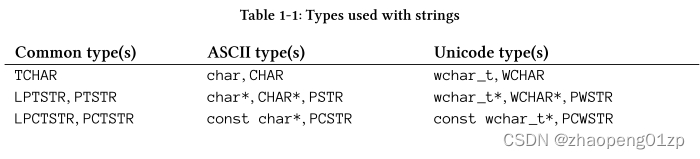
Similar to LPCTSTR there are other typedefs to allow using ASCII or Unicode, based on the UNICODE compilation constant. Table 1-1 shows some of these typedefs.
与 LPCTSTR 类似,还有其他类型定义允许使用 ASCII 或 Unicode,基于 UNICODE 编译常量。表 1-1 显示了其中一些类型定义。
Strings in the C/C++ Runtime
The C/C++ runtime has two sets of functions for manipulating strings. The classic (ASCII) ones begin with “str” such as strlen, strcpy, strcat, etc., but also Unicode versions starting with “wcs”, such as wcslen, wcscpy, wcscat etc.
C/C++ 运行时有两组用于操作字符串的函数。经典的 (ASCII) 版本以“str”开头,例如 strlen、strcpy、strcat 等,但也有以“wcs”开头的 Unicode 版本,例如 wcslen、wcscpy、wcscat 等。
In the same vein as the Windows API, there is a set of macros that expand to either the ASCII or the Unicode version depending on another compilation constant, _UNICODE (notice the underscore). The prefix for these functions is “_tcs”. So we have functions named _tcslen, _tcscpy, _tcscat, etc., all working with the TCHAR type.
与 Windows API 一样,有一组宏根据另一个编译常量 _UNICODE(注意下划线)扩展为 ASCII 或 Unicode 版本。这些函数的前缀是“_tcs”。所以我们有名为 _tcslen、_tcscpy、_tcscat 等的函数,它们都使用 TCHAR 类型。
Visual Studio defines the _UNICODE constant by default so we get the Unicode functions if using the “_tcs” functions. It would very weird if only one of the “UNICODE” constants would be defined, so avoid that.
Visual Studio 默认定义了 _UNICODE 常量,因此如果使用“_tcs”函数,我们将获得 Unicode 函数。如果只定义一个“UNICODE”常量会很奇怪,所以要避免这种情况。
String Output Parameters
Passing strings to functions as input as was done in the CreateMutex case is very common.
Another common need is receiving results in the form of strings. The Windows API uses a few ways to pass back strings results.
像在 CreateMutex 案例中所做的那样,将字符串作为输入传递给函数是很常见的。
另一个常见的需求是接收字符串形式的结果。 Windows API 使用几种方法来传回字符串结果。
The first (and the more common) case is where the client code allocates a buffer to hold the result string and provides the API with the size of the buffer (the maximum size the string can hold), and the API writes the string to the buffer up to the size specified. Some APIs also return the actual number of characters written and/or the number of characters required if the buffer is too small.
第一种(也是更常见的)情况是客户端代码分配一个缓冲区来保存结果字符串并向 API 提供缓冲区的大小(字符串可以保存的最大大小),然后 API 将字符串写入缓冲区达到指定的大小。如果缓冲区太小,某些 API 还会返回实际写入的字符数和/或所需的字符数。
Consider the GetSystemDirectory function defined like so:
考虑像这样定义的 GetSystemDirectory 函数:
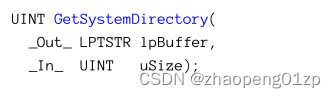
The function accepts a string buffer and its size and returns the number of characters written back. Notice all sizes are in characters, rather than bytes, which is convenient. The function returns zero in case of failure. Here is an example usage (error handling omitted for now):
该函数接受一个字符串缓冲区及其大小,并返回写回的字符数。请注意,所有大小均以字符为单位,而不是字节,这很方便。如果失败,该函数将返回零。这是一个示例用法(现在省略了错误处理):
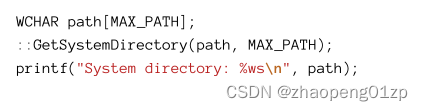
MAX_PATH is defined in the Windows headers as 260, which is the standard maximum path in Windows (this limit can be extended starting with Windows 10). Notice that printf uses %ws as the string format to indicate it’s a Unicode string, since UNICODE is defined by default and so all strings are Unicode.
MAX_PATH 在 Windows 标头中定义为 260,这是 Windows 中的标准最大路径(这个限制可以从 Windows 10 开始扩展)。
请注意,printf 使用 %ws 作为字符串格式来指示它是一个 Unicode 字符串,因为 UNICODE 是默认定义的,所以所有字符串都是 Unicode。
The second common case is where the client code provides a string pointer only (via its address) and the API itself allocates the memory and places the resulting pointer in the provided variable. This means the client code is tasked with freeing the memory once the resulting string is no longer needed. The trick is to use the correct function to free the memory. The API’s documentation indicates which function to use. Here is an example for this usage with the FormatMessage function defined like so (its Unicode variant):
第二种常见情况是客户端代码仅提供一个字符串指针(通过其地址),API 本身分配内存并将结果指针放在提供的变量中。这意味着一旦不再需要生成的字符串,客户端代码的任务就是释放内存。诀窍是使用正确的函数来释放内存。 API 的文档指示要使用的函数。下面是一个这样使用 FormatMessage 函数的示例(它的 Unicode 变体):
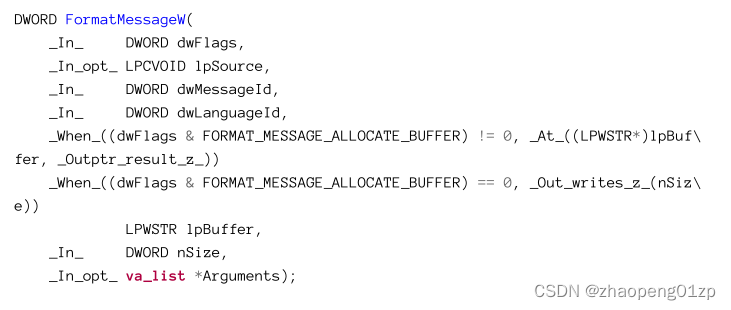
Looks scary, right? I purposefully included the full SAL annotations for this function as the lpBuffer parameter is tricky. FormatMessage returns a string representation of an error number (we’ll discuss errors in more detail in the section “API Errors” later in this chapter). The function is flexible in the sense that it can allocate the string itself or have the client provide a buffer to hold the resulting string. The actual behavior depends on the first dwFlags parameter: if it includes the FORMAT_MESSAGE_ALLOCATE_BUFFER flag, the function will allocate the buffer of the correct size. If the flag is absent, it’s up to the caller to provide storage for the returned string.
看起来很可怕,对吧?我特意为这个函数包含了完整的 SAL 注释,因为 lpBuffer 参数很棘手。 FormatMessage 返回错误编号的字符串表示(我们将在本章后面的“API 错误”部分更详细地讨论错误)。该函数在某种意义上是灵活的,它可以自己分配字符串或让客户端提供一个缓冲区来保存结果字符串。实际行为取决于第一个 dwFlags 参数:如果它包含 FORMAT_MESSAGE_ALLOCATE_BUFFER 标志,函数将分配正确大小的缓冲区。如果该标志不存在,则由调用者为返回的字符串提供存储。
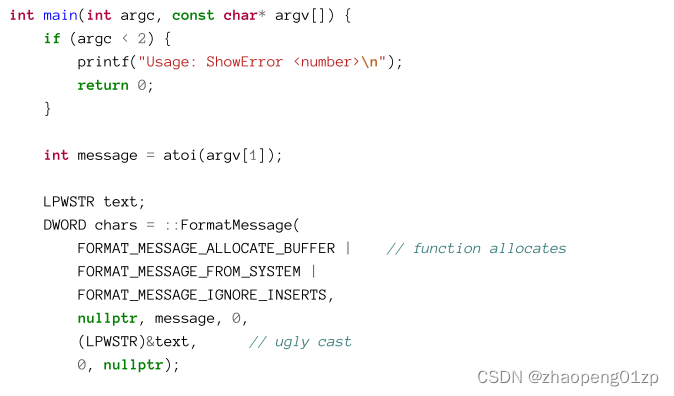
All this makes the function a bit tricky, at least because if the former option is selected, the pointer type should be LPWSTR* —— that is, a pointer to a pointer to be filled in by the function.
This requires a nasty cast to make the compiler happy.
所有这些都让函数有点棘手,至少因为如果选择了前一个选项,指针类型应该是 LPWSTR*——即指向函数要填充的指针的指针。
这需要一个令人讨厌的强制转换才能让编译器满意。
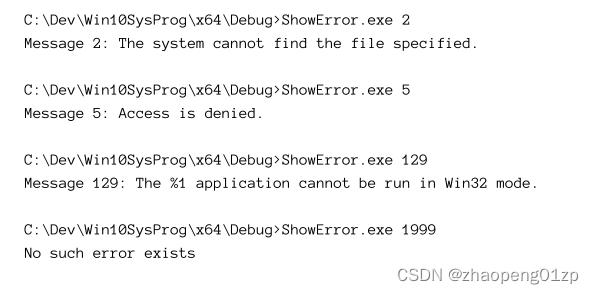
Here is a simple main function that accepts an error number from the command line arguments and shows its string representation (if any). It uses the option of letting the function make the allocation. The reason is that there is no way to know what length the string should be, so it’s best to let the function allocate the correct size.
这是一个简单的主函数,它从命令行参数中接受错误号并显示其字符串表示形式(如果有)。它使用让函数进行分配的选项(FORMAT_MESSAGE_ALLOCATE_BUFFER 标志)。原因是没有办法知道字符串的长度,所以最好让函数分配正确的大小。
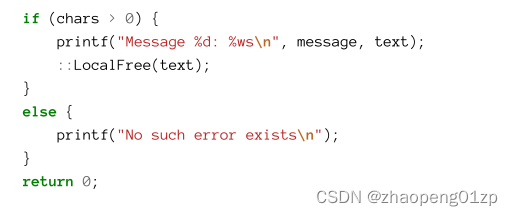
Notice the call to the LocalFree function to free the string if the call is successful. The documentation for FormatMessage states that this is the function to call to free the buffer.
Here is an example run:
如果FormatMessage调用成功,请注意对 LocalFree 函数的调用以释放字符串。 FormatMessage 的文档指出这是释放缓冲区的调用函数。
这是一个示例运行:
Safe String Functions
Some of the classic C/C++ runtime string functions (and some similar functions in the Windows API) are not considered “safe” from a security and reliability standpoint. For example, the strcpy function is problematic because it copies the source string to the target pointer until a NULL terminator is reached. This could overflow the target buffer and cause a crash in the good case (the buffer could be on the stack for example, and corrupt the return address stored there), and be used as a buffer overflow attack where an alternate return address is stored on the stack, jumping to a prepared shellcode.
从安全性和可靠性的角度来看,一些经典的 C/C++ 运行时字符串函数(以及 Windows API 中的一些类似函数)并不被认为是“安全的”。例如,strcpy 函数是有问题的,因为它将源字符串复制到目标指针,直到到达 NULL 终止符为止。这可能会溢出目标缓冲区并在好的情况下导致崩溃(例如,缓冲区可能在堆栈上,并破坏存储在那里的返回地址),并被用作缓冲区溢出攻击,其中备用返回地址存储在堆栈,跳转到准备好的 shellcode。
To mitigate these potential vulnerabilities, a set of “safe” string functions were added to the C/C++ runtime library by Microsoft, where an extra parameter is used to specify the maximum size of a target buffer, so it will never overflow. These functions have a “_s” suffix, such as strcpy_s, wcscat_s, etc.
Here are some examples using these functions:
为了缓解这些潜在的漏洞,微软在 C/C++ 运行时库中添加了一组“安全”字符串函数,其中一个额外的参数用于指定目标缓冲区的最大大小,因此它永远不会溢出。这些函数都有“_s”后缀,例如strcpy_s、wcscat_s等。
以下是使用这些函数的一些示例:
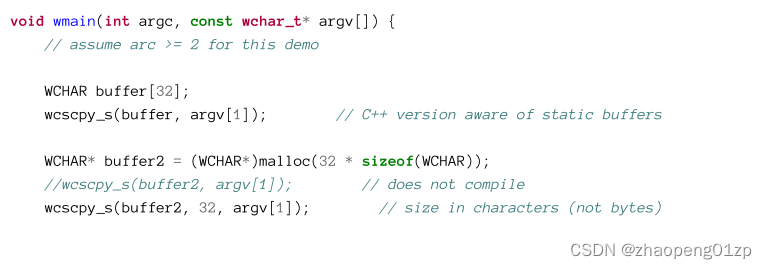
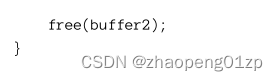
The maximum size is always specified in characters and not bytes. Also note that these functions are able to calculate the maximum size automatically if the target buffer is statically allocated, which is convenient.
最大大小始终以字符而不是字节为单位指定。另请注意,如果目标缓冲区是静态分配的(例如第一个wcscpy_s函数调用),这些函数能够自动计算最大大小,这很方便。
Another set of safe string functions was also added to the Windows API, at least for the purpose of reducing dependency on the C/C++ runtime. These functions are declared (and implemented) in the header . They are built according to the Windows API conventions, where the functions are actually macros expanding to functions with “A” or “W” suffix. Here are some simple examples of usage (using the same declarations as above):
另一组安全字符串函数也被添加到 Windows API,至少是为了减少对 C/C++ 运行时的依赖。这些函数在标头 <strsafe.h> 中声明(和实现)。它们是根据 Windows API 约定构建的,其中函数实际上是扩展为带有“A”或“W”后缀的函数的宏。以下是一些简单的用法示例(使用与上述相同的声明):
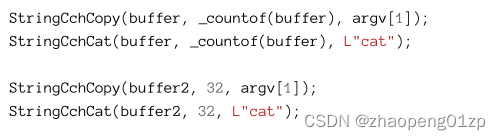
“Cch” stands for Count of Characters.
“Cch”代表字符计数。
Notice these functions don’t have a C++ variant that knows how to handle statically allocated buffers. The solution is to use the _countof macro that returns the number of elements in an array. Its definition is something like sizeof(a)/sizeof(a[0]) given an array a.
Which set of functions should you use? It’s mostly a matter of taste. The important point is to avoid the classic, non-safe functions. If you do try to use them, you’ll get a compiler error like this:
请注意,这些函数没有知道如何处理静态分配缓冲区的 C++ 变体。解决方案是使用返回数组中元素数量的 _countof 宏。它的定义类似于给定数组 a 的 sizeof(a)/sizeof(a[0])。
您应该使用哪一组函数?这主要是品味问题。重要的一点是避免经典的、非安全的功能。如果你确实尝试使用它们,你会得到这样的编译器错误:

Clearly, this error can be disabled by defining _CRT_SECURE_NO_WARNINGS before including the C/C++ headers, but it would be a bad idea. This macro exists to help maintain compatibility with old source code that probably should not be touched when compiled with recent compilers.
显然,可以通过在包含 C/C++ 标头之前定义 _CRT_SECURE_NO_WARNINGS 来禁用此错误,但这是一个坏主意。这个宏的存在是为了帮助保持与旧源代码的兼容性,这些旧源代码在使用最新的编译器编译时可能不应该被触及。
32-bit vs. 64-bit Development
The programming model of 32 bit and 64 bit is identical from an API perspective. You should be able to compile to 32 or 64 bit just by selecting the required configuration in Visual Studio and hit Build. However, if the code should build successfully for both 32-bit and 64-bit targets, coding must be done carefully to use types correctly. In 64-bit, pointers are 8 bytes in size, whereas in 32-bit they are just 4 bytes. This change can lead to errors if a pointer’s size is assumed to be of a certain value. For example, consider this cast operation:
从 API 的角度来看,32 位和 64 位的编程模型是相同的。只需在 Visual Studio 中选择所需的配置并点击“构建”,您就应该能够编译为 32 位或 64 位。但是,如果代码应该为 32 位和 64 位目标成功构建,则编码时必须小心翼翼,正确使用类型。在 64 位中,指针大小为 8 个字节,而在 32 位中,它们仅为 4 个字节。如果假定指针的大小具有特定值,则此更改可能会导致错误。例如,考虑这个转换操作:
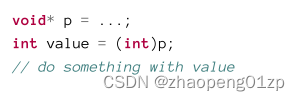
This code is buggy, since in 64-bit the pointer value is truncated to 4 bytes to fit into int (int is still 4 bytes in a 64-bit compilation as well). If such a cast is truly needed, an alternate type should be used instead - INT_PTR:
这段代码有问题,因为在 64 位中,指针值被截断为 4 个字节以适合 int(在 64 位编译中 int 仍然是 4 个字节)。如果确实需要这样的转换,则应使用替代类型 - INT_PTR:
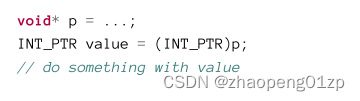
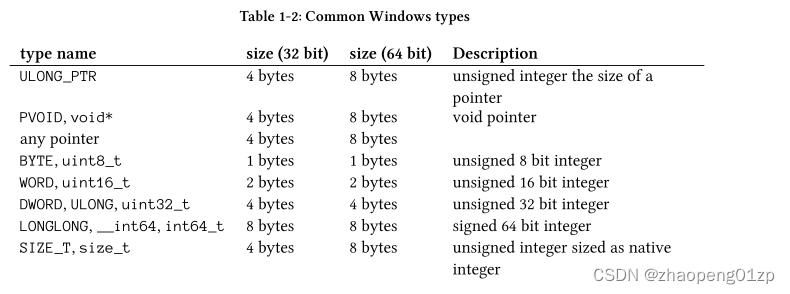
INT_PTR means: “int the size of a pointer”. The Windows headers define several types like this one for this exact reason. Other types maintain their size regardless of the compilation “bitness”. Table 1-2 shows some examples of common types and their sizes.
INT_PTR 表示:“int 指针的大小”。正是出于这个原因,Windows 标头定义了多种类型。不管编译“位数”如何,其他类型都保持其大小。表 1-2 显示了一些常见类型及其大小的示例。
The differences between 32 bit and 64 bit go beyond type sizes. The address space of a 64-bit process is 128 TB (Windows 8.1 and later) compared to a mere 2 GB for 32-bit processes. On x64 systems (Intel/AMD), 32-bit processes can execute just fine thanks to a translation layer called WOW64 (Windows on Windows 64).
32 位和 64 位之间的区别不仅仅是类型大小。 64 位进程的地址空间为 128 TB(Windows 8.1 及更高版本),而 32 位进程仅为 2 GB。在 x64 系统 (Intel/AMD) 上,由于名为 WOW64 的转换层(Windows on Windows 64),32 位进程可以很好地执行。
Lastly, if code should be compiled in 64 bit only (or 32 bit only), the macro _WIN64 is defined for 64-bit compilations. For example, we could replace the following line from HelloWin:
最后,如果代码应该仅在 64 位(或仅 32 位)中编译,则为 64 位编译定义宏 _WIN64。例如,我们可以替换 HelloWin 中的以下行:

with
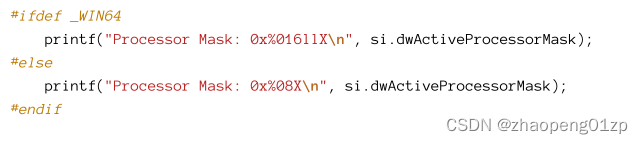
This would be somewhat clearer rather than using the %p format string which automatically expects 4 bytes in 32-bit processes and 8 bytes in 64-bit processes. This forced a cast to PVOID because dwActiveProcessorMask is of type DWORD_PTR and would generate a warning when used with %p.
这会比使用 %p 格式字符串更清晰,它自动在 32 位进程中期望 4 个字节,在 64 位进程中自动期望 8 个字节。这强制转换为 PVOID,因为 dwActiveProcessorMask 是 DWORD_PTR 类型,并且在与 %p 一起使用时会生成警告。
A better option here is to specify %zu or %zX, which is used to format size_t values, equivalent to DWORD_PTR.
这里更好的选择是指定 %zu 或 %zX,它们用于格式化 size_t 值,相当于 DWORD_PTR。
Coding Conventions
Having any coding conventions is good for consistency and clarity, but the actual conventions vary, of course.
拥有任何编码约定都有利于一致性和清晰度,但实际约定当然会有所不同。
-
Windows API functions are used with a double colon prefix. Example: ::CreateFile.
-
Windows API 函数使用双冒号前缀。示例:::CreateFile。
-
Type names use Pascal casing (first letter is capital, and every word starts with a capital letter as well. Examples: Book, SolidBrush. The exception is UI related classes that start with a capital ‘C’; this is for consistency with WTL.
-
类型名称使用 Pascal 大小写(第一个字母大写,每个单词也以大写字母开头。示例:Book、SolidBrush。以大写“C”开头的 UI 相关类除外;这是为了与 WTL 保持一致。
-
Private member variables in C++ classes start with an underscore and use camel casing (first letter is small and subsequent words start with capital letter). Examples: _size, isRunning. The exception is for WTL classes where private member variable names start with m. This is for consistency with ATL/WTL style.
-
C++ 类中的私有成员变量以下划线开头并使用驼峰式大小写(第一个字母小写,后面的单词以大写字母开头)。示例:_size、isRunning。例外情况是私有成员变量名称以 m 开头的 WTL 类。这是为了与 ATL/WTL 风格保持一致。
-
Variable names do not use the old Hungarian notation. However, there may be some occasional exceptions, such as an h prefix for a handle and a p prefix for a pointer.
-
变量名不使用旧的匈牙利表示法。但是,偶尔可能会有一些例外,例如句柄的 h 前缀和指针的 p 前缀。
-
Function names follow the Windows API convention to use Pascal casing.
-
函数名称遵循 Windows API 约定以使用 Pascal 大小写。
-
When common data types are needed such as vectors, the C++ standard library is used unless there is good reason to use something else.
-
当需要常用数据类型(如向量)时,除非有充分的理由使用其他东西,否则会使用 C++ 标准库。
-
We’ll be using the Windows Implementation Library (WIL) from Microsoft, released in a Nuget package. This library contains helpful types for easier working with the Windows API. A brief introduction to WIL is in the next chapter.
-
我们将使用 Microsoft 的 Windows 实现库 (WIL),它以 Nuget 包的形式发布。此库包含有助于更轻松地使用 Windows API 的类型。下一章将简要介绍 WIL。
Hungarian notation uses prefixes to make variable names hint at their type. Examples: szName, dwValue. This convention is now considered obsolete, although parameter names and structure members in the Windows API use it a lot.
匈牙利表示法使用前缀使变量名暗示其类型。示例:szName、dwValue。这个约定现在被认为已经过时,尽管 Windows API 中的参数名称和结构成员经常使用它。
C++ Usage
We won’t be using any “complex” C++ features, but mostly features that enhance productivity, help with error avoidance. Here are the main C++ features we’ll use:
我们不会使用任何“复杂”的 C++ 功能,但主要是提高生产力的功能,有助于避免错误。以下是我们将使用的主要 C++ 功能:
-
The nullptr keyword, representing a true NULL pointer.
-
nullptr 关键字,表示真正的 NULL 指针。
-
The auto keyword that allows type inference when declaring and initializing variables.
This is useful to reduce clutter, save some typing, and focus on the important parts of the code. -
在声明和初始化变量时允许类型推断的 auto 关键字。
这对于减少混乱、节省一些输入并专注于代码的重要部分很有用。 -
The new and delete operators.
-
新建和删除运算符。
-
Scoped enums (enum class).
-
作用域枚举(枚举类)。
-
Classes with member variables and functions.
-
具有成员变量和函数的类。
-
Templates, where they make sense.
-
模板,在它们有意义的地方。
-
Constructors and destructors, especially for building RAII (Resource Acquisition Is Initialization) types. RAII will be discussed in greater detail in the next chapter.
-
构造函数和析构函数,特别是用于构建 RAII(资源获取即初始化)类型。下一章将更详细地讨论 RAII。
Handling API Errors
Windows API function may fail for a variety of reasons. Unfortunately, the way a function indicates success or failure is not consistent across all functions. That said, there are very few cases, briefly described in table 1-3.
Windows API 函数可能因各种原因而失败。不幸的是,函数指示成功或失败的方式在所有函数中并不一致。也就是说,案例很少,在表 1-3 中进行了简要描述。
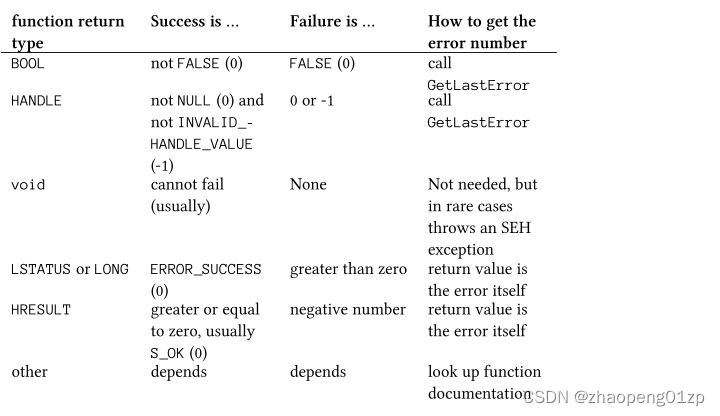
Not needed, but in rare cases throws an SEH exception.
不需要,但在极少数情况下会抛出 SEH 异常。
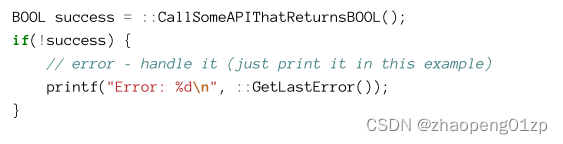
The most common case is returning a BOOL type. The BOOL type is not the same as the C++ bool type; BOOL is in fact a 32-bit signed integer. A non-zero return value indicates success, while a returned zero (FALSE) means the function has failed. It’s important not to test against the TRUE (1) value explicitly, since a success can sometimes return a value different from one. If the function fails, the actual error code is available by calling GetLastError, responsible for storing the last error from an API function occurring on the current thread.
Put another way, each thread has its own last error value, which makes sense in a multithreaded environment like Windows - multiple threads may call API functions at the same time.
最常见的情况是返回 BOOL 类型。 BOOL 类型与 C++ 的 bool 类型不同; BOOL 实际上是一个 32 位有符号整数。非零返回值表示成功,而返回零 (FALSE) 表示函数失败。重要的是不要明确地针对 TRUE (1) 值进行测试,因为成功有时会返回一个不同于 1 的值。如果该函数失败,则可通过调用 GetLastError 获得实际错误代码,它负责存储当前线程上发生的 API 函数的最后一个错误。
换句话说,每个线程都有自己的最后一个错误值,这在像 Windows 这样的多线程环境中是有意义的——多个线程可以同时调用 API 函数。
The second item from table 1-3 is for functions returning void. There are actually very few such functions, and most cannot fail. Unfortunately, there are very few such functions that can actually fail in extreme circumstances (“extreme” usually means very low memory resources) with a Structured Exception Handling (SEH) exception. We’ll discuss SEH in chapter 20. You probably don’t need to worry too much about such functions, because if one of these does fail, it means the entire process and possibly the system is in big trouble anyway.
表 1-3 中的第二项是用于返回 void 的函数。实际上这样的函数非常很少,而且大部分都不会失败。不幸的是,在极端情况下(“极端”通常意味着非常低的内存资源),有极少数这样的函数会因结构化异常处理 (SEH) 异常而失败。我们将在第 20 章讨论 SEH。您可能不需要太担心这类函数,因为如果其中一个函数确实失败了,则意味着整个进程甚至系统可能都遇到了大麻烦。
Next, there are functions returning LSTATUS or LONG, both of which are just signed 32-bit integers. The most common APIs using these scheme are the registry functions we’ll meet in chapter 17. These functions return ERROR_SUCCESS (0) if successful. Otherwise, the returned value is the error itself (calling GetLastError is not needed).
接下来,有返回 LSTATUS 或 LONG 的函数,它们都只是带符号的 32 位整数。使用这些方案的最常见 API 是我们将在第 17 章中遇到的注册表函数。如果成功,这些函数将返回 ERROR_SUCCESS (0)。否则,返回值就是错误本身(不需要调用 GetLastError)。
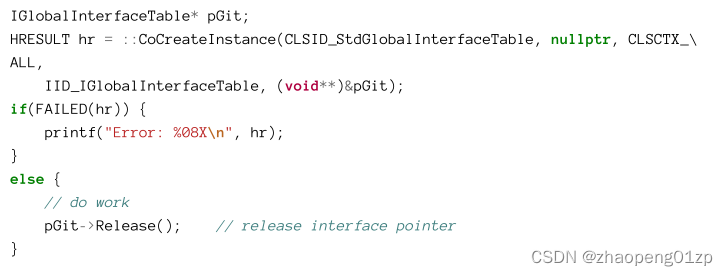
Next on the list from table 1-3 is the HRESULT type, which is yet again a signed 32-bit integer. This return type is common for Component Object Model (COM) functions (COM is discussed in chapter 18). Zero or a positive value indicates success, while a negative value indicates an error, identified by the returned value. In most cases, checking for success or failure is done with the SUCCEEDED or FAILED macros, respectfully, returning just true or false. In rare cases the code would need to look at the actual value.
表 1-3 中的下一个列表是 HRESULT 类型,它也是一个带符号的 32 位整数。这种返回类型在组件对象模型(COM)函数中很常见(COM将在第18章中讨论)。零或正值表示成功,而负值表示错误,由返回值标识。在大多数情况下,对成功或失败的检查是通过SUCCEEDED或FAILED宏来完成的,分别只返回真或假(这两个宏的值)。在极少数情况下,代码需要查看实际值。
The Windows headers contain a macro to convert a Win32 error (GetLastError) to an appropriate HRESULT: HRESULT_FROM_WIN32, which is useful if a COM method needs to return an error based on a failed BOOL-returning API.
Here is an example for handling an HRESULT based error:
Windows 标头包含一个宏,用于将 Win32 错误 (GetLastError) 转换为适当的 HRESULT:HRESULT_FROM_WIN32,如果 COM 方法需要基于失败的返回 BOOL 的 API 返回错误,这将非常有用。
以下是处理基于 HRESULT 的错误的示例:
The last entry in table 1-3 is for “other” functions. For example, the FormatMessage function we met a few sections ago returns a DWORD indicating the number of characters copied to the provided buffer, or zero if the function fails. There are no hard and fast rules for these kinds of functions - the documentation is the best guide. Luckily, there are not that many of them.
表1-3中的最后一条是 "其他 "函数。例如,我们在几节前见过的FormatMessage函数返回一个DWORD,表示复制到提供的缓冲区的字符数,如果函数失败,则返回0。对于这类函数没有硬性规定–文档是最好的指南。幸运的是,这些函数的数量并不多。
Defining Custom Error Codes
The error code mechanism exposed by GetLastError can be used by applications as well to set error codes in a similar vein. This is accomplished by calling SetLastError with the error to set on the current thread. A function can use one of the many predefined error codes, or it can define its own error codes. To prevent any collision with system-defined codes, the application should set bit 29 in the defined error code.
Here is an example of a function that uses this technique:
应用程序也可以使用 GetLastError 公开的错误代码机制,以类似的方式设置错误代码。这是通过使用要在当前线程上设置的错误去调用 SetLastError 来完成的。函数可以使用许多预定义的错误代码之一,也可以定义自己的错误代码。为防止与系统定义的代码发生任何冲突,应用程序应在定义的错误代码中设置第 29 位。
以下是使用此技术的函数示例:
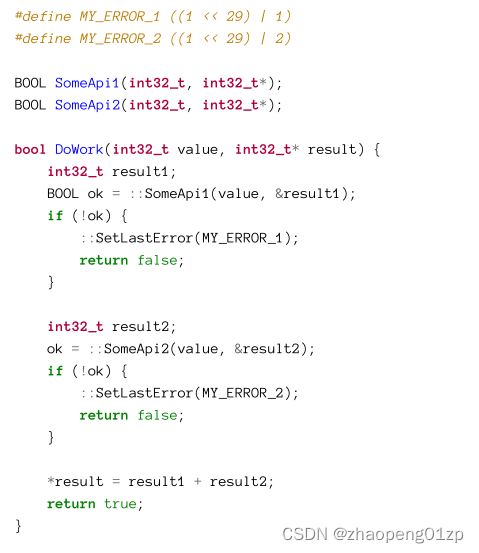
Note that in my functions, I’m free to use the C++ bool type which can be true or false, rather being a 32-bit integer (BOOL). The custom-defined error codes have bit 29 set, making sure they don’t clash with a system defined error code.
请注意,在我的函数中,我可以自由使用 C++ bool 类型,它可以是 true 或 false,而不是 32 位整数 (BOOL)。自定义错误代码设置了第 29 位,确保它们不会与系统定义的错误代码冲突。
The Windows Version
In some cases it’s desirable to query the system for the Windows OS version on which the current application is executing. The official version numbers of Windows releases is shown in table 1-4.
在某些情况下,需要向系统查询当前应用程序正在执行的 Windows 操作系统版本。 Windows 发布的正式版本号如表 1-4 所示。
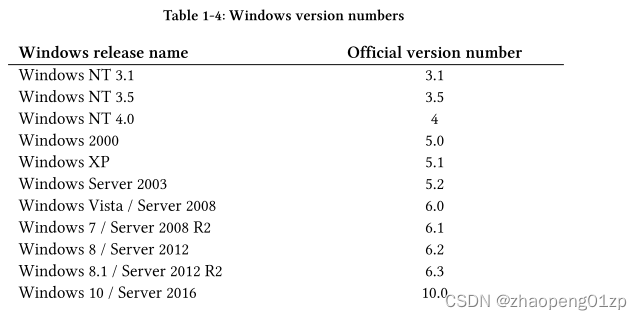
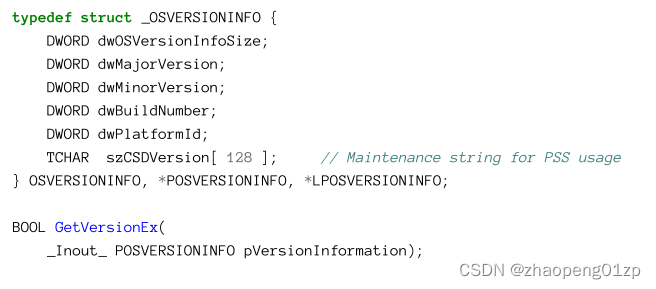
You may be wondering why the version numbers have these values - we’ll get to that in a moment. The classic function to get this information is GetVersionEx, declared like so:
您可能想知道为什么版本号具有这些值 - 我们稍后会谈到。获取此信息的经典函数是 GetVersionEx,声明如下:
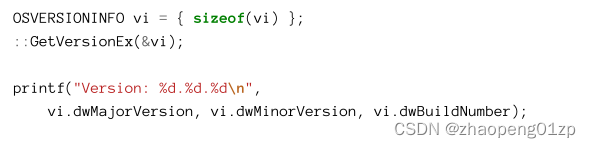
Using it is fairly straightforward:
使用它非常简单:
However, compiling it with recent SDKs causes a compilation error: “error C4996: ‘GetVersionExW’: was declared deprecated”.
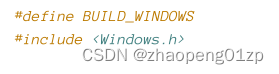
The reason will become clear shortly. It’s possible to remove this deprecation by adding the following definition before including :
但是,使用最新的 SDK 编译它会导致编译错误:“error C4996: ‘GetVersionExW’: was declared deprecated”。(declared deprecated:宣布弃用)
原因很快就会清楚。可以通过在包含 <windows.h> 之前添加以下定义来删除此弃用:
Running the above code snippet on Windows up to 8 (inclusive) gives back the correct Windows version. However, running it on Windows 8.1 or 10 (and their server equivalents), will always display the following output:
在 Windows 8(含)以下运行上述代码片段会返回正确的 Windows 版本。但是,在 Windows 8.1 或 10(及其等效服务器)上运行它,将始终显示以下输出:
Version: 6.2.9200
This is the Windows version for Windows 8. Why? This was a defensive mechanism devised by Microsoft after some issues applications had on Windows Vista. Since Vista came out on January 2006, almost five years after Windows XP, many applications were built in the XP days, and some went to the trouble of checking the minimum Windows version to be XP using the following code:
这是 Windows 8 的 Windows 版本。为什么?这是 Microsoft 在应用程序在 Windows Vista 上出现一些问题后设计的一种防御机制。自从 Vista 于 2006 年 1 月问世以来,也就是 Windows XP 将近五年后,许多应用程序都是在 XP 时代构建的,有些应用程序不厌其烦地使用以下代码检查最低 Windows 版本是否为 XP:
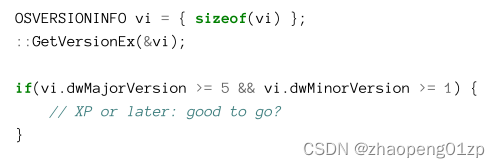
This code is buggy, because it doesn’t foresee the possibility of having a major number of 6 or higher with a minor version of zero. So, for Vista, the above condition failed and would notify the user “Please use XP or later”. The correct check would have been this:
这段代码是有缺陷的,因为它没有预见到主版本号为6或更高,而次版本号为0的可能性。所以,对于Vista来说,上述条件是失败的,并且会通知用户 “请使用XP或更高版本”。正确的检查应该是这样的:

Unfortunately, too many applications had that bug, and so Microsoft decided for Windows 7 not to increase the major version number but only increment the minor number to 1; this solved the bug. What about Windows 8? Microsoft was still afraid of the above bug and so incremented the minor number only, giving 6.2. The reasoning for Windows 8.1 was similar (6.3). But what about Windows 10? Should the version be 6.4? This seems like a total defeat - how long can Microsoft continue leaving the major version as 6? Well, Windows 10 has version number 10.0. Does that mean all is well? Not really. As we saw, the call to GetVersionEx returns the Windows 8 numbers even on Windows 10. What gives?
不幸的是,太多的应用程序都有这个错误,因此微软决定 Windows 7 不增加主要版本号,而只将次要版本号增加到 1;这解决了这个错误。 Windows 8 呢?微软仍然害怕上述错误,因此只增加了次要编号,给出了 6.2。 Windows 8.1 的推理类似 (6.3)。但是 Windows 10 呢?版本应该是6.4吗?这似乎是一场彻底的失败——微软还能继续将主要版本保留为 6 多长时间?那么,Windows 10 的版本号是 10.0。这是否意味着一切都很好?并不真地。正如我们所看到的,即使在 Windows 10 上,对 GetVersionEx 的调用也会返回 Windows 8 编号。有什么用?
A new feature has been introduced (called Switchback) that returned the Windows version as no higher than 8 (6.2) to prevent compatibility issues, unless the application in question has declared its knowledge of a higher-version Windows in existence. This is accomplished using a manifest file - an optional XML file with configuration information - that can be used to indicate a specific Windows version awareness, from Vista to 10.
一个新的功能已经被引入(称为Switchback),该功能返回的Windows版本为不高于8(6.2),以防止出现兼容性问题,除非相关应用程序声明其知道存在更高版本的 Windows。这是通过一个清单文件来实现的(一个带有配置信息的可选的 XML 文件),该文件可以用来表明特定的Windows版本意识,从Vista到10。
This is not just for manipulating the returned version number, but also for some behavioral changes of some APIs for compatibility. This is accomplished using Shims, which changes API behavior depending on the selected OS version.
这不仅仅是为了操纵返回的版本号,也是为了兼容而对一些API进行一些行为上的改变。这是用Shims完成的,它会根据所选的操作系统版本改变API行为。
In Visual Studio, a manifest can be added by following these steps:
在 Visual Studio 中,可以按照以下步骤添加清单:
-
Add an XML file to the project with a name like manifest.xml. This will hold the manifest file’s contents.
-
将 XML 文件添加到项目中,名称类似于 manifest.xml。这将保存清单文件的内容。
-
Fill in the manifest (shown after this list).
-
填写清单(显示在此列表之后)。
-
Open Project/Properties and navigate to the Manifest Tool node, Input and Output. In Additional Manifest Files, type the name of the manifest file (figure 1-8).
-
打开 Project/Properties 并导航到 Manifest Tool 节点、Input and Output。在 Additional Manifest Files 中,键入清单文件的名称(图 1-8)。
-
Build the project normally.
-
正常构建项目。
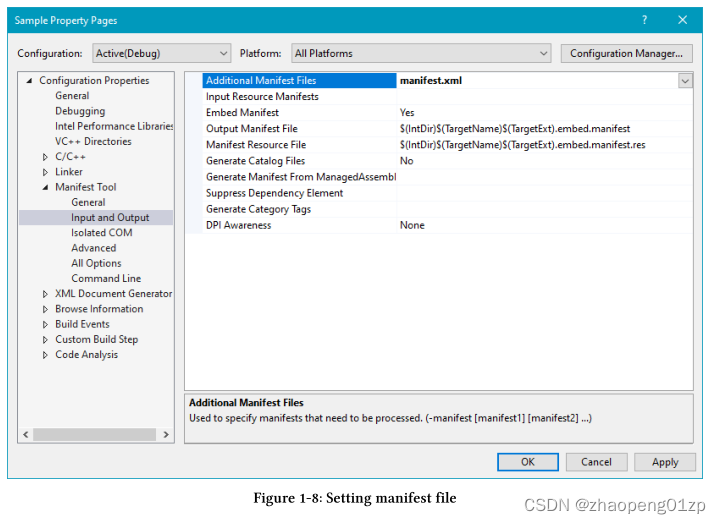
Notice the setting Embed Manifest = Yes in figure 1-8. This embeds the manifest as a resource in the executable rather than leaving it as a loose file in the same directory as the executable and always named {exename}.exe.manifest.
注意图 1-8 中的设置 Embed Manifest = Yes。这会将清单作为资源嵌入可执行文件中,而不是将其作为松散文件保留在与可执行文件相同的目录中,并且始终命名为 {exename}.exe.manifest。
The manifest can have several elements, but we focus on just one in this chapter (we’ll examine others in due course). Here it is:
清单可以有多个元素,但我们在本章中只关注一个元素(我们将在适当的时候检查其他元素)。这里是:
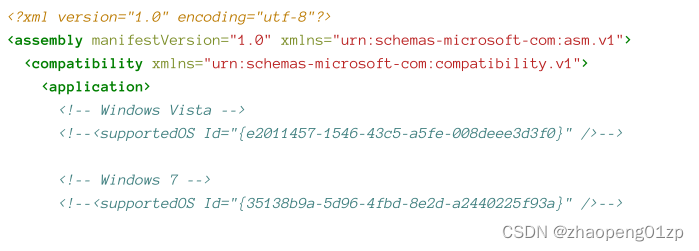
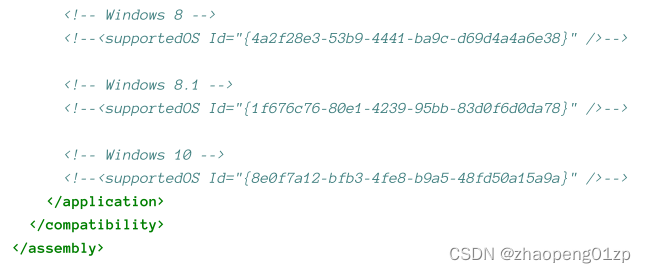
The easiest way to get a nice manifest file to tweak is (ironically perhaps) create a simple console C# application, then add to the project an Application Manifest File item, which will generate the above XML, among other elements.
获得一个好的清单文件进行调整的最简单方法是(可能具有讽刺意味的是)创建一个简单的控制台 C# 应用程序,然后向项目添加一个应用程序清单文件项,它将生成上述 XML 以及其他元素。
The GUIDs for the various OS versions have been created when those versions were released.
This means there is no way an application developed in the Windows 7 days could get a version of Windows 10, for example.
If you uncomment the Windows 8.1 version for instance and re-run the application, the output would be:
各种操作系统版本的GUID是在这些版本发布时创建的。 这意味着在Windows 7时代开发的应用程序不可能得到Windows 10的版本,例如,
如果你取消对Windows 8.1版本的注释并重新运行应用程序,输出结果将是:
Version: 6.3.9600
If you uncomment the Windows 10 GUID (whether the Windows 8.1 GUID is commented out or not is unimportant), you’ll get the real Windows 10 version (if running on a Windows 10 machine, of course):
如果你取消对Windows 10 GUID的注释(Windows 8.1 GUID是否被注释掉并不重要),你会得到真正的Windows 10版本(当然,如果在Windows 10机器上运行的话):
Version: 10.0.18362
Getting the Windows Version
Given that GetVersionEx is deprecated (at least for the reasons discussed in the previous section), what is the proper way to get the Windows version? A new set of APIs is available that can give back the result, but not in a simple numerical sense, but by returning true/false for Windows version questions. These are available in the header file.
鉴于 GetVersionEx 已被弃用(至少出于上一节中讨论的原因),获取 Windows 版本的正确方法是什么?一组新的 API 可以返回结果,但不是在简单的数字意义上,而是通过返回 true/false 来回答 Windows 版本问题。这些在 <versionhelpers.h> 头文件中可用。
Here are some of the functions included:
以下是其中的一些功能:
IsWindowsXPOrGreater,
IsWindowsXPSP3OrGreater,
IsWindows7OrGreater,
IsWindows8Point1OrGreater,
IsWindows10OrGreater,
IsWindowsServer.
Their usage is straightforward - they accept nothing and return TRUE or FALSE. Their implementation uses another version-related function, VerifyVersionInfo:
它们的用法很简单——它们不接受任何东西并返回 TRUE 或 FALSE。他们的实现使用了另一个与版本相关的函数,VerifyVersionInfo:
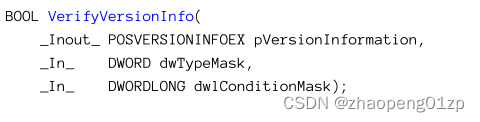
This function knows how to compare version numbers based on the specified criteria (dwConditionMask), such as the major or minor version numbers. You can find the implementation of all the Boolean functions inside versionhelper.h.
这个函数知道如何根据指定的标准(dwConditionMask)来比较版本号,例如主要或次要版本号。你可以在versionhelper.h里面找到所有布尔函数的实现。
There is an undocumented (but reliable) way to get the version numbers regardless of the manifest file without calling GetVersionEx. It’s based on a data structure called KUSER_SHARED_DATA that is mapped to every process to the same virtual address (0x7FFE0000).
Its declaration is listed in this Microsoft link: https://docs.microsoft.com/en-us/windowshardware/drivers/ddi/content/ntddk/ns-ntddk-kuser_shared_data. The Windows version numbers are part of this shared structure in the same offsets. Here is an alternative to showing the Windows version numbers:
有一种未记录(但可靠的)的方法可以在不调用 GetVersionEx 的情况下获取版本号,而无需考虑清单文件。它基于一个名为 KUSER_SHARED_DATA 的数据结构,该数据结构被映射到每个进程的相同的虚拟地址 (0x7FFE0000)。
它的声明在这个微软链接中列出:https://docs.microsoft.com/en-us/windowshardware/drivers/ddi/content/ntddk/ns-ntddk-kuser_shared_data。 Windows 版本号是此共享结构的一部分,具有相同的偏移量。以下是显示 Windows 版本号的替代方法:
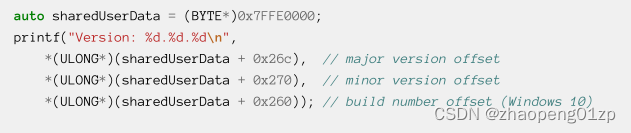
Of course, it’s recommended to use the official APIs rather than KUSER_SHARED_DATA.
当然,建议使用官方API,而不是KUSER_SHARED_DATA。
Exercises
Write a console application that prints more information about the system than the HelloWin application shown earlier, by calling the following APIs: GetNativeSystemInfo, GetComputerName, GetWindowsDirectory, QueryPerformanceCounter, GetProductInfo, GetComputerObjectName.
Handle errors if they occur.
通过调用以下 API,编写一个控制台应用程序,打印比前面显示的 HelloWin 应用程序更多的系统信息:
GetNativeSystemInfo、GetComputerName、GetWindowsDirectory、QueryPerformanceCounter、GetProductInfo、GetComputerObjectName。
如果发生错误,请进行处理。





 扫一扫
扫一扫


 6057
6057

 被折叠的 条评论
为什么被折叠?
被折叠的 条评论
为什么被折叠?
 到【灌水乐园】发言





