


 文章展示了如何在不使用scoped样式的情况下,通过修改CSS类选择器,改变Vue中ElementUI的el-select组件及其下拉选项的背景色、边框、字体颜色等样式,以达到特定的视觉效果。
el-select修改样式
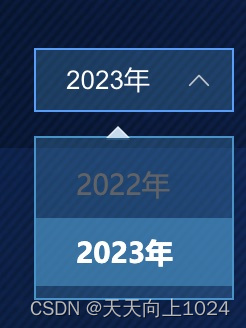
实现效果如下:
<el-select
   v-model="selectJdYear"
   placeholder=""
   size="small"
   class="year1-sel elselect"
   popper-class="elpopperbox"
>
  <el-option
    v-for="item in yearOptions"
    :key="item.value"
     :label="item.label"
     :value="item.value"
	>
   </el-option>
</el-select>
yearOptions: [
    	{
          value: "2022",
          label: "2022年",
        },
        {
          value: "2023",
          label: "2023年",
        },
],
注意: style 不能使用scoped
<style>
.elpopperbox {
  background-color: rgba(46, 163, 220, 0.26) !important;
  border: 1px solid #2893cc !important;
  border-radius: 0 !important;
}

.elpopperbox el-select-dropdown__item {
  color: #707070 !important;
}
.elpopperbox .popper__arrow::after {
  border-bottom-color: rgba(46, 163, 220, 0.26) !important;
}

.elpopperbox .el-select-dropdown__item.hover,
.el-select-dropdown__item:hover {
  background-color: rgba(46, 163, 220, 0.5) !important;
}

.elpopperbox .el-select-dropdown__item.selected {
  color: #fff !important;
}
</style>





 扫一扫
扫一扫


 2081
2081

 被折叠的 条评论
为什么被折叠?
被折叠的 条评论
为什么被折叠?
 到【灌水乐园】发言





