



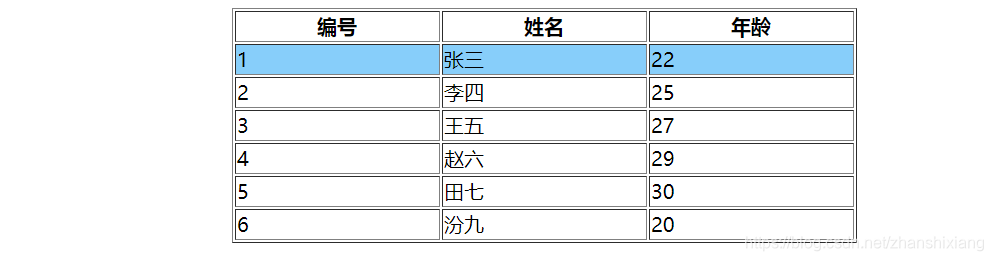
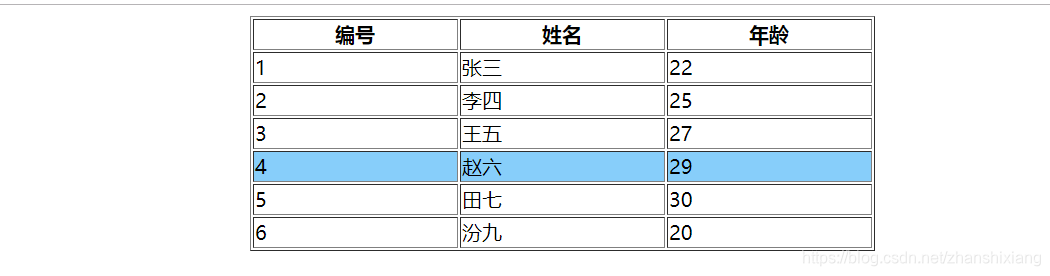
需求:鼠标移动到当前行,显示亮度背景色变色。
首要条件:为table定义一个id 、使用<thead></thead>和<tbody></tbody>将tr区分
* 1、每一行定义一个id
* 2、确定事件:鼠标移动到某元素上: onmouserover 鼠标离开某元素:onmouserout 事件定义在行上面
* 3、定义一个带有两个参数的函数,并为鼠标移动事件绑定这个函数
* 4、定义参数 id为行的id ,flag true or false 区分上下行,设置不同的颜色
代码实现:
<!DOCTYPE html>
<html>
	<head>
		<meta charset="UTF-8">
		<title>鼠标移动行高亮显示</title>
       <script>
       /**首要条件:为table定义一个id 、使用<thead></thead>和<tbody></tbody>将tr区分
        * 1、每一行定义一个id
        * 2、确定事件:鼠标移动到某元素上: onmouserover  鼠标离开某元素:onmouserout  事件定义在行上面
        * 3、定义一个带有两个参数的函数,并为鼠标移动事件绑定这个函数
        * 4、定义参数 id为行的id ,flag true or false 区分上下行,设置不同的颜色
        * @param {Object} id  行的id区分上下行,设置不同的颜色
        * @param {Object} flag true or false 区分上下行,设置不同的颜色
        */

       	function ChangeColor(id,flag){
       		if (flag=="true") {
       		document.getElementById(id).style.backgroundColor="lightskyblue";

       		} else{
       		document.getElementById(id).style.backgroundColor="white";

       		}
       	}

      window.onload=function(){

       	var TabEl=document.getElementById("tab01");
       	var len= TabEl.tBodies[0].rows.length;
      }

       </script>
	</head>
	<body>
		<table border="1" width="500" height="50" align="center" id="tab01" >
			<thead>
			<tr >
				<th>编号</th>
				<th>姓名</th>
				<th>年龄</th>
			</tr>
			</thead>
			<tbody>
				<tr onmouseover="ChangeColor('tr1','true')" onmouseout="ChangeColor('tr1','false')" id="tr1">
				<td>1</td>
				<td>张三</td>
				<td>22</td>
			</tr>
			<tr onmouseover="ChangeColor('tr2','true')" onmouseout="ChangeColor('tr2','false')" id="tr2">
				<td>2</td>
				<td>李四</td>
				<td>25</td>
			</tr>
			<tr onmouseover="ChangeColor('tr3','true')" onmouseout="ChangeColor('tr3','false')" id="tr3">
				<td>3</td>
				<td>王五</td>
				<td>27</td>
			</tr>
			<tr onmouseover="ChangeColor('tr4','true')" onmouseout="ChangeColor('tr4','false')" id="tr4">
				<td>4</td>
				<td>赵六</td>
				<td>29</td>
			</tr>
			<tr onmouseover="ChangeColor('tr5','true')" onmouseout="ChangeColor('tr5','false')" id="tr5">
				<td>5</td>
				<td>田七</td>
				<td>30</td>
			</tr>
			<tr onmouseover="ChangeColor('tr6','true')" onmouseout="ChangeColor('tr6','false')" id="tr6">
				<td>6</td>
				<td>汾九</td>
				<td>20</td>
			</tr>
			</tbody>
		</table>
	</body>
</html>
效果:
当鼠标移动到第一行:
当鼠标移动到第四行:





 扫一扫
扫一扫


 1663
1663

 被折叠的 条评论
为什么被折叠?
被折叠的 条评论
为什么被折叠?
 到【灌水乐园】发言





